{"categories":["docs","develop","ai"],"description":"Store LLM responses for AI apps in a semantic cache.","duplicateOf":"head:data-ai-metadata","location":"body","title":"Redis LangCache","tableOfContents":{"sections":[]},"codeExamples":[]}
Store LLM responses for AI apps in a semantic cache.
LangCache is currently available in preview. Features and behavior are subject to change.
Cut LLM costs and improve response times with semantic caching.
LangCache checks whether a semantically similar prompt has been answered before and returns the cached response instantly: no LLM call required. When there's no match, your app calls the LLM as usual and stores the result for future use.
Concepts
Why a cache hit isn't binary anymore, and how to choose a similarity threshold
LangCache is a semantic caching service, available fully managed on Redis Cloud or self-managed on your own infrastructure, that:
Reduces LLM costs: Avoids redundant API calls for semantically equivalent queries
Improves response times: Returns cached answers in milliseconds instead of waiting for an LLM
Handles embeddings automatically: No embedding model to manage; LangCache generates them for you
Gives you cache control: Configure similarity thresholds, TTLs, and eviction policies
Works with any LLM workflow: REST API and Python/JS SDKs drop into existing applications
Why use LangCache?
For AI applications
Dramatically lower LLM API spend for apps with repetitive queries
Faster responses for AI assistants, chatbots, and retrieval-augmented generation (RAG) pipelines
Cache intermediate results in multi-step agent workflows
Centralize caching across multiple apps via an AI gateway
For developers
Two API calls to integrate: search before LLM, store after LLM
Python and JavaScript SDKs available on PyPI and npm
Deploy fully managed on Redis Cloud or self-managed on your own infrastructure
Monitor hit rates and cost savings from the Redis Cloud console
Quick example
Before calling your LLM, search for a cached response:
POST/v1/caches/{cacheId}/entries/search{"prompt":"What are the features of Product A?"}
On a cache miss, call your LLM, then store the result:
POST/v1/caches/{cacheId}/entries{"prompt":"What are the features of Product A?","response":"Product A includes real-time analytics, automatic scaling, and sub-millisecond latency."}
LangCache uses semantic caching to store and reuse previous LLM responses for repeated queries. Instead of calling the LLM for every request, LangCache checks if a similar response has already been generated and is stored in the cache. If a match is found, LangCache returns the cached response instantly, saving time and resources.
Imagine you’re using an LLM to build an agent to answer questions about your company's products. Your users may ask questions like the following:
"What are the features of Product A?"
"Can you list the main features of Product A?"
"Tell me about Product A’s features."
These prompts may have slight variations, but they essentially ask the same question. LangCache can help you avoid calling the LLM for each of these prompts by caching the response to the first prompt and returning it for any similar prompts.
To watch a cache answer paraphrased questions, try the interactive demo.
Using LangCache as a semantic caching service has the following benefits:
Lower LLM costs: Reduce costly LLM calls by easily storing the most frequently-requested responses.
Faster AI app responses: Get faster AI responses by retrieving previously-stored requests from memory.
Simpler deployments: Access our managed service using a REST API with automated embedding generation, configurable controls, and no database management required.
Advanced cache management: Manage data access, privacy, and eviction protocols. Monitor usage and cache hit rates.
LangCache works well for the following use cases:
AI assistants and chatbots: Optimize conversational AI applications by caching common responses and reducing latency for frequently asked questions.
RAG applications: Enhance retrieval-augmented generation performance by caching responses to similar queries, reducing both cost and response time.
AI agents: Improve multi-step reasoning chains and agent workflows by caching intermediate results and common reasoning patterns.
AI gateways: Integrate LangCache into centralized AI gateway services to manage and control LLM costs across multiple applications..
LLM cost reduction with LangCache
LangCache reduces your LLM costs by caching responses and avoiding repeated API calls. When a response is served from cache, you don’t pay for output tokens. Input token costs are typically offset by embedding and storage costs.
For every cached response, you'll save the output token cost. To calculate your monthly savings with LangCache, you can use the following formula:
Est. monthly savings with LangCache=(Monthly output token costs) × (Cache hit rate)
The more requests you serve from LangCache, the more you save, because you’re not paying to regenerate the output.
Here’s an example:
Monthly LLM spend: $200
Percentage of output tokens in your spend: 60%
Cost of output tokens: $200 × 60% = $120
Cache hit rate: 50%
Estimated savings: $120 × 50% = $60/month
Note:
The formula and numbers above provide a rough estimate of your monthly savings. Actual savings will vary depending on your usage.
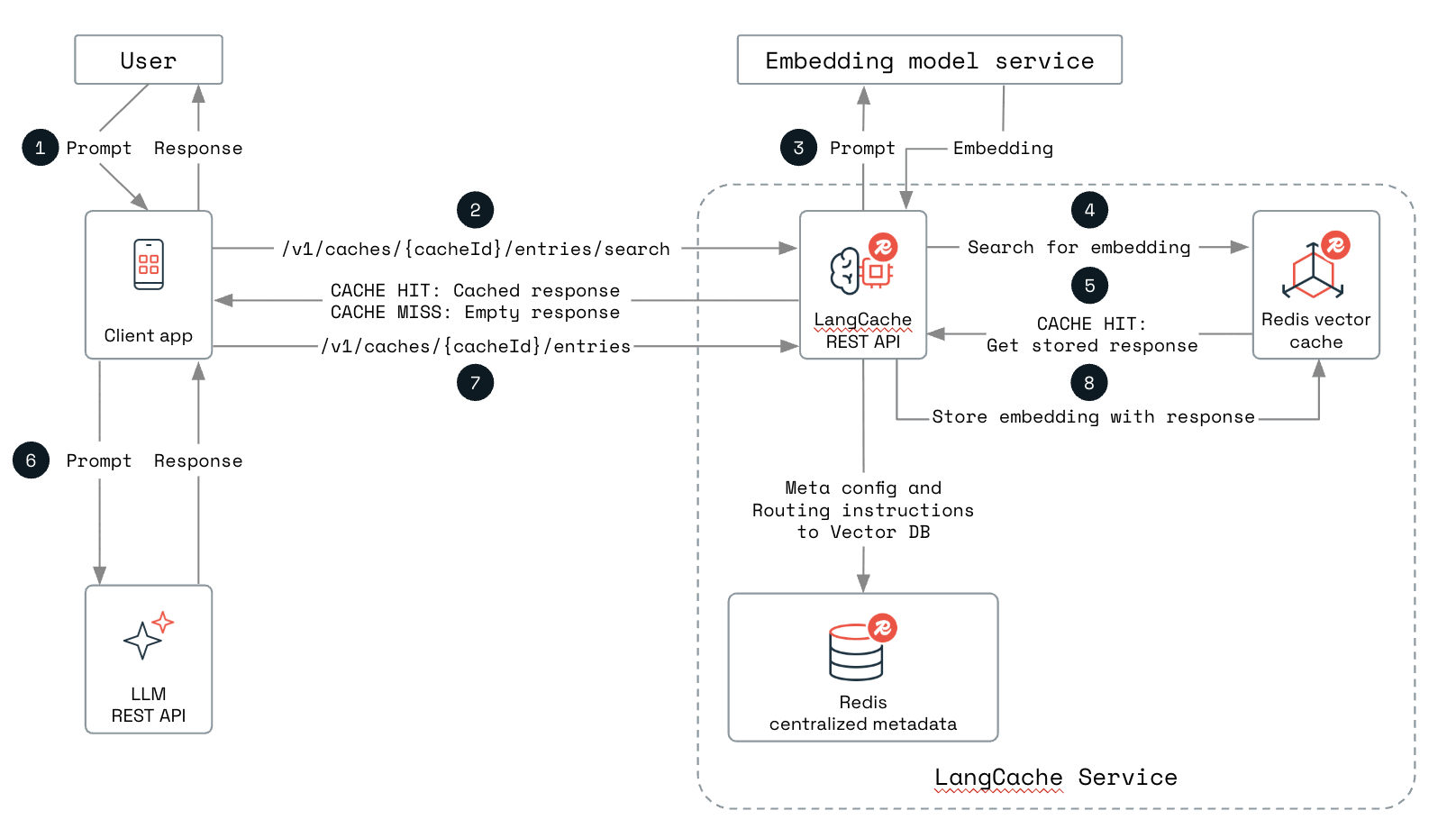
The following diagram displays how you can integrate LangCache into your GenAI app:
A user sends a prompt to your AI app.
Your app sends the prompt to LangCache through the POST /v1/caches/{cacheId}/entries/search endpoint.
LangCache calls an embedding model service to generate an embedding for the prompt.
LangCache searches the cache to see if a similar response already exists by matching the embeddings of the new query with the stored embeddings.
If a semantically similar entry is found (also known as a cache hit), LangCache gets the cached response and returns it to your app. Your app can then send the cached response back to the user.
If no match is found (also known as a cache miss), your app receives an empty response from LangCache. Your app then queries your chosen LLM to generate a new response.
Your app sends the prompt and the new response to LangCache through the POST /v1/caches/{cacheId}/entries endpoint.
LangCache stores the embedding with the new response in the cache for future use.
Self-managed LangCache is available for deployment on Kubernetes as a private preview. See Self-managed LangCache for deployment, configuration, security, and operations.
You need a license key to deploy: contact Redis to request access.
Prerequisites
To use LangCache in private preview, you need:
An AI application that makes LLM API calls
A use case involving repetitive or similar queries
Willingness to provide feedback during the preview phase
Access
LangCache is offered as a fully-managed service. During the private preview:
Participation is free
Usage limits may apply
Dedicated support is provided
Regular feedback sessions are conducted
Data security and privacy
LangCache stores your data on your Redis servers. Redis does not access your data or use it to train AI models. The service maintains enterprise-grade security and privacy standards.
 Concepts
 Quick Start
 API & SDK Examples
 Monitor Cache