{
"schema_version": 2,
"id": "operate/radar/agent",
"title": "Connect clusters with an agent",
"url": "https://redis.io/docs/latest/operate/radar/agent/",
"summary": "Install an agent to connect Redis Software and Redis Open Source clusters that Radar cannot reach directly.",
"tags": [
"docs",
"operate",
"radar"
],
"last_updated": "2026-09-15T10:40:17-05:00",
"page_type": "content",
"content_hash": "92c935c3c55d38d25dec4d123442b41f375fcf406082c0280f257192b6c4c5d6",
"sections": [
{
"id": "overview",
"title": "Overview",
"role": "overview",
"text": "The Radar agent collects data from Redis deployments that Radar can't reach directly. You install it on a host inside your network, and it opens an outbound connection to Radar. Radar never needs inbound access to your network."
},
{
"id": "when-to-connect-clusters-with-an-agent",
"title": "When to connect clusters with an agent",
"role": "content",
"text": "Use an agent for Redis Software and Redis Open Source deployments behind a firewall, in a private subnet, or on a segmented network.\n\nThe agent always connects to Radar over Transport Layer Security (TLS), using gRPC, and makes separate local connections to each Redis endpoint you configure.\n\nRadar accepts those connections on its agent gRPC endpoint, which isn't enabled on every Radar deployment. Confirm the endpoint is available before you install an agent, and get its host and port from whoever administers your Radar deployment.\n\nThe agent runs in one of two modes. They differ in where your source credentials live.\n\n| Mode | Radar holds source credentials | You maintain | Choose it when |\n|---|---|---|---|\n| Managed | Yes | Nothing on the host | You want to add and change sources from the Radar UI. |\n| Static | No | A YAML file on the agent host | Source credentials must never leave the agent host. |"
},
{
"id": "trust-a-private-certificate-authority",
"title": "Trust a private certificate authority",
"role": "content",
"text": "If Radar presents a certificate from a public certificate authority (CA), certificate verification doesn't require any configuration. The agent verifies it against the host's system roots.\n\nIf Radar uses a private CA, point the agent at its certificate bundle instead: `tls.ca_file` in a static agent's configuration file, or `--ca-file` on `radar-agent activate` for a managed agent. The bundle you supply replaces the host's system roots rather than adding to them, so it must contain every certificate the agent needs to verify Radar."
},
{
"id": "install-the-agent",
"title": "Install the agent",
"role": "setup",
"text": "Each Radar release publishes standalone agent tarballs, so a collector host runs the agent without running Radar itself.\n\nInstall the agent on a host that can reach both Radar and the Redis endpoints you want to collect from.\n\n1. Get the tarball for your platform from the [Redis Download Center](https://cloud.redis.io/#/rlec-downloads), under **Modules, tools and integrations**.\n\n Take the `radar-agent-fips-` build only if you require Federal Information Processing Standards (FIPS) 140-3. It refuses to start unless FIPS 140-3 mode is active in its runtime.\n\n
\n\n2. Extract the archive and confirm the version.\n\n [code example]\n\n The agent must report version `1.0.0` or newer. Radar rejects anything older.\n\n
\n\n3. Create the `mcm` service identity the unit runs as.\n\n Skip this step if the host already runs Radar from the RPM, which creates `mcm` for you.\n\n [code example]\n\n
\n\n4. Install the binary, the unit, and the environment file, then create the state directory.\n\n [code example]\n\n `/var/lib/radar-agent` holds runtime state. Create it now, because a managed agent writes to it during activation, before the service first starts. If you install the binary elsewhere, update the paths in the unit.\n\nRun every agent command as the service identity, as `sudo -u mcm /usr/libexec/mcm/radar-agent `."
},
{
"id": "set-up-a-managed-agent",
"title": "Set up a managed agent",
"role": "content",
"text": "1. In Radar, go to **Settings > Agents** and select **Activate managed agent**.\n\n Radar shows an activation command and a daemon command.\n\n 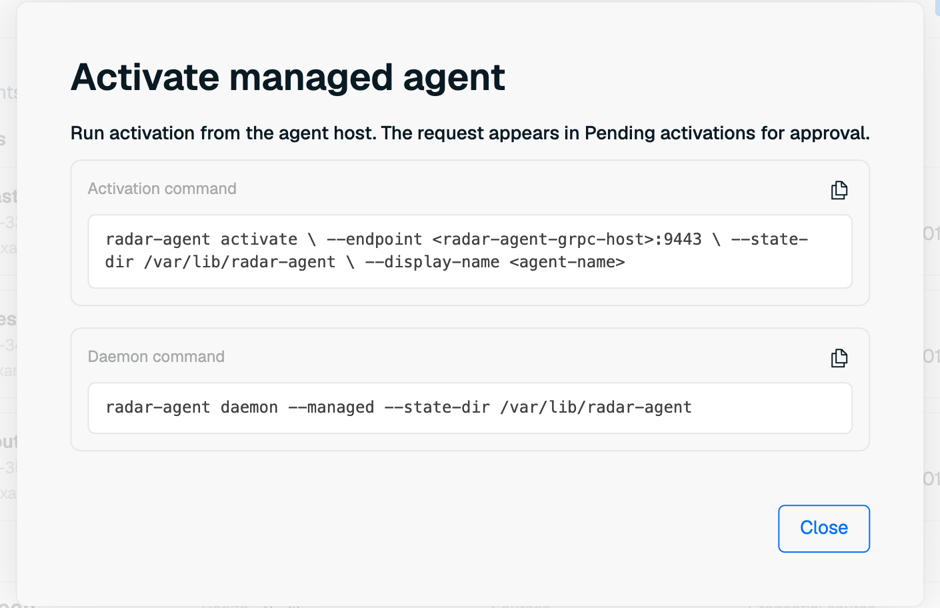\n\n
\n\n2. Copy the whole activation command from the dialog, then run it on the agent host as the service identity.\n\n Keep every argument the dialog generated. On Redis Cloud, the dialog adds `--tenant-activation-id`, a short-lived handle bound to your tenant, and the agent gRPC service rejects an activation that omits it. A self-managed install doesn't generate one.\n\n Replace the endpoint and the agent name. The endpoint is your deployment's public agent gRPC host and port. The dialog shows a placeholder, and the public port isn't necessarily `9443`.\n\n [code example]\n\n When the dialog shows a **Start before** time, run the command before it. The command prints an activation code and waits for approval. You use that code to identify this host in Radar.\n\n
\n\n3. In Radar, find the request under **Pending activations**, confirm the activation code matches, and select **Approve**.\n\n 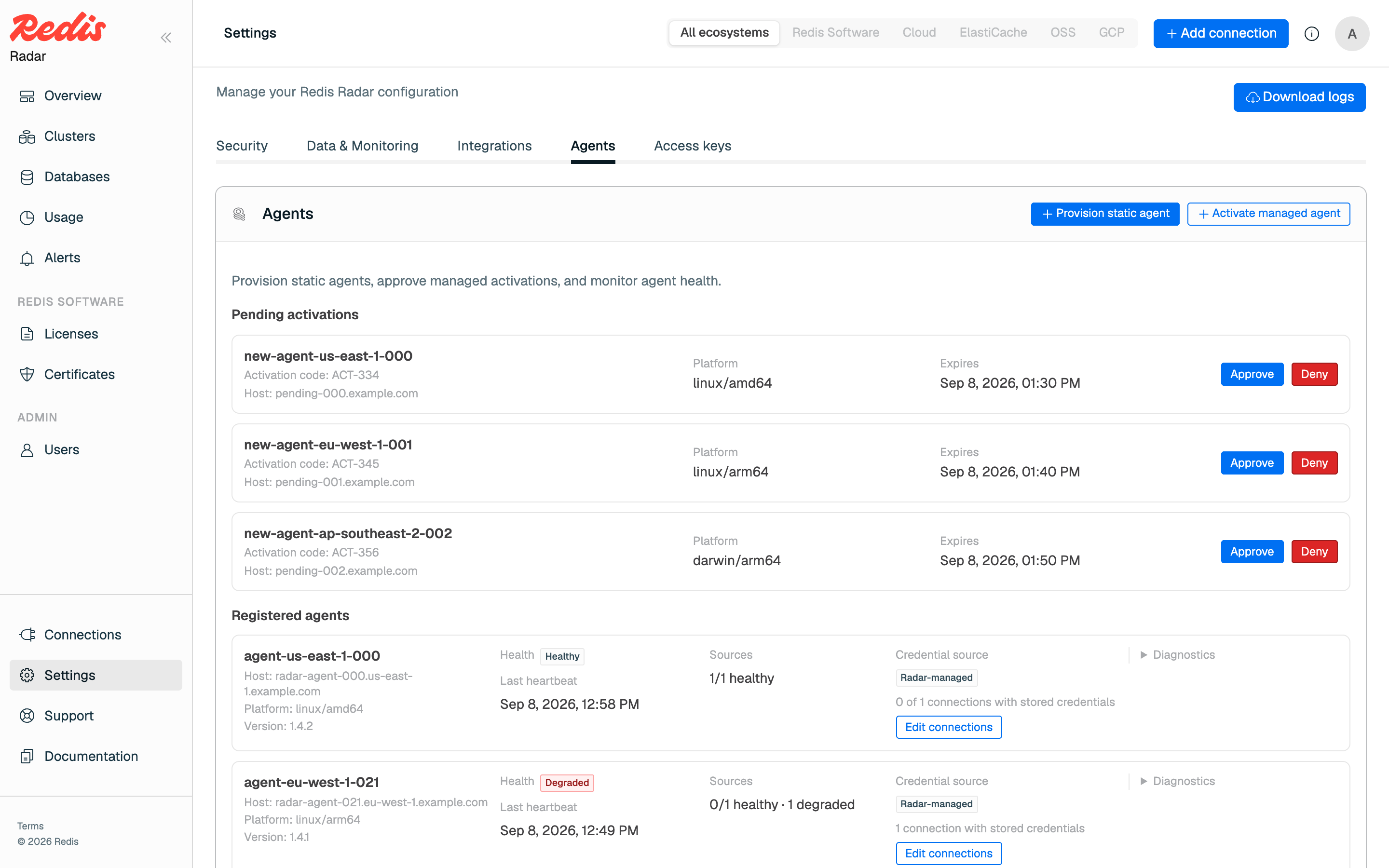\n\n The activation expires 15 minutes after the command prints the code, so approve it while the command is still waiting.\n\n
\n\n4. Enter the Redis Software or Redis Open Source connection details in the approval form, then select **Confirm approval**.\n\n Radar stores these credentials and sends them to the agent. Entering the details doesn't submit the approval; **Confirm approval** does.\n\n Wait for the agent to print `Activation approved; managed credential stored.` before you continue. The daemon needs that credential to start.\n\n
\n\n5. Set the daemon arguments and start the service.\n\n Edit `/etc/radar-agent/radar-agent.env` and replace the default `RADAR_AGENT_DAEMON_ARGS` line with:\n\n [code example]\n\n `--metrics-addr` is optional. It exposes the agent's health and metrics endpoints on the address you give it.\n\n [code example]\n\nTo change an agent's sources later, go to **Settings > Agents**, find the agent under **Registered agents**, and select **Edit connections**.\n\n\nManaged mode stores the credential it was issued in `/var/lib/radar-agent/agent-key.json`. Keep that file readable only by its owner. The configuration cache Radar writes alongside it holds no secrets."
},
{
"id": "set-up-a-static-agent",
"title": "Set up a static agent",
"role": "content",
"text": "1. In Radar, go to **Settings > Agents** and select **Provision static agent**.\n\n Radar returns an agent ID and a one-time access token in the form `.`. Copy both now, because Radar shows the token only once.\n\n Manage these tokens later under **Settings > Access keys**.\n\n 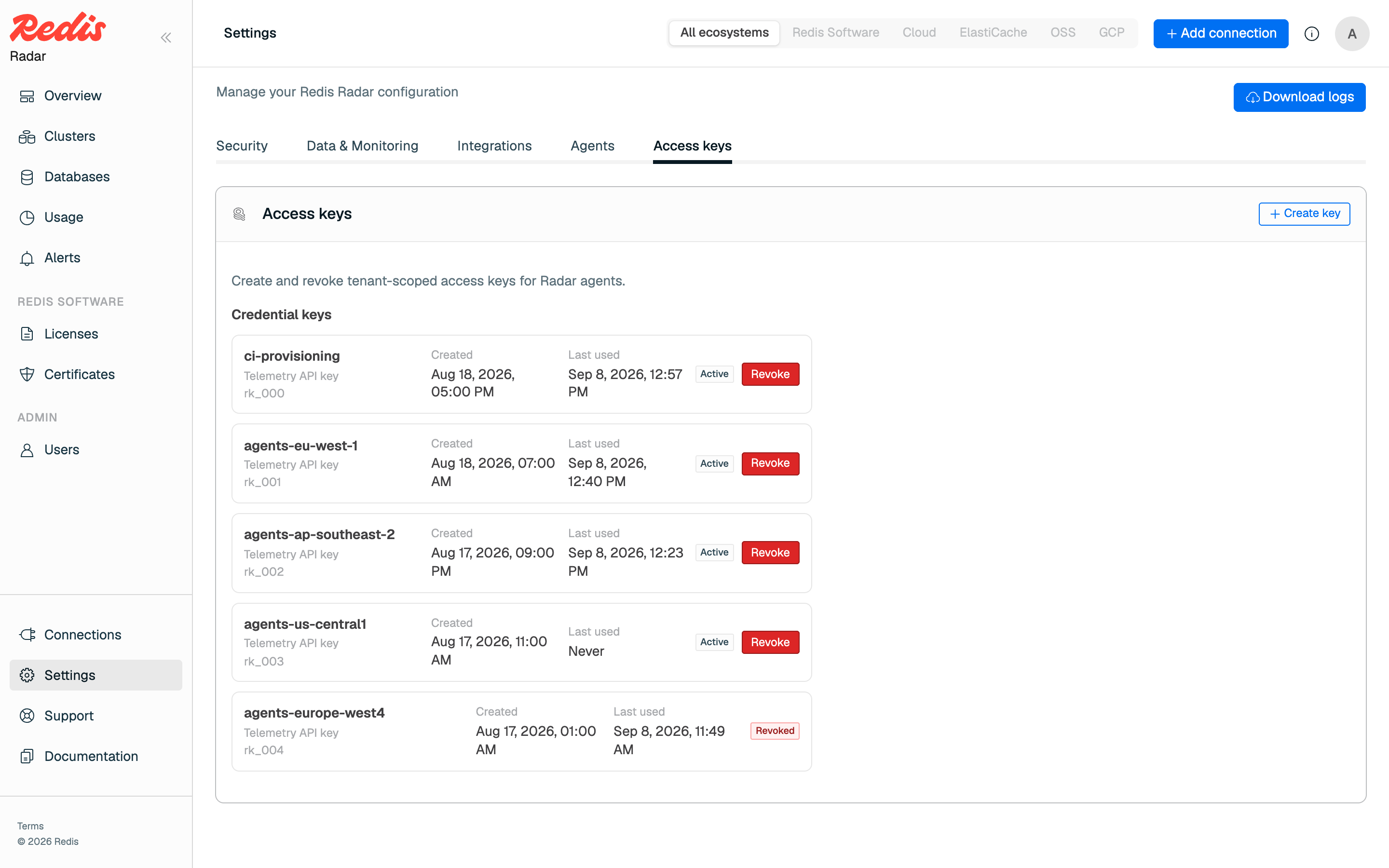\n\n
\n\n2. Generate one universally unique identifier (UUID) for each Redis source you plan to collect from.\n\n [code example]\n\n
\n\n3. Copy the example configuration from the archive, fill it in, and install it.\n\n [code example]\n\n Set the agent ID, the token, and one UUID per source. See [Configuration reference](#configuration-reference) for every setting. Then install it with the ownership the service expects.\n\n [code example]\n\n
\n\n4. Validate the configuration.\n\n [code example]\n\n
\n\n5. Create the redaction salt.\n\n The example configuration turns redaction on and reads the salt from `/var/lib/radar-agent/redaction-salt`. The agent reads that file and doesn't create it, so generate it once before the first collection.\n\n [code example]\n\n Keep the same salt across restarts and upgrades. A new salt changes what existing values redact to, so don't overwrite it if you repeat these steps.\n\n
\n\n6. Collect from every source and print a redacted summary without submitting to Radar.\n\n [code example]\n\n
\n\n7. Submit one collection to confirm the connection to Radar works.\n\n [code example]\n\n Radar creates each source the first time it receives data from that source, and uses your `name` value as the display label when that value is valid.\n\n
\n\n8. Start the service.\n\n The default `RADAR_AGENT_DAEMON_ARGS` in `/etc/radar-agent/radar-agent.env` already points at `/etc/radar-agent/config.yaml`. To expose health and metrics, add `--metrics-addr 127.0.0.1:9090` to that line.\n\n [code example]\n\n\nDon't also add a static agent's sources as regular Radar connections. In static mode the endpoint and credential values belong only in the agent's YAML file."
},
{
"id": "configuration-reference",
"title": "Configuration reference",
"role": "configuration",
"text": "Static mode uses a single YAML file. Managed mode doesn't.\n\n| Setting | Description |\n|---|---|\n| `agent.id` | The agent ID Radar returned when you provisioned the agent. It must match the identity bound to the token, or Radar denies every submission. |\n| `agent.version` | Optional. Defaults to the version of the installed binary. |\n| `radar.endpoint` | The Radar agent endpoint, as `host:port`. |\n| `radar.agent_key` | The one-time token, as `.`. |\n| `radar.tls.ca_file` | Optional. A PEM bundle used to verify Radar's certificate, replacing the host's system roots. |\n| `radar.tls.server_name` | Optional. Overrides the certificate name the agent verifies. |\n| `redaction.enabled` | Whether the agent redacts values in the payloads it submits. Enabled by default. |\n| `redaction.salt_file` | The salt file the agent uses so a given value redacts to the same result on every collection. |\n| `collection.interval` | How often the agent collects when running as a daemon. |\n| `collection.timeout` | How long a single collection can run. |\n| `sources[].id` | The UUID you generated for this source. |\n| `sources[].name` | A name for the source. Radar uses it as the display label. |\n| `sources[].type` | Either `redis_enterprise` for Redis Software or `redis_oss` for Redis Open Source. |\n\nA `redis_enterprise` source takes `base_url`, `username`, and `password`. To collect from a cluster running an older Redis Software version, set `old_version_compatibility.enabled` to `true`.\n\nA `redis_oss` source takes `host`, `port`, and `password`. Set `username` only if you connect as an access control list (ACL) user.\n\nEach source type takes a different TLS setting: `tls.skip_verify` for a `redis_enterprise` source, and `tls.enabled` for a `redis_oss` source. Neither one affects the agent's connection to Radar, which `radar.tls` controls.\n\nTo keep secrets out of the file, reference environment variables instead of literal values."
},
{
"id": "collect-from-an-isolated-network",
"title": "Collect from an isolated network",
"role": "content",
"text": "When the agent host can't reach Radar at all, collect and submit in two steps from different hosts. Install the agent on both hosts, and give each one only the configuration it needs. `export` requires your source credentials and no Radar token, and `submit-export` requires the Radar endpoint and token and no sources. Use the same `agent.id` in both files.\n\nThis keeps your source credentials on the collector, which is the custody benefit static mode exists for.\n\nOn the collector, the sources and the redaction salt:\n\n[code example]\n\nOn the submission host, the Radar endpoint and token:\n\n[code example]\n\n1. On the host that can reach your Redis sources, collect to a file.\n\n [code example]\n\n
\n\n2. Move the file to a host that can reach Radar, then submit it.\n\n [code example]\n\nThe exported file holds sanitized telemetry only. It never contains your Radar token or your source credentials. Each configuration file does hold secrets for its own half, so protect both hosts."
},
{
"id": "monitor-and-secure-the-agent",
"title": "Monitor and secure the agent",
"role": "content",
"text": "Every agent appears in Radar under **Settings > Agents** and in the **Connected agents** list on the Connections page. Radar shows each agent's mode, platform, version, and last heartbeat, along with the combined health of the sources it collects from.\n\n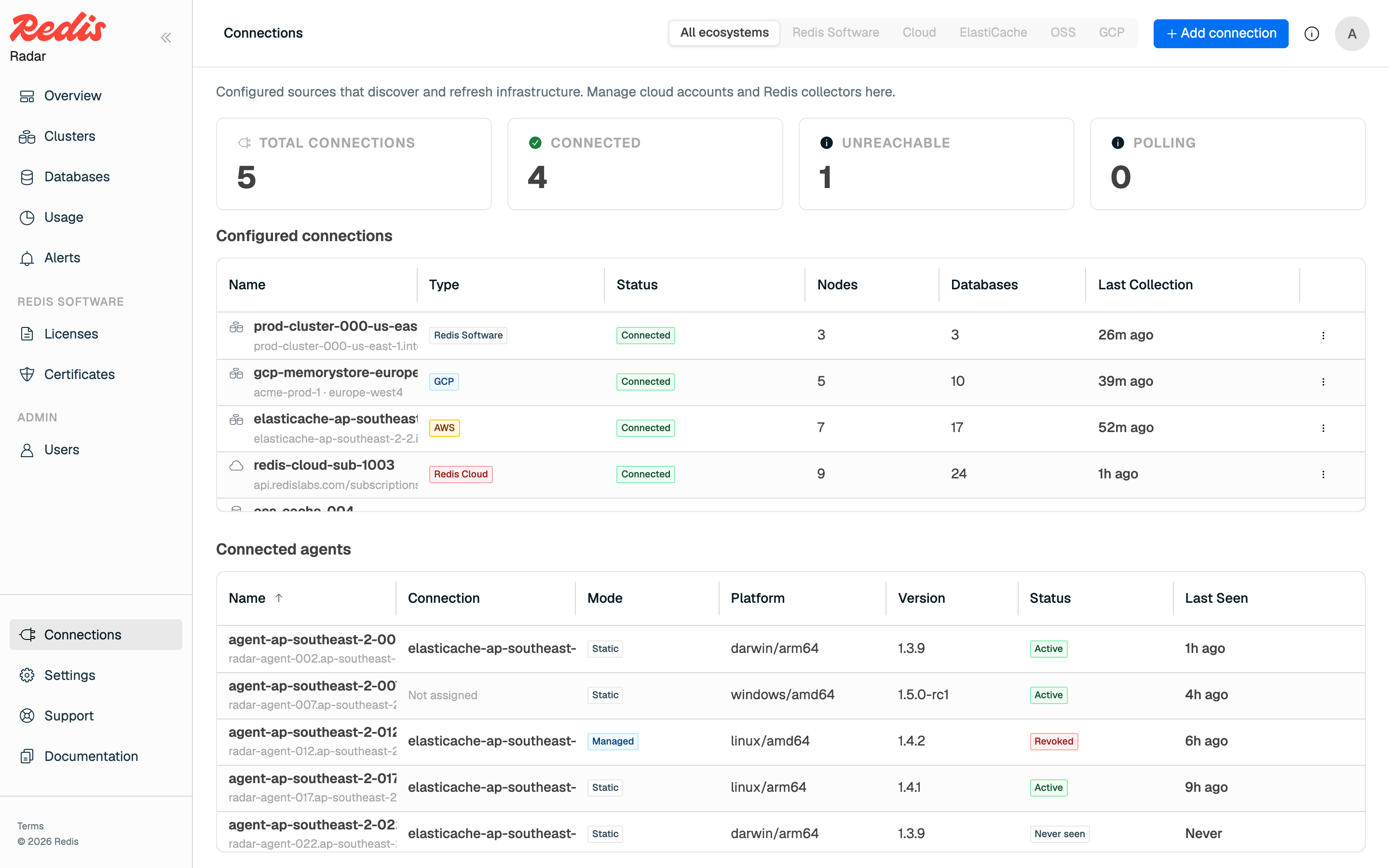\n\nTo expose health and metrics endpoints on the agent host, pass `--metrics-addr` when you start the daemon:\n\n- `GET /healthz` returns a health snapshot: `200` when the agent is healthy, `503` when a source is failing.\n- `GET /metrics` returns per-source collection, submission, and failure counters in Prometheus format.\n\n\nThese endpoints are unauthenticated. Bind them to loopback, as in `--metrics-addr 127.0.0.1:9090`, or put a firewall in front of them.\n\n\nThe daemon writes a local health snapshot only when you start it with `--health-file`, and the `health` command needs that same path. Add `--health-file /var/lib/radar-agent/health.json` to `RADAR_AGENT_DAEMON_ARGS` in `/etc/radar-agent/radar-agent.env`, restart the service, then read it:\n\n[code example]\n\n`--metrics-addr` serves health over HTTP but doesn't write this file. Use `journalctl` for the agent's logs and `systemctl` to restart the service.\n\nBoth `/etc/radar-agent/config.yaml` and `/var/lib/radar-agent/agent-key.json` hold secrets, so restrict them to their owner. Never set `tls.insecure_skip_verify` outside local development, because it turns off certificate verification. To block an agent, revoke its key under **Settings > Access keys**. Revoking takes effect centrally, and the agent can no longer connect.\n\nSource passwords and the agent's token are redacted from logs, diagnostics, health output, error messages, and export bundles."
},
{
"id": "upgrade-or-remove-the-agent",
"title": "Upgrade or remove the agent",
"role": "content",
"text": "To upgrade, get the new tarball, verify it, and replace the binary in place. Your configuration and environment file are untouched. If you run a static agent whose configuration file holds both source and Radar credentials, revalidate it before restarting:\n\n[code example]\n\nKeep `/etc/radar-agent` and `/var/lib/radar-agent` in place, because the agent needs its state to stay registered.\n\nRadar enforces a version policy on every request. An agent older than the minimum supported version is rejected until you upgrade it. An agent newer than the Radar deployment supports is also rejected, and Radar asks for a server upgrade instead.\n\nIf Radar's database is reset, activate the managed agent again. Stop the service before you clear the managed registration state. Recreate the state directory if you removed it, because `/var/lib` is owned by root and `mcm` can't create the directory during activation.\n\n[code example]\n\nThen repeat [Set up a managed agent](#set-up-a-managed-agent) and start the service again. On Redis Cloud, get a fresh tenant activation handle from the dialog first.\n\nTo stop collecting from this host, turn off the service and delete its configuration and state.\n\n[code example]\n\nThen delete `/usr/libexec/mcm/radar-agent` and `/usr/lib/systemd/system/radar-agent.service`, and revoke the agent's key in Radar under **Settings > Access keys**."
},
{
"id": "next-steps",
"title": "Next steps",
"role": "content",
"text": "After the agent reports its first collection, its sources appear alongside your other clusters. See [Monitor your fleet](https://redis.io/docs/latest/operate/radar/monitor)."
}
],
"examples": [
{
"id": "install-the-agent-ex0",
"language": "bash",
"code": "tar -xzf radar-agent--linux-amd64.tar.gz\n cd radar-agent--linux-amd64\n ./radar-agent version",
"section_id": "install-the-agent"
},
{
"id": "install-the-agent-ex1",
"language": "bash",
"code": "sudo groupadd --system mcm\n sudo useradd --system --gid mcm --home-dir / --no-create-home \\\n --shell /sbin/nologin --comment \"Radar service identity\" mcm",
"section_id": "install-the-agent"
},
{
"id": "install-the-agent-ex2",
"language": "bash",
"code": "sudo install -d -m 0755 /usr/libexec/mcm\n sudo install -o root -g root -m 0755 radar-agent /usr/libexec/mcm/radar-agent\n sudo install -d -o root -g mcm -m 0750 /etc/radar-agent\n sudo install -o root -g mcm -m 0640 systemd/radar-agent.env /etc/radar-agent/radar-agent.env\n sudo install -o root -g root -m 0644 systemd/radar-agent.service /usr/lib/systemd/system/\n sudo install -d -o mcm -g mcm -m 0700 /var/lib/radar-agent\n sudo systemctl daemon-reload",
"section_id": "install-the-agent"
},
{
"id": "set-up-a-managed-agent-ex0",
"language": "bash",
"code": "sudo -u mcm /usr/libexec/mcm/radar-agent activate \\\n --endpoint : \\\n --state-dir /var/lib/radar-agent \\\n --display-name \\\n --tenant-activation-id ",
"section_id": "set-up-a-managed-agent"
},
{
"id": "set-up-a-managed-agent-ex1",
"language": "bash",
"code": "RADAR_AGENT_DAEMON_ARGS=--managed --state-dir /var/lib/radar-agent --metrics-addr 127.0.0.1:9090",
"section_id": "set-up-a-managed-agent"
},
{
"id": "set-up-a-managed-agent-ex2",
"language": "bash",
"code": "sudo systemctl enable --now radar-agent.service",
"section_id": "set-up-a-managed-agent"
},
{
"id": "set-up-a-static-agent-ex0",
"language": "bash",
"code": "uuidgen",
"section_id": "set-up-a-static-agent"
},
{
"id": "set-up-a-static-agent-ex1",
"language": "bash",
"code": "cp examples/static-agent.yaml config.yaml",
"section_id": "set-up-a-static-agent"
},
{
"id": "set-up-a-static-agent-ex2",
"language": "bash",
"code": "sudo install -o root -g mcm -m 0640 config.yaml /etc/radar-agent/config.yaml",
"section_id": "set-up-a-static-agent"
},
{
"id": "set-up-a-static-agent-ex3",
"language": "bash",
"code": "sudo -u mcm /usr/libexec/mcm/radar-agent validate --config /etc/radar-agent/config.yaml",
"section_id": "set-up-a-static-agent"
},
{
"id": "set-up-a-static-agent-ex4",
"language": "bash",
"code": "sudo -u mcm sh -c 'umask 077 && openssl rand -hex 32 > /var/lib/radar-agent/redaction-salt'",
"section_id": "set-up-a-static-agent"
},
{
"id": "set-up-a-static-agent-ex5",
"language": "bash",
"code": "sudo -u mcm /usr/libexec/mcm/radar-agent dry-run --config /etc/radar-agent/config.yaml",
"section_id": "set-up-a-static-agent"
},
{
"id": "set-up-a-static-agent-ex6",
"language": "bash",
"code": "sudo -u mcm /usr/libexec/mcm/radar-agent once --config /etc/radar-agent/config.yaml",
"section_id": "set-up-a-static-agent"
},
{
"id": "set-up-a-static-agent-ex7",
"language": "bash",
"code": "sudo systemctl enable --now radar-agent.service",
"section_id": "set-up-a-static-agent"
},
{
"id": "collect-from-an-isolated-network-ex0",
"language": "yaml",
"code": "agent:\n id: \"\"\n\nredaction:\n enabled: true\n salt_file: \"/var/lib/radar-agent/redaction-salt\"\n\nsources:\n - id: \"\"\n name: \"\"\n type: redis_enterprise\n base_url: \"https://:9443\"\n username: \"\"\n password: \"\"",
"section_id": "collect-from-an-isolated-network"
},
{
"id": "collect-from-an-isolated-network-ex1",
"language": "yaml",
"code": "agent:\n id: \"\"\n\nradar:\n endpoint: \":\"\n agent_key: \".\"",
"section_id": "collect-from-an-isolated-network"
},
{
"id": "collect-from-an-isolated-network-ex2",
"language": "bash",
"code": "sudo -u mcm /usr/libexec/mcm/radar-agent export --config /etc/radar-agent/config.yaml --output telemetry.json",
"section_id": "collect-from-an-isolated-network"
},
{
"id": "collect-from-an-isolated-network-ex3",
"language": "bash",
"code": "sudo -u mcm /usr/libexec/mcm/radar-agent submit-export --config /etc/radar-agent/config.yaml --input telemetry.json",
"section_id": "collect-from-an-isolated-network"
},
{
"id": "monitor-and-secure-the-agent-ex0",
"language": "bash",
"code": "sudo -u mcm /usr/libexec/mcm/radar-agent health --health-file /var/lib/radar-agent/health.json",
"section_id": "monitor-and-secure-the-agent"
},
{
"id": "upgrade-or-remove-the-agent-ex0",
"language": "bash",
"code": "sudo -u mcm /usr/libexec/mcm/radar-agent validate --config /etc/radar-agent/config.yaml\nsudo systemctl restart radar-agent.service",
"section_id": "upgrade-or-remove-the-agent"
},
{
"id": "upgrade-or-remove-the-agent-ex1",
"language": "bash",
"code": "sudo systemctl stop radar-agent.service\nsudo rm -rf /var/lib/radar-agent\nsudo install -d -o mcm -g mcm -m 0700 /var/lib/radar-agent",
"section_id": "upgrade-or-remove-the-agent"
},
{
"id": "upgrade-or-remove-the-agent-ex2",
"language": "bash",
"code": "sudo systemctl disable --now radar-agent.service\nsudo rm -rf /etc/radar-agent /var/lib/radar-agent",
"section_id": "upgrade-or-remove-the-agent"
}
]
}