# Enable a module for a database
```json metadata
{
"schema_version": 2,
"title": "Enable a module for a database",
"description": "",
"categories": ["docs","operate","rs"],
"tableOfContents": {"sections":[{"id":"automatically-enabled-capabilities-in-redis-8","title":"Automatically enabled capabilities in Redis 8"},{"children":[{"id":"prerequisites","title":"Prerequisites"},{"id":"create-a-database-and-enable-capabilities","title":"Create a database and enable capabilities"}],"id":"create-a-database-with-a-module","title":"Create a database with a module"},{"id":"module-configuration-options","title":"Module configuration options"}]}
,
"codeExamples": []
}
```
Modules add additional functionality to Redis databases for specific use cases. You can enable modules when you create a database.
## Automatically enabled capabilities in Redis 8
Databases created with or upgraded to Redis version 8 or later automatically enable the capabilities (modules) bundled with Redis Software as follows:
| Database type | Automatically enabled capabilities |
|---------------|------------------------------------|
| RAM-only | [Redis Search](https://redis.io/docs/latest/operate/oss_and_stack/stack-with-enterprise/search)
[JSON](https://redis.io/docs/latest/operate/oss_and_stack/stack-with-enterprise/json)
[Time series](https://redis.io/docs/latest/operate/oss_and_stack/stack-with-enterprise/timeseries)
[Probabilistic](https://redis.io/docs/latest/operate/oss_and_stack/stack-with-enterprise/bloom) |
| Flash-enabled ([Redis Flex](https://redis.io/docs/latest/operate/rs/databases/flash)) | [JSON](https://redis.io/docs/latest/operate/oss_and_stack/stack-with-enterprise/json)
[Probabilistic](https://redis.io/docs/latest/operate/oss_and_stack/stack-with-enterprise/bloom) |
| [Active-Active](https://redis.io/docs/latest/operate/rs/databases/active-active)[1](#enabled-modules-table-note-1) | [Redis Search](https://redis.io/docs/latest/operate/oss_and_stack/stack-with-enterprise/search/search-active-active)
[JSON](https://redis.io/docs/latest/operate/oss_and_stack/stack-with-enterprise/json) |
1. Upgrading existing Active-Active databases to Redis version 8 does not automatically enable these capabilities. Only new Active-Active databases created with Redis version 8 enable these capabilities by default.
## Create a database with a module
You can only add modules to a database when you first create it. You cannot add modules to an existing database.
### Prerequisites
- [Installed the module on the cluster](https://redis.io/docs/latest/operate/rs/installing-upgrading/modules/add-module-to-cluster)
- [Upgraded the module](https://redis.io/docs/latest/operate/rs/installing-upgrading/modules/upgrade-module) to the latest version
### Create a database and enable capabilities
In the Redis Software Cluster Manager UI, follow these steps to add modules to a database:
1. From the **Databases** screen, select **Quick database** or **Create database**.
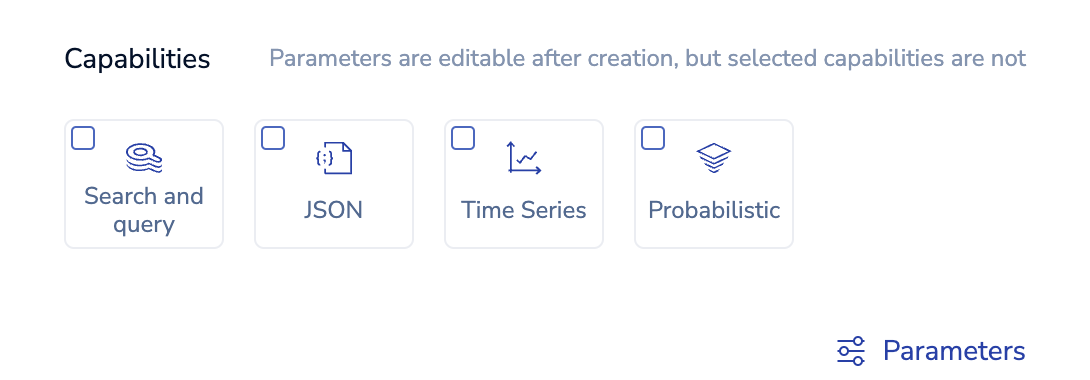
1. In the **Capabilities** section, select one or more capabilities:
> [!NOTE]
> You cannot use RediSearch 1.x and RediSearch 2.x in the same database.
>
1. To use custom configuration for capabilities:
1. Select **Parameters**.
1. Enter the [configuration options](#module-configuration-options).
1. Select **Done**.
1. Configure additional database settings.
> [!NOTE]
> Depending on the [features supported by an enabled module](https://redis.io/docs/latest/operate/oss_and_stack/stack-with-enterprise/enterprise-capabilities#module-feature-support), certain database configuration fields may not be available.
>
1. Select **Create**.
## Module configuration options
- [Redis Search configuration options](https://redis.io/docs/latest/operate/oss_and_stack/stack-with-enterprise/search/config)
- [RedisTimeSeries configuration options](https://redis.io/docs/latest/operate/oss_and_stack/stack-with-enterprise/timeseries/config)
- [RedisBloom configuration options](https://redis.io/docs/latest/operate/oss_and_stack/stack-with-enterprise/bloom/config)