# How to Build a RAG GenAI Chatbot Using Vector Search with LangChain and Redis
**Authors:** Prasan Rajpurohit, William Johnston | **Category:** For AI | **Published:** 2026-02-24 | **Updated:** 2026-02-24
Retrieval-augmented generation (RAG) combines a large language model with an external knowledge base so the chatbot answers questions using your own data instead of relying solely on its training set. In this tutorial you build a RAG chatbot that embeds e-commerce product data into Redis as vectors, retrieves the most relevant products at query time, and passes them to OpenAI to generate accurate, context-aware answers.
## What you'll learn
- How to build a RAG pipeline that connects LangChain, OpenAI, and Redis
- How to create OpenAI embeddings for product data and store them in a [Redis vector store](/tutorials/howtos/solutions/vector/getting-started-vector/)
- How to perform vector similarity search to retrieve relevant documents
- How to maintain conversation history in Redis for multi-turn chat
- How to wire everything into a chatbot API endpoint
## What is retrieval-augmented generation (RAG)?
RAG is an AI pattern that improves the accuracy of a large language model (LLM) by grounding its responses in real data. Instead of answering from memory alone, a RAG system:
1. **Embeds** your documents (products, FAQs, policies, etc.) as vectors in a vector database such as Redis.
2. **Retrieves** the most semantically similar documents for a given user question using [vector similarity search](/tutorials/howtos/solutions/vector/getting-started-vector/).
3. **Generates** an answer by sending the retrieved context along with the question to an LLM like OpenAI's GPT.
This approach reduces hallucinations and keeps answers up to date because the model always references your latest data. Redis is a strong choice for RAG because it serves as both the vector store and the [conversation memory](/tutorials/what-is-agent-memory-example-using-langgraph-and-redis/) backend, minimizing infrastructure complexity.
## Key terms
**GenAI** is a category of artificial intelligence that creates new content based on pre-existing data, including text, images, code, and more.
[**LangChain**](https://js.langchain.com/) is a framework for building language-model applications. It provides modular components for prompt templates, vector stores, memory, and output parsing that you can chain together into a pipeline.
[**OpenAI**](https://openai.com/) provides large language models such as GPT-4 that can understand and generate human-like text. In this tutorial, OpenAI handles both the embedding step and the answer-generation step.
## What does the e-commerce application look like?
> **GITHUB CODE**
>
> Below is a command to the clone the source code for the application used in this tutorial
>
> git clone --branch v9.2.0 [https://github.com/redis-developer/redis-microservices-ecommerce-solutions](https://github.com/redis-developer/redis-microservices-ecommerce-solutions)
The demo is a microservices-based e-commerce app with the following services:
1. `products service`: handles querying products from the database and returning them to the frontend
2. `orders service`: handles validating and creating orders
3. `order history service`: handles querying a customer's order history
4. `payments service`: handles processing orders for payment
5. `api gateway`: unifies the services under a single endpoint
6. `mongodb/ postgresql`: serves as the write-optimized database for storing orders, order history, products, etc.
> **INFO**
>
> You don't need to use MongoDB/ Postgresql as your write-optimized database in the demo application; you can use other [prisma supported databases](https://www.prisma.io/docs/reference/database-reference/supported-databases) as well. This is just an example.
## How is the frontend built?
The e-commerce microservices application consists of a frontend, built using [Next.js](https://nextjs.org/) with [TailwindCSS](https://tailwindcss.com/). The application backend uses [Node.js](https://nodejs.org/). The data is stored in [Redis](https://redis.io/try-free/) and either MongoDB or PostgreSQL, using [Prisma](https://www.prisma.io/docs/reference/database-reference/supported-databases). Below are screenshots showcasing the frontend of the e-commerce app.
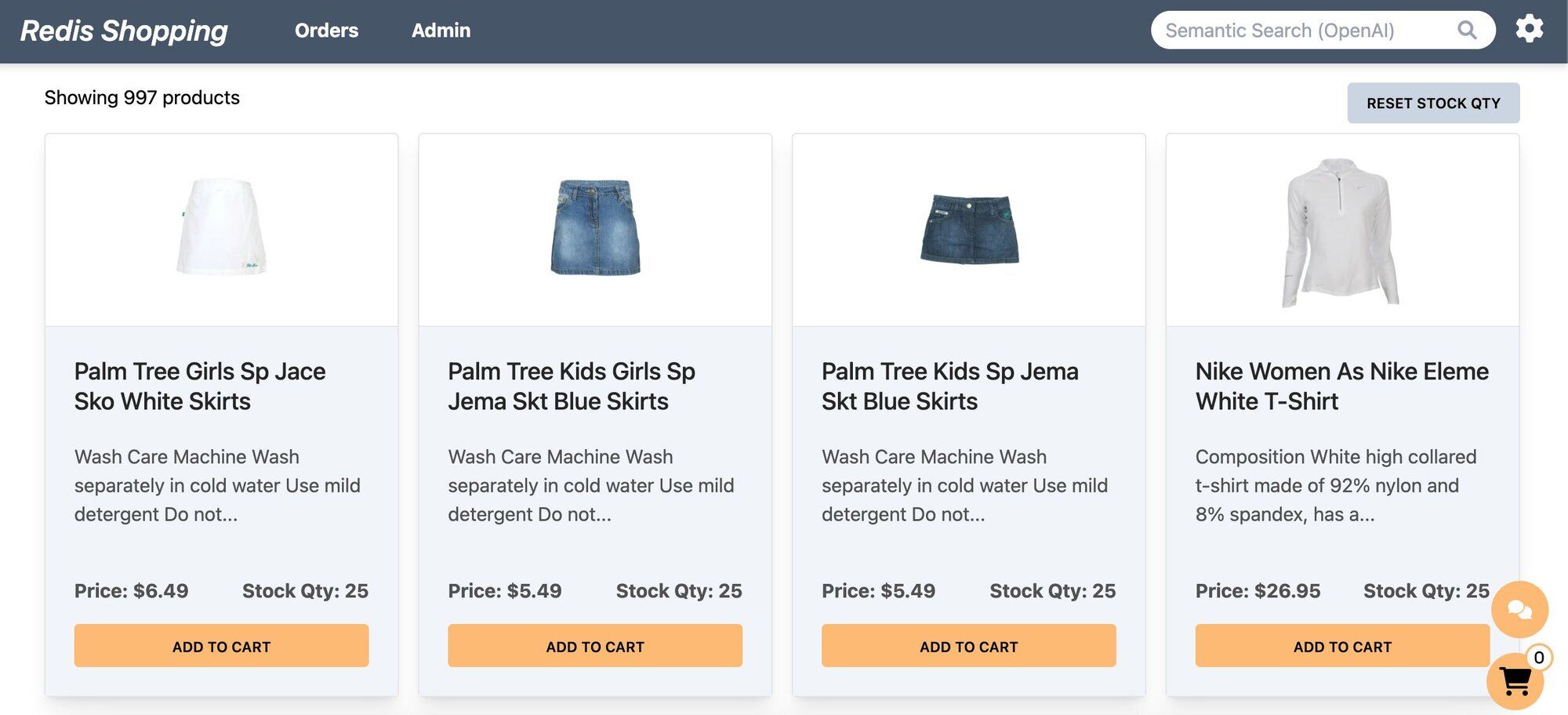
- **Dashboard:** Displays a list of products with different search functionalities, configurable in the settings page.
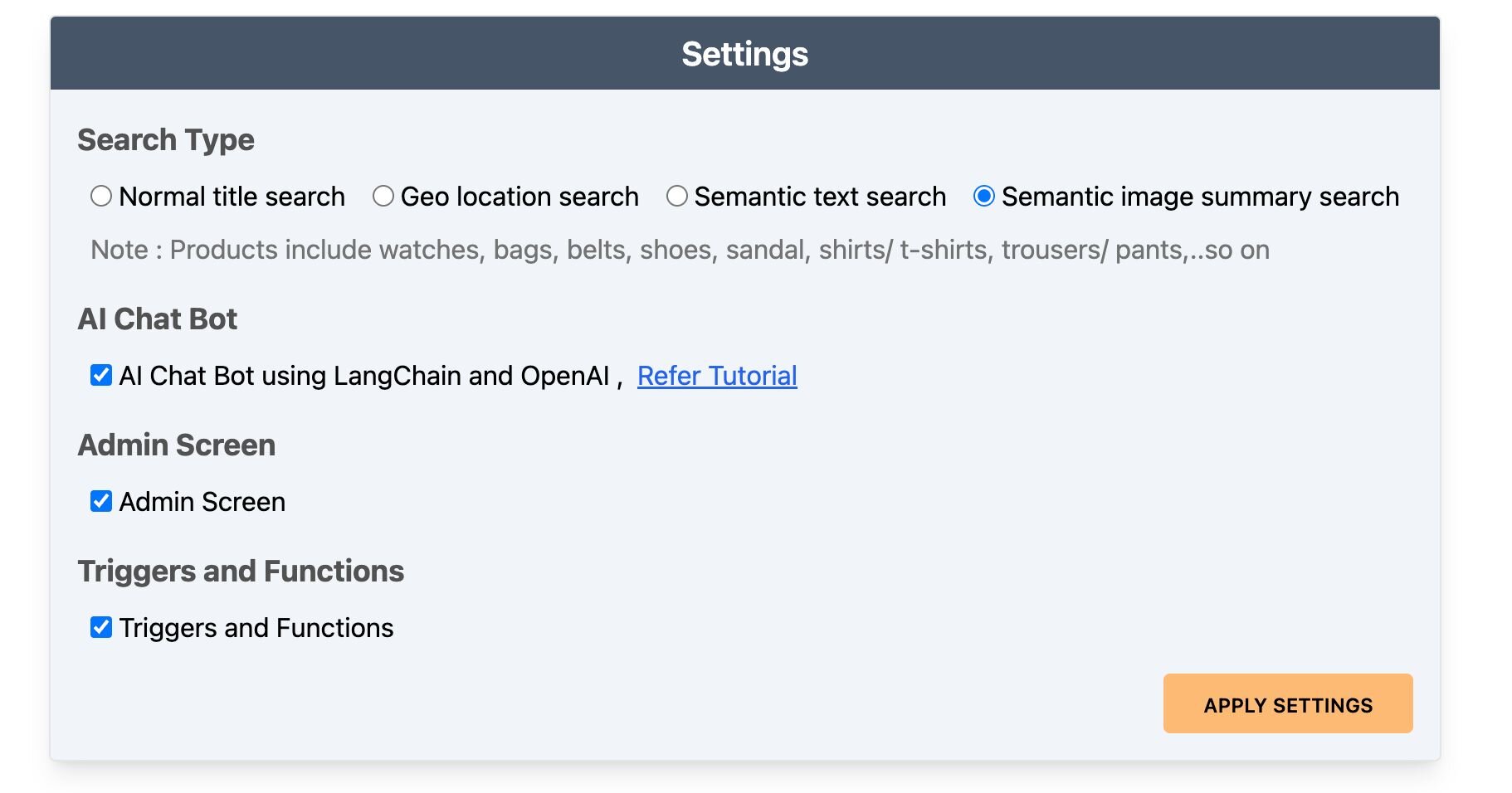
- **Settings:** Accessible by clicking the gear icon at the top right of the dashboard. Control the search bar, chatbot visibility, and other features here.
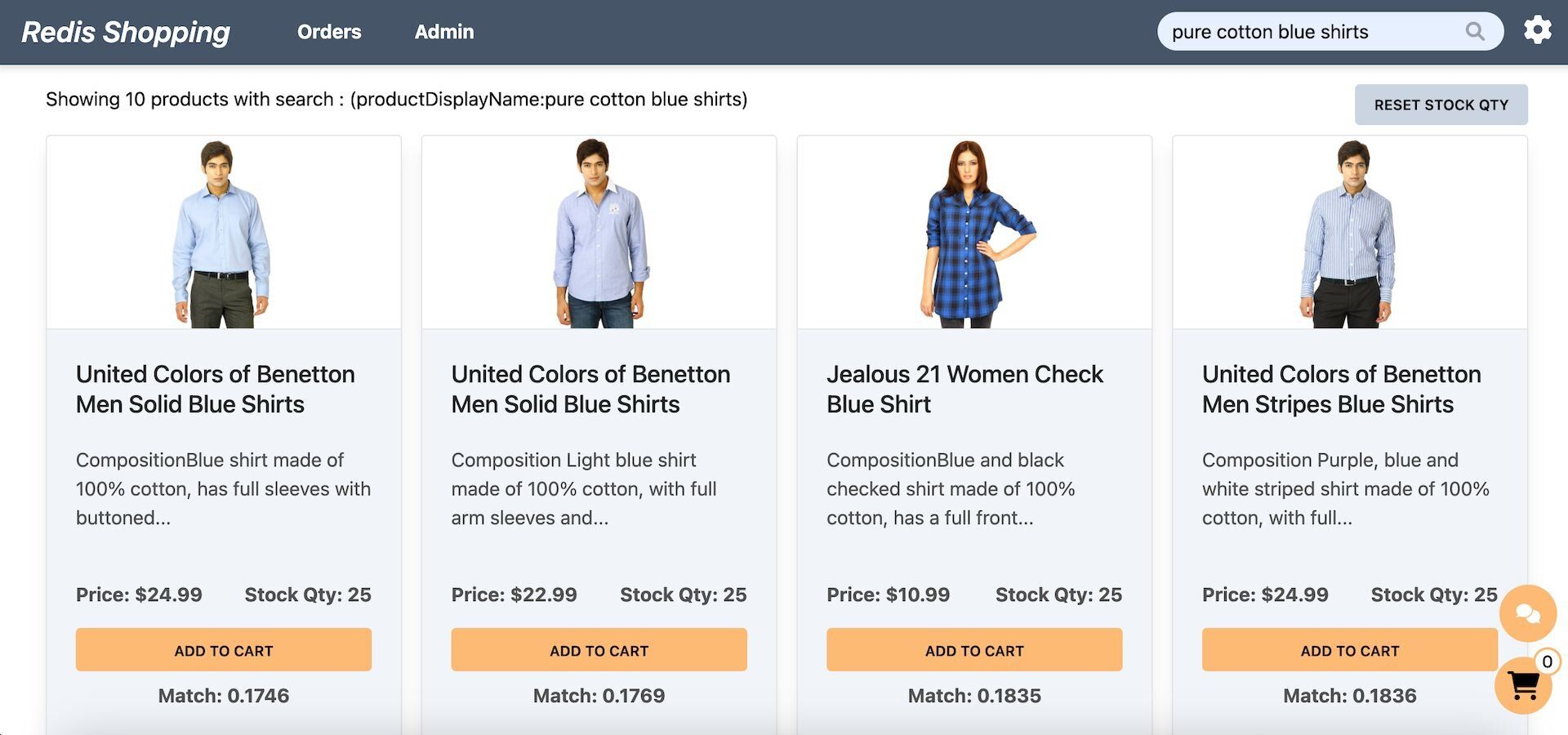
- **Dashboard (Semantic Text Search):** Configured for semantic text search, the search bar enables natural language queries. Example: "pure cotton blue shirts."
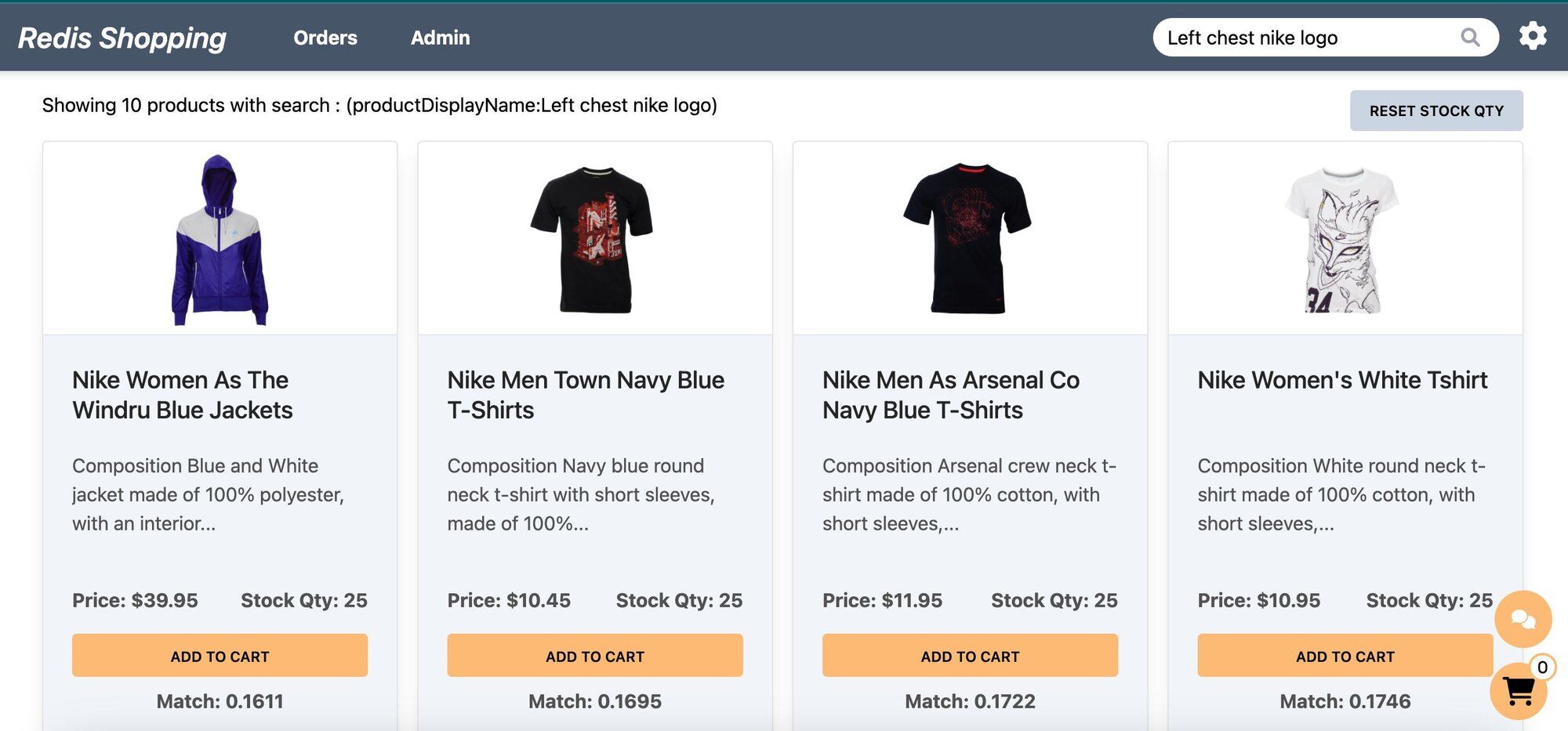
- **Dashboard (Semantic Image-Based Queries):** Configured for semantic image summary search, the search bar allows for image-based queries. Example: "Left chest nike logo."
- **Chat Bot:** Located at the bottom right corner of the page, assisting in product searches and detailed views.
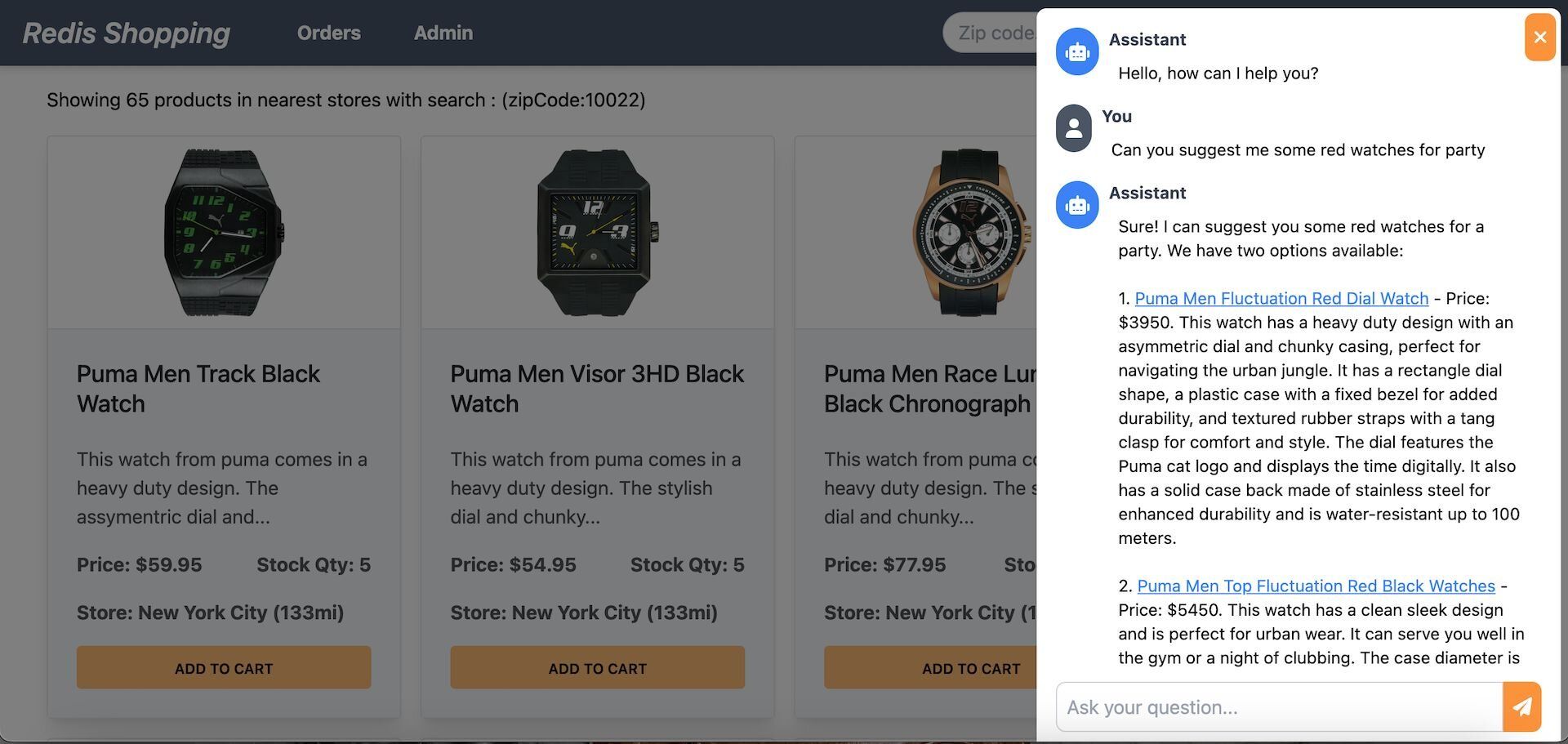
Selecting a product in the chat displays its details on the dashboard.
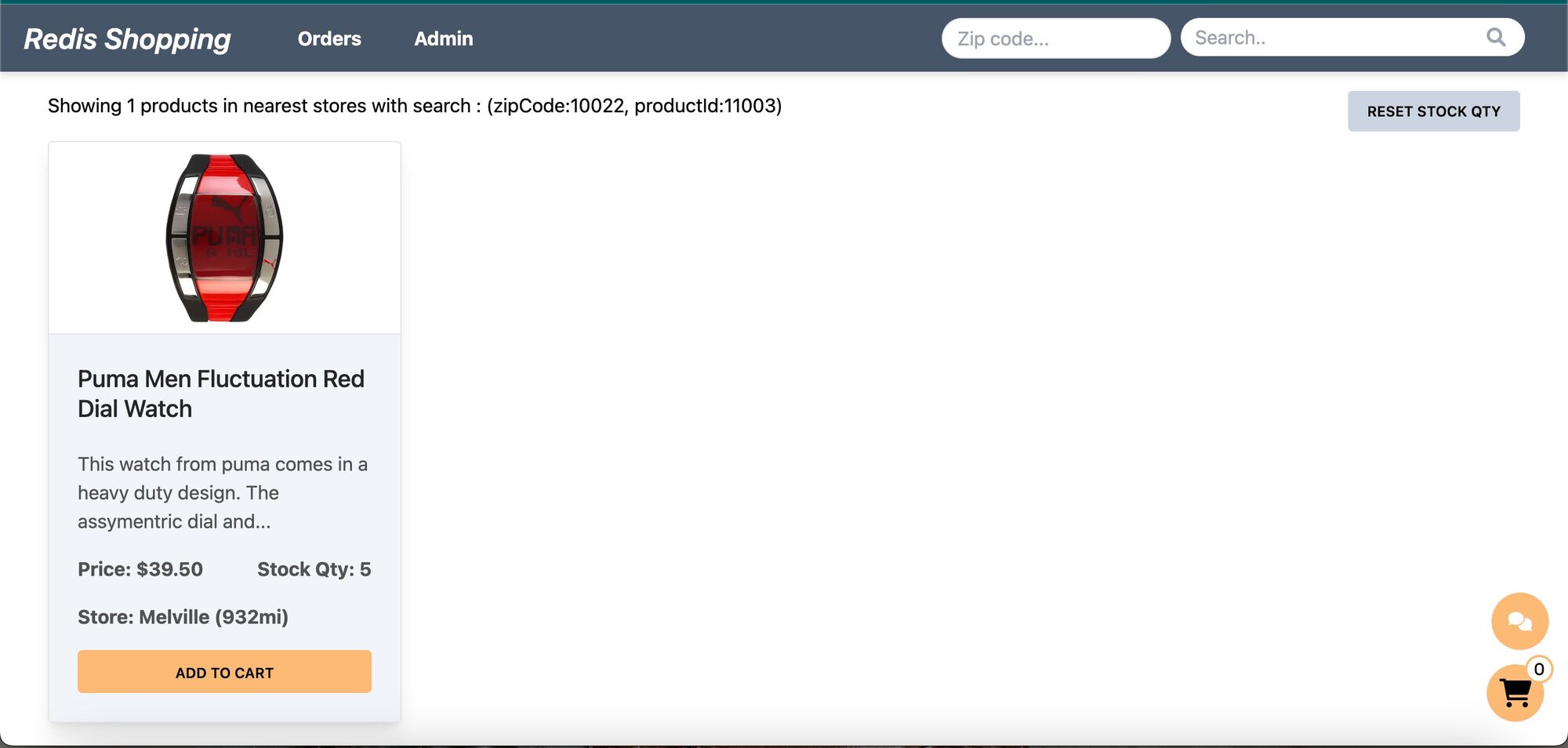
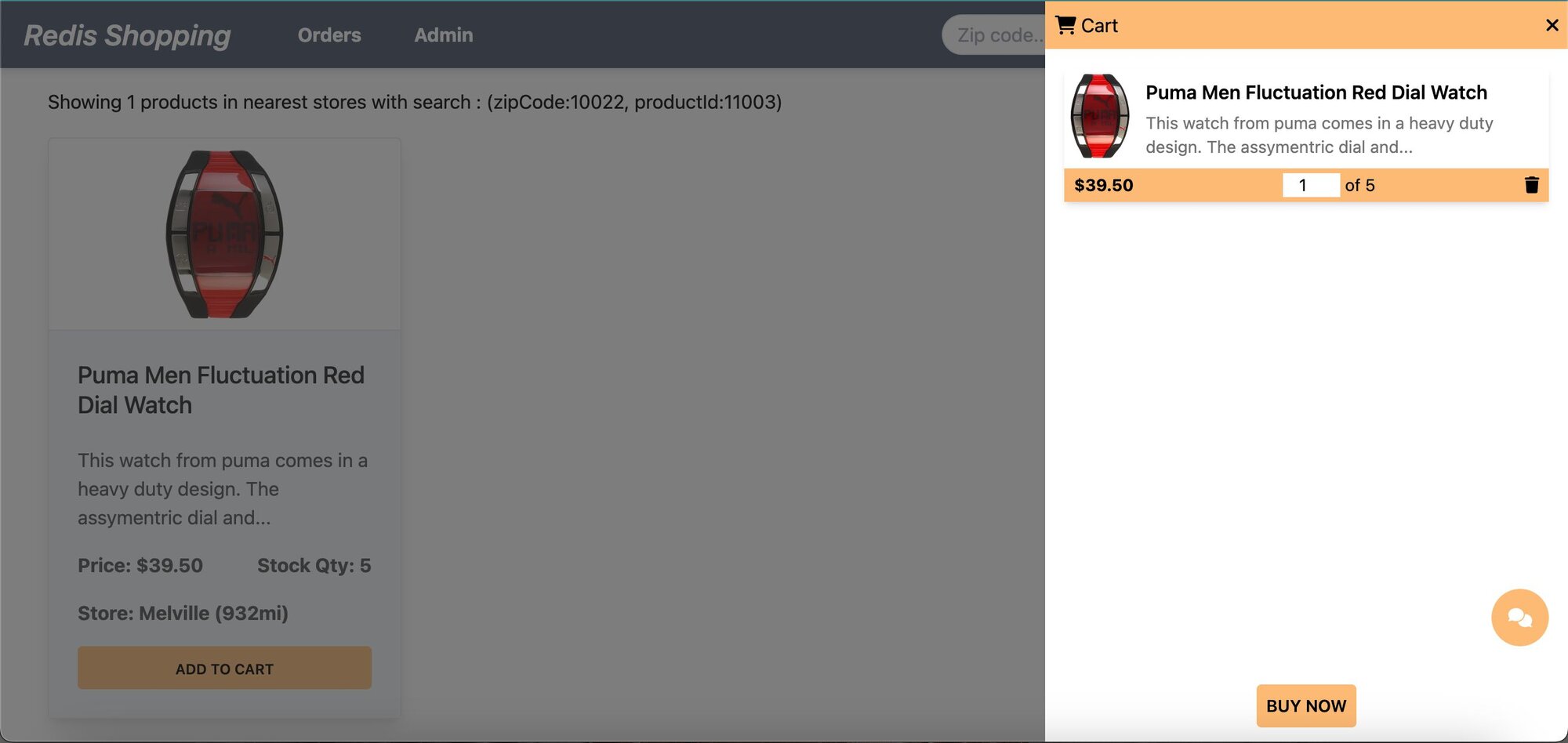
- **Shopping Cart:** Add products to the cart and check out using the "Buy Now" button.
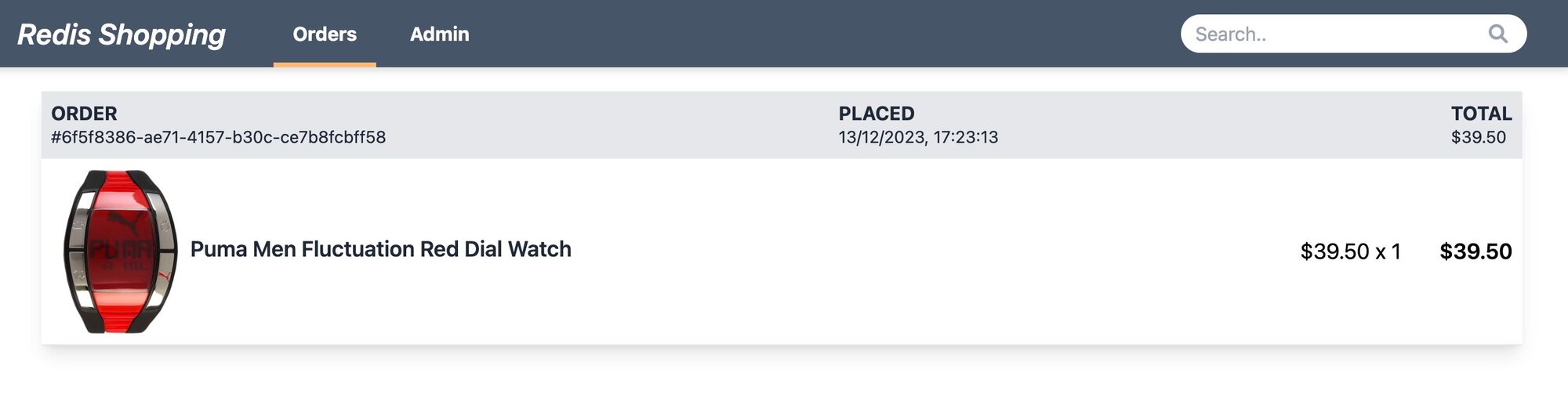
- **Order History:** Post-purchase, the 'Orders' link in the top navigation bar shows the order status and history.
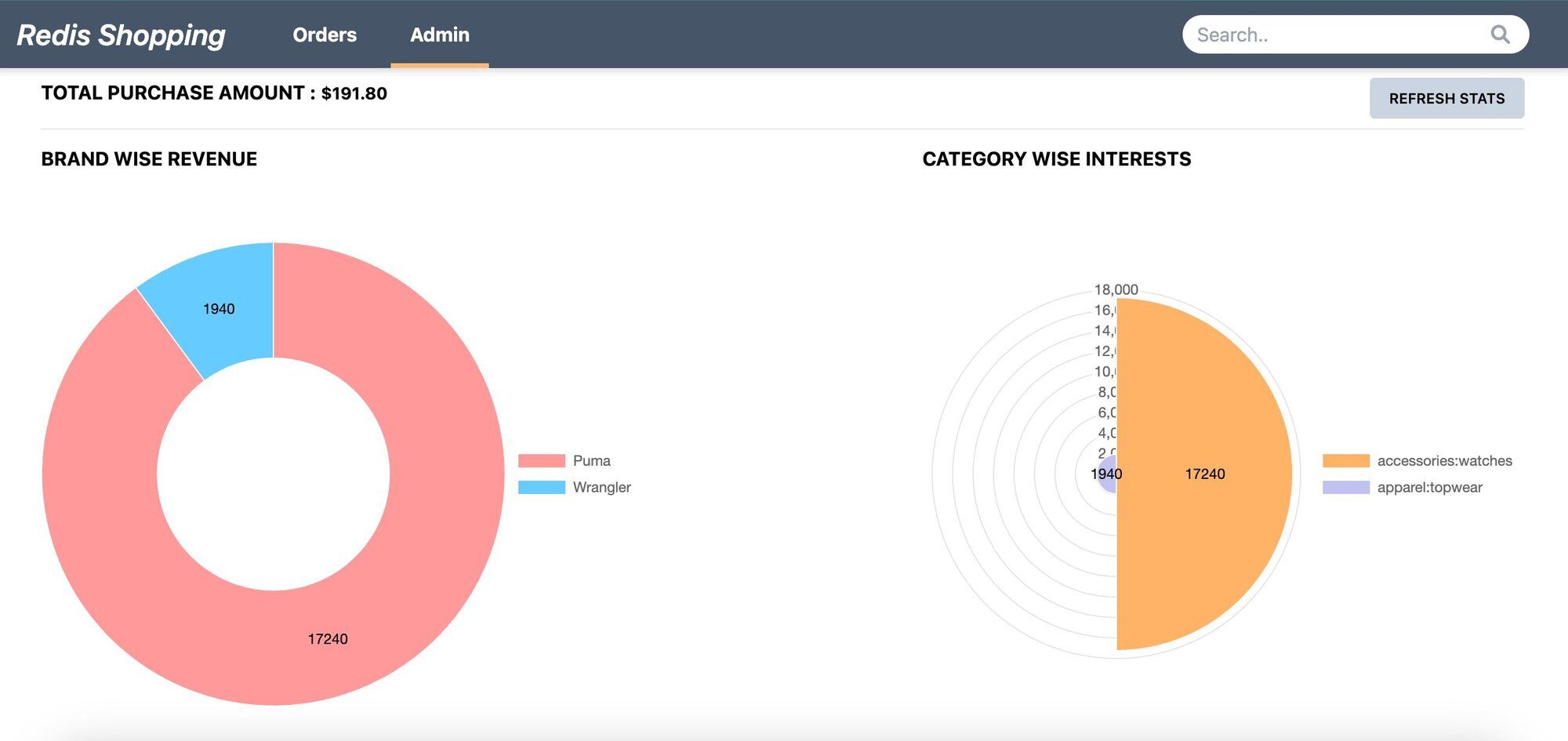
- **Admin Panel:** Accessible via the 'admin' link in the top navigation. Displays purchase statistics and trending products.
## How does the chatbot architecture work?
### What is the RAG chatbot flow?
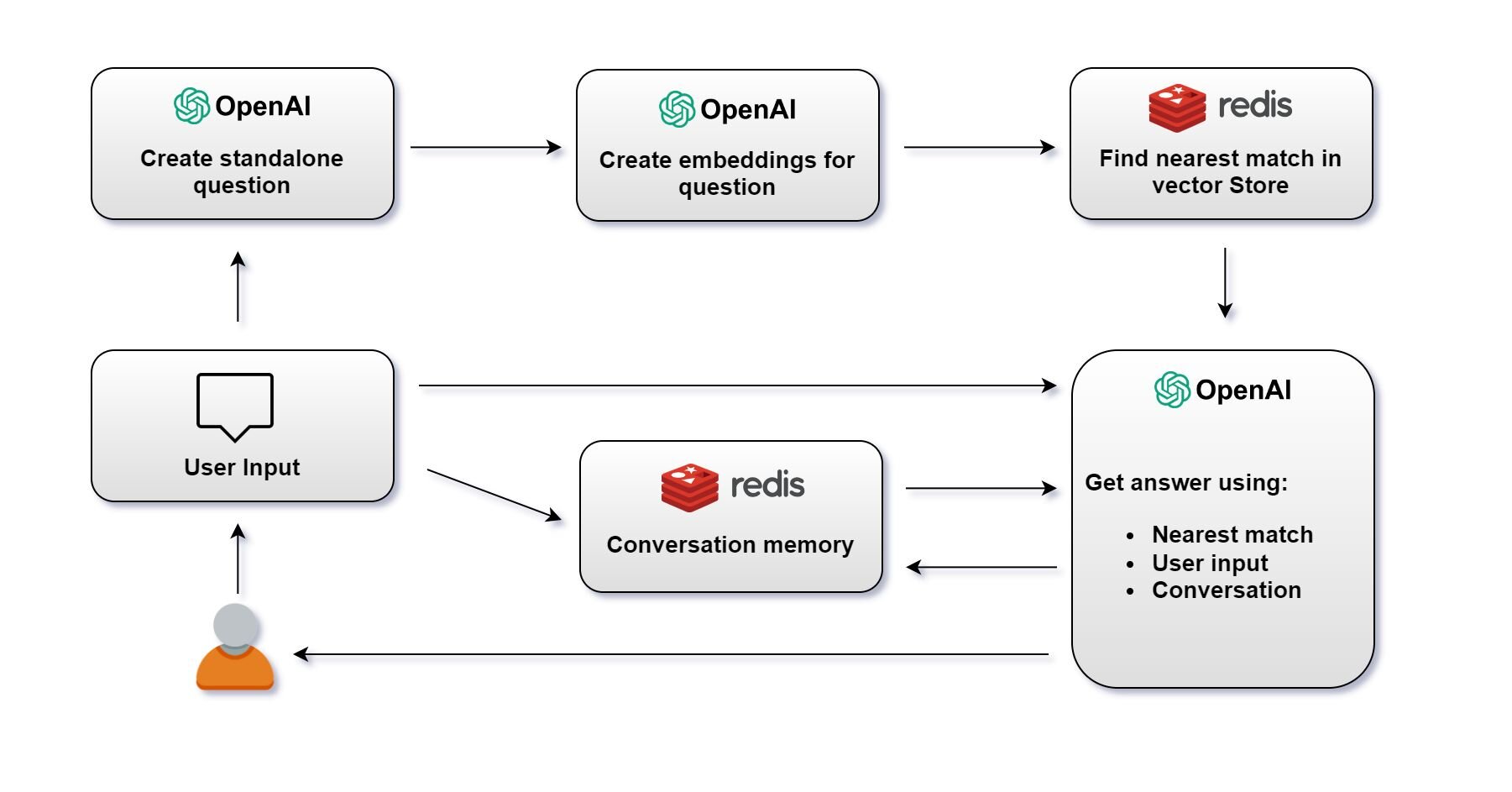
1> **Create Standalone Question**: Create a standalone question using OpenAI's language model.
A standalone question is just a question reduced to the minimum number of words needed to express the request for information.
```js
//Example
userQuestion =
"I'm thinking of buying one of your T-shirts but I need to know what your returns policy is as some T-shirts just don't fit me and I don't want to waste money.";
//semanticMeaning of above question
standAloneQuestion = 'What is your return policy?';
```
2> **Create Embeddings for Question**: Once the question is created, OpenAI's language model generates an embedding for the question.
3> **Find Nearest Match in Redis Vector Store**: The embedding is then used to query the Redis vector store. The system searches for the nearest match to the question embedding among stored vectors.
4> **Get Answer**: With the user's initial question, the nearest match from the vector store, and the conversation memory, OpenAI's language model generates an answer. This answer is then provided to the user.
Note: The system maintains a conversation memory, which tracks the ongoing conversation's context. This memory is crucial for ensuring the continuity and relevance of the conversation.
5> **User Receives Answer**: The answer is sent back to the user, completing the interaction cycle. The conversation memory is updated with this latest exchange to inform future responses.
### What does a sample prompt and response look like?
Say, OriginalQuestion of user is as follows:
`I am looking for a watch, Can you recommend anything for formal occasions with price under 50 dollars?`
Converted standaloneQuestion by openAI is as follows:
`What watches do you recommend for formal occasions with a price under $50?`
After vector search on **Redis**, we get the following similarProducts:
```javascript
similarProducts = [
{
pageContent: `Product details are as follows:
productId: 11005.
productDisplayName: Puma Men Visor 3HD Black Watch.
price: 5495 ...`,
metadata: { productId: '11005' },
},
{
pageContent: `Product details are as follows:
productId: 11006.
productDisplayName: Puma Men Race Luminous Black Chronograph Watch.
price: 7795 ... `,
metadata: { productId: '11006' },
},
];
```
The final openAI response with above context and earlier chat history (if any) is as follows:
```javascript
answer = `I recommend two watches for formal occasions with a price under $50.
First, we have the Puma Men Visor 3HD Black Watch priced at $54.95. This watch features a heavy-duty design with a stylish dial and chunky casing, giving it a tough appearance - perfect for navigating the urban jungle. It has a square dial shape and a 32 mm case diameter. The watch comes with a 2-year warranty and is water-resistant up to 50 meters.
Second, we have the Puma Men Race Luminous Black Chronograph Watch priced at $77.95. This watch also features a heavy-duty design with a stylish dial and chunky casing. It has a round dial shape and a 40 mm case diameter. The watch comes with a 2-year warranty and is water-resistant up to 50 meters.
Both these watches from Puma are perfect for formal occasions and are priced under $50. I hope this helps, and please let me know if you have any other questions!`;
```
## How do you set up the database?
> **INFO**
>
> Sign up for an [OpenAI account](https://platform.openai.com/) to get your API key to be used in the demo (add OPEN_AI_API_KEY variable in .env file). You can also refer to the [OpenAI API documentation](https://platform.openai.com/docs/api-reference/introduction) for more information.
> **GITHUB CODE**
>
> Below is a command to the clone the source code for the application used in this tutorial
>
> git clone --branch v9.2.0 [https://github.com/redis-developer/redis-microservices-ecommerce-solutions](https://github.com/redis-developer/redis-microservices-ecommerce-solutions)
### What does the sample data look like?
For the purposes of this tutorial, let's consider a simplified e-commerce context. The `products` JSON provided offers a glimpse into AI search functionalities we'll be operating on.
```js
const products = [
{
productId: '11000',
price: 3995,
productDisplayName: 'Puma Men Slick 3HD Yellow Black Watches',
variantName: 'Slick 3HD Yellow',
brandName: 'Puma',
ageGroup: 'Adults-Men',
gender: 'Men',
displayCategories: 'Accessories',
masterCategory_typeName: 'Accessories',
subCategory_typeName: 'Watches',
styleImages_default_imageURL:
'http://host.docker.internal:8080/images/11000.jpg',
productDescriptors_description_value:
'Stylish and comfortable, ...',
stockQty: 25,
},
//...
];
```
## How do you seed OpenAI embeddings into Redis?
Below is the sample code to seed `products` data as OpenAI embeddings into Redis.
```javascript
import { Document } from "langchain/document";
import { OpenAIEmbeddings } from "langchain/embeddings/openai";
import { RedisVectorStore } from "langchain/vectorstores/redis";
/**
* Adds OpenAI embeddings to Redis for the given products.
*
* @param _products - An array of (ecommerce) products.
* @param _redisClient - The Redis client used to connect to the Redis server.
* @param _openAIApiKey - The API key for accessing the OpenAI service.
*/
const addOpenAIEmbeddingsToRedis = async (
_products,
_redisClient,
_openAIApiKey
) => {
if (_products?.length > 0 && _redisClient && _openAIApiKey) {
// Check if the data is already seeded
const existingKeys = await _redisClient.keys("openAIProducts:*");
if (existingKeys.length > 0) {
console.log("seeding openAIEmbeddings skipped !");
return;
}
const vectorDocs: Document[] = [];
// Create a document for each product
for (let product of _products) {
let doc = new Document({
metadata: {
productId: product.productId,
},
pageContent: ` Product details are as follows:
productId: ${product.productId}.
productDisplayName: ${product.productDisplayName}.
price: ${product.price}.
variantName: ${product.variantName}.
brandName: ${product.brandName}.
ageGroup: ${product.ageGroup}.
gender: ${product.gender}.
productColors: ${product.productColors}
Category: ${product.displayCategories}, ${product.masterCategory_typeName} - ${product.subCategory_typeName}
productDescription: ${product.productDescriptors_description_value}`,
});
vectorDocs.push(doc);
}
// Create a new OpenAIEmbeddings instance
const embeddings = new OpenAIEmbeddings({
openAIApiKey: _openAIApiKey,
});
// Add the documents to the RedisVectorStore
const vectorStore = await RedisVectorStore.fromDocuments(
vectorDocs,
embeddings,
{
redisClient: _redisClient,
indexName: "openAIProductsIdx",
keyPrefix: "openAIProducts:",
}
);
console.log("seeding OpenAIEmbeddings completed");
}
};
```
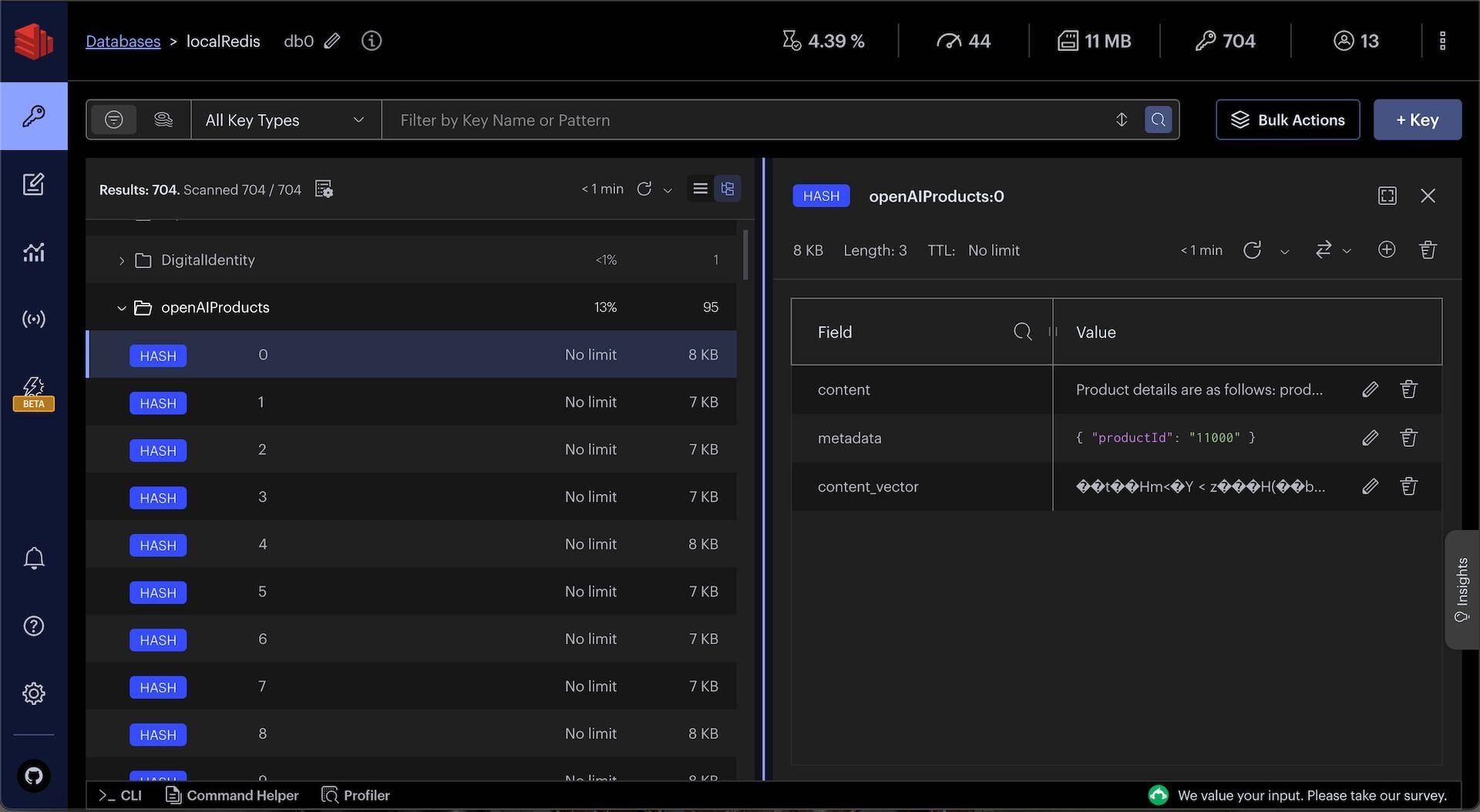
You can observe openAIProducts JSON in Redis Insight:
> **TIP**
>
> Download [Redis Insight](https://redis.io/insight/) to visually explore your Redis data or to engage with raw Redis commands in the workbench.
## How do you set up the chatbot API?
Once products data is seeded as OpenAI embeddings into Redis, you can create a chatbot API to answer user questions and recommend products.
### What does the API endpoint look like?
The code that follows shows an example API request and response for the chatBot API:
Request:
```bash
POST http://localhost:3000/products/chatBot
{
"userMessage":"I am looking for a watch, Can you recommend anything for formal occasions with price under 50 dollars?"
}
```
Response:
```json
{
"data": "I recommend two watches for formal occasions with a price under $50.
First, we have the Puma Men Visor 3HD Black Watch priced at $54.95. This watch features a heavy-duty design with a stylish dial and chunky casing, giving it a tough appearance - perfect for navigating the urban jungle. It has a square dial shape and a 32 mm case diameter. The watch comes with a 2-year warranty and is water-resistant up to 50 meters.
Second, we have the Puma Men Race Luminous Black Chronograph Watch priced at $77.95. This watch also features a heavy-duty design with a stylish dial and chunky casing. It has a round dial shape and a 40 mm case diameter. The watch comes with a 2-year warranty and is water-resistant up to 50 meters.
Both these watches from Puma are perfect for formal occasions and are priced under $50. I hope this helps, and please let me know if you have any other questions!",
"error": null,
"auth": "SES_54f211db-50a7-45df-8067-c3dc4272beb2"
}
```
### How is the chatbot API implemented?
When you make a request, it goes through the API gateway to the `products` service. Ultimately, it ends up calling a `chatBotMessage` function which looks as follows:
```javascript
import {
ChatOpenAI,
ChatOpenAICallOptions,
} from "langchain/chat_models/openai";
import { PromptTemplate } from "langchain/prompts";
import { OpenAIEmbeddings } from "langchain/embeddings/openai";
import { RedisVectorStore } from "langchain/vectorstores/redis";
import { StringOutputParser } from "langchain/schema/output_parser";
import { Document } from "langchain/document";
let llm: ChatOpenAI;
const chatBotMessage = async (
_userMessage: string,
_sessionId: string,
_openAIApiKey: string
) => {
const CHAT_BOT_LOG = "CHAT_BOT_LOG_STREAM";
const redisWrapperInst = getRedis();
// Add user message to chat history
const chatHistoryName = "chatHistory:" + _sessionId;
redisWrapperInst.addItemToList(
chatHistoryName,
"userMessage: " + _userMessage
);
// add log
addMessageToStream(
{ name: "originalQuestion", comments: _userMessage },
CHAT_BOT_LOG
);
// (1) Create a standalone question
const standaloneQuestion = await convertToStandAloneQuestion(
_userMessage,
_sessionId,
_openAIApiKey
);
// add log
addMessageToStream(
{ name: "standaloneQuestion", comments: standaloneQuestion },
CHAT_BOT_LOG
);
// (2) Get similar products from Redis
const similarProducts = await getSimilarProductsByVSS(
standaloneQuestion,
_openAIApiKey
);
if (similarProducts?.length) {
// add log
addMessageToStream(
{ name: "similarProducts", comments: JSON.stringify(similarProducts) },
CHAT_BOT_LOG
);
}
// Combine the product details into a single document
const productDetails = combineVectorDocuments(similarProducts);
console.log("productDetails:", productDetails);
// (3) Get answer from OpenAI
const answer = await convertToAnswer(
_userMessage,
standaloneQuestion,
productDetails,
_sessionId,
_openAIApiKey
);
// add log
addMessageToStream({ name: "answer", comments: answer }, CHAT_BOT_LOG);
// Add answer to chat history
redisWrapperInst.addItemToList(
chatHistoryName,
"openAIMessage(You): " + answer
);
return answer;
};
```
The following function converts the userMessage to a standaloneQuestion using OpenAI:
```javascript
// (1) Create a standalone question
const convertToStandAloneQuestion = async (
_userQuestion: string,
_sessionId: string,
_openAIApiKey: string
) => {
const llm = getOpenAIInstance(_openAIApiKey);
const chatHistory = await getChatHistory(_sessionId);
const standaloneQuestionTemplate = `Given some conversation history (if any) and a question, convert it to a standalone question.
***********************************************************
conversation history:
${chatHistory}
***********************************************************
question: {question}
standalone question:`;
const standaloneQuestionPrompt = PromptTemplate.fromTemplate(
standaloneQuestionTemplate
);
const chain = standaloneQuestionPrompt
.pipe(llm)
.pipe(new StringOutputParser());
const response = await chain.invoke({
question: _userQuestion,
});
return response;
};
const getOpenAIInstance = (_openAIApiKey: string) => {
if (!llm) {
llm = new ChatOpenAI({
openAIApiKey: _openAIApiKey,
});
}
return llm;
};
const getChatHistory = async (_sessionId: string, _separator?: string) => {
let chatHistory = "";
if (!_separator) {
_separator = "\n\n";
}
if (_sessionId) {
const redisWrapperInst = getRedis();
const chatHistoryName = "chatHistory:" + _sessionId;
const items = await redisWrapperInst.getAllItemsFromList(chatHistoryName);
if (items?.length) {
chatHistory = items.join(_separator);
}
}
return chatHistory;
};
const combineVectorDocuments = (
_vectorDocs: Document[],
_separator?: string
) => {
if (!_separator) {
_separator = "\n\n --------------------- \n\n";
}
return _vectorDocs.map((doc) => doc.pageContent).join(_separator);
};
```
The following function uses Redis to find similar products for the standaloneQuestion:
```javascript
// (2) Get similar products from Redis
const getSimilarProductsByVSS = async (
_standAloneQuestion: string,
_openAIApiKey: string
) => {
const client = getNodeRedisClient();
const embeddings = new OpenAIEmbeddings({
openAIApiKey: _openAIApiKey,
});
const vectorStore = new RedisVectorStore(embeddings, {
redisClient: client,
indexName: "openAIProductsIdx",
keyPrefix: "openAIProducts:",
});
const KNN = 3;
/* Simple standalone search in the vector DB */
const vectorDocs = await vectorStore.similaritySearch(
_standAloneQuestion,
KNN
);
return vectorDocs;
};
```
The following function uses OpenAI to convert the standaloneQuestion, similar products from Redis, and other context into a human-readable answer:
```javascript
// (3) Get answer from OpenAI
const convertToAnswer = async (
_originalQuestion: string,
_standAloneQuestion: string,
_productDetails: string,
_sessionId: string,
_openAIApiKey: string
) => {
const llm = getOpenAIInstance(_openAIApiKey);
const chatHistory = await getChatHistory(_sessionId);
const answerTemplate = `
Please assume the persona of a retail shopping assistant for this conversation.
Use a friendly tone, and assume the target audience are normal people looking for a product in a ecommerce website.
***********************************************************
${
chatHistory
? `
Conversation history between user and you is :
${chatHistory}
`
: ""
}
***********************************************************
OriginalQuestion of user is : {originalQuestion}
***********************************************************
converted stand alone question is : {standAloneQuestion}
***********************************************************
resulting details of products for the stand alone question are :
{productDetails}
Note : Different product details are separated by "---------------------" (if any)
***********************************************************
Answer the question based on the context provided and the conversation history.
If you don't know the answer, please direct the questioner to email help@redis.com. Don't try to suggest any product out of context as it may not be in the store.
Let the answer include product display name, price and optional other details based on question asked.
Let the product display name be a link like productDisplayName
so that user can click on it and go to the product page with help of productId.
answer: `;
const answerPrompt = PromptTemplate.fromTemplate(answerTemplate);
const chain = answerPrompt.pipe(llm).pipe(new StringOutputParser());
const response = await chain.invoke({
originalQuestion: _originalQuestion,
standAloneQuestion: _standAloneQuestion,
productDetails: _productDetails,
});
return response;
};
```
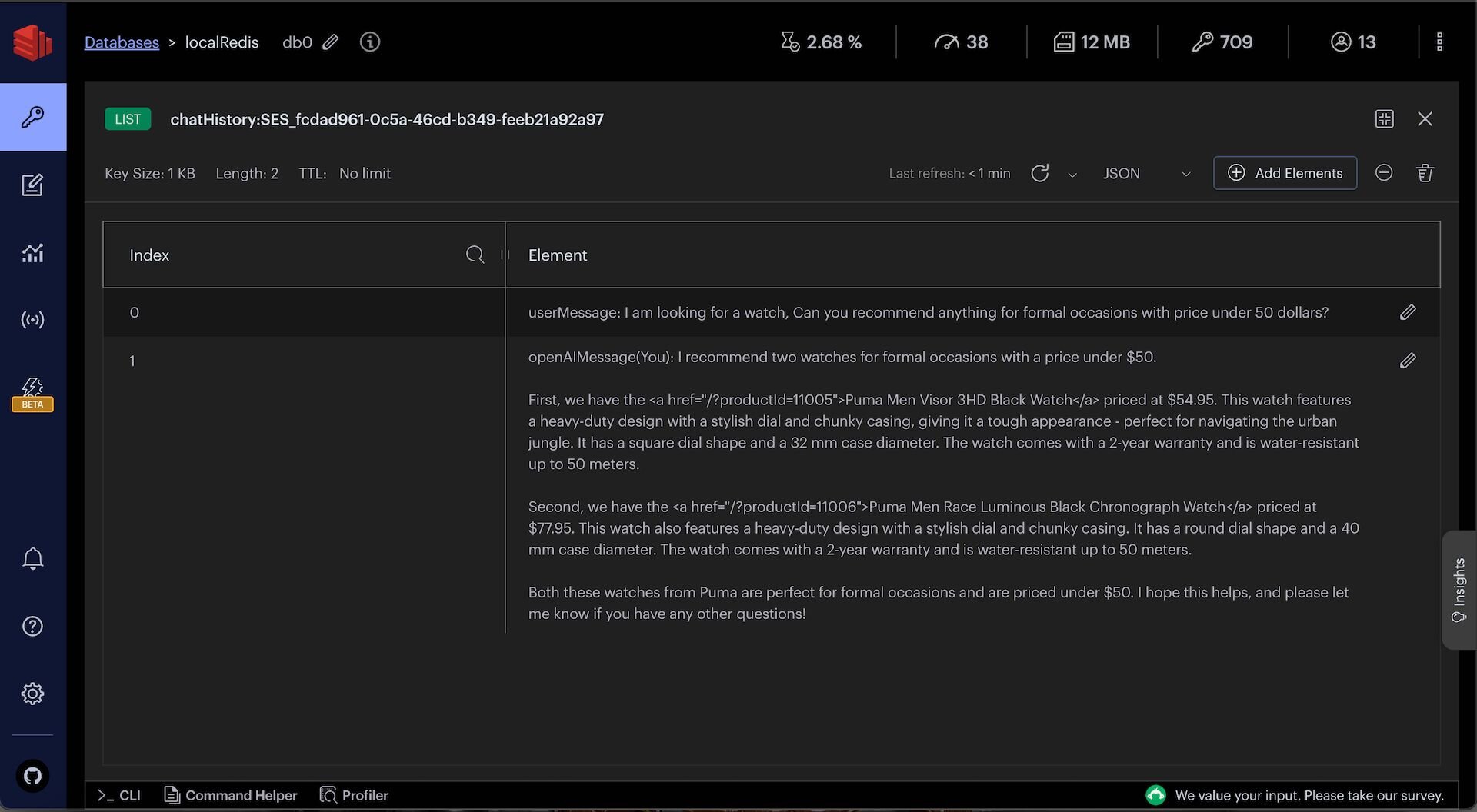
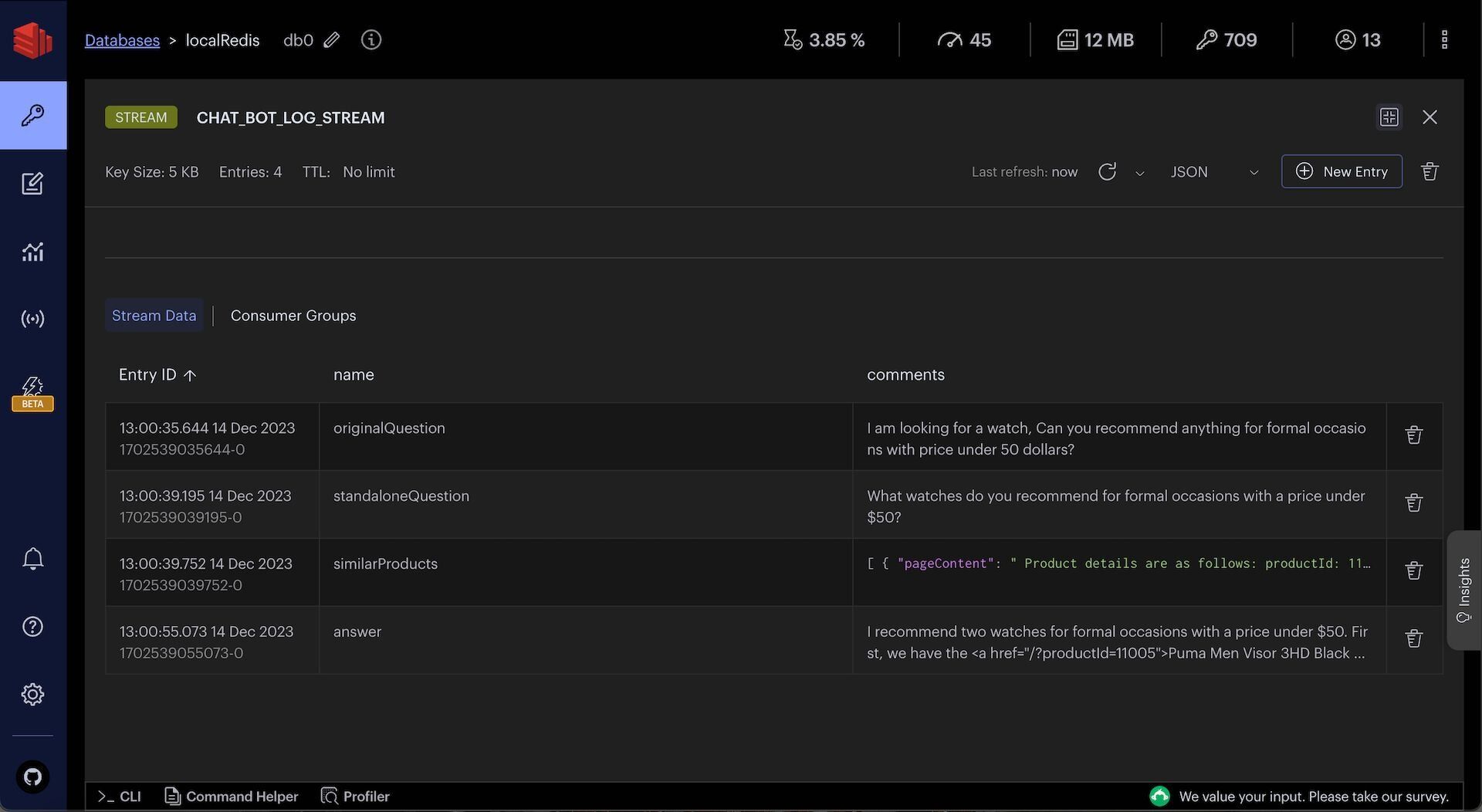
You can observe chat history and intermediate chat logs in Redis Insight:
> **TIP**
>
> Download [Redis Insight](https://redis.io/insight/) to visually explore your Redis data or to engage with raw Redis commands in the workbench.
## Summary
Building a RAG chatbot using LangChain and Redis involves embedding your data as vectors, searching for relevant context at query time, and passing that context to an LLM for answer generation. Redis serves double duty as the vector store and the conversation memory backend, keeping your infrastructure simple.
## Next steps
- [Get started with vector similarity search in Redis](/tutorials/howtos/solutions/vector/getting-started-vector/) to learn the fundamentals of embedding and querying vectors.
- [Explore agent memory with LangGraph and Redis](/tutorials/what-is-agent-memory-example-using-langgraph-and-redis/) to add long-term memory and agentic workflows to your chatbot.
- [LangChain JS documentation](https://js.langchain.com/docs/get_started/quickstart) for more on chains, prompts, and output parsers.
- [LangChain Redis integration](https://js.langchain.com/docs/integrations/vectorstores/redis) for detailed configuration options.