# Vector Semantic Text Search Using LangChain (OpenAI) and Redis
**Authors:** Prasan Rajpurohit, William Johnston | **Category:** For developers | **Published:** 2026-02-25 | **Updated:** 2026-02-26
> **TL;DR:**
>
> Semantic text search uses AI embeddings to match queries by meaning instead of keywords. In this tutorial, you generate OpenAI embeddings for product descriptions, store them in Redis using LangChain's `RedisVectorStore`, and query them with a similarity search API—so a search for "pure cotton blue shirts" returns relevant results even if those exact words don't appear in the product listing.
Semantic text search lets users find products and documents by meaning rather than exact keyword matches. This tutorial shows how to build a semantic search engine using Redis as a vector store, with LangChain and OpenAI embeddings to convert natural language queries into vector similarity lookups.
## What you'll learn
- How semantic search differs from traditional full-text search
- How to generate vector embeddings from product descriptions using OpenAI
- How to store and index embeddings in Redis with LangChain
- How to build a search API that finds products by meaning using vector similarity
- How to integrate semantic search into a frontend application
## How is semantic search different from full-text search?
Full-text search matches documents based on the presence of specific keywords. It works well when users know the exact terms in the data, but it struggles with synonyms, paraphrases, and natural language queries. For example, searching "affordable blue casual wear" won't match a product described as "budget-friendly navy leisure shirt."
Semantic search solves this by converting text into numerical vectors (embeddings) that capture meaning. Queries and documents that are conceptually similar end up close together in vector space, regardless of the exact words used. Redis serves as a high-performance vector store for these embeddings, enabling sub-millisecond similarity lookups at scale.
| Feature | Full-text search | Semantic search |
| ------------------------ | --------------------------------- | --------------------------- |
| Matching method | Keyword occurrence | Vector similarity (meaning) |
| Handles synonyms | No (without manual configuration) | Yes (automatically) |
| Natural language queries | Limited | Strong |
| Setup complexity | Lower | Requires embedding model |
| Best for | Exact lookups, filters | Discovery, natural language |
## Terminology
- [**LangChain**](https://js.langchain.com/): A versatile library for developing language model applications, combining language models, storage systems, and custom logic.
- [**OpenAI**](https://openai.com/): A provider of cutting-edge language models like GPT-3, essential for applications in semantic search and conversational AI.
## What does the e-commerce application architecture look like?
> **GITHUB CODE**
>
> Below is a command to the clone the source code for the application used in this tutorial
>
> git clone --branch v9.2.0 [https://github.com/redis-developer/redis-microservices-ecommerce-solutions](https://github.com/redis-developer/redis-microservices-ecommerce-solutions)
The demo application uses a microservices architecture:
1. `products service`: handles querying products from the database and returning them to the frontend
2. `orders service`: handles validating and creating orders
3. `order history service`: handles querying a customer's order history
4. `payments service`: handles processing orders for payment
5. `api gateway`: unifies the services under a single endpoint
6. `mongodb/ postgresql`: serves as the write-optimized database for storing orders, order history, products, etc.
> **INFO**
>
> You don't need to use MongoDB/ Postgresql as your write-optimized database in the demo application; you can use other [prisma supported databases](https://www.prisma.io/docs/reference/database-reference/supported-databases) as well. This is just an example.
## What does the frontend look like?
The e-commerce microservices application consists of a frontend, built using [Next.js](https://nextjs.org/) with [TailwindCSS](https://tailwindcss.com/). The application backend uses [Node.js](https://nodejs.org/). The data is stored in [Redis](https://redis.io/try-free/) and either MongoDB or PostgreSQL, using [Prisma](https://www.prisma.io/docs/reference/database-reference/supported-databases). Below are screenshots showcasing the frontend of the e-commerce app.
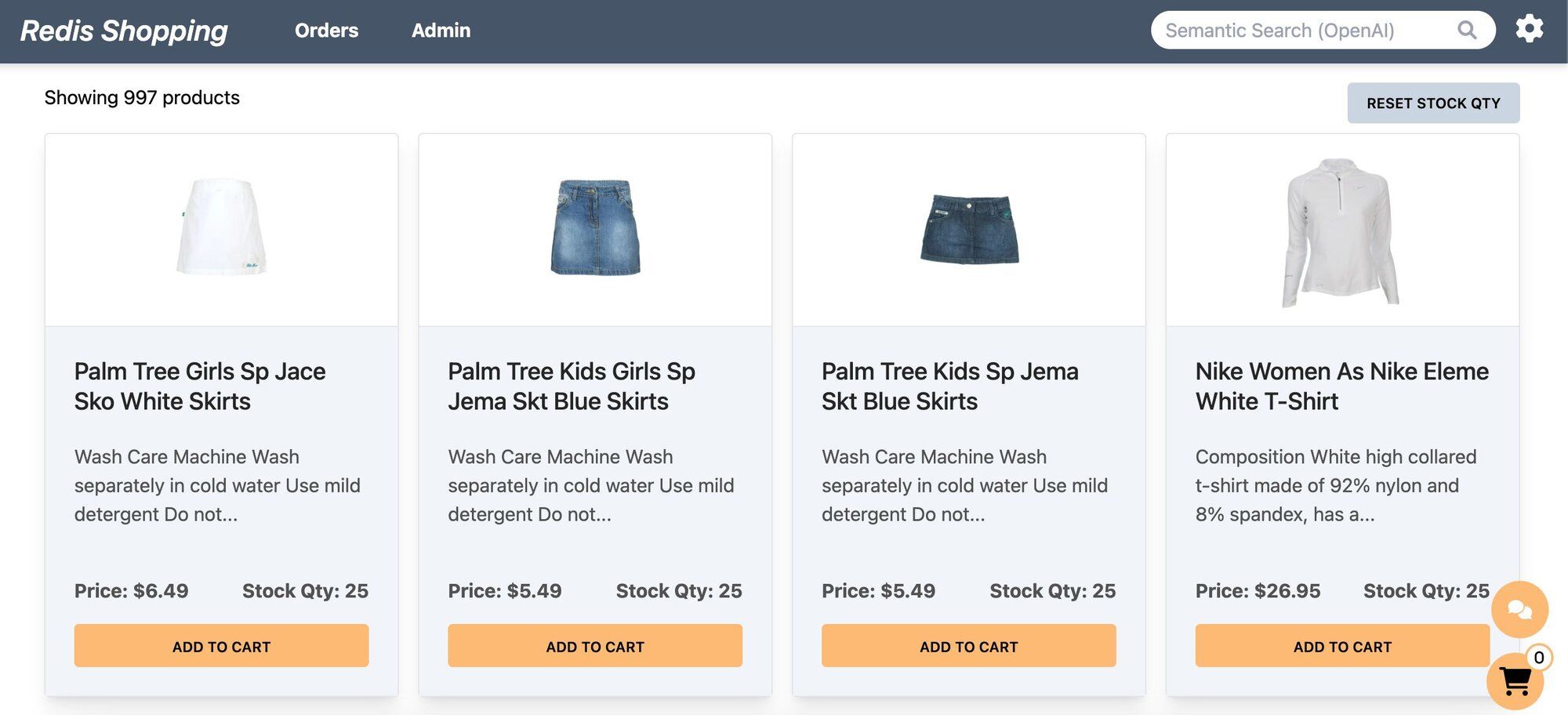
- **Dashboard:** Displays a list of products with different search functionalities, configurable in the settings page.
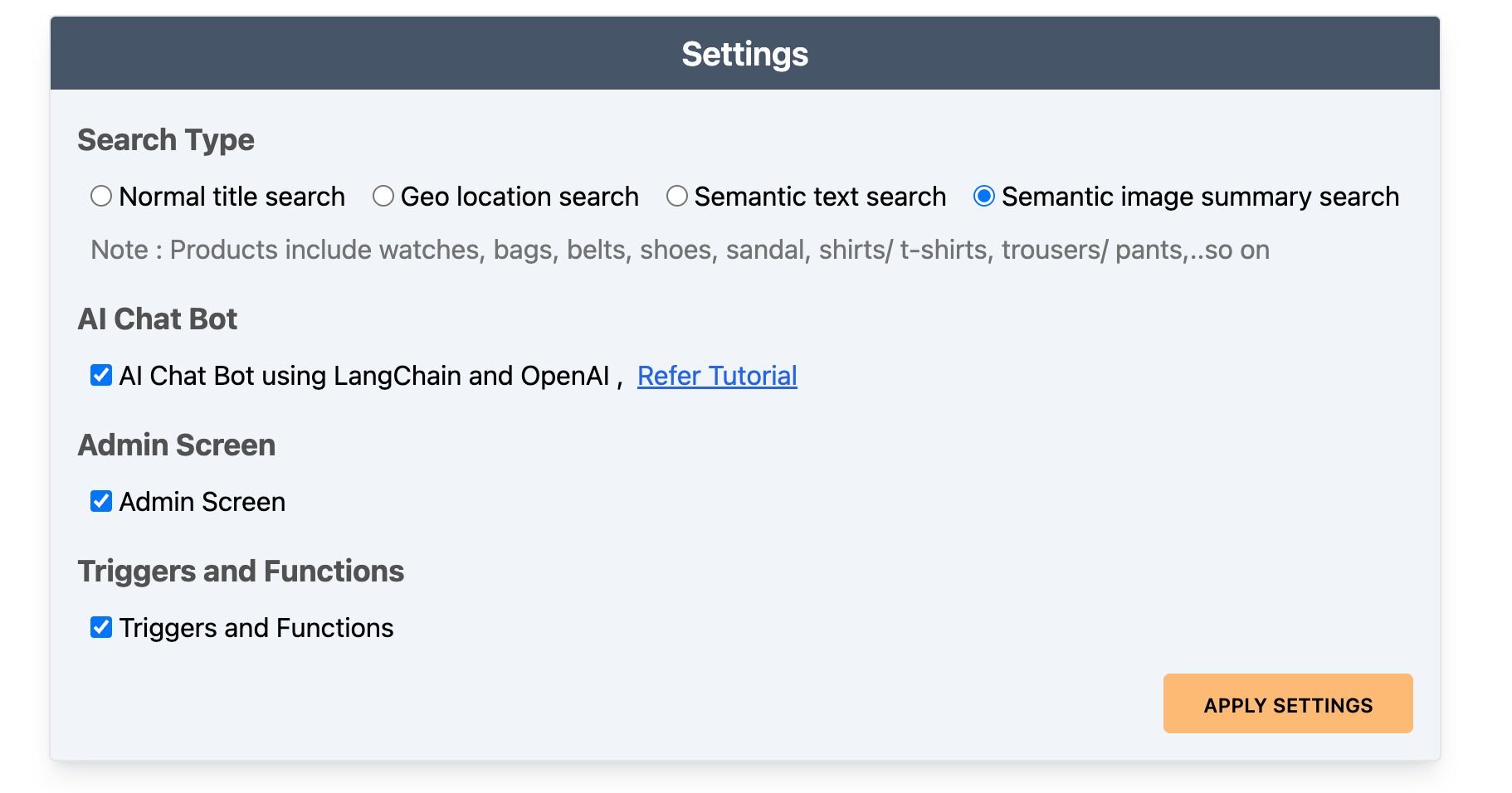
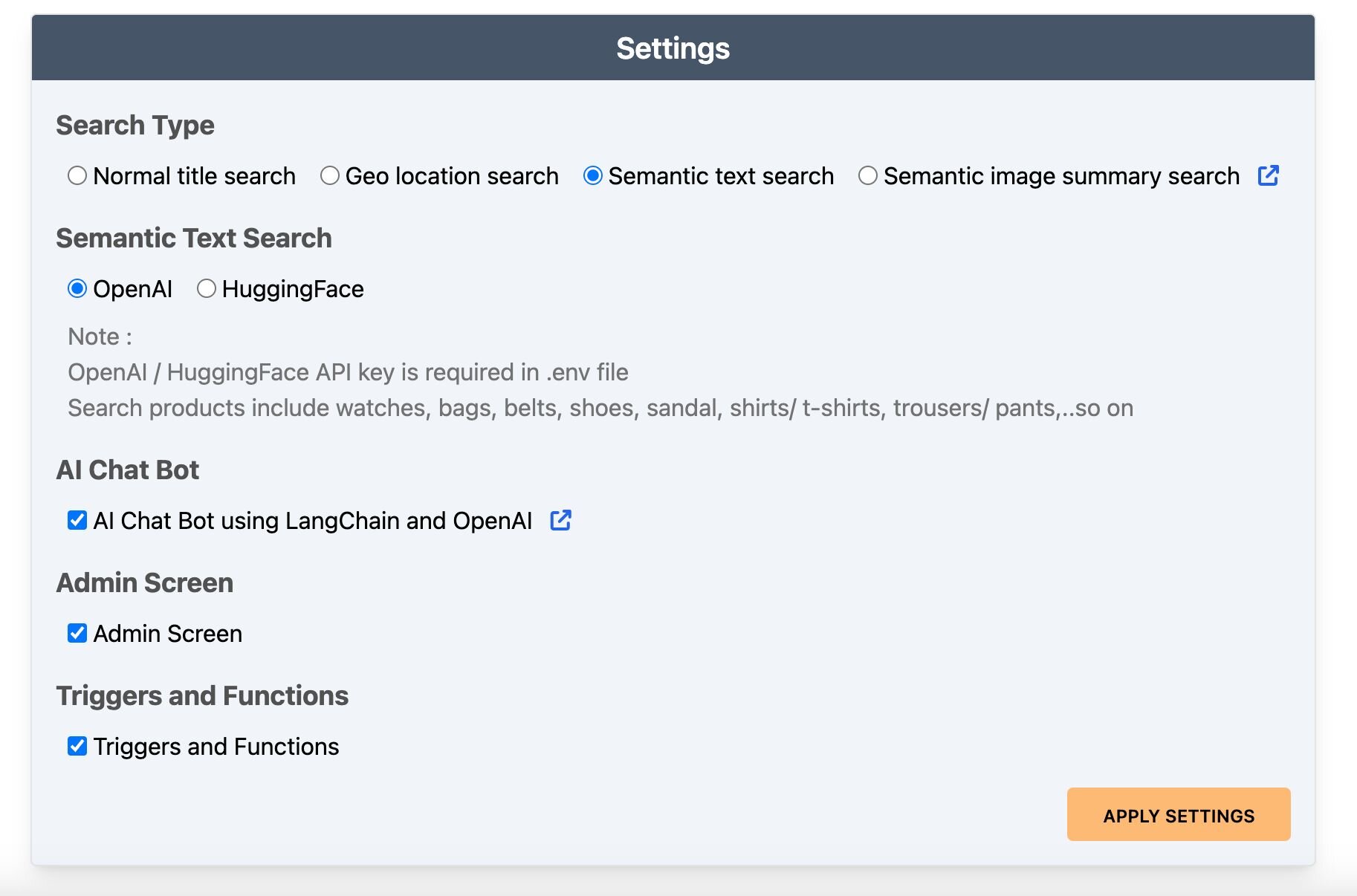
- **Settings:** Accessible by clicking the gear icon at the top right of the dashboard. Control the search bar, chatbot visibility, and other features here.
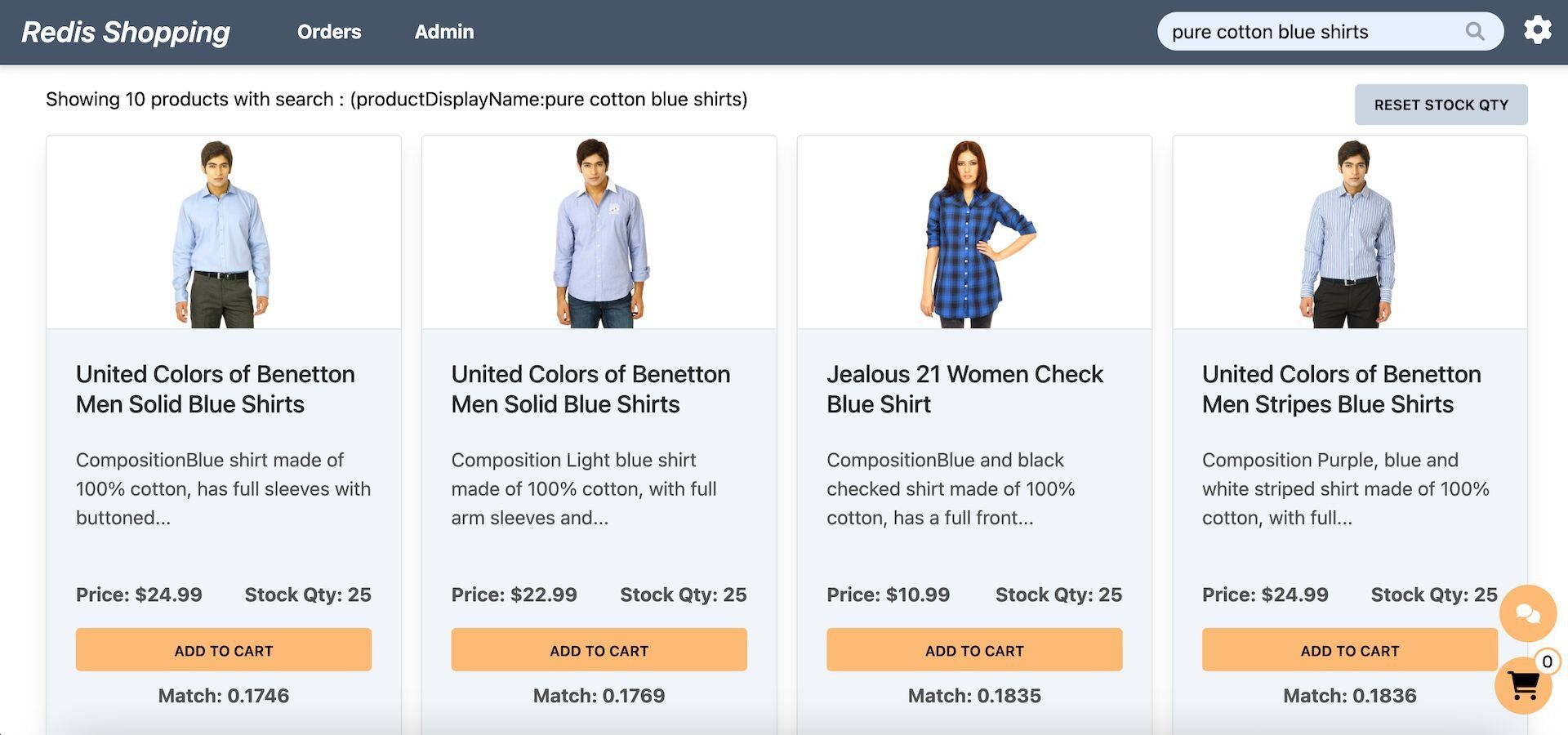
- **Dashboard (Semantic Text Search):** Configured for semantic text search, the search bar enables natural language queries. Example: "pure cotton blue shirts."
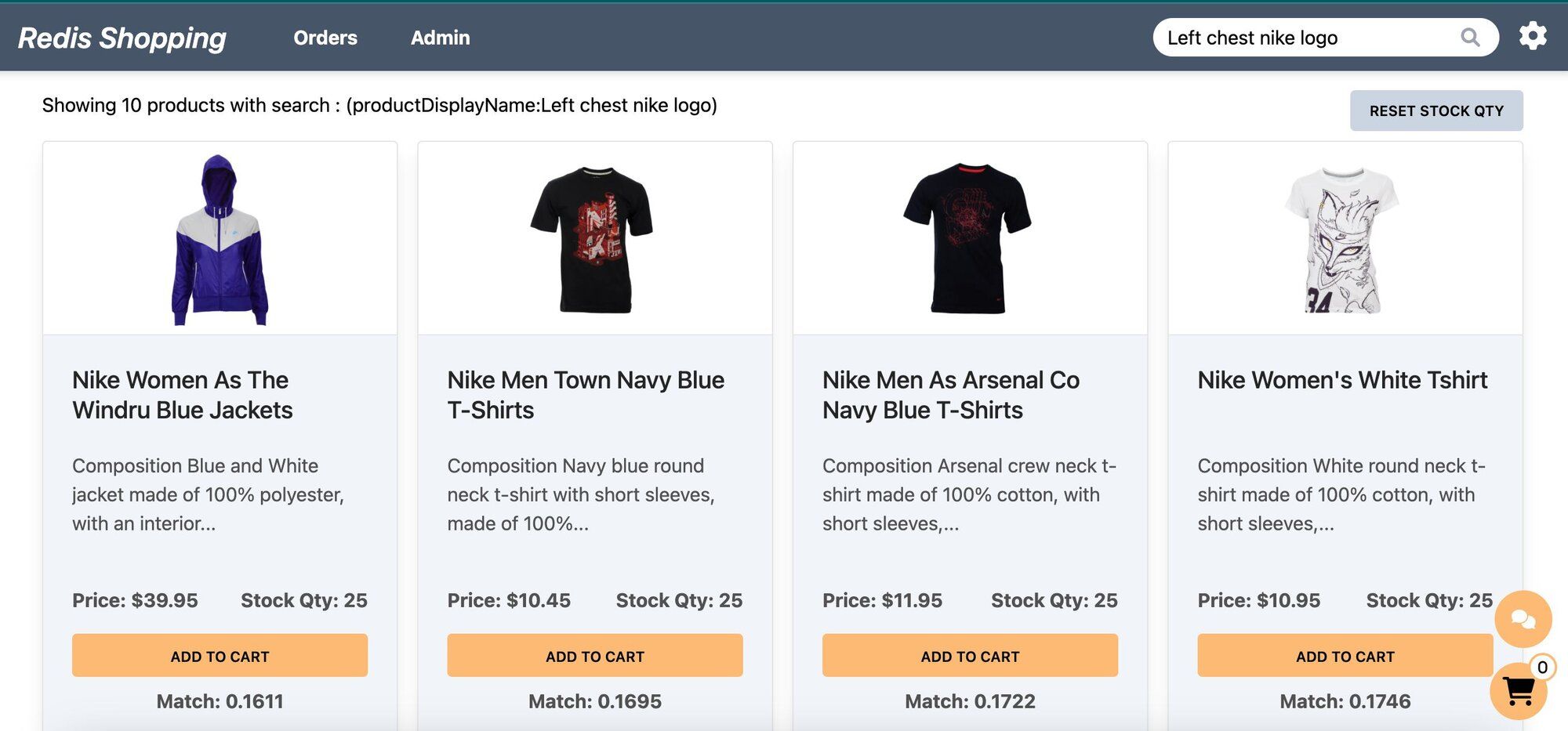
- **Dashboard (Semantic Image-Based Queries):** Configured for semantic image summary search, the search bar allows for image-based queries. Example: "Left chest nike logo."
- **Chat Bot:** Located at the bottom right corner of the page, assisting in product searches and detailed views.
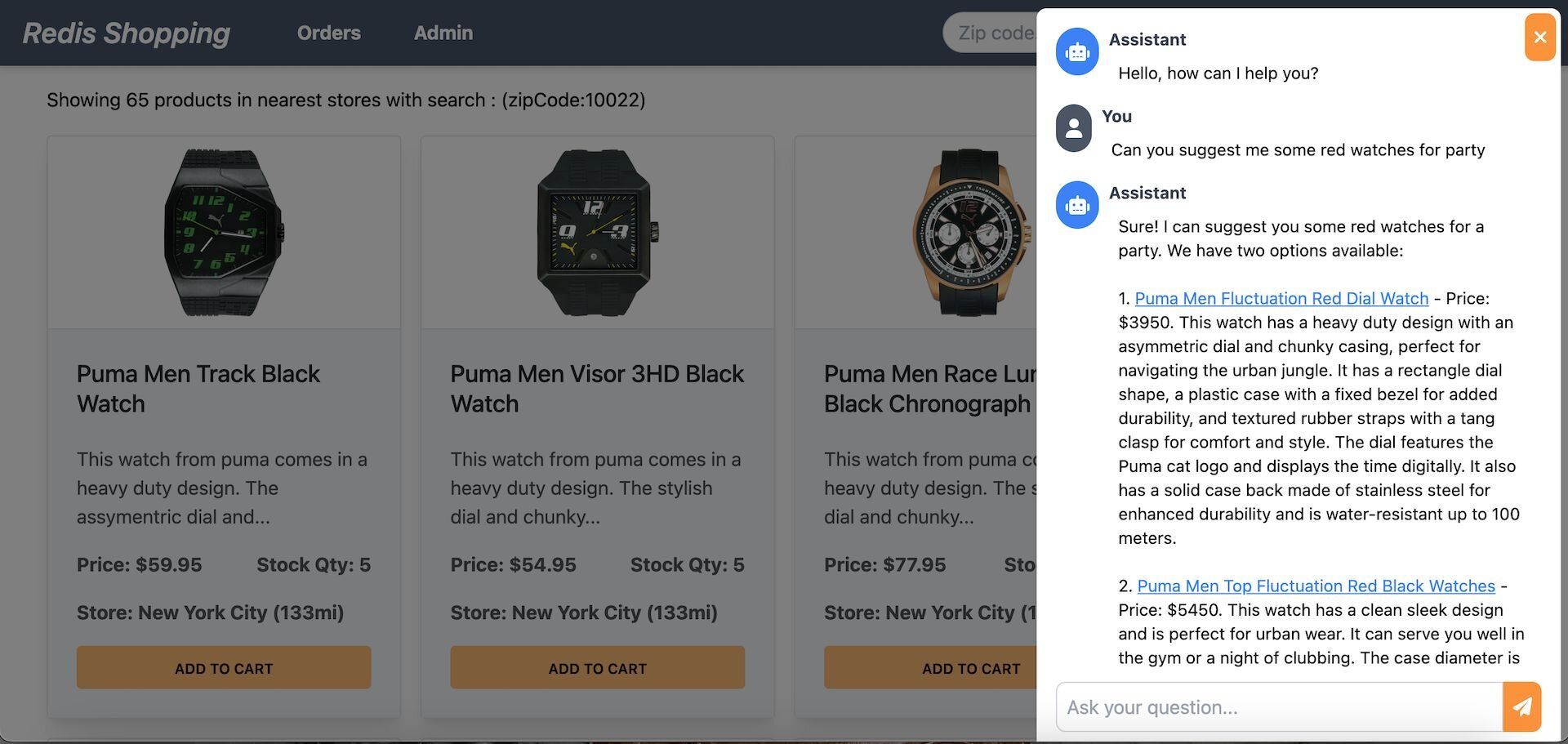
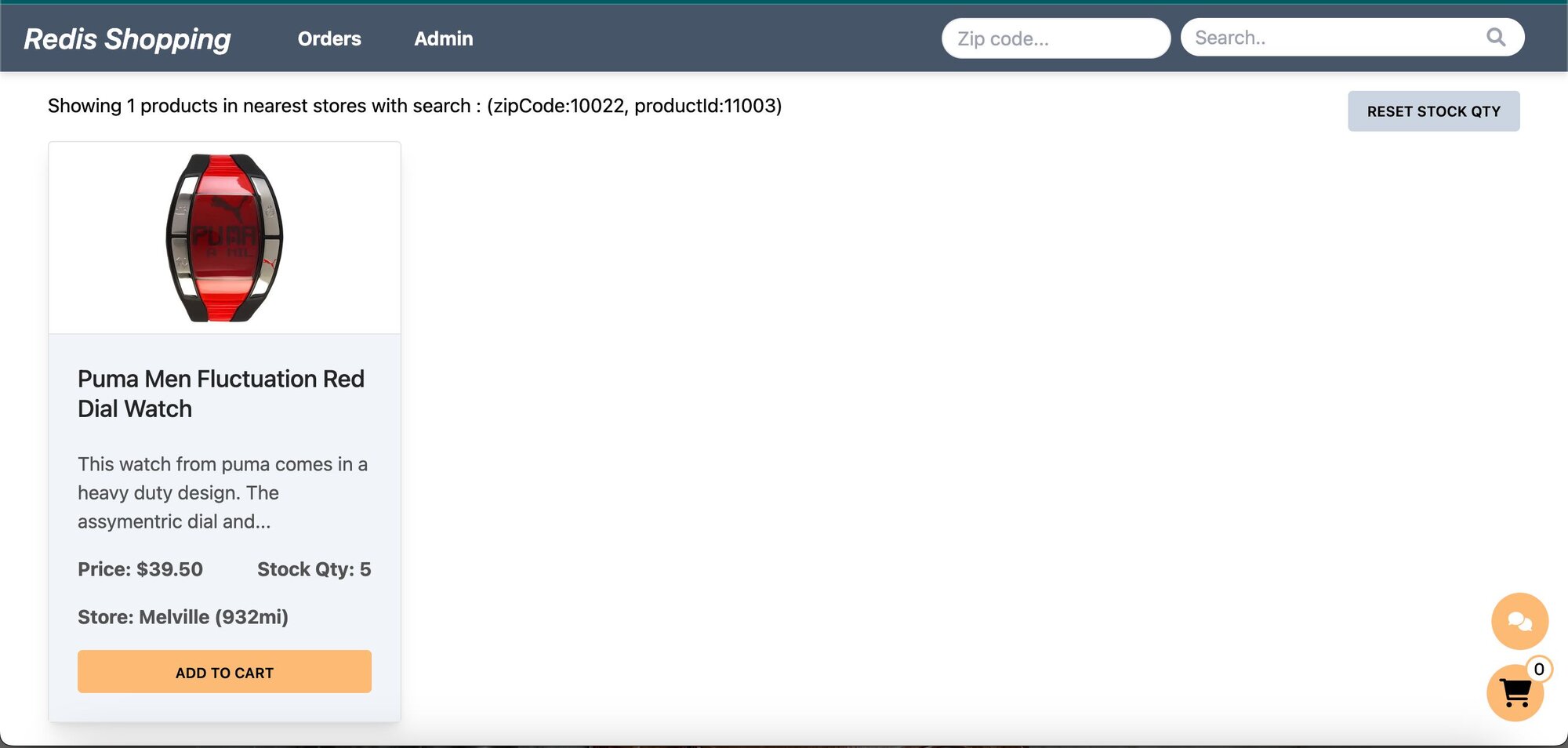
Selecting a product in the chat displays its details on the dashboard.
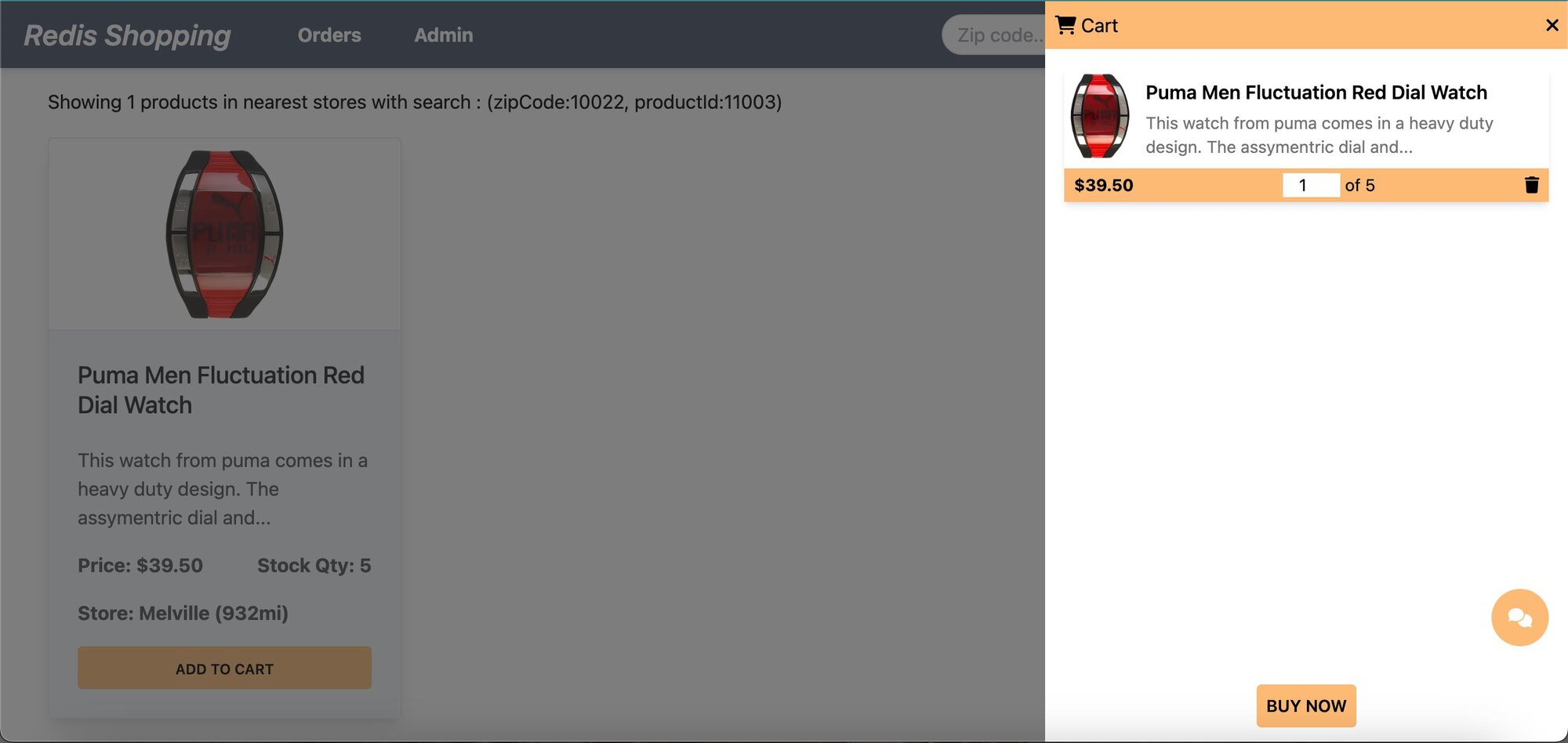
- **Shopping Cart:** Add products to the cart and check out using the "Buy Now" button.
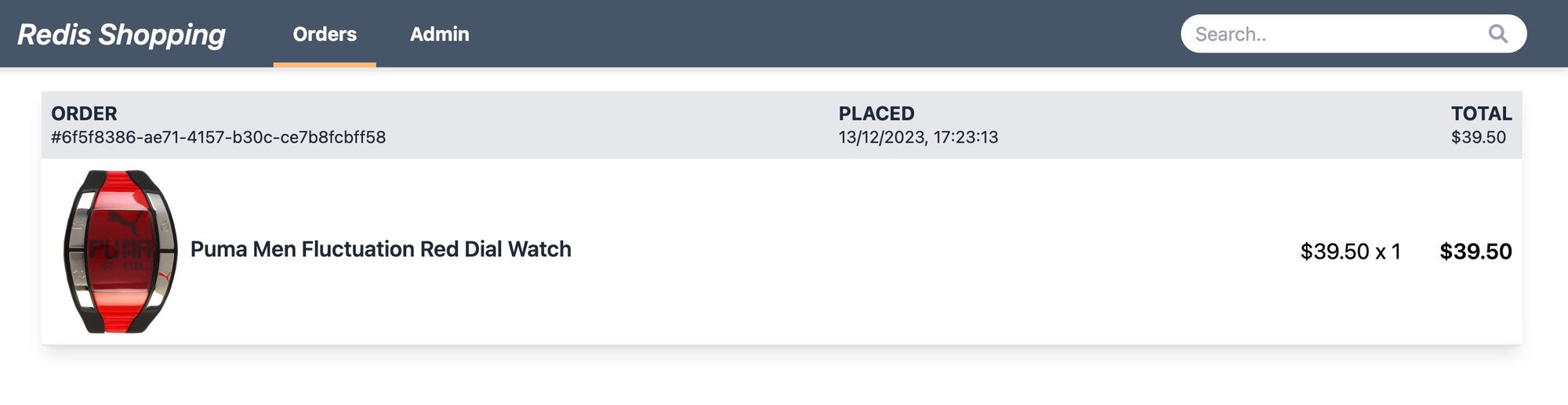
- **Order History:** Post-purchase, the 'Orders' link in the top navigation bar shows the order status and history.
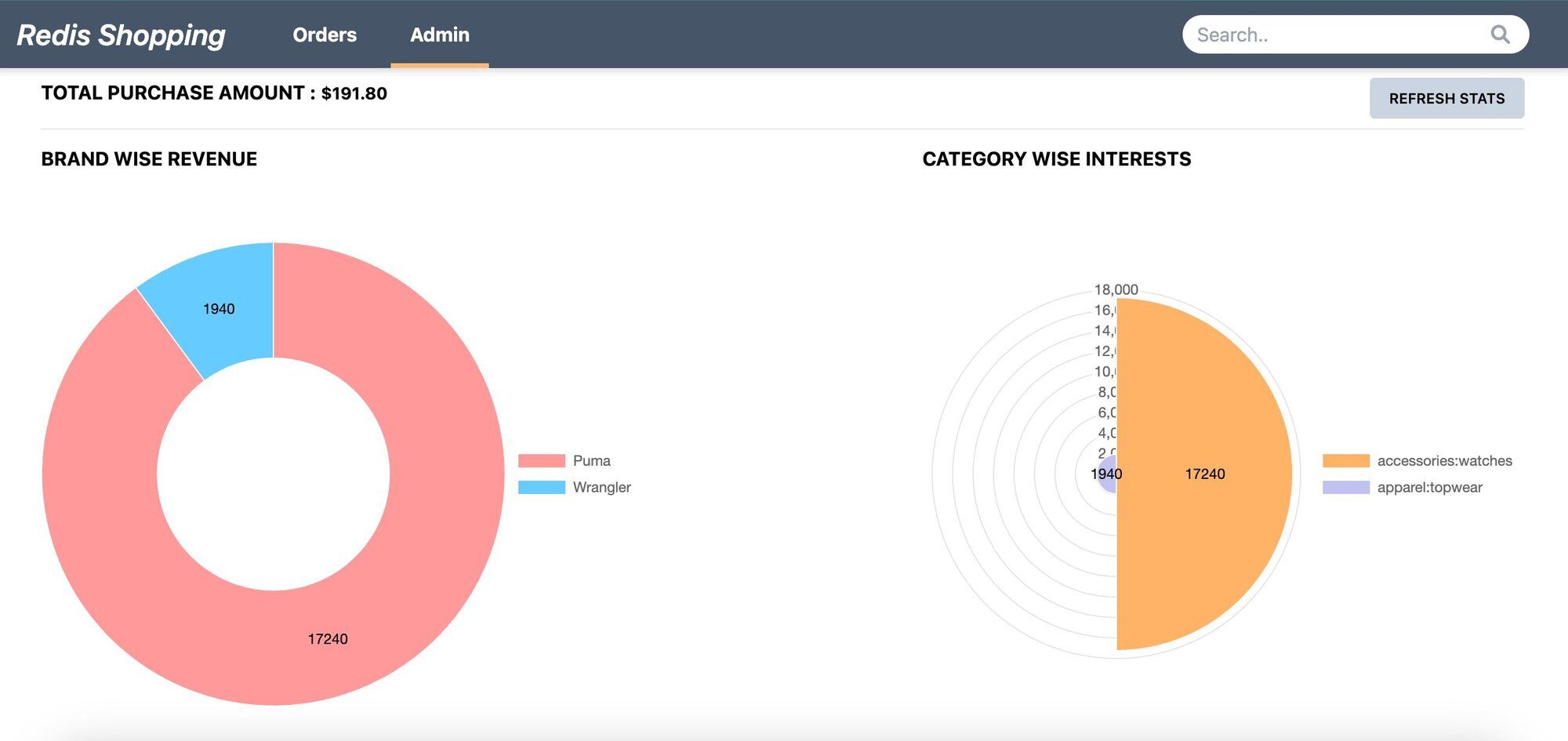
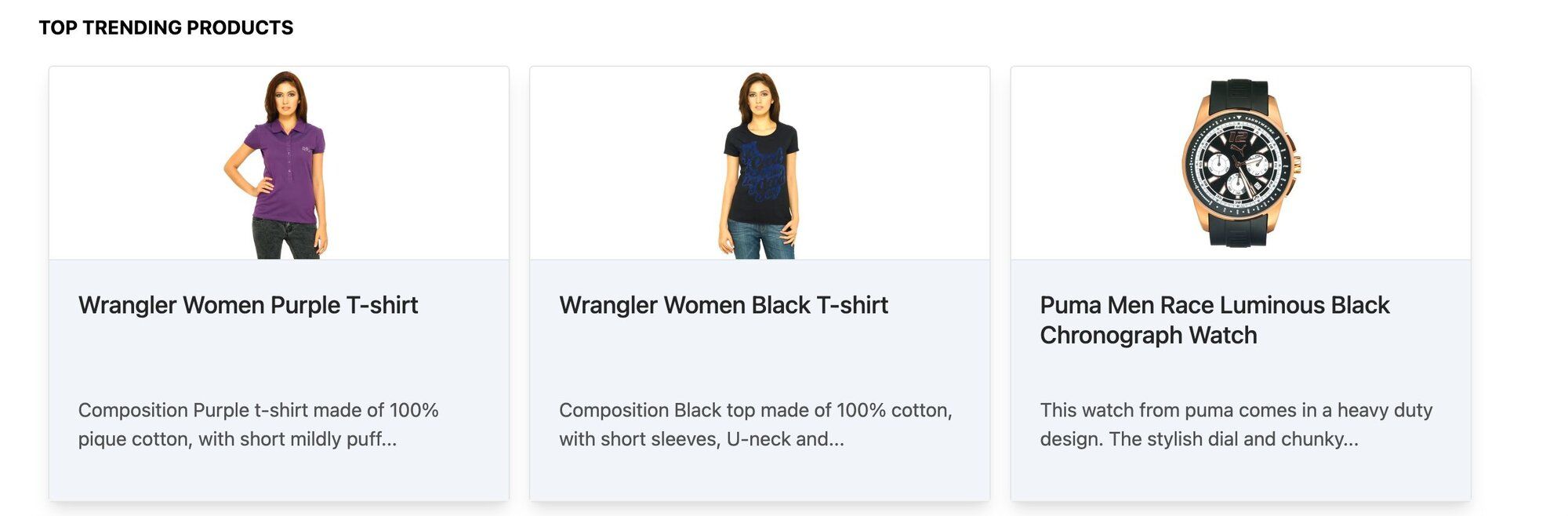
- **Admin Panel:** Accessible via the 'admin' link in the top navigation. Displays purchase statistics and trending products.
## How do you set up the database for semantic search?
> **INFO**
>
> Sign up for an [OpenAI account](https://platform.openai.com/) to get your API key to be used in the demo (add OPEN_AI_API_KEY variable in .env file). You can also refer to the [OpenAI API documentation](https://platform.openai.com/docs/api-reference/introduction) for more information.
> **GITHUB CODE**
>
> Below is a command to the clone the source code for the application used in this tutorial
>
> git clone --branch v9.2.0 [https://github.com/redis-developer/redis-microservices-ecommerce-solutions](https://github.com/redis-developer/redis-microservices-ecommerce-solutions)
### What does the sample data look like?
Consider a simplified e-commerce dataset featuring product details for semantic search.
```js
const products = [
{
productId: '11000',
price: 3995,
productDisplayName: 'Puma Men Slick 3HD Yellow Black Watches',
variantName: 'Slick 3HD Yellow',
brandName: 'Puma',
ageGroup: 'Adults-Men',
gender: 'Men',
displayCategories: 'Accessories',
masterCategory_typeName: 'Accessories',
subCategory_typeName: 'Watches',
styleImages_default_imageURL:
'http://host.docker.internal:8080/images/11000.jpg',
productDescriptors_description_value: 'Stylish and comfortable, ...',
stockQty: 25,
},
//...
];
```
### How do you generate and store embeddings in Redis?
Implement the `addEmbeddingsToRedis` function to integrate AI-generated product description embeddings with Redis.
This process involves two main steps:
1. **Generating Vector Documents**: Utilizing the `convertToVectorDocuments` function, we transform product details into vector documents. This transformation is crucial as it converts product details into a format suitable for Redis storage.
2. **Seeding Embeddings into Redis**: The `seedOpenAIEmbeddings` function is then employed to store these vector documents into Redis. This step is essential for enabling efficient retrieval and search capabilities within the Redis database.
```js
import { Document } from 'langchain/document';
import { OpenAIEmbeddings } from 'langchain/embeddings/openai';
import { RedisVectorStore } from 'langchain/vectorstores/redis';
const convertToVectorDocuments = async (_products) => {
const vectorDocs = [];
if (_products?.length > 0) {
for (let product of _products) {
let doc = new Document({
metadata: {
productId: product.productId,
},
pageContent: ` Product details are as follows:
productId: ${product.productId}.
productDisplayName: ${product.productDisplayName}.
price: ${product.price}.
variantName: ${product.variantName}.
brandName: ${product.brandName}.
ageGroup: ${product.ageGroup}.
gender: ${product.gender}.
productColors: ${product.productColors}
Category: ${product.displayCategories}, ${product.masterCategory_typeName} - ${product.subCategory_typeName}
productDescription: ${product.productDescriptors_description_value}`,
});
vectorDocs.push(doc);
}
}
return vectorDocs;
};
const seedOpenAIEmbeddings = async (
vectorDocs,
_redisClient,
_openAIApiKey,
) => {
if (vectorDocs?.length && _redisClient && _openAIApiKey) {
console.log('openAIEmbeddings started !');
const embeddings = new OpenAIEmbeddings({
openAIApiKey: _openAIApiKey,
});
const vectorStore = await RedisVectorStore.fromDocuments(
vectorDocs,
embeddings,
{
redisClient: _redisClient,
indexName: 'openAIProductsIdx',
keyPrefix: 'openAIProducts:',
},
);
console.log('OpenAIEmbeddings completed');
}
};
const addEmbeddingsToRedis = async (
_products,
_redisClient,
_openAIApiKey,
_huggingFaceApiKey,
) => {
if (_products?.length > 0 && _redisClient && _openAIApiKey) {
const vectorDocs = await convertToVectorDocuments(_products);
await seedOpenAIEmbeddings(vectorDocs, _redisClient, _openAIApiKey);
}
};
```
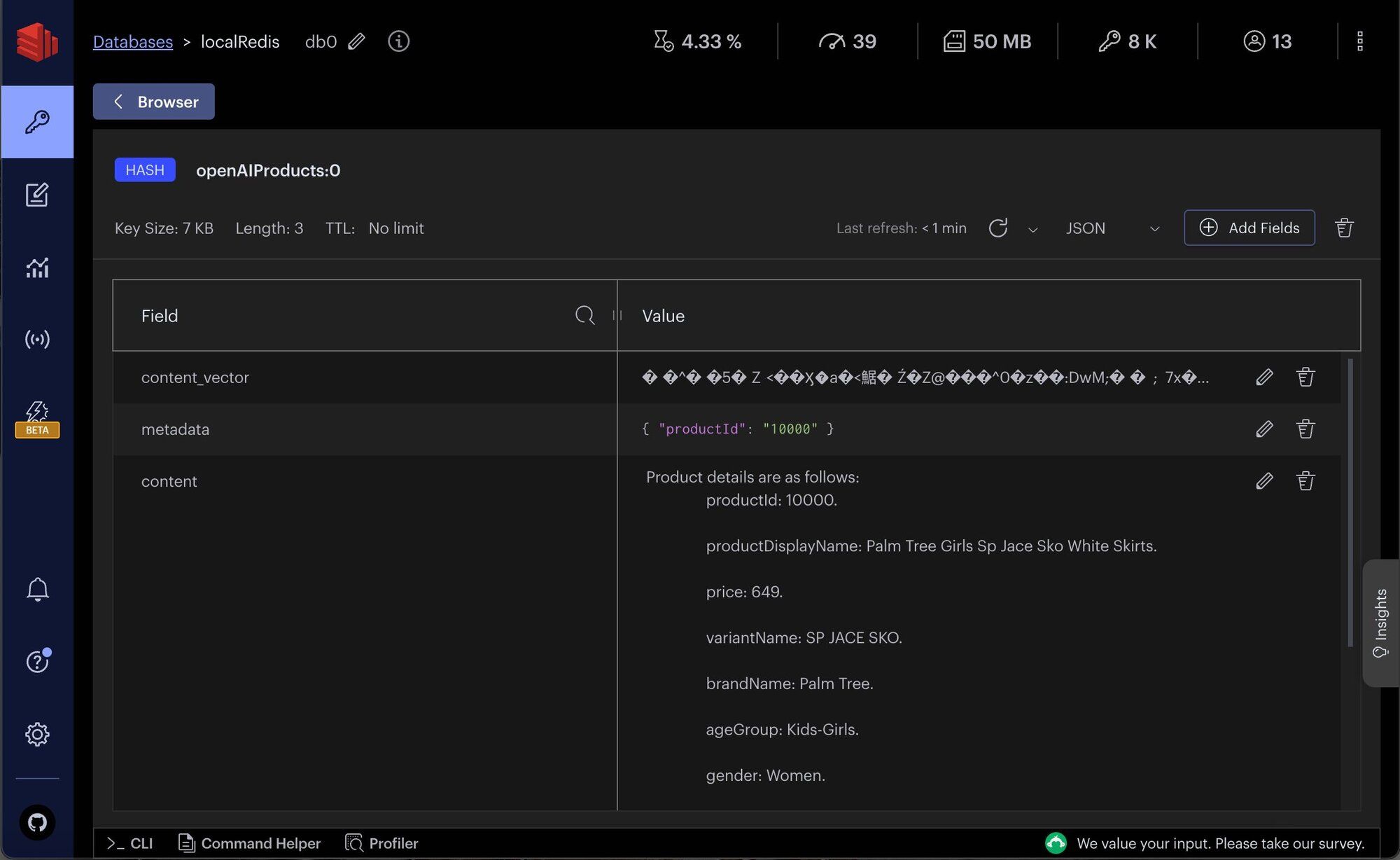
Examine the structured `openAI product details` within Redis using Redis Insight.
> **TIP**
>
> Download [Redis Insight](https://redis.io/insight/) to visually explore your Redis data or to engage with raw Redis commands in the workbench.
## How do you build the semantic search API?
### What does the search API request and response look like?
This section covers the API request and response structure for `getProductsByVSSText`, which is essential for retrieving products based on semantic text search.
#### Search API request format
The example request format for the API is as follows:
```bash
POST http://localhost:3000/products/getProductsByVSSText
{
"searchText":"pure cotton blue shirts",
//optional
"maxProductCount": 4, // 2 (default)
"similarityScoreLimit":0.2, // 0.2 (default)
}
```
#### Search API response structure
The response from the API is a JSON object containing an array of product details that match the semantic search criteria:
```json
{
"data": [
{
"productId": "11031",
"price": 1099,
"productDisplayName": "Jealous 21 Women Check Blue Tops",
"productDescriptors_description_value": "Composition : Green and navy blue checked round neck blouson tunic top made of 100% cotton, has a full buttoned placket, three fourth sleeves with buttoned cuffs and a belt below the waist
Fitting
Regular
Wash care
Machine/hand wash separately in mild detergent
Do not bleach or wring
Dry in shade
Medium iron
If you're in the mood to have some checked fun, this blouson tunic top from jealous 21 will fulfil your heart's desire with élan. The cotton fabric promises comfort, while the smart checks guarantee unparalleled attention. Pair this top with leggings and ballerinas for a cute, neat look.
Model statistics
The model wears size M in tops
Height: 5'7\"; Chest: 33\"; Waist: 25\"",
"stockQty": 25,
"productColors": "Blue,Green",
"similarityScore": 0.168704152107
}
],
"error": null,
"auth": "SES_fd57d7f4-3deb-418f-9a95-6749cd06e348"
}
```
### How does the search API implementation work?
The backend implementation of this API involves following steps:
1. `getProductsByVSSText` function handles the API Request.
2. `getSimilarProductsScoreByVSS` function performs semantic search on product details. It integrates with `OpenAI's` semantic analysis capabilities to interpret the searchText and identify relevant products from `Redis` vector store.
```js
// server/src/services/products/src/open-ai-prompt.ts
const getSimilarProductsScoreByVSS = async (_params) => {
let {
standAloneQuestion,
openAIApiKey,
//optional
KNN,
scoreLimit,
} = _params;
let vectorDocs = [];
const client = getNodeRedisClient();
KNN = KNN || 2;
scoreLimit = scoreLimit || 1;
let embeddings = new OpenAIEmbeddings({
openAIApiKey: openAIApiKey,
});
let indexName = 'openAIProductsIdx';
let keyPrefix = 'openAIProducts:';
if (embeddings) {
// create vector store
const vectorStore = new RedisVectorStore(embeddings, {
redisClient: client,
indexName: indexName,
keyPrefix: keyPrefix,
});
// search for similar products
const vectorDocsWithScore = await vectorStore.similaritySearchWithScore(
standAloneQuestion,
KNN,
);
// filter by scoreLimit
for (let [doc, score] of vectorDocsWithScore) {
if (score <= scoreLimit) {
doc['similarityScore'] = score;
vectorDocs.push(doc);
}
}
}
return vectorDocs;
};
```
```js
// server/src/services/products/src/service-impl.ts
const getProductsByVSSText = async (productsVSSFilter) => {
let { searchText, maxProductCount, similarityScoreLimit } =
productsVSSFilter;
let products = [];
const openAIApiKey = process.env.OPEN_AI_API_KEY || '';
maxProductCount = maxProductCount || 2;
similarityScoreLimit = similarityScoreLimit || 0.2;
if (!openAIApiKey) {
throw new Error('Please provide openAI API key in .env file');
}
if (!searchText) {
throw new Error('Please provide search text');
}
//VSS search
const vectorDocs = await getSimilarProductsScoreByVSS({
standAloneQuestion: searchText,
openAIApiKey: openAIApiKey,
KNN: maxProductCount,
scoreLimit: similarityScoreLimit,
});
if (vectorDocs?.length) {
const productIds = vectorDocs.map((doc) => doc?.metadata?.productId);
//get product with details
products = await getProductByIds(productIds, true);
}
//...
return products;
};
```
### How do you configure the frontend for semantic search?
- **Settings configuration**: Enable `Semantic text search` in the settings page
- **Performing a search**: Use textual queries on the dashboard.

- _Note:_ Users can click on the product description within the product card to view the complete details.
## Next steps
Now that you've built a semantic text search engine with Redis, LangChain, and OpenAI, here are some ways to go further:
- **Get started with vector similarity search**: Learn the fundamentals of vector search in Redis with the [vector similarity search getting started tutorial](/tutorials/howtos/solutions/vector/getting-started-vector/).
- **Build a RAG chatbot**: Combine semantic search with generative AI to create a [conversational chatbot powered by Redis and LangChain](/tutorials/howtos/solutions/vector/gen-ai-chatbot/).
- **Try image-based semantic search**: Extend your search beyond text with [semantic image-based queries using LangChain and Redis](/tutorials/howtos/solutions/vector/image-summary-search/).
## Further reading
- [Perform vector similarity search using Redis](/tutorials/howtos/solutions/vector/getting-started-vector/)
- [Build a RAG GenAI chatbot with Redis and LangChain](/tutorials/howtos/solutions/vector/gen-ai-chatbot/)
- [Semantic image-based queries using LangChain (OpenAI) and Redis](/tutorials/howtos/solutions/vector/image-summary-search/)
- [LangChain JS](https://js.langchain.com/docs/get_started/quickstart)
- [Learn LangChain](https://scrimba.com/learn/langchain)
- [LangChain Redis integration](https://js.langchain.com/docs/integrations/vectorstores/redis)