 Concepts
Learn how sessions, turns, and steps work
Learn more →
Read more
Debug AI agent answers by tracing the context behind each turn, from retrieval to prompt.
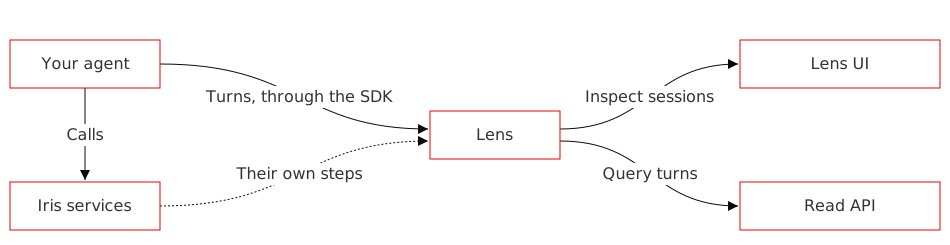
Lens is a Redis Iris observability tool that traces your AI agent's turns. A turn is one agent exchange, such as answering a single message. For each turn, Lens records what each source returned, such as a memory recall or a retrieval, and what entered the prompt. It also records which model and tool calls ran, how long each step took, and how the turn ended.
When your agent gives a wrong answer, Lens shows where it went wrong. For example, you might see that the right memory was recalled but dropped from the prompt, or that a retrieval came back empty.
Concepts
Learn how sessions, turns, and steps work
 Quickstart
Trace your first turn and read it back
Agent integration
Trace agents built with LangGraph, the OpenAI Agents SDK, and more
Lens groups turns into sessions by agent, and records each turn's steps. See Lens concepts.
Set up a Lens instance and get its endpoints and keys:
Install the Redis Iris Python package:
pip install 'redis-iris[llm-tracing]>=1.0.0'
With IRIS_LENS_ENDPOINT, IRIS_LENS_API_KEY, and IRIS_LENS_AGENT_ID in your environment, trace a turn. The example calls OpenAI; use any supported client.
import uuid

from openai import OpenAI
from redis_iris import lens

lens.init()
client = OpenAI()

session_id = f"quickstart-{uuid.uuid4().hex[:8]}"

with lens.turn(session_id, user_id="user-1042") as turn:
    response = client.responses.create(
        model="gpt-4.1-mini",
        input="Where can I see my refund status?",
    )
    print(response.output_text)
    turn.set_outcome("completed")

turn_id = turn.trace_id
print(f"Session: {session_id}")
print(f"Turn: {turn_id}")
import uuid

from openai import OpenAI
from redis_iris import lens

lens.init()
client = OpenAI()

session_id = f"quickstart-{uuid.uuid4().hex[:8]}"

with lens.turn(session_id, user_id="user-1042") as turn:
    response = client.responses.create(
        model="gpt-4.1-mini",
        input="Where can I see my refund status?",
    )
    print(response.output_text)
    turn.set_outcome("completed")

turn_id = turn.trace_id
print(f"Session: {session_id}")
print(f"Turn: {turn_id}")

import os
import time

from redis_agent_lens import Lens, errors

with Lens(
    server_url=os.environ["LENS_URL"],
    instance_id=os.environ["LENS_INSTANCE_ID"],
) as reader:
    for _ in range(30):
        try:
            detail = reader.get_turn(turn_id=turn_id)
            break
        except errors.NotFoundErrorResponseContent:
            time.sleep(2)
    else:
        raise RuntimeError("The turn isn't readable. Check the iris.lens warnings for an export error.")

print(f"Outcome: {detail.outcome.value}")
print(f"Tokens: {detail.tokens.total}")
Follow the quickstart to read the turn back.