View and manage Agent Memory service
View and manage your Agent Memory service in Redis Cloud.
After you have created your first Agent Memory service, select Agent Memory under Iris in the Redis Cloud console menu to see the Agent Memory page.
This page lists all Agent Memory services associated with your account, with each service's status, name, store ID, related database, and created date.
Select your Agent Memory service from the list to view the service's details. The service's page has these tabs:
- Configuration: view and edit the service's settings, connect an agent, and flush or delete the service.
- MemoryETL: extract long-term memories from documents you upload. This tab has a Beta badge.
- API explorer: try Agent Memory API requests against the service.
- Memory Inspector: browse the service's sessions and search its long-term memories.
- Metrics: view latency and token usage.
Which tabs, sections, and buttons you see depends on your permissions. For example, Edit, Flush, Delete, Create API key, Metrics, and Memory Inspector each need a specific permission.
Configuration tab
The Configuration tab lets you view the details of your Agent Memory service.
It starts with a banner for connecting your agent:
- Select Connect to see the service's endpoint, its store ID, and Quick connect samples for each software development kit (SDK).
- Select Create API key to create a key with access to this service. The button appears only when the service has no active API key. See Connect and create an API key.
- Select API docs to open the Agent Memory API documentation.
The banner is followed by these sections:
- The General settings section provides the connection details and general settings for your Agent Memory service.
- The Memory configuration section provides the service settings for your Redis Agent Memory service.
- The AI model and credentials section shows the model configuration for a service that uses a customer-managed provider key.
- The Memory types & extraction section shows any custom memory types defined for your service.
- The Sensitive-data exclusions section shows the sensitive-data exclusions configured for your service.
- The Danger zone section lets you flush or delete your Redis Agent Memory service.
Some of these settings can be changed after service creation. To do so, select Edit in the General settings section, make your changes, and select Save.
General settings
The General settings section provides the connection details and general settings for your Agent Memory service.
| Setting name | Description |
|---|---|
| Service Name | The name of your agent memory service. (Editable) |
| Database | The name of the database your service uses. |
| Store ID | The unique ID of your Agent Memory store. |
| URL List | The base URL for Agent Memory requests. If the service is available in several regions, select Show all regions to see each region's URL. |
Select the copy button next to the Store ID or a URL to copy it to the clipboard.
Follow the Redis Agent Memory quickstart to use the connection information and API key.
Memory configuration
The Memory configuration section shows the time-to-live (TTL) for memory storage, the extraction cadence, and the automatic summarization settings for session memory.

| Setting name | Description |
|---|---|
| Short-term TTL | The time-to-live (TTL) of your agent's short-term memory (also known as session memory). (Editable) |
| Long-term TTL | The time-to-live (TTL) of your agent's long-term memory. (Editable) |
| Extraction cadence | How often the extraction pipeline runs while a session is active. Defaults to 5 minutes; can be set to a value between 60 and 600 seconds. (Editable) |
| Automatic summarization | Whether older messages in a session are automatically compressed into a summary to keep session memory concise during long conversations. (Editable) |
| Summarize after (messages) | The number of messages a session can hold before older messages are summarized. Shown only when automatic summarization is enabled. (Editable) |
| Keep most recent (messages) | The number of most recent messages that are always kept in full and never summarized. Shown only when automatic summarization is enabled. (Editable) |
AI model and credentials
The AI model and credentials section appears when the service uses your model provider key.
Provider and model values shown in the screenshot are examples.

The provider and embedding model are read-only. You can change the LLM model or replace the provider key. For update steps, key rotation behavior, security, and troubleshooting guidance, see Configure AI models for Agent Memory.
Memory types & extraction
The Memory types & extraction section shows any custom memory types defined for the service, each listed with its name, fields, and extraction strategy.
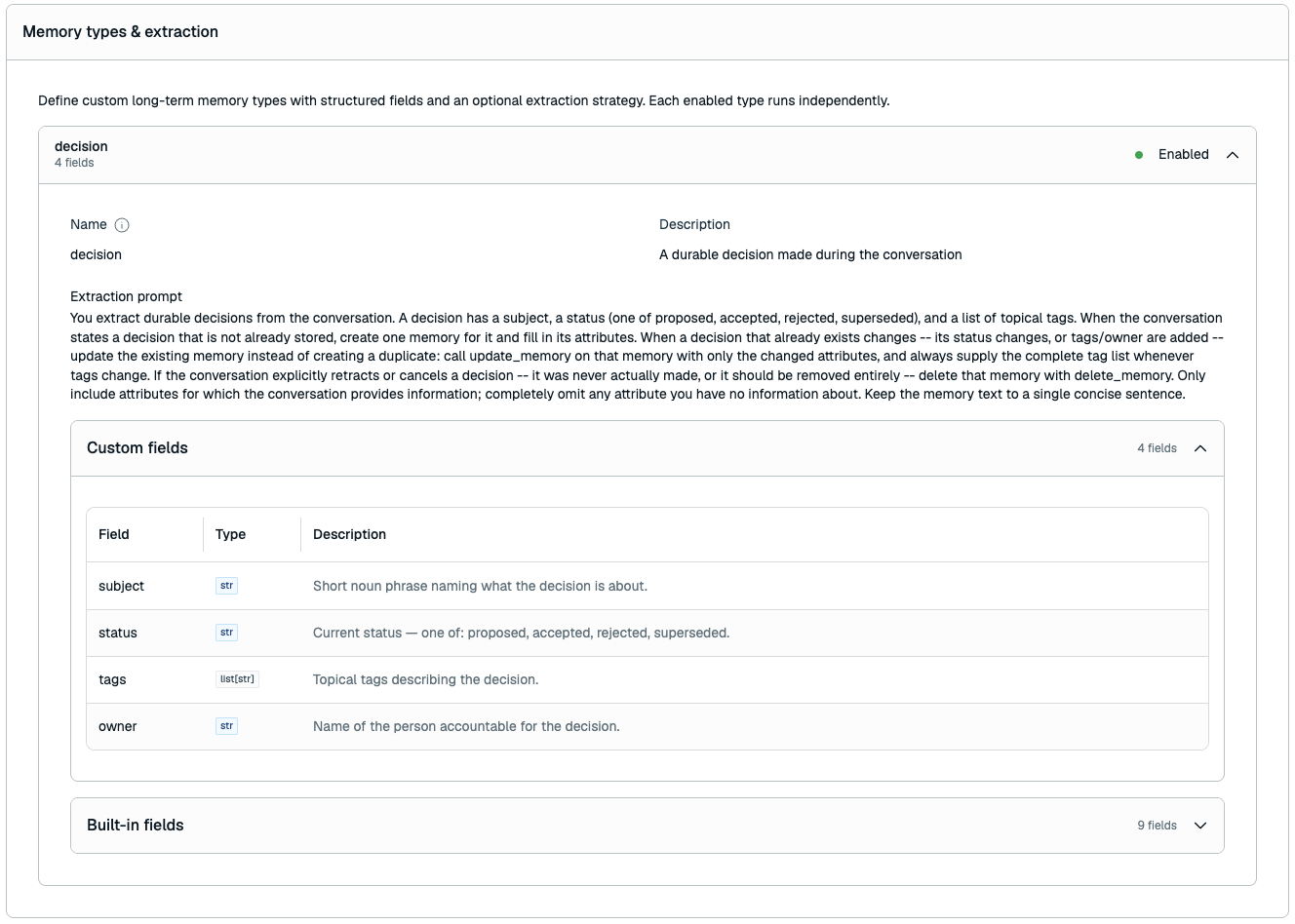
Custom memory types
Because a custom memory type's structure is fixed after creation, only some settings can be changed when you edit the service:
| Setting name | Description |
|---|---|
| Name | The name of the custom memory type. (Read-only) |
| Fields | The fields that make up the custom memory type, with their names, types, and descriptions. (Read-only) |
| Extraction prompt | The extraction strategy prompt for the custom memory type. (Editable) |
| Enabled | Whether the extraction strategy is active. (Editable) |
To change a custom memory type's name or fields, you must create a new service. You can't delete a custom memory type, remove an existing type's extraction prompt, or add an extraction strategy to a type created without one. You can, however, add a new custom memory type when editing the service, up to the limit of 3 custom memory types.
Sensitive-data exclusions
The Sensitive-data exclusions section shows the sensitive-data exclusions configured for the service.
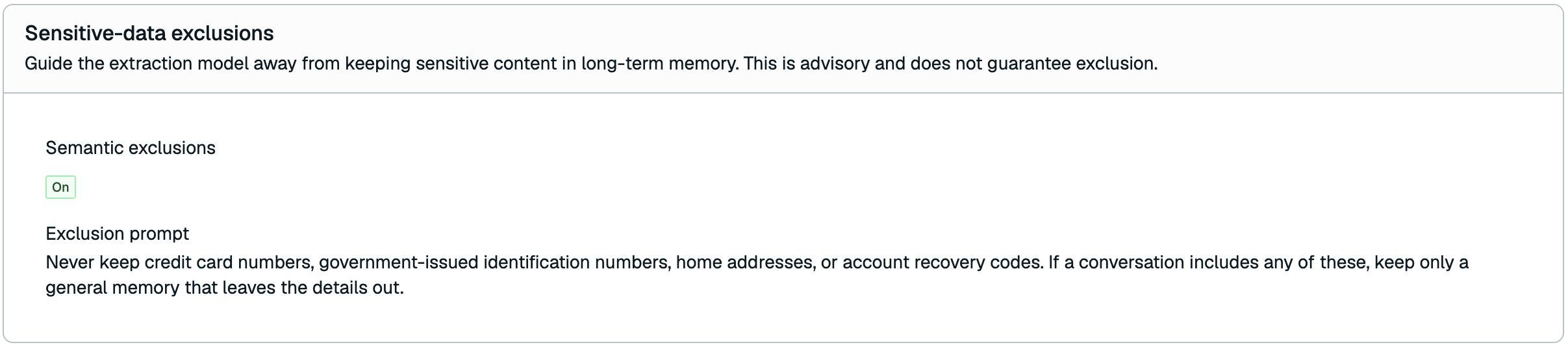
| Setting name | Description |
|---|---|
| Built-in detectors | Whether built-in detectors are applied, with each selected detector and the action it takes on a match. Only selected detectors are listed. (Editable) |
| Custom detectors | Whether custom detectors are applied, with each detector's name, pattern, action on a match, and status. (Editable) |
| Semantic exclusions | Whether semantic exclusions are applied when memories are extracted. (Editable) |
| Exclusion prompt | The plain-language description of what should never be kept in long-term memory. Required when semantic exclusions are enabled. (Editable) |
Turning semantic exclusions off keeps the exclusion prompt you saved, so you can turn them back on later without retyping it.
Changing exclusions affects later extractions and direct writes. Existing memories are not automatically checked again. Content updates apply the current built-in and custom detectors; see direct-write exclusions. There is no automatic cleanup of existing memories that match a changed policy. To clear all previously stored memory, flush the service, which permanently erases all of the service's stored memory data.
Semantic exclusions are advisory. They steer the extraction model, but they do not guarantee that sensitive content is excluded. Do not rely on semantic exclusions as your only control for regulated or highly sensitive data.
Danger zone
The Danger zone section lets you flush or delete your Agent Memory service.
Flush memory entries
Flushing the service completely erases all stored memory data while preserving the service configuration and the search index used by the service.
To flush the service:
-
Select Flush. You can't flush the service while you're editing it, or while it's unavailable.
-
In the Flush all entries dialog, select Yes, I want to flush all entries.
-
Select Flush to confirm.
Flushing the service is permanent and cannot be undone, and will result in empty memory retrieval results until new memory is stored.
Delete service
Deleting your Agent Memory service permanently deletes the service configuration and its short-term sessions. Long-term memories stay in your database.
To delete your Agent Memory service:
-
Select Delete. You can't delete the service while you're editing it.
-
In the Delete service dialog, select Yes, I want to delete this resource.
-
Select Delete again to confirm.
Deleting the Agent Memory service is permanent and cannot be undone.
API explorer tab
The API explorer tab lets you try Agent Memory API requests against your service from the console.
Metrics tab
The Metrics tab shows performance and usage data for your Agent Memory service. Choose a period of an hour, a day, a week, 30 days, or 90 days.
The API & reliability view shows the following:
| Metric | Description |
|---|---|
| Short-term Memory Latency | The average time to process a Short-term memory (or Session memory) lookup request. |
| Long-term Memory Latency | The average time to process a Long-term memory lookup request. |
The view also shows Latency by phase, with charts for Retrieval latency, Embedding latency, and Generation latency. Some services don't report phase latency.
The Token consumption view shows how many large language model (LLM) and embedding tokens the service used, with a breakdown by feature, such as extraction and session summaries. Select Export to download the data as a comma-separated values (CSV) file.
Create an API key
Agents call the Agent Memory API with an API key that has access to the service. To create a key for one service, select Create API key or Connect in the service's connect banner. To create a key that can reach several services, or to manage existing keys, use Access & Identity:
- In the Redis Cloud console menu, select Access & Identity under Iris.
- Select New API key.
- Under Access, give the key access to your service's memory store under Agent Memory.
- Select Create key.
- Copy the key's token.
The console shows the key's token only once, when you create it. Save it to a secure location before you close the page. If you lose it, create a new key.
To remove an agent's access, delete its key in Access & Identity.