Connect with MCP
Connect an MCP client, discover published knowledge, and load skill instructions and files.
Connect a Streamable HTTP MCP client to retrieve published FAQs and skill content. Redis Agent Playbooks expose three tools and standard skill resources. For framework examples that retrieve context before a model turn, see Integrate with an agent.
Before you begin
Get the data-plane endpoint, playbook identifier, and an API key with read permission. Save and load the IRIS_AGENT_PLAYBOOKS_* variables as shown in Connect to the playbook.
Publish the sample FAQ or skill to test discovery. The basic clients use no model-provider key.
For the Python client, use Python 3.10 or later and install these dependencies:
Python
python -m pip install mcp==2.3.0 httpx2==2.13.1
HTTP
curl --version
jq --version
Configure the connection
Use a client that supports Streamable HTTP and custom request headers:
| Setting | Value |
|---|---|
| Transport | Streamable HTTP |
| Endpoint | <data-plane-base-url>/iris/data/v1/agent-playbooks/playbooks/<playbook-id>/mcp |
| Request header | Authorization: Bearer <reader-api-key> |
The endpoint must be reachable from the client runtime. A hosted client needs an HTTPS endpoint reachable from its provider; a local address works for clients on the same host. Keep the playbook key in connection settings and out of agent instructions.
Use the tools
Call tools/list on an initialized connection to get the input schemas. MCP tool arguments use different names from some HTTP request fields:
| Tool | Input | Result |
|---|---|---|
discover_entries |
Required query; optional filter, pinned_entries, and limit. Each pin uses exactly one entry_id or entry_key. |
Published FAQ answers and skill previews, including identifiers and versions. |
load_skill |
The selected skill's entry_id and version. |
Full instructions and resource descriptors. |
fetch_resource |
A returned resource uri. |
File content, media type, and digest. |
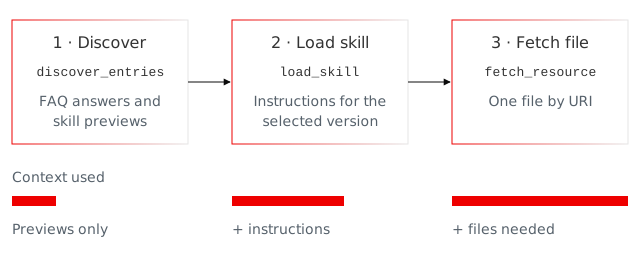
Use the tools in this order:
- Discover knowledge for the task. Use an applicable FAQ answer directly.
- Select a skill preview, then load its instructions with the returned identifier and version together.
- Fetch supporting files when the instructions or task require them, using their returned URIs.
See Discovery for selection controls. Progressive disclosure loads skill content on demand; these three tool definitions remain available on the connection.
Connect a client
This client connects, lists tools, and prints discovery results for a refund task. For an agent that selects a skill and loads its instructions and files, see the framework examples.
Copy the complete program and save it as mcp_client.py or mcp_client.sh. Run python mcp_client.py or bash mcp_client.sh with the connection values you exported.
import asyncio
import json
import os

import httpx2
from mcp import Client
from mcp.client.streamable_http import streamable_http_client


def read_result(result):
    if result.is_error:
        raise RuntimeError(f"Playbook tool failed: {result.content}")
    if result.structured_content is not None:
        return result.structured_content
    return json.loads(next(block.text for block in result.content if block.type == "text"))


async def main():
    url = f"{os.environ['IRIS_AGENT_PLAYBOOKS_URL'].rstrip('/')}/iris/data/v1/agent-playbooks/playbooks/{os.environ['IRIS_AGENT_PLAYBOOKS_PLAYBOOK_ID']}/mcp"
    async with httpx2.AsyncClient(
        headers={"Authorization": f"Bearer {os.environ['IRIS_AGENT_PLAYBOOKS_API_KEY']}"}
    ) as http:
        async with Client(streamable_http_client(url, http_client=http)) as client:
            print("Tools:", [tool.name for tool in (await client.list_tools()).tools])
            result = await client.call_tool(
                "discover_entries",
                {
                    "query": "Draft a reply to a customer whose refund status shows Processing.",
                    "limit": 3,
                },
            )
            print(json.dumps(read_result(result), indent=2))


asyncio.run(main())
import asyncio
import json
import os

import httpx2
from mcp import Client
from mcp.client.streamable_http import streamable_http_client


def read_result(result):
    if result.is_error:
        raise RuntimeError(f"Playbook tool failed: {result.content}")
    if result.structured_content is not None:
        return result.structured_content
    return json.loads(next(block.text for block in result.content if block.type == "text"))


async def main():
    url = f"{os.environ['IRIS_AGENT_PLAYBOOKS_URL'].rstrip('/')}/iris/data/v1/agent-playbooks/playbooks/{os.environ['IRIS_AGENT_PLAYBOOKS_PLAYBOOK_ID']}/mcp"
    async with httpx2.AsyncClient(
        headers={"Authorization": f"Bearer {os.environ['IRIS_AGENT_PLAYBOOKS_API_KEY']}"}
    ) as http:
        async with Client(streamable_http_client(url, http_client=http)) as client:
            print("Tools:", [tool.name for tool in (await client.list_tools()).tools])
            result = await client.call_tool(
                "discover_entries",
                {
                    "query": "Draft a reply to a customer whose refund status shows Processing.",
                    "limit": 3,
                },
            )
            print(json.dumps(read_result(result), indent=2))


asyncio.run(main())
set -euo pipefail
MCP_URL="${IRIS_AGENT_PLAYBOOKS_URL%/}/iris/data/v1/agent-playbooks/playbooks/$IRIS_AGENT_PLAYBOOKS_PLAYBOOK_ID/mcp"
PROTOCOL_VERSION=2025-11-25

post() {
  curl --fail-with-body --silent --show-error "$MCP_URL" \
    -H "Authorization: Bearer $IRIS_AGENT_PLAYBOOKS_API_KEY" \
    -H 'Content-Type: application/json' \
    -H 'Accept: application/json, text/event-stream' \
    -H "MCP-Protocol-Version: $PROTOCOL_VERSION" \
    --data-binary "$1"
}

rpc() {
  local request response
  request=$(jq -n --arg method "$1" --argjson params "$2" --argjson id "$3" \
    '{jsonrpc: "2.0", id: $id, method: $method, params: $params}') || return $?
  response=$(post "$request") || return $?
  jq -e '
    if .error then error("MCP request failed: " + .error.message)
    elif .result.isError then error("Playbook tool failed: " + (.result.content | tostring))
    elif has("result") | not then error("MCP response has no result")
    else .result end
  ' <<< "$response"
}

INITIALIZED=$(rpc initialize '{
  "protocolVersion": "2025-11-25",
  "capabilities": {},
  "clientInfo": {"name": "playbook-curl-example", "version": "1.0.0"}
}' 1)
PROTOCOL_VERSION=$(jq -er '.protocolVersion' <<< "$INITIALIZED")
case "$PROTOCOL_VERSION" in
  2025-11-25|2025-06-18|2025-03-26|2024-11-05) ;;
  *) printf 'Unsupported MCP protocol version: %s\n' "$PROTOCOL_VERSION" >&2; exit 1 ;;
esac
post '{"jsonrpc":"2.0","method":"notifications/initialized"}' > /dev/null
rpc tools/list '{}' 2 | jq -r '.tools[].name'

read_result() {
  jq -e '.structuredContent // ([.content[] | select(.type == "text")][0].text | fromjson)'
}

rpc tools/call '{
  "name": "discover_entries",
  "arguments": {
    "query": "Draft a reply to a customer whose refund status shows Processing.",
    "limit": 3
  }
}' 3 | read_result
set -euo pipefail
MCP_URL="${IRIS_AGENT_PLAYBOOKS_URL%/}/iris/data/v1/agent-playbooks/playbooks/$IRIS_AGENT_PLAYBOOKS_PLAYBOOK_ID/mcp"
PROTOCOL_VERSION=2025-11-25

post() {
  curl --fail-with-body --silent --show-error "$MCP_URL" \
    -H "Authorization: Bearer $IRIS_AGENT_PLAYBOOKS_API_KEY" \
    -H 'Content-Type: application/json' \
    -H 'Accept: application/json, text/event-stream' \
    -H "MCP-Protocol-Version: $PROTOCOL_VERSION" \
    --data-binary "$1"
}

rpc() {
  local request response
  request=$(jq -n --arg method "$1" --argjson params "$2" --argjson id "$3" \
    '{jsonrpc: "2.0", id: $id, method: $method, params: $params}') || return $?
  response=$(post "$request") || return $?
  jq -e '
    if .error then error("MCP request failed: " + .error.message)
    elif .result.isError then error("Playbook tool failed: " + (.result.content | tostring))
    elif has("result") | not then error("MCP response has no result")
    else .result end
  ' <<< "$response"
}

INITIALIZED=$(rpc initialize '{
  "protocolVersion": "2025-11-25",
  "capabilities": {},
  "clientInfo": {"name": "playbook-curl-example", "version": "1.0.0"}
}' 1)
PROTOCOL_VERSION=$(jq -er '.protocolVersion' <<< "$INITIALIZED")
case "$PROTOCOL_VERSION" in
  2025-11-25|2025-06-18|2025-03-26|2024-11-05) ;;
  *) printf 'Unsupported MCP protocol version: %s\n' "$PROTOCOL_VERSION" >&2; exit 1 ;;
esac
post '{"jsonrpc":"2.0","method":"notifications/initialized"}' > /dev/null
rpc tools/list '{}' 2 | jq -r '.tools[].name'

read_result() {
  jq -e '.structuredContent // ([.content[] | select(.type == "text")][0].text | fromjson)'
}

rpc tools/call '{
  "name": "discover_entries",
  "arguments": {
    "query": "Draft a reply to a customer whose refund status shows Processing.",
    "limit": 3
  }
}' 3 | read_result
Expect the three tool names followed by the discovery response as JSON. It includes matching FAQ answers and skill previews. Empty pinnedEntries and discoveredEntries arrays can reflect the query, publication, filters, or preview budget. A request or tool error stops the program with an error.
Read skill files as MCP resources
Clients can also read published skill files through standard MCP resources. Use the URI returned by discovery or load_skill.
| Method | Request | Result |
|---|---|---|
resources/templates/list |
List resource templates on the initialized connection. | The template for published skill files, rather than an inventory of skills. |
resources/read |
Set uri to a returned skill file URI. |
A contents array with the URI, media type, and file content. |
Read text when present. Otherwise, base64-decode blob to get the file bytes. An empty file can use an empty blob, so check field presence. The fetch_resource tool uses the same distinction and also returns a file digest; standard resource results omit that digest.
File reads enforce the current publication even with a management key. If publication changes between discovery and reading, rediscover and reassess the selected skill. Agent frameworks that expose tools can use fetch_resource.
Troubleshoot the connection
- If connection fails, check the full endpoint, network reachability, and reader key.
- If a tool reports
isError, inspect its error before using the content. Connection and transport failures can raise separately. - If loading fails after a publication change, rediscover once and reassess the returned previews. Preserve returned identifiers and URIs; do not construct replacements.
Keep diagnostic details without logging keys or private content. See service limits and errors for recovery guidance.