Proposals
Turn suggested answers from agents and applications into reviewed FAQs for your playbook.
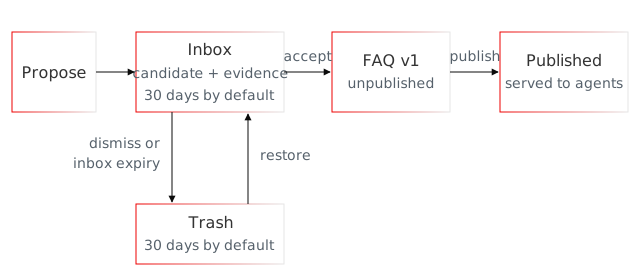
Use proposals to review suggested frequently asked questions (FAQs) and skills before publishing them. An agent or application submits candidate content; a reviewer checks its content, resources, and evidence before acceptance creates an unpublished entry.
Proposals create new entries. They do not revise existing entries. To correct existing content, use FAQ versioning or skill versioning.
Start with the FAQ walkthrough or review a skill proposal. Automatic extraction from Redis Agent Memory suggests FAQs only. Neither path affects agent responses until you publish the accepted entry.
Before you begin
Use an existing playbook and application programming interface (API) keys with these permissions:
proposeto create candidates and attach evidence.writeto edit, accept, dismiss, restore, or purge proposals.publishto publish the entry returned by acceptance.
For this walkthrough, give IRIS_AGENT_PLAYBOOKS_API_KEY all three permissions and follow the quickstart's client setup. Append the snippets in order and run each write once. In your application, you can separate suggestion, review, and publication across keys.
For the skill examples and complete Python or cURL program, first prepare the sample skill package. The pinned CLI's proposal commands support FAQs; use the SDK or cURL for skill proposals.
Find proposals to review
A key with read permission can list, search, and inspect proposals. The inbox contains candidates awaiting review and any acceptance still in progress. Only open candidates can be edited.
For software development kit (SDK) and cURL lists, follow the cursor until it is absent, even after an empty page. Keep the view and sort settings unchanged. Responses return items and nextCursor and don't include a total count. The command-line interface (CLI) follows cursors automatically. Use --page for one page with items and nextCursor, then --cursor to continue.
cursor = None
while True:
    page = playbook.client.list_proposals(
        view="INBOX", sort_by="updatedAt", sort_order="DESC", limit=50, cursor=cursor
    )
    for item in page.items:
        print(item.proposal_id, item.state, item.evidence_count, item.action)
    cursor = page.next_cursor
    if cursor is None:
        break
import os
from redis_agent_playbook import models
from redis_iris.agent_playbooks import AgentPlaybooks

playbook = AgentPlaybooks.from_env()
print(playbook.client.get_playbook_health())

cursor = None
while True:
    page = playbook.client.list_proposals(
        view="INBOX", sort_by="updatedAt", sort_order="DESC", limit=50, cursor=cursor
    )
    for item in page.items:
        print(item.proposal_id, item.state, item.evidence_count, item.action)
    cursor = page.next_cursor
    if cursor is None:
        break

related = playbook.client.search_proposals(
    query="Contact support about a missing refund",
    min_score=0.7,
    action_type="ADD",
    entry_kind="FAQ",
    limit=5,
)
for match in related.items:
    print(match.proposal.proposal_id, match.score, match.proposal.action)

action = {
    "add": {
        "target": {"new_entry": {}},
        "candidate": {
            "content": {
                "intents": ["Contact support about a missing refund"],
                "attributes": {"locale": "en-US", "topic": "refund"},
                "payload": {
                    "faq": {
                        "question": "What should I send support about a missing refund?",
                        "answer": "Send your order number and the date you requested the refund.",
                    }
                },
            }
        },
    }
}
proposal = playbook.client.create_proposal(
    action=action,
    source={
        "kind": "document",
        "reference": {"documentId": "sample-refund-policy"},
    },
)
proposal_id = proposal.proposal_id
print(proposal_id, proposal.revision)

from datetime import datetime, timezone
from uuid import uuid4

evidence_id = "evd_" + uuid4().hex
observed_at = datetime.now(timezone.utc)
evidence = playbook.client.submit_proposal_evidence(
    proposal_id=proposal_id,
    evidence_id=evidence_id,
    observed_at=observed_at,
    producer={"name": "docs-example", "prompt_version": "refund-review-v1"},
    source={
        "kind": "document",
        "reference": {"documentId": "sample-refund-policy"},
        "content": {
            "excerpt": (
                "For refund inquiries, collect the order number and request date. "
                "Do not request full card details."
            )
        },
    },
)
print(evidence.disposition)

reviewed = playbook.client.get_proposal(proposal_id=proposal_id)
print(reviewed.model_dump_json(by_alias=True, indent=2))

revised_action = reviewed.action.model_dump(exclude_unset=True)
revised_action["add"]["candidate"]["content"]["payload"]["faq"]["answer"] += (
    " Do not send full card details."
)
revised = playbook.client.replace_proposal(
    proposal_id=proposal_id,
    action=revised_action,
    expected_revision=reviewed.revision,
)
print(revised.revision, revised.action)

playbook.client.dismiss_proposal(
    proposal_id=proposal_id,
    expected_revision=revised.revision,
)
playbook.client.restore_proposal(proposal_id=proposal_id)
# To purge a trashed proposal instead of restoring it:
# playbook.client.purge_proposal(proposal_id=proposal_id)

final_review = playbook.client.get_proposal(proposal_id=proposal_id)
print(final_review.action, final_review.evidence)

from redis_agent_playbook import models

accepted = playbook.client.accept_proposal(
    proposal_id=proposal_id,
    expected_revision=final_review.revision,
)
if not isinstance(accepted.result, models.VersionCreated):
    raise ValueError("Review the unrecognized acceptance result before publishing")
receipt = accepted.result.version_created
accepted_version = playbook.client.get_faq_version(
    faq_id=receipt.entry_id,
    version=receipt.version,
)
print(receipt.entry_id, receipt.version, accepted_version.content)

playbook.client.publish_faq(faq_id=receipt.entry_id, version=receipt.version)

cursor = None
while True:
    page = playbook.client.list_proposals(
        view="TRASH", sort_by="updatedAt", sort_order="DESC", limit=50, cursor=cursor
    )
    for item in page.items:
        print(item.proposal_id, item.state, item.evidence_count, item.action)
    cursor = page.next_cursor
    if cursor is None:
        break

import base64
from pathlib import Path

skill_proposal = playbook.client.create_proposal(action={
    "add": {
        "target": {"new_entry": {}},
        "candidate": {"content": {
            "attributes": {"locale": "en-US", "topic": "refund"},
            "payload": {"skill_package": {
                "package_base64": base64.b64encode(Path("refund-support-reply.zip").read_bytes()).decode("ascii"),
            }},
        }},
    },
})
skill_proposal_id = skill_proposal.proposal_id
print(skill_proposal_id, skill_proposal.revision)

import hashlib

skill_review = playbook.client.get_proposal(proposal_id=skill_proposal_id)
candidate = skill_review.action.add.candidate.content.payload.skill
print(candidate.manifest, candidate.instructions)
resource = next(r for r in candidate.resources if r.path == "references/reply-template.md")
resource_response = playbook.client.get_proposal_resource(
    proposal_id=skill_proposal_id,
    resource_id=resource.resource_id,
    expected_revision=skill_review.revision,
)
try:
    template_bytes = resource_response.result.read()
finally:
    resource_response.result.close()
if "sha256:" + hashlib.sha256(template_bytes).hexdigest() != resource.digest:
    raise ValueError("Proposal resource digest does not match the reviewed descriptor")
print(template_bytes.decode("utf-8"))

accepted_skill = playbook.client.accept_proposal(
    proposal_id=skill_proposal_id, expected_revision=skill_review.revision,
)
if not isinstance(accepted_skill.result, models.VersionCreated):
    raise ValueError("Review the unrecognized acceptance result before publishing")
skill_receipt = accepted_skill.result.version_created
if skill_receipt.entry_kind != "SKILL":
    raise ValueError("Expected a skill receipt")
skill_version = playbook.client.get_skill_version(
    skill_id=skill_receipt.entry_id, version=skill_receipt.version,
)
print(skill_receipt.entry_id, skill_receipt.version, skill_version.content)

playbook.client.publish_skill(skill_id=skill_receipt.entry_id, version=skill_receipt.version)
iris --json agent-playbooks proposals list --view inbox --sort-by updatedAt --sort-order desc \
  --page-size 50 | jq .
set -euo pipefail
iris agent-playbooks health

iris --json agent-playbooks proposals list --view inbox --sort-by updatedAt --sort-order desc \
  --page-size 50 | jq .

iris --json agent-playbooks proposals search 'Contact support about a missing refund' \
  --min-score 0.7 --action-type add --entry-type faq --limit 5 | jq .items

cat > proposal-faq.json <<'JSON'
{
  "question": "What should I send support about a missing refund?",
  "answer": "Send your order number and the date you requested the refund.",
  "intents": ["Contact support about a missing refund"],
  "attributes": {"locale": "en-US", "topic": "refund"}
}
JSON
cat > proposal-source.json <<'JSON'
{
  "kind": "document",
  "reference": {"documentId": "sample-refund-policy"}
}
JSON
iris --json agent-playbooks proposals create proposal-faq.json --source proposal-source.json > proposal-created.json
PROPOSAL_ID=$(jq -er '.proposalId' proposal-created.json)
jq '{proposalId, revision}' proposal-created.json

EVIDENCE_ID="evd_$(openssl rand -hex 16)"
jq -n --arg observedAt "$(date -u +%Y-%m-%dT%H:%M:%SZ)" '{
  observedAt: $observedAt,
  producer: {name: "docs-example", promptVersion: "refund-review-v1"},
  source: {
    kind: "document",
    reference: {documentId: "sample-refund-policy"},
    content: {
      excerpt: "For refund inquiries, collect the order number and request date. Do not request full card details."
    }
  }
}' > evidence.json
iris --json agent-playbooks proposals evidence "$PROPOSAL_ID" "$EVIDENCE_ID" --input evidence.json | jq .disposition

iris --json agent-playbooks proposals show "$PROPOSAL_ID" > reviewed.json
jq . reviewed.json

REVISION=$(jq -er '.revision' reviewed.json)
jq '
  .action.add.candidate.content |
  {
    question: .payload.faq.question,
    answer: (.payload.faq.answer + " Do not send full card details."),
    intents: (.intents // []),
    attributes: (.attributes // {}),
    metadata: .metadata
  }
' reviewed.json > proposal-update.json
ENTRY_KEY=$(jq -r '.action.add.target.newEntry.entryKey // empty' reviewed.json)
if [[ -n "$ENTRY_KEY" ]]; then
  jq --arg key "$ENTRY_KEY" '.entryKey = $key' proposal-update.json > proposal-keyed.json
  mv proposal-keyed.json proposal-update.json
fi
iris --json agent-playbooks proposals replace "$PROPOSAL_ID" proposal-update.json \
  --expected-revision "$REVISION" > revised.json
jq '{revision, action}' revised.json

REVISION=$(jq -er '.revision' revised.json)
iris agent-playbooks proposals dismiss "$PROPOSAL_ID" --expected-revision "$REVISION"
iris agent-playbooks proposals restore "$PROPOSAL_ID"
# To purge a trashed proposal instead of restoring it:
# iris agent-playbooks proposals purge "$PROPOSAL_ID" --yes

iris --json agent-playbooks proposals show "$PROPOSAL_ID" > final-review.json
jq '{action, evidence, revision}' final-review.json

REVISION=$(jq -er '.revision' final-review.json)
iris --json agent-playbooks proposals accept "$PROPOSAL_ID" --expected-revision "$REVISION" > accepted.json
ACCEPTED_FAQ_ID=$(jq -er '.result.versionCreated.entryId' accepted.json)
ACCEPTED_VERSION=$(jq -er '.result.versionCreated.version' accepted.json)
iris --json agent-playbooks faqs show "$ACCEPTED_FAQ_ID" --version "$ACCEPTED_VERSION" | jq '{entryId, version, content}'

iris agent-playbooks faqs publish "$ACCEPTED_FAQ_ID" --version "$ACCEPTED_VERSION"

iris --json agent-playbooks proposals list --view trash --sort-by updatedAt --sort-order desc \
  --page-size 50 | jq .
CURSOR=''
while true; do
  PAGE_ARGS=(--data-urlencode view=INBOX --data-urlencode sortBy=updatedAt --data-urlencode sortOrder=DESC --data-urlencode limit=50)
  if [[ -n "$CURSOR" ]]; then PAGE_ARGS+=(--data-urlencode "cursor=$CURSOR"); fi
  curl --fail-with-body --silent --show-error --get "$PLAYBOOK_API/proposals" \
    -H "Authorization: Bearer $IRIS_AGENT_PLAYBOOKS_API_KEY" "${PAGE_ARGS[@]}" > inbox.json
  jq '.items[] | {proposalId, state, evidenceCount, action}' inbox.json
  CURSOR=$(jq -r '.nextCursor // empty' inbox.json)
  [[ -n "$CURSOR" ]] || break
done
set -euo pipefail

set -euo pipefail
PLAYBOOK_API="${IRIS_AGENT_PLAYBOOKS_URL%/}/iris/data/v1/agent-playbooks/playbooks/$IRIS_AGENT_PLAYBOOKS_PLAYBOOK_ID"
curl --fail-with-body --silent --show-error \
  "$PLAYBOOK_API/health" \
  -H "Authorization: Bearer $IRIS_AGENT_PLAYBOOKS_API_KEY" | jq .

CURSOR=''
while true; do
  PAGE_ARGS=(--data-urlencode view=INBOX --data-urlencode sortBy=updatedAt --data-urlencode sortOrder=DESC --data-urlencode limit=50)
  if [[ -n "$CURSOR" ]]; then PAGE_ARGS+=(--data-urlencode "cursor=$CURSOR"); fi
  curl --fail-with-body --silent --show-error --get "$PLAYBOOK_API/proposals" \
    -H "Authorization: Bearer $IRIS_AGENT_PLAYBOOKS_API_KEY" "${PAGE_ARGS[@]}" > inbox.json
  jq '.items[] | {proposalId, state, evidenceCount, action}' inbox.json
  CURSOR=$(jq -r '.nextCursor // empty' inbox.json)
  [[ -n "$CURSOR" ]] || break
done

curl --fail-with-body --silent --show-error \
  -X POST "$PLAYBOOK_API/proposals/search" \
  -H "Authorization: Bearer $IRIS_AGENT_PLAYBOOKS_API_KEY" \
  -H 'Content-Type: application/json' \
  --data '{"query":"Contact support about a missing refund","minScore":0.7,"actionType":"ADD","entryKind":"FAQ","limit":5}' \
  | jq '.items[] | {proposalId: .proposal.proposalId, score, action: .proposal.action}'

cat > proposal.json <<'JSON'
{"source":{"kind":"document","reference":{"documentId":"sample-refund-policy"}},
"action":{"add":{
  "target":{"newEntry":{}},
  "candidate":{"content":{
    "intents":["Contact support about a missing refund"],
    "attributes":{"locale":"en-US","topic":"refund"},
    "payload":{"faq":{
      "question":"What should I send support about a missing refund?",
      "answer":"Send your order number and the date you requested the refund."
    }}
  }}
}}}
JSON
curl --fail-with-body --silent --show-error \
  -X POST "$PLAYBOOK_API/proposals" \
  -H "Authorization: Bearer $IRIS_AGENT_PLAYBOOKS_API_KEY" \
  -H 'Content-Type: application/json' --data-binary @proposal.json > proposal-created.json
PROPOSAL_ID=$(jq -er '.proposalId' proposal-created.json)
jq '{proposalId, revision}' proposal-created.json

EVIDENCE_ID="evd_$(openssl rand -hex 16)"
jq -n --arg observedAt "$(date -u +%Y-%m-%dT%H:%M:%SZ)" '{
  observedAt: $observedAt,
  producer: {name: "docs-example", promptVersion: "refund-review-v1"},
  source: {
    kind: "document",
    reference: {documentId: "sample-refund-policy"},
    content: {excerpt: "For refund inquiries, collect the order number and request date. Do not request full card details."}
  }
}' > evidence.json
curl --fail-with-body --silent --show-error \
  -X PUT "$PLAYBOOK_API/proposals/$PROPOSAL_ID/evidence/$EVIDENCE_ID" \
  -H "Authorization: Bearer $IRIS_AGENT_PLAYBOOKS_API_KEY" \
  -H 'Content-Type: application/json' --data-binary @evidence.json | jq .disposition

curl --fail-with-body --silent --show-error \
  "$PLAYBOOK_API/proposals/$PROPOSAL_ID" \
  -H "Authorization: Bearer $IRIS_AGENT_PLAYBOOKS_API_KEY" > reviewed.json
jq . reviewed.json

jq --arg revision "$(jq -er '.revision' reviewed.json)" '
  {action} |
  .action.add.candidate.content.payload.faq.answer += " Do not send full card details." |
  .expectedRevision = $revision
' reviewed.json > proposal-update.json
curl --fail-with-body --silent --show-error \
  -X PATCH "$PLAYBOOK_API/proposals/$PROPOSAL_ID" \
  -H "Authorization: Bearer $IRIS_AGENT_PLAYBOOKS_API_KEY" \
  -H 'Content-Type: application/json' --data-binary @proposal-update.json > revised.json
jq '{revision, action}' revised.json

curl --fail-with-body --silent --show-error \
  -X PUT "$PLAYBOOK_API/proposals/$PROPOSAL_ID/dismissal" \
  -H "Authorization: Bearer $IRIS_AGENT_PLAYBOOKS_API_KEY" \
  -H 'Content-Type: application/json' \
  --data "$(jq '{expectedRevision: .revision}' revised.json)" | jq .state
curl --fail-with-body --silent --show-error \
  -X DELETE "$PLAYBOOK_API/proposals/$PROPOSAL_ID/dismissal" \
  -H "Authorization: Bearer $IRIS_AGENT_PLAYBOOKS_API_KEY" | jq .state
# To purge instead of restoring, DELETE /proposals/$PROPOSAL_ID.

curl --fail-with-body --silent --show-error \
  "$PLAYBOOK_API/proposals/$PROPOSAL_ID" \
  -H "Authorization: Bearer $IRIS_AGENT_PLAYBOOKS_API_KEY" > final-review.json
jq '{action, evidence, revision}' final-review.json

curl --fail-with-body --silent --show-error \
  -X POST "$PLAYBOOK_API/proposals/$PROPOSAL_ID/acceptance" \
  -H "Authorization: Bearer $IRIS_AGENT_PLAYBOOKS_API_KEY" \
  -H 'Content-Type: application/json' \
  --data "$(jq '{expectedRevision: .revision}' final-review.json)" > accepted.json
ACCEPTED_FAQ_ID=$(jq -er '.result.versionCreated.entryId' accepted.json)
ACCEPTED_VERSION=$(jq -er '.result.versionCreated.version' accepted.json)
curl --fail-with-body --silent --show-error \
  "$PLAYBOOK_API/faqs/$ACCEPTED_FAQ_ID/versions/$ACCEPTED_VERSION" \
  -H "Authorization: Bearer $IRIS_AGENT_PLAYBOOKS_API_KEY" \
  | jq '{entryId, version, content}'

curl --fail-with-body --silent --show-error \
  -X PUT "$PLAYBOOK_API/faqs/$ACCEPTED_FAQ_ID/publication" \
  -H "Authorization: Bearer $IRIS_AGENT_PLAYBOOKS_API_KEY" \
  -H 'Content-Type: application/json' \
  --data "$(jq '{version: .result.versionCreated.version}' accepted.json)" | jq .publication

CURSOR=''
while true; do
  PAGE_ARGS=(--data-urlencode view=TRASH --data-urlencode sortBy=updatedAt --data-urlencode sortOrder=DESC --data-urlencode limit=50)
  if [[ -n "$CURSOR" ]]; then PAGE_ARGS+=(--data-urlencode "cursor=$CURSOR"); fi
  curl --fail-with-body --silent --show-error --get "$PLAYBOOK_API/proposals" \
    -H "Authorization: Bearer $IRIS_AGENT_PLAYBOOKS_API_KEY" "${PAGE_ARGS[@]}" > trash.json
  jq '.items[] | {proposalId, state, evidenceCount, action}' trash.json
  CURSOR=$(jq -r '.nextCursor // empty' trash.json)
  [[ -n "$CURSOR" ]] || break
done

jq -n --rawfile package <(base64 < refund-support-reply.zip | tr -d '\n') '{
  action: {add: {
    target: {newEntry: {}},
    candidate: {content: {
      attributes: {locale: "en-US", topic: "refund"},
      payload: {skillPackage: {packageBase64: $package}}
    }}
  }}
}' > skill-proposal.json
curl --fail-with-body --silent --show-error \
  -X POST "$PLAYBOOK_API/proposals" \
  -H "Authorization: Bearer $IRIS_AGENT_PLAYBOOKS_API_KEY" \
  -H 'Content-Type: application/json' --data-binary @skill-proposal.json > skill-proposal-created.json
SKILL_PROPOSAL_ID=$(jq -er '.proposalId' skill-proposal-created.json)
jq '{proposalId, revision}' skill-proposal-created.json

curl --fail-with-body --silent --show-error \
  "$PLAYBOOK_API/proposals/$SKILL_PROPOSAL_ID" \
  -H "Authorization: Bearer $IRIS_AGENT_PLAYBOOKS_API_KEY" > skill-reviewed.json
jq '.action.add.candidate.content.payload.skill | {manifest, instructions, resources}' skill-reviewed.json
RESOURCE_ID=$(jq -er '.action.add.candidate.content.payload.skill.resources[] | select(.path == "references/reply-template.md") | .resourceId' skill-reviewed.json)
SKILL_REVISION=$(jq -er '.revision' skill-reviewed.json)
curl --fail-with-body --silent --show-error --get \
  "$PLAYBOOK_API/proposals/$SKILL_PROPOSAL_ID/resources/$RESOURCE_ID" \
  --data-urlencode "expectedRevision=$SKILL_REVISION" \
  -H "Authorization: Bearer $IRIS_AGENT_PLAYBOOKS_API_KEY" --output reply-template.reviewed.md
EXPECTED_DIGEST=$(jq -er --arg id "$RESOURCE_ID" '.action.add.candidate.content.payload.skill.resources[] | select(.resourceId == $id) | .digest' skill-reviewed.json)
ACTUAL_DIGEST="sha256:$(openssl dgst -sha256 reply-template.reviewed.md | awk '{print $NF}')"
[[ "$ACTUAL_DIGEST" == "$EXPECTED_DIGEST" ]] || { echo 'Proposal resource digest mismatch' >&2; exit 1; }
cat reply-template.reviewed.md

curl --fail-with-body --silent --show-error \
  -X POST "$PLAYBOOK_API/proposals/$SKILL_PROPOSAL_ID/acceptance" \
  -H "Authorization: Bearer $IRIS_AGENT_PLAYBOOKS_API_KEY" \
  -H 'Content-Type: application/json' \
  --data "$(jq '{expectedRevision: .revision}' skill-reviewed.json)" > skill-accepted.json
jq -e '.result.versionCreated.entryKind == "SKILL"' skill-accepted.json > /dev/null
ACCEPTED_SKILL_ID=$(jq -er '.result.versionCreated.entryId' skill-accepted.json)
ACCEPTED_SKILL_VERSION=$(jq -er '.result.versionCreated.version' skill-accepted.json)
curl --fail-with-body --silent --show-error \
  "$PLAYBOOK_API/skills/$ACCEPTED_SKILL_ID/versions/$ACCEPTED_SKILL_VERSION" \
  -H "Authorization: Bearer $IRIS_AGENT_PLAYBOOKS_API_KEY" | jq .content

curl --fail-with-body --silent --show-error \
  -X PUT "$PLAYBOOK_API/skills/$ACCEPTED_SKILL_ID/publication" \
  -H "Authorization: Bearer $IRIS_AGENT_PLAYBOOKS_API_KEY" \
  -H 'Content-Type: application/json' \
  --data "$(jq '{version: .result.versionCreated.version}' skill-accepted.json)" | jq .publication
Search before submitting another candidate. Compare similar questions to decide whether they need the same answer. Proposal search covers open candidates, not trash, accepted proposals, or published FAQs.
related = playbook.client.search_proposals(
    query="Contact support about a missing refund",
    min_score=0.7,
    action_type="ADD",
    entry_kind="FAQ",
    limit=5,
)
for match in related.items:
    print(match.proposal.proposal_id, match.score, match.proposal.action)
iris --json agent-playbooks proposals search 'Contact support about a missing refund' \
  --min-score 0.7 --action-type add --entry-type faq --limit 5 | jq .items
curl --fail-with-body --silent --show-error \
  -X POST "$PLAYBOOK_API/proposals/search" \
  -H "Authorization: Bearer $IRIS_AGENT_PLAYBOOKS_API_KEY" \
  -H 'Content-Type: application/json' \
  --data '{"query":"Contact support about a missing refund","minScore":0.7,"actionType":"ADD","entryKind":"FAQ","limit":5}' \
  | jq '.items[] | {proposalId: .proposal.proposalId, score, action: .proposal.action}'
Create a proposal
Write a self-contained question and answer. Add intents for the task and attributes for its audience, then call create_proposal with an add action targeting newEntry. You can supply an entry key for the resulting FAQ and immutable source context that a reviewer can check.
Save the proposal identifier and revision. Use the revision to identify the candidate you edit or accept.
action = {
    "add": {
        "target": {"new_entry": {}},
        "candidate": {
            "content": {
                "intents": ["Contact support about a missing refund"],
                "attributes": {"locale": "en-US", "topic": "refund"},
                "payload": {
                    "faq": {
                        "question": "What should I send support about a missing refund?",
                        "answer": "Send your order number and the date you requested the refund.",
                    }
                },
            }
        },
    }
}
proposal = playbook.client.create_proposal(
    action=action,
    source={
        "kind": "document",
        "reference": {"documentId": "sample-refund-policy"},
    },
)
proposal_id = proposal.proposal_id
print(proposal_id, proposal.revision)
cat > proposal-faq.json <<'JSON'
{
  "question": "What should I send support about a missing refund?",
  "answer": "Send your order number and the date you requested the refund.",
  "intents": ["Contact support about a missing refund"],
  "attributes": {"locale": "en-US", "topic": "refund"}
}
JSON
cat > proposal-source.json <<'JSON'
{
  "kind": "document",
  "reference": {"documentId": "sample-refund-policy"}
}
JSON
iris --json agent-playbooks proposals create proposal-faq.json --source proposal-source.json > proposal-created.json
PROPOSAL_ID=$(jq -er '.proposalId' proposal-created.json)
jq '{proposalId, revision}' proposal-created.json
cat > proposal.json <<'JSON'
{"source":{"kind":"document","reference":{"documentId":"sample-refund-policy"}},
"action":{"add":{
  "target":{"newEntry":{}},
  "candidate":{"content":{
    "intents":["Contact support about a missing refund"],
    "attributes":{"locale":"en-US","topic":"refund"},
    "payload":{"faq":{
      "question":"What should I send support about a missing refund?",
      "answer":"Send your order number and the date you requested the refund."
    }}
  }}
}}}
JSON
curl --fail-with-body --silent --show-error \
  -X POST "$PLAYBOOK_API/proposals" \
  -H "Authorization: Bearer $IRIS_AGENT_PLAYBOOKS_API_KEY" \
  -H 'Content-Type: application/json' --data-binary @proposal.json > proposal-created.json
PROPOSAL_ID=$(jq -er '.proposalId' proposal-created.json)
jq '{proposalId, revision}' proposal-created.json
The CLI takes a flat FAQ candidate file and a separate source file in JavaScript Object Notation (JSON), and constructs the proposal action for you.
Handle an existing candidate
If creation or replacement returns 409 with type /errors/proposal-already-exists, read the existing proposal. The error body names it in existingId; Python exposes it as error.data.existing_id on ConflictErrorResponseContent.
If the open candidate addresses the same need, attach evidence to it rather than creating another suggestion. Review its current revision before editing or accepting it.
Attach evidence
Use submit_proposal_evidence to add another observation to an open proposal. For example, attach a policy excerpt that supports the answer or a conversation that reveals a missing condition.
| HTTP/CLI field | Python argument or dictionary field | Purpose |
|---|---|---|
evidenceId |
evidence_id |
Required observation identifier: evd_ followed by 32 lowercase hexadecimal characters. Reuse it for an exact retry. |
observedAt |
observed_at |
Required time of the source observation. |
producer.name |
producer["name"] |
Required application or agent name. |
producer.promptVersion |
producer["prompt_version"] |
Optional prompt version. |
producer.commitSHA |
producer["commit_sha"] |
Optional commit hash: 40 or 64 lowercase hexadecimal characters. |
source.kind |
source["kind"] |
Required source label. |
source.reference |
source["reference"] |
Optional JSON object locating the source. |
source.content |
source["content"] |
Optional JSON object containing the observation or excerpt. |
Include a supporting passage and a reference the reviewer can check. Redis Agent Playbooks do not independently verify caller-supplied attribution. An evidence count measures observations, not correctness or independent users.
Evidence is immutable. Retrying the same identifier and payload returns the disposition ALREADY_PRESENT; new evidence returns ADDED. Reusing that identifier for changed content returns a conflict. Use a new identifier for a new observation.
The creation source explains the first suggestion and does not increase evidenceCount. Attached evidence stays with the proposal; acceptance does not copy it into the FAQ. Check evidence limits before attaching large passages.
This example attaches a policy excerpt. The cURL and CLI tabs use openssl to generate an identifier.
from datetime import datetime, timezone
from uuid import uuid4

evidence_id = "evd_" + uuid4().hex
observed_at = datetime.now(timezone.utc)
evidence = playbook.client.submit_proposal_evidence(
    proposal_id=proposal_id,
    evidence_id=evidence_id,
    observed_at=observed_at,
    producer={"name": "docs-example", "prompt_version": "refund-review-v1"},
    source={
        "kind": "document",
        "reference": {"documentId": "sample-refund-policy"},
        "content": {
            "excerpt": (
                "For refund inquiries, collect the order number and request date. "
                "Do not request full card details."
            )
        },
    },
)
print(evidence.disposition)
EVIDENCE_ID="evd_$(openssl rand -hex 16)"
jq -n --arg observedAt "$(date -u +%Y-%m-%dT%H:%M:%SZ)" '{
  observedAt: $observedAt,
  producer: {name: "docs-example", promptVersion: "refund-review-v1"},
  source: {
    kind: "document",
    reference: {documentId: "sample-refund-policy"},
    content: {
      excerpt: "For refund inquiries, collect the order number and request date. Do not request full card details."
    }
  }
}' > evidence.json
iris --json agent-playbooks proposals evidence "$PROPOSAL_ID" "$EVIDENCE_ID" --input evidence.json | jq .disposition
EVIDENCE_ID="evd_$(openssl rand -hex 16)"
jq -n --arg observedAt "$(date -u +%Y-%m-%dT%H:%M:%SZ)" '{
  observedAt: $observedAt,
  producer: {name: "docs-example", promptVersion: "refund-review-v1"},
  source: {
    kind: "document",
    reference: {documentId: "sample-refund-policy"},
    content: {excerpt: "For refund inquiries, collect the order number and request date. Do not request full card details."}
  }
}' > evidence.json
curl --fail-with-body --silent --show-error \
  -X PUT "$PLAYBOOK_API/proposals/$PROPOSAL_ID/evidence/$EVIDENCE_ID" \
  -H "Authorization: Bearer $IRIS_AGENT_PLAYBOOKS_API_KEY" \
  -H 'Content-Type: application/json' --data-binary @evidence.json | jq .disposition
Review and edit a candidate
- Retrieve the complete proposal and its evidence with
get_proposal. - Check that the sources support the answer, its conditions, and its intended audience.
- Check for sensitive or conversation-specific details that should not become reusable guidance.
- Replace the candidate with
replace_proposalif it needs changes. Supply the complete action andexpected_revisionfor the revision you read (expectedRevisionin HTTP). - Review the returned candidate and record its new revision.
Editing preserves evidence. If another reviewer changes the candidate, the revision check fails; review the current answer before trying again.
reviewed = playbook.client.get_proposal(proposal_id=proposal_id)
print(reviewed.model_dump_json(by_alias=True, indent=2))
iris --json agent-playbooks proposals show "$PROPOSAL_ID" > reviewed.json
jq . reviewed.json
curl --fail-with-body --silent --show-error \
  "$PLAYBOOK_API/proposals/$PROPOSAL_ID" \
  -H "Authorization: Bearer $IRIS_AGENT_PLAYBOOKS_API_KEY" > reviewed.json
jq . reviewed.json
Add the excerpt's guidance about card details. Preserve the other fields from the proposal you just read.
revised_action = reviewed.action.model_dump(exclude_unset=True)
revised_action["add"]["candidate"]["content"]["payload"]["faq"]["answer"] += (
    " Do not send full card details."
)
revised = playbook.client.replace_proposal(
    proposal_id=proposal_id,
    action=revised_action,
    expected_revision=reviewed.revision,
)
print(revised.revision, revised.action)
REVISION=$(jq -er '.revision' reviewed.json)
jq '
  .action.add.candidate.content |
  {
    question: .payload.faq.question,
    answer: (.payload.faq.answer + " Do not send full card details."),
    intents: (.intents // []),
    attributes: (.attributes // {}),
    metadata: .metadata
  }
' reviewed.json > proposal-update.json
ENTRY_KEY=$(jq -r '.action.add.target.newEntry.entryKey // empty' reviewed.json)
if [[ -n "$ENTRY_KEY" ]]; then
  jq --arg key "$ENTRY_KEY" '.entryKey = $key' proposal-update.json > proposal-keyed.json
  mv proposal-keyed.json proposal-update.json
fi
iris --json agent-playbooks proposals replace "$PROPOSAL_ID" proposal-update.json \
  --expected-revision "$REVISION" > revised.json
jq '{revision, action}' revised.json
jq --arg revision "$(jq -er '.revision' reviewed.json)" '
  {action} |
  .action.add.candidate.content.payload.faq.answer += " Do not send full card details." |
  .expectedRevision = $revision
' reviewed.json > proposal-update.json
curl --fail-with-body --silent --show-error \
  -X PATCH "$PLAYBOOK_API/proposals/$PROPOSAL_ID" \
  -H "Authorization: Bearer $IRIS_AGENT_PLAYBOOKS_API_KEY" \
  -H 'Content-Type: application/json' --data-binary @proposal-update.json > revised.json
jq '{revision, action}' revised.json
Dismiss, restore, or purge
Dismiss a candidate you do not want to accept. You can inspect or restore it from trash before its retention deadline. Restore it before editing, attaching evidence, or accepting it.
Open proposals also expire. Check inboxExpiresAt and purgeAt, and see review and retention limits for how activity changes those deadlines.
Purge a trashed proposal to remove it permanently. Save any review records your application needs first.
Test dismissal and restoration before accepting the sample. Purging instead ends the walkthrough for that proposal.
playbook.client.dismiss_proposal(
    proposal_id=proposal_id,
    expected_revision=revised.revision,
)
playbook.client.restore_proposal(proposal_id=proposal_id)
# To purge a trashed proposal instead of restoring it:
# playbook.client.purge_proposal(proposal_id=proposal_id)
REVISION=$(jq -er '.revision' revised.json)
iris agent-playbooks proposals dismiss "$PROPOSAL_ID" --expected-revision "$REVISION"
iris agent-playbooks proposals restore "$PROPOSAL_ID"
# To purge a trashed proposal instead of restoring it:
# iris agent-playbooks proposals purge "$PROPOSAL_ID" --yes
curl --fail-with-body --silent --show-error \
  -X PUT "$PLAYBOOK_API/proposals/$PROPOSAL_ID/dismissal" \
  -H "Authorization: Bearer $IRIS_AGENT_PLAYBOOKS_API_KEY" \
  -H 'Content-Type: application/json' \
  --data "$(jq '{expectedRevision: .revision}' revised.json)" | jq .state
curl --fail-with-body --silent --show-error \
  -X DELETE "$PLAYBOOK_API/proposals/$PROPOSAL_ID/dismissal" \
  -H "Authorization: Bearer $IRIS_AGENT_PLAYBOOKS_API_KEY" | jq .state
# To purge instead of restoring, DELETE /proposals/$PROPOSAL_ID.
Accept and publish
Call accept_proposal with the revision you reviewed. Acceptance creates one unpublished FAQ. Use the entry identifier and version in result.versionCreated to read that FAQ, then publish the reviewed version with a key that has publish permission.
A proposal being accepted (state PROMOTING) or already accepted (PROMOTED) cannot be edited. If acceptance is interrupted, retry it rather than creating another FAQ. The returned receipt is historical: it does not contain the answer or confirm that the FAQ still exists. Inspect the FAQ before acting on a retried result.
If your client cannot recognize the result type, inspect the result or upgrade the client before publishing.
final_review = playbook.client.get_proposal(proposal_id=proposal_id)
print(final_review.action, final_review.evidence)
iris --json agent-playbooks proposals show "$PROPOSAL_ID" > final-review.json
jq '{action, evidence, revision}' final-review.json
curl --fail-with-body --silent --show-error \
  "$PLAYBOOK_API/proposals/$PROPOSAL_ID" \
  -H "Authorization: Bearer $IRIS_AGENT_PLAYBOOKS_API_KEY" > final-review.json
jq '{action, evidence, revision}' final-review.json
Accept the reviewed revision.
from redis_agent_playbook import models

accepted = playbook.client.accept_proposal(
    proposal_id=proposal_id,
    expected_revision=final_review.revision,
)
if not isinstance(accepted.result, models.VersionCreated):
    raise ValueError("Review the unrecognized acceptance result before publishing")
receipt = accepted.result.version_created
accepted_version = playbook.client.get_faq_version(
    faq_id=receipt.entry_id,
    version=receipt.version,
)
print(receipt.entry_id, receipt.version, accepted_version.content)
REVISION=$(jq -er '.revision' final-review.json)
iris --json agent-playbooks proposals accept "$PROPOSAL_ID" --expected-revision "$REVISION" > accepted.json
ACCEPTED_FAQ_ID=$(jq -er '.result.versionCreated.entryId' accepted.json)
ACCEPTED_VERSION=$(jq -er '.result.versionCreated.version' accepted.json)
iris --json agent-playbooks faqs show "$ACCEPTED_FAQ_ID" --version "$ACCEPTED_VERSION" | jq '{entryId, version, content}'
curl --fail-with-body --silent --show-error \
  -X POST "$PLAYBOOK_API/proposals/$PROPOSAL_ID/acceptance" \
  -H "Authorization: Bearer $IRIS_AGENT_PLAYBOOKS_API_KEY" \
  -H 'Content-Type: application/json' \
  --data "$(jq '{expectedRevision: .revision}' final-review.json)" > accepted.json
ACCEPTED_FAQ_ID=$(jq -er '.result.versionCreated.entryId' accepted.json)
ACCEPTED_VERSION=$(jq -er '.result.versionCreated.version' accepted.json)
curl --fail-with-body --silent --show-error \
  "$PLAYBOOK_API/faqs/$ACCEPTED_FAQ_ID/versions/$ACCEPTED_VERSION" \
  -H "Authorization: Bearer $IRIS_AGENT_PLAYBOOKS_API_KEY" \
  | jq '{entryId, version, content}'
Publish the returned FAQ version after review.
playbook.client.publish_faq(faq_id=receipt.entry_id, version=receipt.version)
iris agent-playbooks faqs publish "$ACCEPTED_FAQ_ID" --version "$ACCEPTED_VERSION"
curl --fail-with-body --silent --show-error \
  -X PUT "$PLAYBOOK_API/faqs/$ACCEPTED_FAQ_ID/publication" \
  -H "Authorization: Bearer $IRIS_AGENT_PLAYBOOKS_API_KEY" \
  -H 'Content-Type: application/json' \
  --data "$(jq '{version: .result.versionCreated.version}' accepted.json)" | jq .publication
The accepted FAQ remains after this example. Delete it with the FAQ cleanup procedure using the returned entry identifier when you finish.
Inspect promotion history
Use the trash view to inspect dismissed, expired, and accepted proposals while they are retained. Accepted proposals cannot be restored or edited. Purging their review record does not delete the FAQ. An acceptance still in progress remains in the inbox and cannot be purged.
cursor = None
while True:
    page = playbook.client.list_proposals(
        view="TRASH", sort_by="updatedAt", sort_order="DESC", limit=50, cursor=cursor
    )
    for item in page.items:
        print(item.proposal_id, item.state, item.evidence_count, item.action)
    cursor = page.next_cursor
    if cursor is None:
        break
iris --json agent-playbooks proposals list --view trash --sort-by updatedAt --sort-order desc \
  --page-size 50 | jq .
CURSOR=''
while true; do
  PAGE_ARGS=(--data-urlencode view=TRASH --data-urlencode sortBy=updatedAt --data-urlencode sortOrder=DESC --data-urlencode limit=50)
  if [[ -n "$CURSOR" ]]; then PAGE_ARGS+=(--data-urlencode "cursor=$CURSOR"); fi
  curl --fail-with-body --silent --show-error --get "$PLAYBOOK_API/proposals" \
    -H "Authorization: Bearer $IRIS_AGENT_PLAYBOOKS_API_KEY" "${PAGE_ARGS[@]}" > trash.json
  jq '.items[] | {proposalId, state, evidenceCount, action}' trash.json
  CURSOR=$(jq -r '.nextCursor // empty' trash.json)
  [[ -n "$CURSOR" ]] || break
done
Review skill proposals
Submit the complete skill ZIP in skillPackage.packageBase64 under content.payload. The service validates the archive and returns normalized instructions and resource descriptors. A proposal resource has no published skill URI; read it through the proposal resource operation with the revision you reviewed.
If creation rejects skillPackage with /errors/unknown-request-member, ask your administrator to check that the service supports your SDK's API contract.
import base64
from pathlib import Path

skill_proposal = playbook.client.create_proposal(action={
    "add": {
        "target": {"new_entry": {}},
        "candidate": {"content": {
            "attributes": {"locale": "en-US", "topic": "refund"},
            "payload": {"skill_package": {
                "package_base64": base64.b64encode(Path("refund-support-reply.zip").read_bytes()).decode("ascii"),
            }},
        }},
    },
})
skill_proposal_id = skill_proposal.proposal_id
print(skill_proposal_id, skill_proposal.revision)
jq -n --rawfile package <(base64 < refund-support-reply.zip | tr -d '\n') '{
  action: {add: {
    target: {newEntry: {}},
    candidate: {content: {
      attributes: {locale: "en-US", topic: "refund"},
      payload: {skillPackage: {packageBase64: $package}}
    }}
  }}
}' > skill-proposal.json
curl --fail-with-body --silent --show-error \
  -X POST "$PLAYBOOK_API/proposals" \
  -H "Authorization: Bearer $IRIS_AGENT_PLAYBOOKS_API_KEY" \
  -H 'Content-Type: application/json' --data-binary @skill-proposal.json > skill-proposal-created.json
SKILL_PROPOSAL_ID=$(jq -er '.proposalId' skill-proposal-created.json)
jq '{proposalId, revision}' skill-proposal-created.json
Read the candidate, inspect its instructions, and read the supporting files. This example verifies the reply template's SHA-256 digest before displaying its text. Do not run scripts merely because archive validation succeeded.
import hashlib

skill_review = playbook.client.get_proposal(proposal_id=skill_proposal_id)
candidate = skill_review.action.add.candidate.content.payload.skill
print(candidate.manifest, candidate.instructions)
resource = next(r for r in candidate.resources if r.path == "references/reply-template.md")
resource_response = playbook.client.get_proposal_resource(
    proposal_id=skill_proposal_id,
    resource_id=resource.resource_id,
    expected_revision=skill_review.revision,
)
try:
    template_bytes = resource_response.result.read()
finally:
    resource_response.result.close()
if "sha256:" + hashlib.sha256(template_bytes).hexdigest() != resource.digest:
    raise ValueError("Proposal resource digest does not match the reviewed descriptor")
print(template_bytes.decode("utf-8"))
curl --fail-with-body --silent --show-error \
  "$PLAYBOOK_API/proposals/$SKILL_PROPOSAL_ID" \
  -H "Authorization: Bearer $IRIS_AGENT_PLAYBOOKS_API_KEY" > skill-reviewed.json
jq '.action.add.candidate.content.payload.skill | {manifest, instructions, resources}' skill-reviewed.json
RESOURCE_ID=$(jq -er '.action.add.candidate.content.payload.skill.resources[] | select(.path == "references/reply-template.md") | .resourceId' skill-reviewed.json)
SKILL_REVISION=$(jq -er '.revision' skill-reviewed.json)
curl --fail-with-body --silent --show-error --get \
  "$PLAYBOOK_API/proposals/$SKILL_PROPOSAL_ID/resources/$RESOURCE_ID" \
  --data-urlencode "expectedRevision=$SKILL_REVISION" \
  -H "Authorization: Bearer $IRIS_AGENT_PLAYBOOKS_API_KEY" --output reply-template.reviewed.md
EXPECTED_DIGEST=$(jq -er --arg id "$RESOURCE_ID" '.action.add.candidate.content.payload.skill.resources[] | select(.resourceId == $id) | .digest' skill-reviewed.json)
ACTUAL_DIGEST="sha256:$(openssl dgst -sha256 reply-template.reviewed.md | awk '{print $NF}')"
[[ "$ACTUAL_DIGEST" == "$EXPECTED_DIGEST" ]] || { echo 'Proposal resource digest mismatch' >&2; exit 1; }
cat reply-template.reviewed.md
Resource reads require expectedRevision (expected_revision in Python). If another reviewer replaces the candidate, a stale resource read or acceptance returns 412 with type /errors/revision-conflict. Read and review the new candidate and its files before retrying. To replace a skill candidate, submit a complete ZIP with the retained intents, attributes, and metadata; the normalized response payload is not an upload request.
Accept the reviewed revision and check the receipt's entryKind before selecting a publication operation. A skill receipt identifies an unpublished skill version:
accepted_skill = playbook.client.accept_proposal(
    proposal_id=skill_proposal_id, expected_revision=skill_review.revision,
)
if not isinstance(accepted_skill.result, models.VersionCreated):
    raise ValueError("Review the unrecognized acceptance result before publishing")
skill_receipt = accepted_skill.result.version_created
if skill_receipt.entry_kind != "SKILL":
    raise ValueError("Expected a skill receipt")
skill_version = playbook.client.get_skill_version(
    skill_id=skill_receipt.entry_id, version=skill_receipt.version,
)
print(skill_receipt.entry_id, skill_receipt.version, skill_version.content)
curl --fail-with-body --silent --show-error \
  -X POST "$PLAYBOOK_API/proposals/$SKILL_PROPOSAL_ID/acceptance" \
  -H "Authorization: Bearer $IRIS_AGENT_PLAYBOOKS_API_KEY" \
  -H 'Content-Type: application/json' \
  --data "$(jq '{expectedRevision: .revision}' skill-reviewed.json)" > skill-accepted.json
jq -e '.result.versionCreated.entryKind == "SKILL"' skill-accepted.json > /dev/null
ACCEPTED_SKILL_ID=$(jq -er '.result.versionCreated.entryId' skill-accepted.json)
ACCEPTED_SKILL_VERSION=$(jq -er '.result.versionCreated.version' skill-accepted.json)
curl --fail-with-body --silent --show-error \
  "$PLAYBOOK_API/skills/$ACCEPTED_SKILL_ID/versions/$ACCEPTED_SKILL_VERSION" \
  -H "Authorization: Bearer $IRIS_AGENT_PLAYBOOKS_API_KEY" | jq .content
Publish the reviewed skill version with publish_skill:
playbook.client.publish_skill(skill_id=skill_receipt.entry_id, version=skill_receipt.version)
curl --fail-with-body --silent --show-error \
  -X PUT "$PLAYBOOK_API/skills/$ACCEPTED_SKILL_ID/publication" \
  -H "Authorization: Bearer $IRIS_AGENT_PLAYBOOKS_API_KEY" \
  -H 'Content-Type: application/json' \
  --data "$(jq '{version: .result.versionCreated.version}' skill-accepted.json)" | jq .publication
The accepted skill remains published. Use its returned entry identifier with the skill cleanup procedure when you finish. Purging a proposal's review record does not delete its accepted entry.
Automate proposal generation
Choose how your application contributes suggestions:
- Redis Agent Memory: Derive reusable answers from recorded agent conversations through background extraction.
- Proposal and evidence APIs: Generate suggestions from your own sources and triggers, such as resolved support cases or evaluation findings.
Both paths feed the same review inbox. Background extraction generates FAQs; your application can submit FAQ or skill proposals. Automatic skill extraction is not supported.
Extract FAQs from agent usage in Redis Agent Memory
- Record session events in Redis Agent Memory, including user questions and agent responses under the correct conversation identity. Retrieving playbook knowledge alone does not record an interaction.
- Ask your administrator to configure and enable extraction for the source store and destination playbook. Proposal permissions alone do not enable it.
- Let a representative conversation become idle, then inspect the inbox for suggestions and new evidence.
Each playbook can extract from one whole Redis Agent Memory store in the same tenant; selecting individual namespaces is not supported. Keep source conversations available for extraction and review. Later events in a completed conversation do not automatically trigger another extraction.
Not every conversation produces a proposal. It might still be active, contain no reusable answer, or support an existing FAQ or open candidate. Extraction can add evidence to an open proposal without replacing its answer. It never updates a published FAQ. See extraction setup and operator troubleshooting for timing and diagnosis.
Review background extraction results
Open the proposal's source conversation or supporting quotes and check the generated answer against them. Extraction suggests reusable wording, which can differ from the conversation or reflect conflicting observations. Resolve those differences and remove conversation-specific details before following the review and publication steps.
Generate proposals with the proposal and evidence APIs
Use the Python, cURL, or CLI examples in your application when you need custom sources or generation rules. Redis Agent Memory is optional for this path. Your application selects the source material and generates the suggested answer.
- Extract a reusable question and answer from the source material, keeping a reference the reviewer can inspect.
- Compare it with published FAQs and open proposals. Check the question, conditions, and audience, rather than relying on similarity scores alone.
- Attach evidence if an open candidate addresses the same need. A differing answer can help the reviewer; evidence does not edit the candidate.
- Create a proposal if the answer covers a new need. Save its identifier and revision.
- Route the candidate to a reviewer before accepting and publishing it.
Use a key with propose permission, which includes read. Keep review and publication permissions separate. Put source identifiers in source.reference and supporting material in source.content, using JSON objects appropriate to your source.
Handle retries and concurrent observations
Persist evidence identifiers and their original payloads before submission so a background job can follow the exact-retry rules. Do not generate another identifier on each retry.
Proposal creation is not idempotent: after an uncertain response, inspect the inbox before creating again. Follow existing-candidate handling for duplicate errors. Concurrent submissions can still produce equivalent candidates that need review.
Recheck the proposal if its state changes, and leave restoration or edits to an authorized reviewer. Check proposal and evidence limits and retain failed observations for investigation instead of retrying permanent validation errors.