Redis bitmaps
Introduction to Redis bitmaps
Starting with Redis 8.12, Redis can store bitmaps in two representations:
- By default, a bitmap is a set of bit-oriented operations defined on a string, which is treated like a bit vector.
- When enabled, Redis can instead store a bitmap as a distinct, native
bitmaptype with thebitmap-roaringcompressed encoding.
Both representations support the existing bit-oriented commands. Native
bitmaps also support retrieving set-bit offsets as integer arrays. With the default
512 MB proto-max-bulk-len, they can address up to 2^32 different bits.
Native bitmaps are not strings, so generic string commands don't operate on
them. See Roaring-compressed bitmaps before
enabling the native representation.
You can perform bitwise operations on one or more bitmaps. Some examples of bitmap use cases include:
- Efficient set representations for cases where the members of a set correspond to the integers 0-N.
- Object permissions, where each bit represents a particular permission, similar to the way that file systems store permissions.
Example
Suppose you have 1000 cyclists racing through the country-side, with sensors on their bikes labeled 0-999. You want to quickly determine whether a given sensor has pinged a tracking server within the hour to check in on a rider.
You can represent this scenario using a bitmap whose key references the current hour.
- Rider 123 pings the server on January 1, 2024 within the 00:00 hour. You can then confirm that rider 123 pinged the server. You can also check to see if rider 456 has pinged the server for that same hour.
> SETBIT pings:2024-01-01-00:00 123 1
(integer) 0
> GETBIT pings:2024-01-01-00:00 123
1
> GETBIT pings:2024-01-01-00:00 456
0
const res1 = await client.setBit("pings:2024-01-01-00:00", 123, 1)
console.log(res1)  // >>> 0

const res2 = await client.getBit("pings:2024-01-01-00:00", 123)
console.log(res2)  // >>> 1

const res3 = await client.getBit("pings:2024-01-01-00:00", 456)
console.log(res3)  // >>> 0
import { createClient, RESP_TYPES } from 'redis';

const client = createClient({
  commandOptions: {
    typeMapping: {
      [RESP_TYPES.BLOB_STRING]: Buffer
    }
  }
});
await client.connect();


const res1 = await client.setBit("pings:2024-01-01-00:00", 123, 1)
console.log(res1)  // >>> 0

const res2 = await client.getBit("pings:2024-01-01-00:00", 123)
console.log(res2)  // >>> 1

const res3 = await client.getBit("pings:2024-01-01-00:00", 456)
console.log(res3)  // >>> 0


await client.setBit("pings:2024-01-01-00:00", 123, 1)
const res4 = await client.bitCount("pings:2024-01-01-00:00")
console.log(res4)  // >>> 1

await client.setBit("A", 0, 1)
await client.setBit("A", 1, 1)
await client.setBit("A", 3, 1)
await client.setBit("A", 4, 1)

const res5 = await client.get("A")
console.log(res5.readUInt8(0).toString(2).padStart(8, '0'))
// >>> 11011000

await client.setBit("B", 3, 1)
await client.setBit("B", 4, 1)
await client.setBit("B", 7, 1)

const res6 = await client.get("B")
console.log(res6.readUInt8(0).toString(2).padStart(8, '0'))
// >>> 00011001

await client.setBit("C", 1, 1)
await client.setBit("C", 2, 1)
await client.setBit("C", 4, 1)
await client.setBit("C", 5, 1)

const res7 = await client.get("C")
console.log(res7.readUInt8(0).toString(2).padStart(8, '0'))
// >>> 01101100

await client.bitOp("AND", "R", ["A", "B", "C"])
const res8 = await client.get("R")
console.log(res8.readUInt8(0).toString(2).padStart(8, '0'))
// >>> 00001000

await client.bitOp("OR", "R", ["A", "B", "C"])
const res9 = await client.get("R")
console.log(res9.readUInt8(0).toString(2).padStart(8, '0'))
// >>> 11111101

await client.bitOp("XOR", "R", ["A", "B"]) // XOR uses two keys here
const res10 = await client.get("R")
console.log(res10.readUInt8(0).toString(2).padStart(8, '0'))
// >>> 11000001

await client.bitOp("NOT", "R", "A")
const res11 = await client.get("R")
console.log(res11.readUInt8(0).toString(2).padStart(8, '0'))
// >>> 00100111

await client.bitOp("DIFF", "R", ["A", "B", "C"])
const res12 = await client.get("R")
console.log(res12.readUInt8(0).toString(2).padStart(8, '0'))
// >>> 10000000

await client.bitOp("DIFF1", "R", ["A", "B", "C"])
const res13 = await client.get("R")
console.log(res13.readUInt8(0).toString(2).padStart(8, '0'))
// >>> 00100101

await client.bitOp("ANDOR", "R", ["A", "B", "C"])
const res14 = await client.get("R")
console.log(res14.readUInt8(0).toString(2).padStart(8, '0'))
// >>> 01011000

await client.bitOp("ONE", "R", ["A", "B", "C"])
const res15 = await client.get("R")
console.log(res15.readUInt8(0).toString(2).padStart(8, '0'))
// >>> 10100101
        boolean res1 = jedis.setbit("pings:2024-01-01-00:00", 123, true);
        System.out.println(res1); // >>> false

        boolean res2 = jedis.getbit("pings:2024-01-01-00:00", 123);
        System.out.println(res2); // >>> true

        boolean res3 = jedis.getbit("pings:2024-01-01-00:00", 456);
        System.out.println(res3); // >>> false
package io.redis.examples;

import redis.clients.jedis.RedisClient;
import redis.clients.jedis.args.BitOP;

public class BitMapsExample {

    public void run() {
        RedisClient jedis = RedisClient.create("redis://localhost:6379");


        boolean res1 = jedis.setbit("pings:2024-01-01-00:00", 123, true);
        System.out.println(res1); // >>> false

        boolean res2 = jedis.getbit("pings:2024-01-01-00:00", 123);
        System.out.println(res2); // >>> true

        boolean res3 = jedis.getbit("pings:2024-01-01-00:00", 456);
        System.out.println(res3); // >>> false


        long res4 = jedis.bitcount("pings:2024-01-01-00:00");
        System.out.println(res4); // >>> 1


        jedis.setbit("A", 0, true);
        jedis.setbit("A", 1, true);
        jedis.setbit("A", 3, true);
        jedis.setbit("A", 4, true);

        byte[] res5 = jedis.get("A".getBytes());
        System.out.println(String.format("%8s", Integer.toBinaryString(res5[0] & 0xFF)).replace(' ', '0'));
        // >>> 11011000

        jedis.setbit("B", 3, true);
        jedis.setbit("B", 4, true);
        jedis.setbit("B", 7, true);

        byte[] res6 = jedis.get("B".getBytes());
        System.out.println(String.format("%8s", Integer.toBinaryString(res6[0] & 0xFF)).replace(' ', '0'));
        // >>> 00011001

        jedis.setbit("C", 1, true);
        jedis.setbit("C", 2, true);
        jedis.setbit("C", 4, true);
        jedis.setbit("C", 5, true);

        byte[] res7 = jedis.get("C".getBytes());
        System.out.println(String.format("%8s", Integer.toBinaryString(res7[0] & 0xFF)).replace(' ', '0'));
        // >>> 01101100

        jedis.bitop(BitOP.AND, "R", "A", "B", "C");
        byte[] res8 = jedis.get("R".getBytes());
        System.out.println(String.format("%8s", Integer.toBinaryString(res8[0] & 0xFF)).replace(' ', '0'));
        // >>> 00001000

        jedis.bitop(BitOP.OR, "R", "A", "B", "C");
        byte[] res9 = jedis.get("R".getBytes());
        System.out.println(String.format("%8s", Integer.toBinaryString(res9[0] & 0xFF)).replace(' ', '0'));
        // >>> 11111101

        jedis.bitop(BitOP.XOR, "R", "A", "B");
        byte[] res10 = jedis.get("R".getBytes());
        System.out.println(String.format("%8s", Integer.toBinaryString(res10[0] & 0xFF)).replace(' ', '0'));
        // >>> 11000001

        jedis.bitop(BitOP.NOT, "R", "A");
        byte[] res11 = jedis.get("R".getBytes());
        System.out.println(String.format("%8s", Integer.toBinaryString(res11[0] & 0xFF)).replace(' ', '0'));
        // >>> 00100111

        jedis.bitop(BitOP.DIFF, "R", "A", "B", "C");
        byte[] res12 = jedis.get("R".getBytes());
        System.out.println(String.format("%8s", Integer.toBinaryString(res12[0] & 0xFF)).replace(' ', '0'));
        // >>> 10000000

        jedis.bitop(BitOP.DIFF1, "R", "A", "B", "C");
        byte[] res13 = jedis.get("R".getBytes());
        System.out.println(String.format("%8s", Integer.toBinaryString(res13[0] & 0xFF)).replace(' ', '0'));
        // >>> 00100101

        jedis.bitop(BitOP.ANDOR, "R", "A", "B", "C");
        byte[] res14 = jedis.get("R".getBytes());
        System.out.println(String.format("%8s", Integer.toBinaryString(res14[0] & 0xFF)).replace(' ', '0'));
        // >>> 01011000

        jedis.bitop(BitOP.ONE, "R", "A", "B", "C");
        byte[] res15 = jedis.get("R".getBytes());
        System.out.println(String.format("%8s", Integer.toBinaryString(res15[0] & 0xFF)).replace(' ', '0'));
        // >>> 10100101


        jedis.close();
    }
}
            CompletableFuture<Void> ping = async.setbit("pings:2024-01-01-00:00", 123, 1).thenCompose(res1 -> {
                System.out.println(res1); // >>> 0
                return async.getbit("pings:2024-01-01-00:00", 123);
            }).thenCompose(res2 -> {
                System.out.println(res2); // >>> 1
                return async.getbit("pings:2024-01-01-00:00", 456);
            }).thenAccept(res3 -> {
                System.out.println(res3); // >>> 0
            }).toCompletableFuture();
package io.redis.examples.async;

import io.lettuce.core.*;
import io.lettuce.core.api.StatefulRedisConnection;
import io.lettuce.core.api.async.RedisAsyncCommands;
import io.lettuce.core.codec.ByteArrayCodec;

import java.util.concurrent.CompletableFuture;


public class BitmapExample {

    public void run() {
        RedisClient redisClient = RedisClient.create("redis://localhost:6379");

        try (StatefulRedisConnection<String, String> connection = redisClient.connect();
                StatefulRedisConnection<byte[], byte[]> bytesConnection = redisClient.connect(ByteArrayCodec.INSTANCE)) {
            RedisAsyncCommands<String, String> async = connection.async();
            RedisAsyncCommands<byte[], byte[]> asyncBytes = bytesConnection.async();


            CompletableFuture<Void> ping = async.setbit("pings:2024-01-01-00:00", 123, 1).thenCompose(res1 -> {
                System.out.println(res1); // >>> 0
                return async.getbit("pings:2024-01-01-00:00", 123);
            }).thenCompose(res2 -> {
                System.out.println(res2); // >>> 1
                return async.getbit("pings:2024-01-01-00:00", 456);
            }).thenAccept(res3 -> {
                System.out.println(res3); // >>> 0
            }).toCompletableFuture();
            ping.join();

            CompletableFuture<Void> bitcount = async.bitcount("pings:2024-01-01-00:00").thenAccept(res4 -> {
                System.out.println(res4); // >>> 1
            }).toCompletableFuture();
            bitcount.join();

            CompletableFuture<Void> setup = async.setbit("A", 0, 1).thenCompose(v -> async.setbit("A", 1, 1))
                    .thenCompose(v -> async.setbit("A", 3, 1)).thenCompose(v -> async.setbit("A", 4, 1))
                    .thenCompose(v -> async.setbit("B", 3, 1)).thenCompose(v -> async.setbit("B", 4, 1))
                    .thenCompose(v -> async.setbit("B", 7, 1)).thenCompose(v -> async.setbit("C", 1, 1))
                    .thenCompose(v -> async.setbit("C", 2, 1)).thenCompose(v -> async.setbit("C", 4, 1))
                    .thenCompose(v -> async.setbit("C", 5, 1)).thenCompose(v -> asyncBytes.get("A".getBytes()))
                    .thenApply(res -> {
                        byte b = (res != null && res.length > 0) ? res[0] : 0;
                        String bitsA = String.format("%8s", Integer.toBinaryString(b & 0xFF)).replace(' ', '0');
                        System.out.println(bitsA); // >>> 11011000
                        return bitsA;
                    }).thenCompose(v -> asyncBytes.get("B".getBytes())).thenApply(res -> {
                        byte b = (res != null && res.length > 0) ? res[0] : 0;
                        String bitsB = String.format("%8s", Integer.toBinaryString(b & 0xFF)).replace(' ', '0');
                        System.out.println(bitsB); // >>> 00011001
                        return bitsB;
                    })
                    // Print C
                    .thenCompose(v -> asyncBytes.get("C".getBytes())).thenAccept(res -> {
                        byte b = (res != null && res.length > 0) ? res[0] : 0;
                        String bitsC = String.format("%8s", Integer.toBinaryString(b & 0xFF)).replace(' ', '0');
                        System.out.println(bitsC); // >>> 01101100
                    }).toCompletableFuture();
            setup.join();

            CompletableFuture<Void> andOp = async.bitopAnd("R", "A", "B", "C")
                    .thenCompose(len -> asyncBytes.get("R".getBytes())).thenAccept(res -> {
                        byte b = (res != null && res.length > 0) ? res[0] : 0;
                        String bits = String.format("%8s", Integer.toBinaryString(b & 0xFF)).replace(' ', '0');
                        System.out.println(bits); // >>> 00001000
                    }).toCompletableFuture();
            andOp.join();

            CompletableFuture<Void> orOp = async.bitopOr("R", "A", "B", "C").thenCompose(len -> asyncBytes.get("R".getBytes()))
                    .thenAccept(res -> {
                        byte b = (res != null && res.length > 0) ? res[0] : 0;
                        String bits = String.format("%8s", Integer.toBinaryString(b & 0xFF)).replace(' ', '0');
                        System.out.println(bits); // >>> 11111101
                    }).toCompletableFuture();
            orOp.join();

            CompletableFuture<Void> xorOp = async.bitopXor("R", "A", "B").thenCompose(len -> asyncBytes.get("R".getBytes()))
                    .thenAccept(res -> {
                        byte b = (res != null && res.length > 0) ? res[0] : 0;
                        String bits = String.format("%8s", Integer.toBinaryString(b & 0xFF)).replace(' ', '0');
                        System.out.println(bits); // >>> 11000001
                    }).toCompletableFuture();
            xorOp.join();

            CompletableFuture<Void> notOp = async.bitopNot("R", "A").thenCompose(len -> asyncBytes.get("R".getBytes()))
                    .thenAccept(res -> {
                        byte b = (res != null && res.length > 0) ? res[0] : 0;
                        String bits = String.format("%8s", Integer.toBinaryString(b & 0xFF)).replace(' ', '0');
                        System.out.println(bits); // >>> 00100111
                    }).toCompletableFuture();
            notOp.join();

            CompletableFuture<Void> diffOp = async.bitopDiff("R", "A", "B", "C")
                    .thenCompose(len -> asyncBytes.get("R".getBytes())).thenAccept(res -> {
                        byte b = (res != null && res.length > 0) ? res[0] : 0;
                        String bits = String.format("%8s", Integer.toBinaryString(b & 0xFF)).replace(' ', '0');
                        System.out.println(bits); // >>> 10000000
                    }).toCompletableFuture();
            diffOp.join();

            CompletableFuture<Void> diff1Op = async.bitopDiff1("R", "A", "B", "C")
                    .thenCompose(len -> asyncBytes.get("R".getBytes())).thenAccept(res -> {
                        byte b = (res != null && res.length > 0) ? res[0] : 0;
                        String bits = String.format("%8s", Integer.toBinaryString(b & 0xFF)).replace(' ', '0');
                        System.out.println(bits); // >>> 00100101
                    }).toCompletableFuture();
            diff1Op.join();

            CompletableFuture<Void> andorOp = async.bitopAndor("R", "A", "B", "C")
                    .thenCompose(len -> asyncBytes.get("R".getBytes())).thenAccept(res -> {
                        byte b = (res != null && res.length > 0) ? res[0] : 0;
                        String bits = String.format("%8s", Integer.toBinaryString(b & 0xFF)).replace(' ', '0');
                        System.out.println(bits); // >>> 01011000
                    }).toCompletableFuture();
            andorOp.join();

            CompletableFuture<Void> oneOp = async.bitopOne("R", "A", "B", "C")
                    .thenCompose(len -> asyncBytes.get("R".getBytes())).thenAccept(res -> {
                        byte b = (res != null && res.length > 0) ? res[0] : 0;
                        String bits = String.format("%8s", Integer.toBinaryString(b & 0xFF)).replace(' ', '0');
                        System.out.println(bits); // >>> 10100101
                    }).toCompletableFuture();
            oneOp.join();

        } finally {
            redisClient.shutdown();
        }
    }

}
            Mono<Void> ping = reactive.setbit("pings:2024-01-01-00:00", 123, 1).doOnNext(res1 -> {
                System.out.println(res1); // >>> 0
            }).flatMap(v -> reactive.getbit("pings:2024-01-01-00:00", 123)).doOnNext(res2 -> {
                System.out.println(res2); // >>> 1
            }).flatMap(v -> reactive.getbit("pings:2024-01-01-00:00", 456)).doOnNext(res3 -> {
                System.out.println(res3); // >>> 0
            }).then();
package io.redis.examples.reactive;

import io.lettuce.core.*;
import io.lettuce.core.api.StatefulRedisConnection;
import io.lettuce.core.api.reactive.RedisReactiveCommands;
import io.lettuce.core.codec.ByteArrayCodec;
import reactor.core.publisher.Mono;


public class BitmapExample {

    public void run() {
        RedisClient redisClient = RedisClient.create("redis://localhost:6379");

        try (StatefulRedisConnection<String, String> connection = redisClient.connect();
                StatefulRedisConnection<byte[], byte[]> bytesConnection = redisClient.connect(ByteArrayCodec.INSTANCE)) {

            RedisReactiveCommands<String, String> reactive = connection.commands(RedisReactiveCommands.factory());
            RedisReactiveCommands<byte[], byte[]> reactiveBytes = bytesConnection.commands(RedisReactiveCommands.factory());


            Mono<Void> ping = reactive.setbit("pings:2024-01-01-00:00", 123, 1).doOnNext(res1 -> {
                System.out.println(res1); // >>> 0
            }).flatMap(v -> reactive.getbit("pings:2024-01-01-00:00", 123)).doOnNext(res2 -> {
                System.out.println(res2); // >>> 1
            }).flatMap(v -> reactive.getbit("pings:2024-01-01-00:00", 456)).doOnNext(res3 -> {
                System.out.println(res3); // >>> 0
            }).then();
            ping.block();

            Mono<Void> bitcount = reactive.bitcount("pings:2024-01-01-00:00").doOnNext(res4 -> {
                System.out.println(res4); // >>> 1
            }).then();
            bitcount.block();

            Mono<Void> setup = reactive.setbit("A", 0, 1).then(reactive.setbit("A", 1, 1)).then(reactive.setbit("A", 3, 1))
                    .then(reactive.setbit("A", 4, 1)).then(reactive.setbit("B", 3, 1)).then(reactive.setbit("B", 4, 1))
                    .then(reactive.setbit("B", 7, 1)).then(reactive.setbit("C", 1, 1)).then(reactive.setbit("C", 2, 1))
                    .then(reactive.setbit("C", 4, 1)).then(reactive.setbit("C", 5, 1)).then(reactiveBytes.get("A".getBytes()))
                    .doOnNext(res -> {
                        byte b = (res != null && res.length > 0) ? res[0] : 0;
                        String bitsA = String.format("%8s", Integer.toBinaryString(b & 0xFF)).replace(' ', '0');
                        System.out.println(bitsA); // >>> 11011000
                    }).then(reactiveBytes.get("B".getBytes())).doOnNext(res -> {
                        byte b = (res != null && res.length > 0) ? res[0] : 0;
                        String bitsB = String.format("%8s", Integer.toBinaryString(b & 0xFF)).replace(' ', '0');
                        System.out.println(bitsB); // >>> 00011001
                    }).then(reactiveBytes.get("C".getBytes())).doOnNext(res -> {
                        byte b = (res != null && res.length > 0) ? res[0] : 0;
                        String bitsC = String.format("%8s", Integer.toBinaryString(b & 0xFF)).replace(' ', '0');
                        System.out.println(bitsC); // >>> 01101100
                    }).then();
            setup.block();

            Mono<Void> andOp = reactive.bitopAnd("R", "A", "B", "C").then(reactiveBytes.get("R".getBytes())).doOnNext(res -> {
                byte b = (res != null && res.length > 0) ? res[0] : 0;
                String bits = String.format("%8s", Integer.toBinaryString(b & 0xFF)).replace(' ', '0');
                System.out.println(bits); // >>> 00001000
            }).then();
            andOp.block();

            Mono<Void> orOp = reactive.bitopOr("R", "A", "B", "C").then(reactiveBytes.get("R".getBytes())).doOnNext(res -> {
                byte b = (res != null && res.length > 0) ? res[0] : 0;
                String bits = String.format("%8s", Integer.toBinaryString(b & 0xFF)).replace(' ', '0');
                System.out.println(bits); // >>> 11111101
            }).then();
            orOp.block();

            Mono<Void> xorOp = reactive.bitopXor("R", "A", "B").then(reactiveBytes.get("R".getBytes())).doOnNext(res -> {
                byte b = (res != null && res.length > 0) ? res[0] : 0;
                String bits = String.format("%8s", Integer.toBinaryString(b & 0xFF)).replace(' ', '0');
                System.out.println(bits); // >>> 11000001
            }).then();
            xorOp.block();

            Mono<Void> notOp = reactive.bitopNot("R", "A").then(reactiveBytes.get("R".getBytes())).doOnNext(res -> {
                byte b = (res != null && res.length > 0) ? res[0] : 0;
                String bits = String.format("%8s", Integer.toBinaryString(b & 0xFF)).replace(' ', '0');
                System.out.println(bits); // >>> 00100111
            }).then();
            notOp.block();

            Mono<Void> diffOp = reactive.bitopDiff("R", "A", "B", "C").then(reactiveBytes.get("R".getBytes())).doOnNext(res -> {
                byte b = (res != null && res.length > 0) ? res[0] : 0;
                String bits = String.format("%8s", Integer.toBinaryString(b & 0xFF)).replace(' ', '0');
                System.out.println(bits); // >>> 10000000
            }).then();
            diffOp.block();

            Mono<Void> diff1Op = reactive.bitopDiff1("R", "A", "B", "C").then(reactiveBytes.get("R".getBytes()))
                    .doOnNext(res -> {
                        byte b = (res != null && res.length > 0) ? res[0] : 0;
                        String bits = String.format("%8s", Integer.toBinaryString(b & 0xFF)).replace(' ', '0');
                        System.out.println(bits); // >>> 00100101
                    }).then();
            diff1Op.block();

            Mono<Void> andorOp = reactive.bitopAndor("R", "A", "B", "C").then(reactiveBytes.get("R".getBytes()))
                    .doOnNext(res -> {
                        byte b = (res != null && res.length > 0) ? res[0] : 0;
                        String bits = String.format("%8s", Integer.toBinaryString(b & 0xFF)).replace(' ', '0');
                        System.out.println(bits); // >>> 01011000
                    }).then();
            andorOp.block();

            Mono<Void> oneOp = reactive.bitopOne("R", "A", "B", "C").then(reactiveBytes.get("R".getBytes())).doOnNext(res -> {
                byte b = (res != null && res.length > 0) ? res[0] : 0;
                String bits = String.format("%8s", Integer.toBinaryString(b & 0xFF)).replace(' ', '0');
                System.out.println(bits); // >>> 10100101
            }).then();
            oneOp.block();


        } finally {
            redisClient.shutdown();
        }
    }

}
	res1, err := rdb.SetBit(ctx, "pings:2024-01-01-00:00", 123, 1).Result()

	if err != nil {
		panic(err)
	}

	fmt.Println(res1) // >>> 0

	res2, err := rdb.GetBit(ctx, "pings:2024-01-01-00:00", 123).Result()

	if err != nil {
		panic(err)
	}

	fmt.Println(res2) // >>> 1

	res3, err := rdb.GetBit(ctx, "pings:2024-01-01-00:00", 456).Result()

	if err != nil {
		panic(err)
	}

	fmt.Println(res3) // >>> 0
package example_commands_test

import (
	"context"
	"fmt"

	"github.com/redis/go-redis/v9"
)


func ExampleClient_ping() {
	ctx := context.Background()

	rdb := redis.NewClient(&redis.Options{
		Addr:     "localhost:6379",
		Password: "", // no password docs
		DB:       0,  // use default DB
	})


	res1, err := rdb.SetBit(ctx, "pings:2024-01-01-00:00", 123, 1).Result()

	if err != nil {
		panic(err)
	}

	fmt.Println(res1) // >>> 0

	res2, err := rdb.GetBit(ctx, "pings:2024-01-01-00:00", 123).Result()

	if err != nil {
		panic(err)
	}

	fmt.Println(res2) // >>> 1

	res3, err := rdb.GetBit(ctx, "pings:2024-01-01-00:00", 456).Result()

	if err != nil {
		panic(err)
	}

	fmt.Println(res3) // >>> 0

}

func ExampleClient_bitcount() {
	ctx := context.Background()

	rdb := redis.NewClient(&redis.Options{
		Addr:     "localhost:6379",
		Password: "", // no password docs
		DB:       0,  // use default DB
	})


	res4, err := rdb.BitCount(ctx, "pings:2024-01-01-00:00",
		&redis.BitCount{
			Start: 0,
			End:   456,
		}).Result()

	if err != nil {
		panic(err)
	}

	fmt.Println(res4) // >>> 1

}

func ExampleClient_bitop_setup() {
	ctx := context.Background()

	rdb := redis.NewClient(&redis.Options{
		Addr:     "localhost:6379",
		Password: "", // no password docs
		DB:       0,  // use default DB
	})


	rdb.SetBit(ctx, "A", 0, 1)
	rdb.SetBit(ctx, "A", 1, 1)
	rdb.SetBit(ctx, "A", 3, 1)
	rdb.SetBit(ctx, "A", 4, 1)
	ba, _ := rdb.Get(ctx, "A").Bytes()
	fmt.Printf("%08b\n", ba[0])
	// >>> 11011000

	rdb.SetBit(ctx, "B", 3, 1)
	rdb.SetBit(ctx, "B", 4, 1)
	rdb.SetBit(ctx, "B", 7, 1)
	bb, _ := rdb.Get(ctx, "B").Bytes()
	fmt.Printf("%08b\n", bb[0])
	// >>> 00011001

	rdb.SetBit(ctx, "C", 1, 1)
	rdb.SetBit(ctx, "C", 2, 1)
	rdb.SetBit(ctx, "C", 4, 1)
	rdb.SetBit(ctx, "C", 5, 1)
	bc, _ := rdb.Get(ctx, "C").Bytes()
	fmt.Printf("%08b\n", bc[0])
	// >>> 01101100

}

func ExampleClient_bitop_ops() {
	ctx := context.Background()

	rdb := redis.NewClient(&redis.Options{
		Addr:     "localhost:6379",
		Password: "", // no password docs
		DB:       0,  // use default DB
	})


	rdb.SetBit(ctx, "A", 0, 1)
	rdb.SetBit(ctx, "A", 1, 1)
	rdb.SetBit(ctx, "A", 3, 1)
	rdb.SetBit(ctx, "A", 4, 1)
	rdb.SetBit(ctx, "B", 3, 1)
	rdb.SetBit(ctx, "B", 4, 1)
	rdb.SetBit(ctx, "B", 7, 1)
	rdb.SetBit(ctx, "C", 1, 1)
	rdb.SetBit(ctx, "C", 2, 1)
	rdb.SetBit(ctx, "C", 4, 1)
	rdb.SetBit(ctx, "C", 5, 1)

	rdb.BitOpAnd(ctx, "R", "A", "B", "C")
	br, _ := rdb.Get(ctx, "R").Bytes()
	fmt.Printf("%08b\n", br[0])
	// >>> 00001000

	rdb.BitOpOr(ctx, "R", "A", "B", "C")
	br, _ = rdb.Get(ctx, "R").Bytes()
	fmt.Printf("%08b\n", br[0])
	// >>> 11111101

	rdb.BitOpXor(ctx, "R", "A", "B")
	br, _ = rdb.Get(ctx, "R").Bytes()
	fmt.Printf("%08b\n", br[0])
	// >>> 11000001

	rdb.BitOpNot(ctx, "R", "A")
	br, _ = rdb.Get(ctx, "R").Bytes()
	fmt.Printf("%08b\n", br[0])
	// >>> 00100111

	rdb.BitOpDiff(ctx, "R", "A", "B", "C")
	br, _ = rdb.Get(ctx, "R").Bytes()
	fmt.Printf("%08b\n", br[0])
	// >>> 10000000

	rdb.BitOpDiff1(ctx, "R", "A", "B", "C")
	br, _ = rdb.Get(ctx, "R").Bytes()
	fmt.Printf("%08b\n", br[0])
	// >>> 00100101

	rdb.BitOpAndOr(ctx, "R", "A", "B", "C")
	br, _ = rdb.Get(ctx, "R").Bytes()
	fmt.Printf("%08b\n", br[0])
	// >>> 01011000

	rdb.BitOpOne(ctx, "R", "A", "B", "C")
	br, _ = rdb.Get(ctx, "R").Bytes()
	fmt.Printf("%08b\n", br[0])
	// >>> 10100101

}

func ExampleClient_bitrangeintarray() {
	ctx := context.Background()

	rdb := redis.NewClient(&redis.Options{
		Addr:     "localhost:6379",
		Password: "", // no password docs
		DB:       0,  // use default DB
	})


	rdb.ConfigSet(ctx, "bitmap-default-roaring", "yes")

	for _, offset := range []int64{1, 7, 9, 30} {
		rdb.SetBit(ctx, "members", offset, 1)
	}

	two, one := int64(2), int64(1)

	res1, err := rdb.BitRangeIntArray(ctx, "members", 0, -1).Result()

	if err != nil {
		panic(err)
	}

	fmt.Println(res1) // >>> [1 7 9 30]

	res2, err := rdb.BitRangeIntArrayWithOptions(ctx, "members", 28, 31,
		&redis.BitRangeIntArrayOptions{Unit: "BIT", Zeros: true},
	).Result()

	if err != nil {
		panic(err)
	}

	fmt.Println(res2) // >>> [28 29 31]

	res3, err := rdb.BitRangeIntArrayWithOptions(ctx, "members", 0, -1,
		&redis.BitRangeIntArrayOptions{Unit: "BIT", Limit: &two},
	).Result()

	if err != nil {
		panic(err)
	}

	fmt.Println(res3) // >>> [1 7]

	res4, err := rdb.BitRangeIntArrayWithOptions(ctx, "members", 8, -1,
		&redis.BitRangeIntArrayOptions{Unit: "BIT", Limit: &two},
	).Result()

	if err != nil {
		panic(err)
	}

	fmt.Println(res4) // >>> [9 30]

	res5, err := rdb.BitRangeIntArrayWithOptions(ctx, "members", 0, -1,
		&redis.BitRangeIntArrayOptions{Unit: "BYTE", Limit: &one},
	).Result()

	if err != nil {
		panic(err)
	}

	fmt.Println(res5) // >>> [1 7]

	res6, err := rdb.BitRangeIntArrayWithOptions(ctx, "members", 1, -1,
		&redis.BitRangeIntArrayOptions{Unit: "BYTE", Limit: &one},
	).Result()

	if err != nil {
		panic(err)
	}

	fmt.Println(res6) // >>> [9]


}
        bool res1 = db.StringSetBit("pings:2024-01-01-00:00", 123, true);
        Console.WriteLine(res1);    // >>> 0

        bool res2 = db.StringGetBit("pings:2024-01-01-00:00", 123);
        Console.WriteLine(res2);    // >>> True

        bool res3 = db.StringGetBit("pings:2024-01-01-00:00", 456);
        Console.WriteLine(res3);    // >>> False
using StackExchange.Redis;


public class BitmapTutorial
{
    public void Run()
    {
        var muxer = ConnectionMultiplexer.Connect("localhost:6379");
        var db = muxer.GetDatabase();


        bool res1 = db.StringSetBit("pings:2024-01-01-00:00", 123, true);
        Console.WriteLine(res1);    // >>> 0

        bool res2 = db.StringGetBit("pings:2024-01-01-00:00", 123);
        Console.WriteLine(res2);    // >>> True

        bool res3 = db.StringGetBit("pings:2024-01-01-00:00", 456);
        Console.WriteLine(res3);    // >>> False

        // Tests for 'ping' step.


        bool res4 = db.StringSetBit("pings:2024-01-01-00:00", 123, true);
        long res5 = db.StringBitCount("pings:2024-01-01-00:00");
        Console.WriteLine(res5);    // >>> 1

        // Tests for 'bitcount' step.


        // Bitwise operations are not supported in NRedisStack.


        // Bitwise operations are not supported in NRedisStack.


        // Bitwise operations are not supported in NRedisStack.


        // Bitwise operations are not supported in NRedisStack.


        // Bitwise operations are not supported in NRedisStack.


        // Bitwise operations are not supported in NRedisStack.


        // Bitwise operations are not supported in NRedisStack.


        // Bitwise operations are not supported in NRedisStack.


        // Bitwise operations are not supported in NRedisStack.


    }
}
        $res1 = $r->setbit('pings:2024-01-01-00:00', 123, 1);
        echo $res1 . PHP_EOL;
        // >>> 0

        $res2 = $r->getbit('pings:2024-01-01-00:00', 123);
        echo $res2 . PHP_EOL;
        // >>> 1

        $res3 = $r->getbit('pings:2024-01-01-00:00', 456);
        echo $res3 . PHP_EOL;
        // >>> 0
<?php

require 'vendor/autoload.php';

use Predis\Client as PredisClient;

class DtBitmapTest
{
    public function testDtBitmap() {
        $r = new PredisClient([
            'scheme'   => 'tcp',
            'host'     => '127.0.0.1',
            'port'     => 6379,
            'password' => '',
            'database' => 0,
        ]);

        $res1 = $r->setbit('pings:2024-01-01-00:00', 123, 1);
        echo $res1 . PHP_EOL;
        // >>> 0

        $res2 = $r->getbit('pings:2024-01-01-00:00', 123);
        echo $res2 . PHP_EOL;
        // >>> 1

        $res3 = $r->getbit('pings:2024-01-01-00:00', 456);
        echo $res3 . PHP_EOL;
        // >>> 0

        // Ensure the bit is set
        $r->setbit('pings:2024-01-01-00:00', 123, 1);
        $res4 = $r->bitcount('pings:2024-01-01-00:00');
        echo $res4 . PHP_EOL;
        // >>> 1

        $r->setbit('A', 0, 1);
        $r->setbit('A', 1, 1);
        $r->setbit('A', 3, 1);
        $r->setbit('A', 4, 1);

        $res5 = $r->get('A');
        echo str_pad(decbin(ord($res5)), 8, '0', STR_PAD_LEFT) . PHP_EOL;
        // >>> 11011000

        $r->setbit('B', 3, 1);
        $r->setbit('B', 4, 1);
        $r->setbit('B', 7, 1);

        $res6 = $r->get('B');
        echo str_pad(decbin(ord($res6)), 8, '0', STR_PAD_LEFT) . PHP_EOL;
        // >>> 00011001

        $r->setbit('C', 1, 1);
        $r->setbit('C', 2, 1);
        $r->setbit('C', 4, 1);
        $r->setbit('C', 5, 1);

        $res7 = $r->get('C');
        echo str_pad(decbin(ord($res7)), 8, '0', STR_PAD_LEFT) . PHP_EOL;
        // >>> 01101100

        $r->bitop('AND', 'R', 'A', 'B', 'C');
        $res8 = $r->get('R');
        echo str_pad(decbin(ord($res8)), 8, '0', STR_PAD_LEFT) . PHP_EOL;
        // >>> 00001000

        $r->bitop('OR', 'R', 'A', 'B', 'C');
        $res9 = $r->get('R');
        echo str_pad(decbin(ord($res9)), 8, '0', STR_PAD_LEFT) . PHP_EOL;
        // >>> 11111101

        $r->bitop('XOR', 'R', 'A', 'B');
        $res10 = $r->get('R');
        echo str_pad(decbin(ord($res10)), 8, '0', STR_PAD_LEFT) . PHP_EOL;
        // >>> 11000001

        $r->bitop('NOT', 'R', 'A');
        $res11 = $r->get('R');
        echo str_pad(decbin(ord($res11)), 8, '0', STR_PAD_LEFT) . PHP_EOL;
        // >>> 00100111

        $r->bitop('DIFF', 'R', 'A', 'B', 'C');
        $res12 = $r->get('R');
        echo str_pad(decbin(ord($res12)), 8, '0', STR_PAD_LEFT) . PHP_EOL;
        // >>> 10000000

        $r->bitop('DIFF1', 'R', 'A', 'B', 'C');
        $res13 = $r->get('R');
        echo str_pad(decbin(ord($res13)), 8, '0', STR_PAD_LEFT) . PHP_EOL;
        // >>> 00100101

        $r->bitop('ANDOR', 'R', 'A', 'B', 'C');
        $res14 = $r->get('R');
        echo str_pad(decbin(ord($res14)), 8, '0', STR_PAD_LEFT) . PHP_EOL;
        // >>> 01011000

        $r->bitop('ONE', 'R', 'A', 'B', 'C');
        $res15 = $r->get('R');
        echo str_pad(decbin(ord($res15)), 8, '0', STR_PAD_LEFT) . PHP_EOL;
        // >>> 10100101
    }
}
Bit Operations
Bit operations are divided into two groups: constant-time single bit operations, like setting a bit to 1 or 0, or getting its value, and operations on groups of bits, for example counting the number of set bits in a given range of bits (e.g., population counting).
One of the biggest advantages of bitmaps is that they often provide extreme space savings when storing information. For example in a system where different users are represented by incremental user IDs, it is possible to remember a single bit information (for example, knowing whether a user wants to receive a newsletter) of 4 billion users using just 512 MB of memory.
The SETBIT command takes as its first argument the bit number, and as its second
argument the value to set the bit to, which is 1 or 0. The command
automatically enlarges the string if the addressed bit is outside the
current string length.
GETBIT just returns the value of the bit at the specified index.
Out of range bits (addressing a bit that is outside the length of the string
stored into the target key) are always considered to be zero.
There are three commands operating on group of bits:
BITOPperforms bit-wise operations between different strings. The provided operators areAND,OR,XOR,NOT,DIFF,DIFF1,ANDOR, andONE.BITCOUNTperforms population counting, reporting the number of bits set to 1.BITPOSfinds the first bit having the specified value of 0 or 1.
Both BITPOS and BITCOUNT are able to operate with byte ranges of the
string, instead of running for the whole length of the string. We can trivially see the number of bits that have been set in a bitmap.
> BITCOUNT pings:2024-01-01-00:00
(integer) 1
await client.setBit("pings:2024-01-01-00:00", 123, 1)
const res4 = await client.bitCount("pings:2024-01-01-00:00")
console.log(res4)  // >>> 1
        long res4 = jedis.bitcount("pings:2024-01-01-00:00");
        System.out.println(res4); // >>> 1
            CompletableFuture<Void> bitcount = async.bitcount("pings:2024-01-01-00:00").thenAccept(res4 -> {
                System.out.println(res4); // >>> 1
            }).toCompletableFuture();
            Mono<Void> bitcount = reactive.bitcount("pings:2024-01-01-00:00").doOnNext(res4 -> {
                System.out.println(res4); // >>> 1
            }).then();
	res4, err := rdb.BitCount(ctx, "pings:2024-01-01-00:00",
		&redis.BitCount{
			Start: 0,
			End:   456,
		}).Result()

	if err != nil {
		panic(err)
	}

	fmt.Println(res4) // >>> 1
        bool res4 = db.StringSetBit("pings:2024-01-01-00:00", 123, true);
        long res5 = db.StringBitCount("pings:2024-01-01-00:00");
        Console.WriteLine(res5);    // >>> 1
        // Ensure the bit is set
        $r->setbit('pings:2024-01-01-00:00', 123, 1);
        $res4 = $r->bitcount('pings:2024-01-01-00:00');
        echo $res4 . PHP_EOL;
        // >>> 1
For example imagine you want to know the longest streak of daily visits of
your web site users. You start counting days starting from zero, that is the
day you made your web site public, and set a bit with SETBIT every time
the user visits the web site. As a bit index you simply take the current unix
time, subtract the initial offset, and divide by the number of seconds in a day
(normally, 3600*24).
This way for each user you have a small string containing the visit
information for each day. With BITCOUNT it is possible to easily get
the number of days a given user visited the web site, while with
a few BITPOS calls, or simply fetching and analyzing the bitmap client-side,
it is possible to easily compute the longest streak.
Bitwise operations
The BITOP command performs bitwise
operations over two or more source keys, storing the result in a destination key.
The examples below show the available operations using three keys: A (with bit pattern
11011000), B (00011001), and C (01101100).
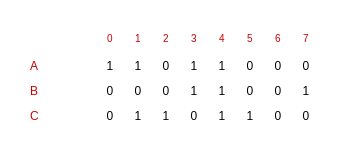
Numbering the bits from left to right, starting at zero, the following SETBIT commands
will create these bitmaps:
> SETBIT A 0 1
(integer) 0
> SETBIT A 1 1
(integer) 0
> SETBIT A 3 1
(integer) 0
> SETBIT A 4 1
(integer) 0
> GET A
"\xd8"
# Hex value: 0xd8 = 0b11011000

> SETBIT B 3 1
(integer) 0
> SETBIT B 4 1
(integer) 0
> SETBIT B 7 1
(integer) 0
> GET B
"\x19"
# Hex value: 0x19 = 0b00011001

> SETBIT C 1 1
(integer) 0
> SETBIT C 2 1
(integer) 0
> SETBIT C 4 1
(integer) 0
> SETBIT C 5 1
(integer) 0
> GET C
"l"
# ASCII "l" = hex 0x6c = 0b01101100
await client.setBit("A", 0, 1)
await client.setBit("A", 1, 1)
await client.setBit("A", 3, 1)
await client.setBit("A", 4, 1)

const res5 = await client.get("A")
console.log(res5.readUInt8(0).toString(2).padStart(8, '0'))
// >>> 11011000

await client.setBit("B", 3, 1)
await client.setBit("B", 4, 1)
await client.setBit("B", 7, 1)

const res6 = await client.get("B")
console.log(res6.readUInt8(0).toString(2).padStart(8, '0'))
// >>> 00011001

await client.setBit("C", 1, 1)
await client.setBit("C", 2, 1)
await client.setBit("C", 4, 1)
await client.setBit("C", 5, 1)

const res7 = await client.get("C")
console.log(res7.readUInt8(0).toString(2).padStart(8, '0'))
// >>> 01101100
        jedis.setbit("A", 0, true);
        jedis.setbit("A", 1, true);
        jedis.setbit("A", 3, true);
        jedis.setbit("A", 4, true);

        byte[] res5 = jedis.get("A".getBytes());
        System.out.println(String.format("%8s", Integer.toBinaryString(res5[0] & 0xFF)).replace(' ', '0'));
        // >>> 11011000

        jedis.setbit("B", 3, true);
        jedis.setbit("B", 4, true);
        jedis.setbit("B", 7, true);

        byte[] res6 = jedis.get("B".getBytes());
        System.out.println(String.format("%8s", Integer.toBinaryString(res6[0] & 0xFF)).replace(' ', '0'));
        // >>> 00011001

        jedis.setbit("C", 1, true);
        jedis.setbit("C", 2, true);
        jedis.setbit("C", 4, true);
        jedis.setbit("C", 5, true);

        byte[] res7 = jedis.get("C".getBytes());
        System.out.println(String.format("%8s", Integer.toBinaryString(res7[0] & 0xFF)).replace(' ', '0'));
        // >>> 01101100
            CompletableFuture<Void> setup = async.setbit("A", 0, 1).thenCompose(v -> async.setbit("A", 1, 1))
                    .thenCompose(v -> async.setbit("A", 3, 1)).thenCompose(v -> async.setbit("A", 4, 1))
                    .thenCompose(v -> async.setbit("B", 3, 1)).thenCompose(v -> async.setbit("B", 4, 1))
                    .thenCompose(v -> async.setbit("B", 7, 1)).thenCompose(v -> async.setbit("C", 1, 1))
                    .thenCompose(v -> async.setbit("C", 2, 1)).thenCompose(v -> async.setbit("C", 4, 1))
                    .thenCompose(v -> async.setbit("C", 5, 1)).thenCompose(v -> asyncBytes.get("A".getBytes()))
                    .thenApply(res -> {
                        byte b = (res != null && res.length > 0) ? res[0] : 0;
                        String bitsA = String.format("%8s", Integer.toBinaryString(b & 0xFF)).replace(' ', '0');
                        System.out.println(bitsA); // >>> 11011000
                        return bitsA;
                    }).thenCompose(v -> asyncBytes.get("B".getBytes())).thenApply(res -> {
                        byte b = (res != null && res.length > 0) ? res[0] : 0;
                        String bitsB = String.format("%8s", Integer.toBinaryString(b & 0xFF)).replace(' ', '0');
                        System.out.println(bitsB); // >>> 00011001
                        return bitsB;
                    })
                    // Print C
                    .thenCompose(v -> asyncBytes.get("C".getBytes())).thenAccept(res -> {
                        byte b = (res != null && res.length > 0) ? res[0] : 0;
                        String bitsC = String.format("%8s", Integer.toBinaryString(b & 0xFF)).replace(' ', '0');
                        System.out.println(bitsC); // >>> 01101100
                    }).toCompletableFuture();
            Mono<Void> setup = reactive.setbit("A", 0, 1).then(reactive.setbit("A", 1, 1)).then(reactive.setbit("A", 3, 1))
                    .then(reactive.setbit("A", 4, 1)).then(reactive.setbit("B", 3, 1)).then(reactive.setbit("B", 4, 1))
                    .then(reactive.setbit("B", 7, 1)).then(reactive.setbit("C", 1, 1)).then(reactive.setbit("C", 2, 1))
                    .then(reactive.setbit("C", 4, 1)).then(reactive.setbit("C", 5, 1)).then(reactiveBytes.get("A".getBytes()))
                    .doOnNext(res -> {
                        byte b = (res != null && res.length > 0) ? res[0] : 0;
                        String bitsA = String.format("%8s", Integer.toBinaryString(b & 0xFF)).replace(' ', '0');
                        System.out.println(bitsA); // >>> 11011000
                    }).then(reactiveBytes.get("B".getBytes())).doOnNext(res -> {
                        byte b = (res != null && res.length > 0) ? res[0] : 0;
                        String bitsB = String.format("%8s", Integer.toBinaryString(b & 0xFF)).replace(' ', '0');
                        System.out.println(bitsB); // >>> 00011001
                    }).then(reactiveBytes.get("C".getBytes())).doOnNext(res -> {
                        byte b = (res != null && res.length > 0) ? res[0] : 0;
                        String bitsC = String.format("%8s", Integer.toBinaryString(b & 0xFF)).replace(' ', '0');
                        System.out.println(bitsC); // >>> 01101100
                    }).then();
	rdb.SetBit(ctx, "A", 0, 1)
	rdb.SetBit(ctx, "A", 1, 1)
	rdb.SetBit(ctx, "A", 3, 1)
	rdb.SetBit(ctx, "A", 4, 1)
	ba, _ := rdb.Get(ctx, "A").Bytes()
	fmt.Printf("%08b\n", ba[0])
	// >>> 11011000

	rdb.SetBit(ctx, "B", 3, 1)
	rdb.SetBit(ctx, "B", 4, 1)
	rdb.SetBit(ctx, "B", 7, 1)
	bb, _ := rdb.Get(ctx, "B").Bytes()
	fmt.Printf("%08b\n", bb[0])
	// >>> 00011001

	rdb.SetBit(ctx, "C", 1, 1)
	rdb.SetBit(ctx, "C", 2, 1)
	rdb.SetBit(ctx, "C", 4, 1)
	rdb.SetBit(ctx, "C", 5, 1)
	bc, _ := rdb.Get(ctx, "C").Bytes()
	fmt.Printf("%08b\n", bc[0])
	// >>> 01101100
// Bitwise operations are not supported in NRedisStack.
        $r->setbit('A', 0, 1);
        $r->setbit('A', 1, 1);
        $r->setbit('A', 3, 1);
        $r->setbit('A', 4, 1);

        $res5 = $r->get('A');
        echo str_pad(decbin(ord($res5)), 8, '0', STR_PAD_LEFT) . PHP_EOL;
        // >>> 11011000

        $r->setbit('B', 3, 1);
        $r->setbit('B', 4, 1);
        $r->setbit('B', 7, 1);

        $res6 = $r->get('B');
        echo str_pad(decbin(ord($res6)), 8, '0', STR_PAD_LEFT) . PHP_EOL;
        // >>> 00011001

        $r->setbit('C', 1, 1);
        $r->setbit('C', 2, 1);
        $r->setbit('C', 4, 1);
        $r->setbit('C', 5, 1);

        $res7 = $r->get('C');
        echo str_pad(decbin(ord($res7)), 8, '0', STR_PAD_LEFT) . PHP_EOL;
        // >>> 01101100
AND
Set a bit in the destination key to 1 only if it is set in all the source keys.
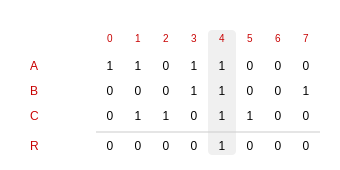
> BITOP AND R A B C
(integer) 1
> GET R
"\b"
# ASCII "\b" (backspace) = hex 0x08 = 0b00001000
await client.bitOp("AND", "R", ["A", "B", "C"])
const res8 = await client.get("R")
console.log(res8.readUInt8(0).toString(2).padStart(8, '0'))
// >>> 00001000
        jedis.bitop(BitOP.AND, "R", "A", "B", "C");
        byte[] res8 = jedis.get("R".getBytes());
        System.out.println(String.format("%8s", Integer.toBinaryString(res8[0] & 0xFF)).replace(' ', '0'));
        // >>> 00001000
            CompletableFuture<Void> andOp = async.bitopAnd("R", "A", "B", "C")
                    .thenCompose(len -> asyncBytes.get("R".getBytes())).thenAccept(res -> {
                        byte b = (res != null && res.length > 0) ? res[0] : 0;
                        String bits = String.format("%8s", Integer.toBinaryString(b & 0xFF)).replace(' ', '0');
                        System.out.println(bits); // >>> 00001000
                    }).toCompletableFuture();
            Mono<Void> andOp = reactive.bitopAnd("R", "A", "B", "C").then(reactiveBytes.get("R".getBytes())).doOnNext(res -> {
                byte b = (res != null && res.length > 0) ? res[0] : 0;
                String bits = String.format("%8s", Integer.toBinaryString(b & 0xFF)).replace(' ', '0');
                System.out.println(bits); // >>> 00001000
            }).then();
	rdb.BitOpAnd(ctx, "R", "A", "B", "C")
	br, _ := rdb.Get(ctx, "R").Bytes()
	fmt.Printf("%08b\n", br[0])
	// >>> 00001000
// Bitwise operations are not supported in NRedisStack.
        $r->bitop('AND', 'R', 'A', 'B', 'C');
        $res8 = $r->get('R');
        echo str_pad(decbin(ord($res8)), 8, '0', STR_PAD_LEFT) . PHP_EOL;
        // >>> 00001000
OR
Set a bit in the destination key to 1 if it is set in at least one of the source keys.
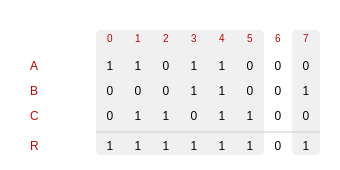
> BITOP OR R A B C
(integer) 1
> GET R
"\xfd"
# Hex value: 0xfd = 0b11111101
await client.bitOp("OR", "R", ["A", "B", "C"])
const res9 = await client.get("R")
console.log(res9.readUInt8(0).toString(2).padStart(8, '0'))
// >>> 11111101
        jedis.bitop(BitOP.OR, "R", "A", "B", "C");
        byte[] res9 = jedis.get("R".getBytes());
        System.out.println(String.format("%8s", Integer.toBinaryString(res9[0] & 0xFF)).replace(' ', '0'));
        // >>> 11111101
            CompletableFuture<Void> orOp = async.bitopOr("R", "A", "B", "C").thenCompose(len -> asyncBytes.get("R".getBytes()))
                    .thenAccept(res -> {
                        byte b = (res != null && res.length > 0) ? res[0] : 0;
                        String bits = String.format("%8s", Integer.toBinaryString(b & 0xFF)).replace(' ', '0');
                        System.out.println(bits); // >>> 11111101
                    }).toCompletableFuture();
            Mono<Void> orOp = reactive.bitopOr("R", "A", "B", "C").then(reactiveBytes.get("R".getBytes())).doOnNext(res -> {
                byte b = (res != null && res.length > 0) ? res[0] : 0;
                String bits = String.format("%8s", Integer.toBinaryString(b & 0xFF)).replace(' ', '0');
                System.out.println(bits); // >>> 11111101
            }).then();
	rdb.BitOpOr(ctx, "R", "A", "B", "C")
	br, _ = rdb.Get(ctx, "R").Bytes()
	fmt.Printf("%08b\n", br[0])
	// >>> 11111101
// Bitwise operations are not supported in NRedisStack.
        $r->bitop('OR', 'R', 'A', 'B', 'C');
        $res9 = $r->get('R');
        echo str_pad(decbin(ord($res9)), 8, '0', STR_PAD_LEFT) . PHP_EOL;
        // >>> 11111101
XOR
For two source keys, set a bit in the destination key to 1 if the value of the bit is different in the two keys. For three or more source keys, the result of XORing the first two keys is then XORed with the next key, and so forth.
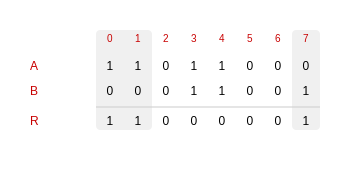
> BITOP XOR R A B
(integer) 1
> GET R
"\xc1"
# Hex value: 0xc1 = 0b11000001
await client.bitOp("XOR", "R", ["A", "B"]) // XOR uses two keys here
const res10 = await client.get("R")
console.log(res10.readUInt8(0).toString(2).padStart(8, '0'))
// >>> 11000001
        jedis.bitop(BitOP.XOR, "R", "A", "B");
        byte[] res10 = jedis.get("R".getBytes());
        System.out.println(String.format("%8s", Integer.toBinaryString(res10[0] & 0xFF)).replace(' ', '0'));
        // >>> 11000001
            CompletableFuture<Void> xorOp = async.bitopXor("R", "A", "B").thenCompose(len -> asyncBytes.get("R".getBytes()))
                    .thenAccept(res -> {
                        byte b = (res != null && res.length > 0) ? res[0] : 0;
                        String bits = String.format("%8s", Integer.toBinaryString(b & 0xFF)).replace(' ', '0');
                        System.out.println(bits); // >>> 11000001
                    }).toCompletableFuture();
            Mono<Void> xorOp = reactive.bitopXor("R", "A", "B").then(reactiveBytes.get("R".getBytes())).doOnNext(res -> {
                byte b = (res != null && res.length > 0) ? res[0] : 0;
                String bits = String.format("%8s", Integer.toBinaryString(b & 0xFF)).replace(' ', '0');
                System.out.println(bits); // >>> 11000001
            }).then();
	rdb.BitOpXor(ctx, "R", "A", "B")
	br, _ = rdb.Get(ctx, "R").Bytes()
	fmt.Printf("%08b\n", br[0])
	// >>> 11000001
// Bitwise operations are not supported in NRedisStack.
        $r->bitop('XOR', 'R', 'A', 'B');
        $res10 = $r->get('R');
        echo str_pad(decbin(ord($res10)), 8, '0', STR_PAD_LEFT) . PHP_EOL;
        // >>> 11000001
NOT
Set a bit in the destination key to 1 if it is not set in the source key (this is the only unary operator).
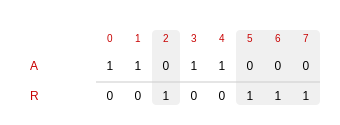
> BITOP NOT R A
(integer) 1
> GET R
"'"
# ASCII "'" (single quote) = hex 0x27 = 0b00100111
await client.bitOp("NOT", "R", "A")
const res11 = await client.get("R")
console.log(res11.readUInt8(0).toString(2).padStart(8, '0'))
// >>> 00100111
        jedis.bitop(BitOP.NOT, "R", "A");
        byte[] res11 = jedis.get("R".getBytes());
        System.out.println(String.format("%8s", Integer.toBinaryString(res11[0] & 0xFF)).replace(' ', '0'));
        // >>> 00100111
            CompletableFuture<Void> notOp = async.bitopNot("R", "A").thenCompose(len -> asyncBytes.get("R".getBytes()))
                    .thenAccept(res -> {
                        byte b = (res != null && res.length > 0) ? res[0] : 0;
                        String bits = String.format("%8s", Integer.toBinaryString(b & 0xFF)).replace(' ', '0');
                        System.out.println(bits); // >>> 00100111
                    }).toCompletableFuture();
            Mono<Void> notOp = reactive.bitopNot("R", "A").then(reactiveBytes.get("R".getBytes())).doOnNext(res -> {
                byte b = (res != null && res.length > 0) ? res[0] : 0;
                String bits = String.format("%8s", Integer.toBinaryString(b & 0xFF)).replace(' ', '0');
                System.out.println(bits); // >>> 00100111
            }).then();
	rdb.BitOpNot(ctx, "R", "A")
	br, _ = rdb.Get(ctx, "R").Bytes()
	fmt.Printf("%08b\n", br[0])
	// >>> 00100111
// Bitwise operations are not supported in NRedisStack.
        $r->bitop('NOT', 'R', 'A');
        $res11 = $r->get('R');
        echo str_pad(decbin(ord($res11)), 8, '0', STR_PAD_LEFT) . PHP_EOL;
        // >>> 00100111
DIFF
Set a bit in the destination key to 1 if it is set in the first source key, but not in any of the other source keys.
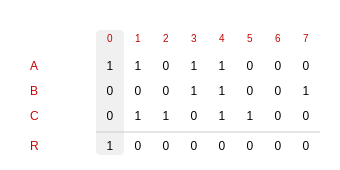
> BITOP DIFF R A B C
(integer) 1
> GET R
"\x80"
# Hex value: 0x80 = 0b10000000
await client.bitOp("DIFF", "R", ["A", "B", "C"])
const res12 = await client.get("R")
console.log(res12.readUInt8(0).toString(2).padStart(8, '0'))
// >>> 10000000
        jedis.bitop(BitOP.DIFF, "R", "A", "B", "C");
        byte[] res12 = jedis.get("R".getBytes());
        System.out.println(String.format("%8s", Integer.toBinaryString(res12[0] & 0xFF)).replace(' ', '0'));
        // >>> 10000000
            CompletableFuture<Void> diffOp = async.bitopDiff("R", "A", "B", "C")
                    .thenCompose(len -> asyncBytes.get("R".getBytes())).thenAccept(res -> {
                        byte b = (res != null && res.length > 0) ? res[0] : 0;
                        String bits = String.format("%8s", Integer.toBinaryString(b & 0xFF)).replace(' ', '0');
                        System.out.println(bits); // >>> 10000000
                    }).toCompletableFuture();
            Mono<Void> diffOp = reactive.bitopDiff("R", "A", "B", "C").then(reactiveBytes.get("R".getBytes())).doOnNext(res -> {
                byte b = (res != null && res.length > 0) ? res[0] : 0;
                String bits = String.format("%8s", Integer.toBinaryString(b & 0xFF)).replace(' ', '0');
                System.out.println(bits); // >>> 10000000
            }).then();
	rdb.BitOpDiff(ctx, "R", "A", "B", "C")
	br, _ = rdb.Get(ctx, "R").Bytes()
	fmt.Printf("%08b\n", br[0])
	// >>> 10000000
// Bitwise operations are not supported in NRedisStack.
        $r->bitop('DIFF', 'R', 'A', 'B', 'C');
        $res12 = $r->get('R');
        echo str_pad(decbin(ord($res12)), 8, '0', STR_PAD_LEFT) . PHP_EOL;
        // >>> 10000000
DIFF1
Set a bit in the destination key to 1 if it is not set in the first source key, but set in at least one of the other source keys.
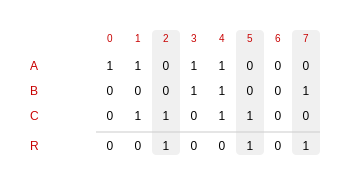
> BITOP DIFF1 R A B C
(integer) 1
> GET R
"%"
# ASCII "%" (percent) = hex 0x25 = 0b00100101
await client.bitOp("DIFF1", "R", ["A", "B", "C"])
const res13 = await client.get("R")
console.log(res13.readUInt8(0).toString(2).padStart(8, '0'))
// >>> 00100101
        jedis.bitop(BitOP.DIFF1, "R", "A", "B", "C");
        byte[] res13 = jedis.get("R".getBytes());
        System.out.println(String.format("%8s", Integer.toBinaryString(res13[0] & 0xFF)).replace(' ', '0'));
        // >>> 00100101
            CompletableFuture<Void> diff1Op = async.bitopDiff1("R", "A", "B", "C")
                    .thenCompose(len -> asyncBytes.get("R".getBytes())).thenAccept(res -> {
                        byte b = (res != null && res.length > 0) ? res[0] : 0;
                        String bits = String.format("%8s", Integer.toBinaryString(b & 0xFF)).replace(' ', '0');
                        System.out.println(bits); // >>> 00100101
                    }).toCompletableFuture();
            Mono<Void> diff1Op = reactive.bitopDiff1("R", "A", "B", "C").then(reactiveBytes.get("R".getBytes()))
                    .doOnNext(res -> {
                        byte b = (res != null && res.length > 0) ? res[0] : 0;
                        String bits = String.format("%8s", Integer.toBinaryString(b & 0xFF)).replace(' ', '0');
                        System.out.println(bits); // >>> 00100101
                    }).then();
	rdb.BitOpDiff1(ctx, "R", "A", "B", "C")
	br, _ = rdb.Get(ctx, "R").Bytes()
	fmt.Printf("%08b\n", br[0])
	// >>> 00100101
// Bitwise operations are not supported in NRedisStack.
        $r->bitop('DIFF1', 'R', 'A', 'B', 'C');
        $res13 = $r->get('R');
        echo str_pad(decbin(ord($res13)), 8, '0', STR_PAD_LEFT) . PHP_EOL;
        // >>> 00100101
ANDOR
Set a bit in the destination key to 1 if it is set in the first source key and also in at least one of the other source keys.
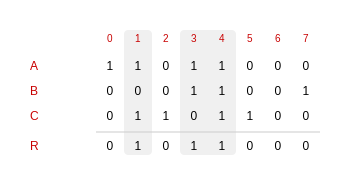
> BITOP ANDOR R A B C
(integer) 1
> GET R
"X"
# ASCII "X" = hex 0x58 = 0b01011000
await client.bitOp("ANDOR", "R", ["A", "B", "C"])
const res14 = await client.get("R")
console.log(res14.readUInt8(0).toString(2).padStart(8, '0'))
// >>> 01011000
        jedis.bitop(BitOP.ANDOR, "R", "A", "B", "C");
        byte[] res14 = jedis.get("R".getBytes());
        System.out.println(String.format("%8s", Integer.toBinaryString(res14[0] & 0xFF)).replace(' ', '0'));
        // >>> 01011000
            CompletableFuture<Void> andorOp = async.bitopAndor("R", "A", "B", "C")
                    .thenCompose(len -> asyncBytes.get("R".getBytes())).thenAccept(res -> {
                        byte b = (res != null && res.length > 0) ? res[0] : 0;
                        String bits = String.format("%8s", Integer.toBinaryString(b & 0xFF)).replace(' ', '0');
                        System.out.println(bits); // >>> 01011000
                    }).toCompletableFuture();
            Mono<Void> andorOp = reactive.bitopAndor("R", "A", "B", "C").then(reactiveBytes.get("R".getBytes()))
                    .doOnNext(res -> {
                        byte b = (res != null && res.length > 0) ? res[0] : 0;
                        String bits = String.format("%8s", Integer.toBinaryString(b & 0xFF)).replace(' ', '0');
                        System.out.println(bits); // >>> 01011000
                    }).then();
	rdb.BitOpAndOr(ctx, "R", "A", "B", "C")
	br, _ = rdb.Get(ctx, "R").Bytes()
	fmt.Printf("%08b\n", br[0])
	// >>> 01011000
// Bitwise operations are not supported in NRedisStack.
        $r->bitop('ANDOR', 'R', 'A', 'B', 'C');
        $res14 = $r->get('R');
        echo str_pad(decbin(ord($res14)), 8, '0', STR_PAD_LEFT) . PHP_EOL;
        // >>> 01011000
ONE
Set a bit in the destination key to 1 if it is set in exactly one of the source keys.
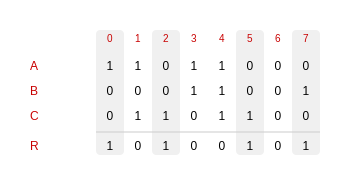
> BITOP ONE R A B C
(integer) 1
> GET R
"\xa5"
# Hex value: 0xa5 = 0b10100101
await client.bitOp("ONE", "R", ["A", "B", "C"])
const res15 = await client.get("R")
console.log(res15.readUInt8(0).toString(2).padStart(8, '0'))
// >>> 10100101
        jedis.bitop(BitOP.ONE, "R", "A", "B", "C");
        byte[] res15 = jedis.get("R".getBytes());
        System.out.println(String.format("%8s", Integer.toBinaryString(res15[0] & 0xFF)).replace(' ', '0'));
        // >>> 10100101
            CompletableFuture<Void> oneOp = async.bitopOne("R", "A", "B", "C")
                    .thenCompose(len -> asyncBytes.get("R".getBytes())).thenAccept(res -> {
                        byte b = (res != null && res.length > 0) ? res[0] : 0;
                        String bits = String.format("%8s", Integer.toBinaryString(b & 0xFF)).replace(' ', '0');
                        System.out.println(bits); // >>> 10100101
                    }).toCompletableFuture();
            Mono<Void> oneOp = reactive.bitopOne("R", "A", "B", "C").then(reactiveBytes.get("R".getBytes())).doOnNext(res -> {
                byte b = (res != null && res.length > 0) ? res[0] : 0;
                String bits = String.format("%8s", Integer.toBinaryString(b & 0xFF)).replace(' ', '0');
                System.out.println(bits); // >>> 10100101
            }).then();
	rdb.BitOpOne(ctx, "R", "A", "B", "C")
	br, _ = rdb.Get(ctx, "R").Bytes()
	fmt.Printf("%08b\n", br[0])
	// >>> 10100101
// Bitwise operations are not supported in NRedisStack.
        $r->bitop('ONE', 'R', 'A', 'B', 'C');
        $res15 = $r->get('R');
        echo str_pad(decbin(ord($res15)), 8, '0', STR_PAD_LEFT) . PHP_EOL;
        // >>> 10100101
Roaring-compressed bitmaps
A string-backed bitmap allocates bytes through the highest addressed bit. This is efficient for dense bitmaps, but a small number of set bits spread across a large range can leave most of the string filled with zeros.
A native Roaring bitmap stores set-bit positions in compressed containers while
preserving the same logical byte length and bitmap command behavior. This can
reduce memory use for sparse bitmaps, such as membership or event indexes over
a large integer ID space. Long runs of set bits can also compress well. Small
bitmaps and irregular dense bitmaps can use as much or more memory than strings
because compressed containers have their own metadata. Compare
MEMORY USAGE and command latency
with representative data before enabling Roaring bitmaps for a workload.
Enable Roaring bitmap creation
The bitmap-default-roaring configuration parameter is no by default. Set it
to yes in your Redis configuration file, or enable it at runtime with
CONFIG SET:
> CONFIG SET bitmap-default-roaring yes
OK
> SETBIT events:2026-07 1000000 1
(integer) 0
> TYPE events:2026-07
bitmap
> OBJECT ENCODING events:2026-07
"bitmap-roaring"
> BITCOUNT events:2026-07
(integer) 1
> GET events:2026-07
(error) WRONGTYPE Operation against a key holding the wrong kind of value
Changing the configuration does not immediately convert existing keys:
- With
bitmap-default-roaring no,SETBITand write forms ofBITFIELDcreate string-backed bitmaps. Existing native bitmaps remain native and continue to accept bitmap commands. - With
bitmap-default-roaring yes, those commands create missing keys as native bitmaps. A write to an existing string converts the complete string to a native bitmap before applying the write. The conversion preserves its bits, logical length, expiration, and key metadata. - Read-only bitmap commands don't change a string's stored representation.
SETalso continues to create a string, regardless of this setting. BITOPstores a non-empty result as a native destination when the setting isyes. When the setting isno, its destination is native if at least one source is native; an operation with only string sources produces a string destination.
There is no command that converts a native bitmap back to a string while
preserving its contents. SET can replace a native bitmap with a new string
value, as it can replace any other Redis type.
Command and type compatibility
SETBIT,
GETBIT,
BITCOUNT,
BITPOS,
BITOP,
BITFIELD, and
BITFIELD_RO work with both
representations and keep their existing reply and range semantics. Setting a
zero bit beyond the current logical end extends either representation, and
bits between the old and new ends read as zero. The read-only commands in this
list accept strings and native bitmaps regardless of bitmap-default-roaring.
BITRANGEINTARRAY also reads both
representations with either setting. It reads strings directly without conversion
and leaves their bytes, type, and expiration unchanged.
The representations are intentionally visible to clients:
TYPEreturnsstringfor a string-backed bitmap andbitmapfor a native one.OBJECT ENCODINGreturnsbitmap-roaringfor a native bitmap.- Generic string commands such as
GET,STRLEN,GETRANGE, andAPPENDreturn a wrong-type error for a native bitmap. Applications that read or modify bitmap bytes with string commands should keep using the default string representation.
Both representations limit accepted bit offsets according to
proto-max-bulk-len. An existing bitmap can have a longer logical length if it
was created or loaded while that limit was higher. BITOP operates on the complete logical length of such a
source. In particular, BITOP NOT can allocate a dense result of that length,
so account for its memory cost before lowering the limit.
Retrieve matching bit offsets
BITRANGEINTARRAY returns set-bit offsets
in ascending order, or clear-bit offsets with ZEROS:
BITRANGEINTARRAY key start end [BYTE|BIT] [LIMIT count] [ZEROS].
The key, start, and end are required. Ranges follow BITCOUNT: byte offsets by
default, bit offsets with BIT, and negative indexes count from the end.
Returned offsets are always bit offsets.
> CONFIG SET bitmap-default-roaring yes
OK
> SETBIT members 1 1
(integer) 0
> SETBIT members 7 1
(integer) 0
> SETBIT members 9 1
(integer) 0
> SETBIT members 30 1
(integer) 0
> BITRANGEINTARRAY members 0 -1
1) (integer) 1
2) (integer) 7
3) (integer) 9
4) (integer) 30
> BITRANGEINTARRAY members 28 31 BIT ZEROS
1) (integer) 28
2) (integer) 29
3) (integer) 31
> BITRANGEINTARRAY members 0 -1 BIT LIMIT 2
1) (integer) 1
2) (integer) 7
> BITRANGEINTARRAY members 8 -1 BIT LIMIT 2
1) (integer) 9
2) (integer) 30
> BITRANGEINTARRAY members 0 -1 BYTE LIMIT 1
1) (integer) 1
2) (integer) 7
> BITRANGEINTARRAY members 1 -1 BYTE LIMIT 1
1) (integer) 9
r.config_set("bitmap-default-roaring", "yes")

for offset in (1, 7, 9, 30):
    r.setbit("members", offset, 1)

res1 = r.bitrangeintarray("members", 0, -1)
print(res1)  # >>> [1, 7, 9, 30]

res2 = r.bitrangeintarray("members", 28, 31, mode="BIT", zeros=True)
print(res2)  # >>> [28, 29, 31]

res3 = r.bitrangeintarray("members", 0, -1, mode="BIT", limit=2)
print(res3)  # >>> [1, 7]

res4 = r.bitrangeintarray("members", 8, -1, mode="BIT", limit=2)
print(res4)  # >>> [9, 30]

res5 = r.bitrangeintarray("members", 0, -1, mode="BYTE", limit=1)
print(res5)  # >>> [1, 7]

res6 = r.bitrangeintarray("members", 1, -1, mode="BYTE", limit=1)
print(res6)  # >>> [9]
import redis

r = redis.Redis(decode_responses=True)


r.config_set("bitmap-default-roaring", "yes")

for offset in (1, 7, 9, 30):
    r.setbit("members", offset, 1)

res1 = r.bitrangeintarray("members", 0, -1)
print(res1)  # >>> [1, 7, 9, 30]

res2 = r.bitrangeintarray("members", 28, 31, mode="BIT", zeros=True)
print(res2)  # >>> [28, 29, 31]

res3 = r.bitrangeintarray("members", 0, -1, mode="BIT", limit=2)
print(res3)  # >>> [1, 7]

res4 = r.bitrangeintarray("members", 8, -1, mode="BIT", limit=2)
print(res4)  # >>> [9, 30]

res5 = r.bitrangeintarray("members", 0, -1, mode="BYTE", limit=1)
print(res5)  # >>> [1, 7]

res6 = r.bitrangeintarray("members", 1, -1, mode="BYTE", limit=1)
print(res6)  # >>> [9]
	rdb.ConfigSet(ctx, "bitmap-default-roaring", "yes")

	for _, offset := range []int64{1, 7, 9, 30} {
		rdb.SetBit(ctx, "members", offset, 1)
	}

	two, one := int64(2), int64(1)

	res1, err := rdb.BitRangeIntArray(ctx, "members", 0, -1).Result()

	if err != nil {
		panic(err)
	}

	fmt.Println(res1) // >>> [1 7 9 30]

	res2, err := rdb.BitRangeIntArrayWithOptions(ctx, "members", 28, 31,
		&redis.BitRangeIntArrayOptions{Unit: "BIT", Zeros: true},
	).Result()

	if err != nil {
		panic(err)
	}

	fmt.Println(res2) // >>> [28 29 31]

	res3, err := rdb.BitRangeIntArrayWithOptions(ctx, "members", 0, -1,
		&redis.BitRangeIntArrayOptions{Unit: "BIT", Limit: &two},
	).Result()

	if err != nil {
		panic(err)
	}

	fmt.Println(res3) // >>> [1 7]

	res4, err := rdb.BitRangeIntArrayWithOptions(ctx, "members", 8, -1,
		&redis.BitRangeIntArrayOptions{Unit: "BIT", Limit: &two},
	).Result()

	if err != nil {
		panic(err)
	}

	fmt.Println(res4) // >>> [9 30]

	res5, err := rdb.BitRangeIntArrayWithOptions(ctx, "members", 0, -1,
		&redis.BitRangeIntArrayOptions{Unit: "BYTE", Limit: &one},
	).Result()

	if err != nil {
		panic(err)
	}

	fmt.Println(res5) // >>> [1 7]

	res6, err := rdb.BitRangeIntArrayWithOptions(ctx, "members", 1, -1,
		&redis.BitRangeIntArrayOptions{Unit: "BYTE", Limit: &one},
	).Result()

	if err != nil {
		panic(err)
	}

	fmt.Println(res6) // >>> [9]
Both set-bit and clear-bit enumeration stay within the value's logical length.
Missing keys, empty values, and empty ranges return empty arrays.
Strings and native bitmaps work with either
bitmap-default-roaring setting; other types return WRONGTYPE.
Keep the same end, unit, and ZEROS setting across pages.
For pagination, BIT LIMIT count returns at most count offsets. Resume at
the last returned offset + 1. BYTE LIMIT count finishes the byte containing
the countth match, so it can return up to seven extra offsets. Resume at
floor(last offset / 8) + 1. LIMIT 0 returns an empty array; negative counts
are errors. Stop when a page contains fewer than count results. A full page
can be followed by a final empty page.
Separate calls do not share a snapshot, so writes can change remaining matches.
Strings are scanned in place over the requested range, without conversion.
LIMIT stops the scan when the page is complete. Response size grows with the
number of offsets; client output-buffer limits still apply.
See the command reference for range and pagination details, and Integer-array command benchmarks for benchmark methodology and historical comparisons against redis-roaring.
Persistence and replication
RDB snapshots, DUMP and
RESTORE, AOF rewrites, and replication
preserve the native bitmap type. When a write creates or converts a native
bitmap because bitmap-default-roaring is yes, Redis propagates the
representation transition explicitly so replicas produce the same type even if
their local setting differs.
For SETBIT and writing BITFIELD operations, Redis records the representation
transition as BITCONVERT before the bitmap
command. For BITOP, Redis uses BITROAROP to
preserve a native result selected by bitmap-default-roaring.
These commands are reserved for internal replication and AOF loading. Ordinary
clients cannot invoke them or discover them through COMMAND introspection; direct calls
return ERR unknown command. Applications should use the public bitmap
commands and bitmap-default-roaring to create and modify native bitmaps.
Before enabling Roaring bitmap creation on a primary, upgrade all replicas and any Redis server that will load its RDB, DUMP payloads, or AOF. Older versions don't understand the native bitmap persistence format.
Split bitmaps into multiple keys
Bitmaps are trivial to split into multiple keys, for example for
the sake of sharding the data set and because in general it is better to
avoid working with huge keys. To split a bitmap across different keys
instead of setting all the bits into a key, a trivial strategy is just
to store M bits per key and obtain the key name with bit-number/M and
the Nth bit to address inside the key with bit-number MOD M.
Performance
SETBIT and GETBIT are O(1).
BITOP is O(n), where n is the logical
length of the longest source bitmap.
For Roaring bitmaps, actual CPU and memory costs also depend on the distribution
of set bits and the resulting compressed containers. In particular, BITOP NOT
can turn a sparse bitmap into a dense result. Benchmark representative data and
operations when choosing a representation.
Learn more
- Redis Bitmaps Explained teaches you how to use bitmaps for map exploration in an online game.
- Redis University's RU101 covers Redis bitmaps in detail.