Tutorial
How to build a Real-Time Leaderboard app Using Redis
February 25, 20264 minute read

TL;DR:Use Redis Sorted Sets to build a real-time leaderboard. Store scores withZADD, retrieve rankings withZREVRANGE, and look up a player's rank withZREVRANK. Redis handles millions of score updates per second with O(log N) complexity, making it the go-to data store for ranking systems.
#What you'll learn
- Why Redis Sorted Sets are the best fit for real-time leaderboards
- How to store and update player scores with
ZADDandZINCRBY - How to query rankings, top-N lists, and score ranges with
ZREVRANGE,ZRANK, andZCOUNT - How to run a complete leaderboard demo application with Docker
#Prerequisites
- Docker and Docker Compose installed
- Basic familiarity with Redis commands
- Java JDK and Gradle (for running the backend outside Docker)
#Why use Redis for leaderboards?
The concept of a leaderboard—a scoreboard showing the ranked names and current scores of the leading competitors—is essential to the world of computer gaming, but leaderboards are now about more than just games. They are about gamification, a broader implementation that can include any group of people with a common goal (coworkers, students, sales groups, fitness groups, volunteers, and so on).
Leaderboards can encourage healthy competition in a group by openly displaying the current ranking of each group member. They also provide a clear way to view the ongoing achievements of the entire team as members move towards a goal.
Redis Sorted Sets are purpose-built for this use case. Every member in a sorted set is associated with a floating-point score, and Redis keeps the set ordered by score at all times. This gives you:
- O(log N) inserts and updates — adding or changing a score is nearly instant, even with millions of entries.
- O(log N + M) range queries — fetching the top 10, bottom 10, or any slice of the leaderboard is fast regardless of total size.
- Atomic score increments —
ZINCRBYlets you adjust scores without read-modify-write race conditions. - Built-in ranking —
ZREVRANKreturns a player's position without scanning the entire set.
These properties make Redis the go-to choice for real-time ranking systems in multiplayer games, sales dashboards, fitness apps, and anywhere else you need live standings.
#How do you set up the leaderboard project?
#Step 1. Clone the repository
#Step 2. Run Docker Compose
#Step 3. Verify the containers are running
#Step 4. Configure environment variables
Copy
.env.example to create .env and provide the values for your environment:If you're using Redis Cloud, supply the database endpoint, password, port, and database name instead.
#How do you build and run the backend?
#Step 5. Install dependencies
- Install Gradle by following the official Gradle installation guide.
- Install JDK by following the Oracle JDK installation guide.
Load the environment variables:
#Step 6. Generate the Gradle wrapper
Expected output:
#Step 7. Build the project
#Step 8. Run the application
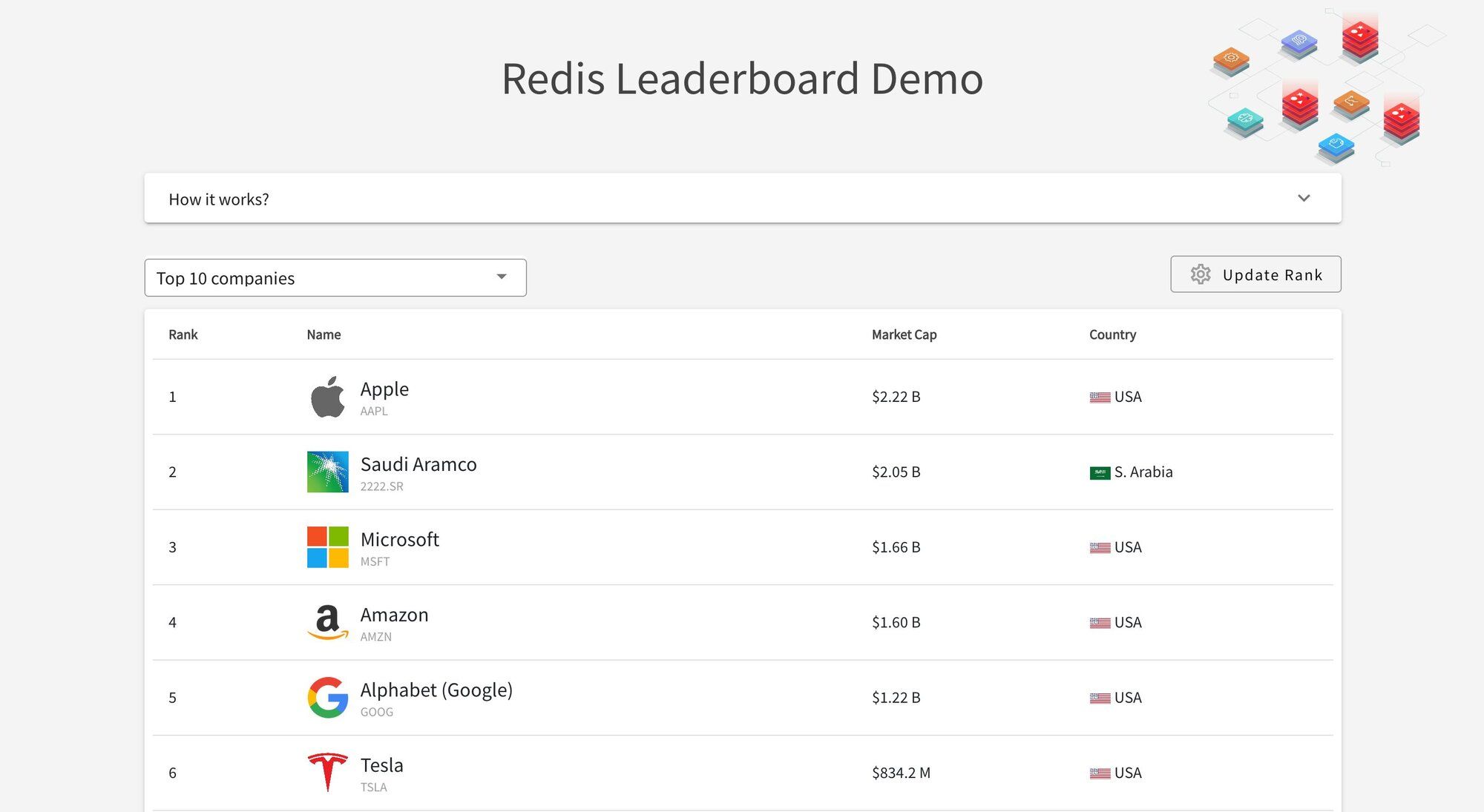
Once the Spring Boot application starts, you can access the leaderboard at
http://localhost:5000.#How does the Redis data model work?
#How is leaderboard data stored?
Company details like market cap and country are stored in a Redis Hash:
Rankings are maintained in a Sorted Set where the score represents the market cap:
#How do you query the leaderboard?
Top 10 companies:
All companies:
Bottom 10 companies:
Between rank 10 and 15:
Show ranks of specific companies:
#How do you update scores in real time?
Adding 1 billion to a company's market cap:
Reducing 1 billion from a company's market cap:
#How do you filter by score range?
Companies between 500 billion and 1 trillion:
Companies over a trillion:
#Next steps
- Unreal Engine integration — Learn how to connect a Redis leaderboard to a game engine in Creating a Real-time Leaderboard with UE5 and Redis.
- Try other languages — The same leaderboard pattern works across stacks:
- Learn more about Sorted Sets — See the Redis Sorted Sets documentation for the full command reference.