Tutorial
Using Redis OM Spring to work with JSON and Hashes in Java
February 26, 202629 minute read

TL;DR:Redis OM Spring is a client library that lets you map Java objects directly to Redis hashes and JSON documents using familiar Spring Data annotations. It builds on Spring Data Redis to add search indexing, dynamic query generation, and repository patterns powered by Redis' native Search and Query engine.
#Introduction
The aim of the Redis OM family of projects is to provide high-level abstractions idiomatically implemented for your language/platform of choice. We currently cater to the Node.js, Python, .NET and Spring communities.
The Spring Framework is the leading full-stack Java/JEE application framework and Redis OM Spring (ROMS) goal is to enable developers to easily add the power of Redis to their Spring Boot applications.
Redis OM Spring provides powerful repository and custom object-mapping abstractions built on top of the amazing Spring Data Redis (SDR) framework.
#What you'll learn
- How to map Java objects to Redis hashes using
@RedisHashand@EnableRedisEnhancedRepositories - How to map Java objects to Redis JSON documents using
@Documentand@EnableRedisDocumentRepositories - How to use
@Indexedand@Searchableannotations for search indexing - How to create dynamic repository queries that translate to Redis Search commands
- How to perform geospatial queries and native Redis searches
#Prerequisites
- JDK 11 or later
- Spring Boot 2.6+
- Gradle 4+ or Maven 3.2+
- Docker / Docker Compose
- A running Redis instance (the tutorial includes a Docker Compose file)
The current preview release provides all of SDRs capabilities plus:
- A
@Documentannotation to map Spring Data models to Redis JSON documents - Enhancements to SDR's
@RedisHashvia@EnableRedisEnhancedRepositoriesto:- use Redis' native search engine (Redis Search) for secondary indexing
- use ULID indentifiers for
@Idannotated fields
RedisDocumentRepositorywith automatic implementation of Repository interfaces for complex querying capabilities using@EnableRedisDocumentRepositories- Declarative Search Indices via
@Indexable - Full-text Search Indices via
@Searchable @Bloomannotation to determine very quickly, and with high degree of certainty, whether a value is in a collection
#How do you map Java objects to Redis hashes with Redis OM Spring?
The Spring Data Redis (SDR) framework makes it easy to write Spring applications that use the Redis as a store for Java objects (POJOs) by eliminating the redundant tasks and boilerplate code required for interacting with the store through Spring's excellent infrastructure support.
Redis OM Spring, builds on top of SDR to improve and optimize the interaction with Redis by leveraging Redis' rich module ecosystem. For Java objects mapped with SDR's
@RedisHash annotation we enhance the object-mapping by:- Eliminating the need for client-side maintained secondary indices and instead using Redis' native Search and Query engine.
- Implementing dynamic repository finders with fast and flexible querying
- Using ULIDs instead of traditional UUIDs for performance, readability and interoperability
In this section, you will build an application that stores
User POJOs (Plain Old Java Objects) as Redis hashes.#Starting with Spring Initializr
We'll start by creating a base Spring Boot application using the Spring Initializr. You can use this pre-initialized project and click Generate to download a ZIP file. This project is configured to fit the examples in this tutorial.
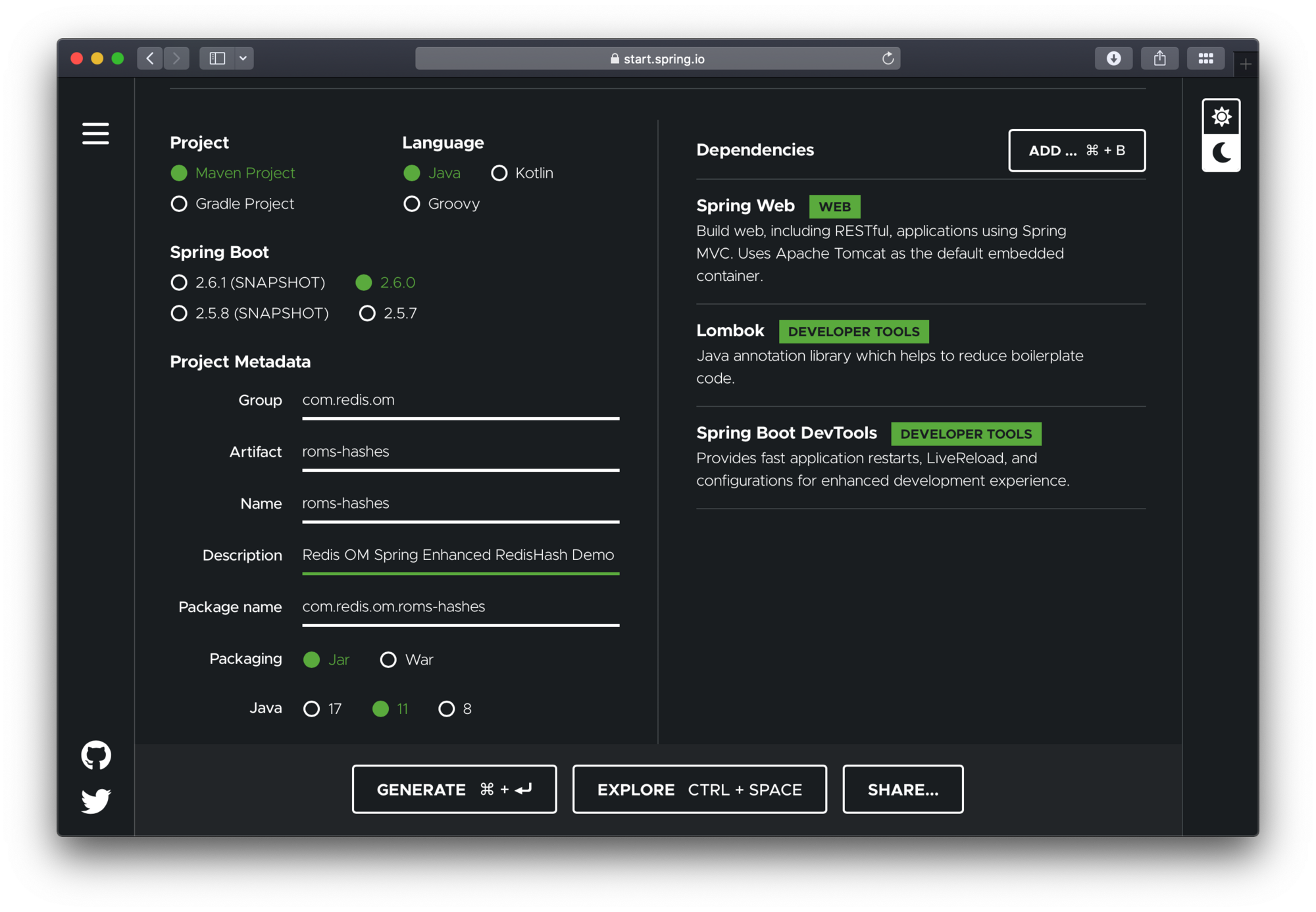
To configure the project:
- Navigate to https://start.spring.io. This service pulls in all the dependencies you need for an application and does most of the setup for you.
- Choose either Gradle or Maven and the language you want to use. This guide assumes that you chose Java.
- Click Dependencies and select Spring Web, Lombok and Spring Boot DevTools.
- Click Generate.
- Download the resulting ZIP file (
roms-hashes.zip), which is an archive of a web application that is configured with your choices.
The dependencies included are:
- Spring Web: Build web/RESTful applications using Spring MVC. It will allow us to expose our app as a web service.
- Lombok: Java annotation library which helps to reduce boilerplate code.
- Spring Boot DevTools: Provides fast application restarts, LiveReload, and configurations for enhanced development experience.
NOTEIf your IDE has the Spring Initializr integration, you can complete this process from your IDE.
NOTEYou can also fork the project from Github and open it in your IDE or other editor.
#Adding Redis OM Spring
#Maven
To use Redis OM Spring, open the
pom.xml file and add the Redis OM Spring Maven dependency to the pom.xml file dependencies element:NOTEPlease check the official Redis OM Spring GitHub repository for the latest version information
#Gradle
If using gradle add the dependency as follows:
#How do you enable Redis enhanced repositories?
The generated application contains a single Java file, the
@SpringBootApplication annotated main application. To enable Spring Data Redis repositories, we also need to annotate the main or the configuration class with @EnableRedisEnhancedRepositories as well as the @Configuration annotation.#Launch Redis
The docker compose YAML file below can get started quickly. You can place at the root folder of your project and name it
docker-compose.yml:To launch the docker compose application, on the command line (or via Docker Desktop), clone this repository and run (from the root folder):
Let's also launch an instance of the Redis CLI so that we can spy on what ROMS is doing. To do so we'll launch Redis in monitor mode:
#Domain Entity
We'll have a single class in our application, the
User class. We'll use lombok to avoid having to create getters and setters. We'll use the lombok annotations @Data, @RequiredArgsConstructor and @AllArgsConstructor.Finally, to mark the class as a JSON document, we use the
@Document annotation.We use Spring Data Redis
@RedisHash annotation. The property named id is annotated with org.springframework.data.annotation.Id. Those two items are responsible for creating the actual key used to persist the Hash in Redis.The
User class has a firstName, middleName and lastName, as well as an email property.#Pre-populating the Database
Let's add a few
User POJOs to Redis on application start-up by modify the RomsHashesApplication class to include the newly created UserRepository using the @Autowired annotation. Then we'll use a CommandLineRunner @Bean annotated method to create four User POJOs and save them to the database.In the
CommandLineRunner we take the following steps:- Use the repository
deleteAllmethod to clear the database (be careful with this is production! 🙀) - Create four
Userinstances; we'll use the four band members of Rage Against the Machine. - Use the repository
saveAllmethod to save allUserPOJOs in bulk.
Since we are using Spring Boot DevTools, if you already had the application running, it should have restarted/reloaded. If not, use the
mvn command to launch the application:If every goes as expected, you should see the familiar Spring Boot banner fly by:
#How does Redis OM Spring store hash data?
If you were watching the Redis CLI monitor you should have seen a barrage of output fly by. Let's break it down and inspect it using another Redis CLI so as to understand the inner workings of the system.
#Redis search indexes
At the top you should have seen the
FT.CREATE command which using the annotations in our POJO determined an index recipe. Since our POJO is annotated with @Document we get an index ON JSON against any keys starting with com.redis.om.documents.domain.Company: (which is the default key prefix for Spring Data Redis and also for ROMS):ROMS uses the POJO fields annotated with
@Indexed or @Searchable to build the index schema. In the case of the User POJO we have the fields firstName, middleName, lastName and email are all annotated as "indexable", meaning that we can do exact searches over these fields.Spring Data Redis creates a SET to maintain primary keys for our entities, ROMS inherits this functionality from SDR. The
DEL command following the index creation is triggered because of the call to userRepo.deleteAll(); in our data loading method. If we had any saved objects already we would also see calls to delete those individual instances.For each of the
User POJO we should see a sequence of REDIS commands like:First SDR checks whether the object already exists in the Redis SET of primary keys using the
SISMEMBER command. Then, a DEL is issued to remove the Hash, following by a HMSET to write the new or udpated Hash. Finally, the id property of the object is addded to the primary keys set using the SADD command.Let's inspect the data using the Redis CLI. We'll start by listing the keys prefixed with
com.redis.om.hashes.domain.User:We have 5 matches, one for each of the
User POJOs created plus the Redis SET for the primary keys. Let's inspect some of the values.Let's check what type of data structure is stored in the
com.redis.om.documents.domain.Company key:Knowing that it is a Redis SET, let inspect it's contents using the
SMEMBERS command:The set contains all the Ids of our Users. Now, let's investigate the
com.redis.om.documents.domain.Company:01FNRW9V98CYQMV2YAB7M4KFGQ key:The Redis datatype stored is a
hash (a Redis Hash). Let's check its contents using the HGETALL command:#How do you query Redis hashes with repository methods?
ROMS most compelling feature is the ability to create repository implementations automatically, at runtime, from a repository interface.
Let's start with a simple method declaration in
UserRepository that will find a unique instance of User given their lastname.ROMS uses the method name, parameters and return type to determine the correct query to generate and how to package and return a result.
findOneByLastName return an Optional of User this tells ROMS to return a null payload if the entity is not found. The findOne part also reinforces that even if there are multiple results we are only interested in getting one. ROMS parses the method name to detemined the number of expected parameters, the ByLastName portion of the method tell us we expect 1 single parameter named lastName.#Testing Controller
Let's create a REST controller to test the
findOneByLastName method. Create the UserController under the package com.redis.om.hashes.controllers as shown:In our controller, we include our
UserRepository and create simple method to respond to a GET request at /api/users/name/{lastName} where {lastName} would be the string parameter we are passing as the lastName to find.Let's test the endpoint using CURL and passing the exact company name
Redis:Let's format the resulting JSON:
Inspecting the Redis CLI MONITOR we should see the query issued:
Let say that we wanted to find
Users by the combination of lastName and firstName, we could add a query declaration to the repository interface like:In this case method
findByFirstNameAndLastName is parsed and the And keyword is used to determine that the method is expecting 2 parameters; firstName and lastName.To test it we could add the following to our controller:
Using CURL to test we
Formatting the resulting JSON we can see the record for
Brad Wilk is returned as the only element of the JSON Array result:Back on the Redis CLI monitor we can see the query generated by our repository method:
Redis OM Spring, extends Spring Data Redis with search capabilities that rival the flexibility of JPA queries by using Redis' native Search and Query engine.
#How do you map Java objects to Redis JSON with Redis OM Spring?
The JSON format has become ubiquitous as a data exchange format as well as a storage format, with many traditional relational databases now supporting JSON as a native format as well as a several document-oriented databases like CouchDB and MongoDB gaining in popularity. JSON as a data format eliminates the rigidity of relational database schemas, allow apps to evolve more naturally.
But did you know that Redis is a full-fledge document database supporting JSON natively? Redis supports JSON as a native Redis datatype and also supports indexing and searching. In this section we'll build a simple Document application using Redis OM Spring.
In this section, you will build an application that stores
Company POJOs (Plain Old Java Objects) as JSON documents in Redis.#Starting with Spring Initializr
We'll start by creating a base Spring Boot application using the Spring Initializr. You can use this pre-initialized project and click Generate to download a ZIP file. This project is configured to fit the examples in this tutorial.
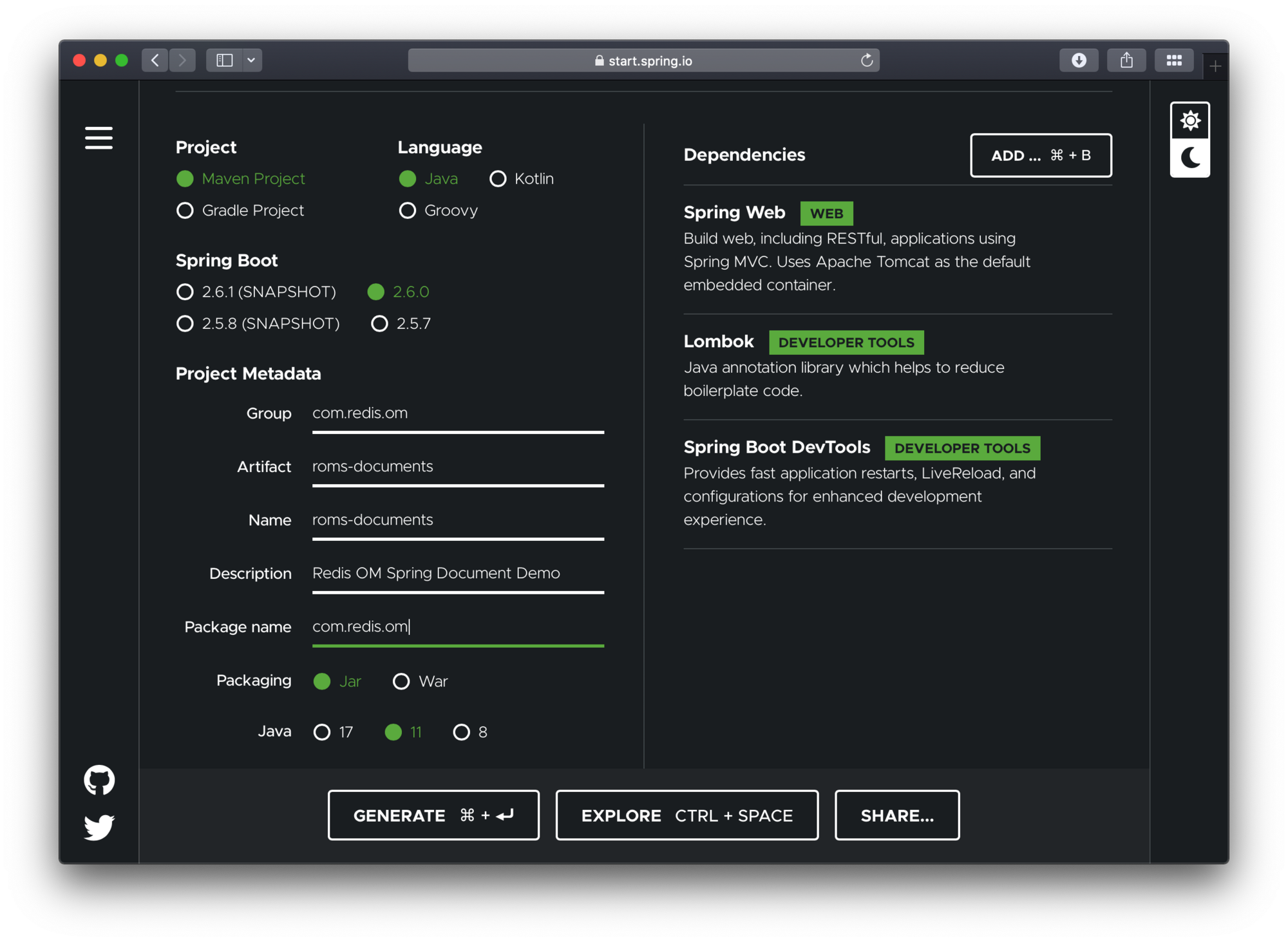
To configure the project:
- Navigate to https://start.spring.io. This service pulls in all the dependencies you need for an application and does most of the setup for you.
- Choose either Gradle or Maven and the language you want to use. This guide assumes that you chose Java.
- Click Dependencies and select Spring Web, Lombok and Spring Boot DevTools.
- Click Generate.
- Download the resulting ZIP file (
roms-documents.zip), which is an archive of a web application that is configured with your choices.
The dependencies included are:
- Spring Web: Build web/RESTful applications using Spring MVC. It will allow us to expose our app as a web service.
- Lombok: Java annotation library which helps to reduce boilerplate code.
- Spring Boot DevTools: Provides fast application restarts, LiveReload, and configurations for enhanced development experience.
NoteIf your IDE has the Spring Initializr integration, you can complete this process from your IDE.
NoteYou can also fork the project from Github and open it in your IDE or other editor.
#Adding Redis OM Spring
#Maven
To use Redis OM Spring, open the
pom.xml file and add the Redis OM Spring Maven dependency to the pom.xml file dependencies element:NotePlease check the official Redis OM Spring GitHub repository for the latest version information
#Gradle
If using gradle add the dependency as follows:
#How do you enable Redis document repositories?
The generated app contains a single file, the
@SpringBootApplications annotated main application:To enable the Redis Document Repositories we add the
@EnableRedisDocumentRepositories which will allow us to use the RedisDocumentRepository class as the type of our Data Repositories.#Launch Redis
The docker compose YAML file below can get started quickly. You can place at the root folder of your project and name it
docker-compose.yml:To launch the docker compose application, on the command line (or via Docker Desktop), clone this repository and run (from the root folder):
Let's also launch an instance of the Redis CLI so that we can spy on what ROMS is doing. To do so we'll launch Redis in monitor mode:
#Domain entity
We'll have a single class in our application, the
Company class. We'll use lombok to avoid having to create getters and setters. We'll use the lombok annotations @Data, @RequiredArgsConstructor and @AllArgsConstructor.Finally, to mark the class as a JSON document, we use the
@Document annotation.Note that it has a
@Document annotation on its type and a property named id that is annotated with org.springframework.data.annotation.Id. Those two items are responsible for creating the actual key used to persist the JSON document in Redis.Our company POJO consists of a
name and url String properties, a Set of Strings representing a set of tags, a org.springframework.data.geo.Point representing a Geo location for our company's headquarters, two Integers for the numberOfEmployees and the yearFounded and a boolean as to whether the company is publiclyListed.#Redis OM Spring document repositories
Working with Redis OM Spring document repositories lets you seamlessly convert and store domain objects in Redis JSON keys, apply custom mapping strategies, and use secondary indexes maintained by Redis.
To create the component responsible for storage and retrieval, we need to define a repository interface. The
RedisDocumentRepository extends the familiar PagingAndSortingRepository from the core org.springframework.data.repository package.Let's create a basic repository under
src/main/java/com/redis/om/documents/repositories with the contents shown:The empty repository declaration is all we need to get basic CRUD functionality/pagination and sorting for our POJOs.
CompanyRepository extends the RedisDocumentRepository interface. The type of entity and ID that it works with, Company and String, are specified in the generic parameters on RedisDocumentRepository. By extending PagingAndSortingRepository, which itself extends CrudRepository, our CompanyRepository inherits several methods for working with Company persistence, including methods for saving, deleting, and finding Company entities.#Pre-populating the database
Let's add a couple of
Company POJOs to Redis so that we can have some data to play with and at the same time get to undertstand how ROMS serializes POJOs to JSON.Modify the
RomsDocumentsApplication class to include the newly created CompanyRepository using the @Autowired annotation. Then we'll use a CommandLineRunner @Bean annotated method to create two Company POJOs and save them to the database.In the
CommandLineRunner we take the following steps:- Use the repository
deleteAllmethod to clear the database (be careful with this is production! 🙀) - Create two
Companyinstances; one for Redis and one for Microsoft. Including name, URL, Geo Location, number of employees, year established, as well a set of tags. - Use the repository
savemethod passing each of the created POJOs.
Since we are using Spring Boot DevTools, if you already had the application running, it should have restarted/reloaded. If not, use the
mvn command to launch the application:If every goes as expected, you should see the familiar Spring Boot banner fly by:
#How does Redis OM Spring store JSON document data?
If you were watching the Redis CLI monitor you should have seen a barrage of output fly by. Let's break it down and inspect it using another Redis CLI so as to understand the inner workings of the system.
#Redis search indexes
At the top you should have seen the
FT.CREATE command which using the annotations in our POJO determined an index recipe. Since our POJO is annotated with @Document we get an index ON JSON against any keys starting with com.redis.om.documents.domain.Company: (which is the default key prefix for Spring Data Redis and also for ROMS):ROMS uses the POJO fields annotated with
@Indexed or @Searchable to build the index schema. In the case of the Company POJO we have name propery annotated as "searchable" which means we get full-text search capabilities over that field. This is reflected in the schema field definition $.name AS name TEXT.On the other hand the field
tags is annotated as "indexable" which means we get an index field of type TAG, meaning that we can search for Companies by the exact value of the field. This is again, reflected in the schema field definition: $.tags[*] AS tags TAGSpring Data Redis creates a SET to maintain primary keys for our entities, ROMS inherits this functionality from SDR. The
DEL command following the index creation is triggered because of the call to companyRepo.deleteAll(); in our data loading method. If we had any saved objects already we would also see calls to delete those individual instances.Finally, for each of the
Company POJOs we should see a sequence of REDIS commands like:The first line checks whether the object already exists in the Redis SET of primary keys using the
SISMEMBER command. Then, the JSON.SET commands is used to save the JSON serialization of the entity. Once that operation succeeds, the id property of the object is addded to the primary keys set using the SADD command.Let's inspect the data using the Redis CLI. We'll start by listing the keys prefixed with
com.redis.om.documents.domain.Company:We have 3 matches, one for each of the
Company POJOs created plus the Redis SET for the primary keys. Let's inspect some of the values.Let's check what type of data structure is stored in the
com.redis.om.documents.domain.Company key:Knowing that it is a Redis SET, let inspect it's contents using the
SMEMBERS command:The set contains all the Ids of our Companies. Now, let's investigate the
com.redis.om.documents.domain.Company:01FNRW9V98CYQMV2YAB7M4KFGQ key:The Redis datatype stored is a
ReJSON-RL (a Redis JSON document). Let's check its contents using the JSON.GET command:With our new gained understanding of how ROMS serialized our
Company POJOs, let's move on to expanding the powers of our CompanyRepository to go beyond CRUD.#How do you create dynamic queries with Redis OM Spring?
ROMS most compelling feature is the ability to create repository implementations automatically, at runtime, from a repository interface.
Let's start with a simple method declaration in
CompanyRepository that will find a unique instance of Company given the company name.ROMS uses the method name, parameters and return type to determine the correct query to generate and how to package and return a result.
findOneByName return an Optional of Company this tells ROMS to return a null payload if the entity is not found. The findOne part also reinforces that even if there are multiple results we are only interested in getting one. ROMS parses the method name to detemined the number of expected parameters, the ByName portion of the method tell us we expect 1 single parameter named name.#Testing controller
Let's create a REST controller to test the
findOneByName method. Create the CompanyController under the package com.redis.om.documents.controllers as shown:In our controller, we include our
CompanyRepository and create simple method to respond to a GET request at /api/companies/name/{name} where {name} would be the string parameter we are passing as the name to find.Let's test the endpoint using CURL by passing it the exact company name
Redis:Let's format the resulting JSON:
Inspecting the Redis CLI Monitor shows the resulting query:
Notice that you can use
redis (all lowercase) or rEdI and you will get a match for Redis, if you go below 4 characters, say you try red or RED you will get no hits. Redis limits the minimun string match size to 4 characters to prevent potentially millions of results being returned.#How do you query geospatial data in Redis OM Spring?
ROMS supports GeoJSON types to store geospatial data. By using the
near keyword in our queries, we tell ROMS to expect a Point (org.springframework.data.geo.Point) and a Distance (org.springframework.data.geo.Distance) types as parameters.Let's add a test endpoint to our controller for our Geo query:
In our controller method we take 2 request parameters; latitude
lat, longitude lon and a distance d (in miles). We use these values to contruct the Point and Distance needed for the repository findByLocationNear method.Let's test the method with CURL, using a location near Redis' Mountain View headquarters:
Formatting the JSON result we get a JSON array containing one entry:
Redis.Inspecting the Redis CLI Monitor shows the resulting query:
#How do you use native Redis search queries?
There might be occasions where you just need to reach for the raw querying power of Redis (just like when you need raw SQL over JPA). For this scenario, we provide the
@Query (com.redis.om.spring.annotations.Query) and the @Aggregation (com.redis.om.spring.annotations.Aggregation) annotations. These annotations expose the raw querying API provided by the JRediSearch library. ROMS adds parameter parsing and results mapping so you can use raw queries and aggregations in your repositories.Let's test it with CURL:
Formatting the JSON we can see that the results include companies with the tag
reliable:Inspecting the Redis CLI Monitor we see the query that produced the results:
#Numeric queries
Just like other Spring Data based libraries, ROMS can handle a variety of queries using logic and numerical operators like
between, startingWith, greaterThan, lessThanOrEquals and many more.Below are some more examples of what's possible:
#Next steps
Now that you've learned how to map Java objects to Redis hashes and JSON documents using Redis OM Spring, here are some resources to continue your journey:
- Getting Started with Redis and Java: Learn the fundamentals of connecting to Redis from Java using the Jedis client library.
- Rate Limiting in Java with Redis: Build a rate limiter in a Spring Boot application using Redis.
- Redis OM Spring GitHub repository: Explore the source code, find the latest version, and review additional examples.
- Redis Search documentation: Dive deeper into the search and query capabilities that power Redis OM Spring's indexing features.