Blog
Atomic slot migration with Redis 8.4




In Redis 8.4, we introduced atomic slot migration (ASM), a significant improvement for anyone operating Redis Cluster at scale. We wrote this blog to teach the Redis community what Redis hash slots are and help you uncover:
- Why you may need to migrate hash slots
- How to detect when hash slots may need to be migrated
- Explain the benefits of atomic slot migration over legacy slot migration
- Explain how you can migrate slots with Redis 8.4 in Redis Open Source
Intro to Redis hash slots
A Redis Cluster is a distributed setup of Redis designed to achieve high availability, scalability, and fault tolerance. Instead of running a single Redis instance, Redis Cluster connects multiple Redis nodes together so that data and traffic can be spread across them.
Redis Cluster uses hash slots (16,384 total) to automatically split and distribute keys across different nodes. Each node in the cluster is responsible for a subset of the hash slots, so no single node holds all the keys. This allows Redis to handle much larger datasets than a single machine could.
Redis determines the hash slot of a key name by computing CRC16(key name) (or the part of the key name inside {}, if present in the key name), then taking the result modulo 16,384.
Read more about Redis clusters and hash slots here.
Reasons for migrating hash slots
There are two primary reasons to move hash slots between nodes.
Scaling the cluster
When you add a new node (scale-out), the cluster needs to move some hash slots (actually, the keys mapped to these hash slots) to the new node so the dataset is balanced. Similarly, before you remove a node (scale-in), its slots need to be reassigned to other nodes.
Handling overloaded nodes
Sometimes, due to key content and access patterns, a specific key, slot, or node can require more resources than others. It may need more memory, more processing power, or more network throughput (bytes per second).
When a node is overloaded, you may rebalance its slots across nodes for better performance and resource utilization. Migrating slots away from overloaded nodes helps restore balance and improve performance across the cluster.
How to detect when hash slots need to be migrated?
Redis provides commands that help operators identify imbalances.
CLUSTER SHARDS reports the set of slots stored in each shard.
In Redis 8.2, we introduced CLUSTER SLOT-STATS <SLOTSRANGE start-slot end-slot | ORDERBY metric [LIMIT limit] [ASC | DESC]>.
This command reports usage statistics for a given slot range; it can help you understand the overall slot usage, spot hot and cold slots, plan slot migrations to balance load, or refine your app logic to better distribute keys.
For each slot, this command can report the following metrics:
KEY-COUNT: number of keys stored in the slotCPU-USEC: CPU time (in microseconds) spent handling the slotNETWORK-BYTES-IN: total inbound network traffic (in bytes) received by the slotNETWORK-BYTES-OUT: total outbound network traffic (in bytes) sent from the slotMEMORY-BYTES: total memory used by the keys in the slot
NOTE: MEMORY-BYTES is available starting from Redis 8.4
Together, these commands allow you to detect when a subset of slots is consuming disproportionate resources and should be migrated to different shards.
Migrating hash slots before Redis 8.4
Before Redis 8.4, migration relied on redis-cli automation or manual orchestration.
The redis-cli command line tool has several arguments to support slot migration:
redis-cli --cluster reshard <host>:<port> --cluster-from <node-id> --cluster-to <node-id> --cluster-slots <number of slots> --cluster-yes: move specific number of slots between nodes.redis-cli --cluster rebalance: Redis will distribute the slots evenly across the cluster so that there is a similar number of hash slots on each shard.redis-cli --cluster help: to see the full syntax.
The same process can be implemented manually using Redis Open Source commands:
- On the target node, put the slot in importing:
CLUSTER SETSLOT <slot> IMPORTING <source-node-id>. - On the source node, put the slot in migrating
CLUSTER SETSLOT <slot> MIGRATING <target-node-id>. - Move keys in batches from the source to the target:
- First, list some keys in the slot:
CLUSTER GETKEYSINSLOT <slot> <count> - Then migrate them:
MIGRATE <target-host> <target-port> "" 0 <timeout-ms> KEYS k1 k2 ....
- First, list some keys in the slot:
- Repeat until the slot is empty (
CLUSTER COUNTKEYSINSLOT <slot>is 0). - Finalize with
CLUSTER SETSLOT <slot> NODE <target-node-id>. - If a slot is empty, you can either:
- Reassign it (no MIGRATE) using
CLUSTER SETSLOT … NODE, - Or assign/remove ranges with
CLUSTER ADDSLOTSRANGE / CLUSTER DELSLOTSRANGE.
- Reassign it (no MIGRATE) using
Issues with hash slots migration before Redis 8.4
Prior to Redis 8.4, slot migration was not atomic. In the former process, keys were moved one by one (i.e., moved to the destination node, and then deleted from the source node). This created several issues:
- Redirects and client complexity
While a slot was being migrated, some of the keys may already have been moved while others have not. If a client was trying to access a key that was already moved, it would get an-ASKreply, and have to retry fetching the key from the destination node. This increased the complexity and the network latency. It also broke naive pipelines. - Multi-key operations become unreliable during resharding
In a multikey command (e.g.,MGET key1, key2), if some of the keys were already moved, the client would get aTRYAGAINreply. The client could complete this command until the whole slot was migrated. - Failures during slot migration may lead to problematic states
When some of the keys were moved, but Redis failed to remove the additional keys (e.g., due to limited available memory on the destination node), Redis was left in a problematic state that needed to be resolved manually, and often led to data loss. - Replication issues
Replicas didn't always know a slot was migrating, so they could reply as if a key was simply deleted instead of issuing an-ASKredirect. - Performance: key-by-key migration is slow
In the previous approach (CLUSTER GETKEYSINSLOT + MIGRATE), keys were moved in small batches (effectively one by one). Key-by-key resharding was inherently slow because it incurred a per-key overhead: extra lookups, and network round-trips. - Large keys and latency spikes
For very large keys,MIGRATEcould time out or cause noticeable latency spikes on both source and destination while serializing and deserializing the payload.
Introducing atomic slot migration (ASM)
ASM solves all of the problems described above. ASM is similar to full-sync replication - at the slot level. With ASM, the complete slot’s content is replicated to the destination node and a live delta (like a replication backlog). Only upon completion of the replication, Redis performs a single atomic handoff of ownership. Clients keep talking to the source during the copy and do not experience any of the mid-migration problems listed above.
Migrating hash slots—starting with Redis 8.4
In Redis 8.4, we introduced a new command, CLUSTER MIGRATION, with several subcommands.
Slot migration begins when sending the command CLUSTER MIGRATION IMPORT <start-slot> <end-slot> [<start-slot> <end-slot>]... to the destination primary node. This command returns a task ID that can be used to monitor the status of the task. The destination node initiates a single migration task per source node, regardless of how many slot ranges are included.
Users can monitor the migration status using the CLUSTER MIGRATION STATUS <ID id | ALL> command.
Users can also cancel ongoing migration tasks with CLUSTER MIGRATION CANCEL <ID id | ALL>. This command needs to be sent to the destination node.
Atomic slot migration: Performance impact
ASM maintains production-level performance during migrations. Throughput remains consistent with baseline levels; redirects are rare, and any additional latency introduced is minor and short-lived, keeping it within standard operational bounds.
To quantify the performance impact of ASM, we benchmarked Redis 8.4 under continuous production-like traffic while migrating a third of the hash slots to other nodes.
Workload
- 10M keys, 512-byte values (~5GB)
- 1:10 write:read ratio simulating a cache access pattern
- 10 threads, each using 50 clients (500 connections), to simulate continuous load
Test Environment
Redis 8.4 cluster running on multiple c4-standard-8 GCP instances (8 vCPUs, 32GB RAM), with a separate client instance running memtier_benchmark. Each shard runs on its own instance. All instances were deployed on the same zone (us-central1-a).
Scale out: from 3 to 4 shards
The Redis Cluster was launched with three nodes and scaled out to four after the 85-second mark. ASM was used to rebalance the cluster by migrating one-third of the hash slots from each existing node to the newly added node.
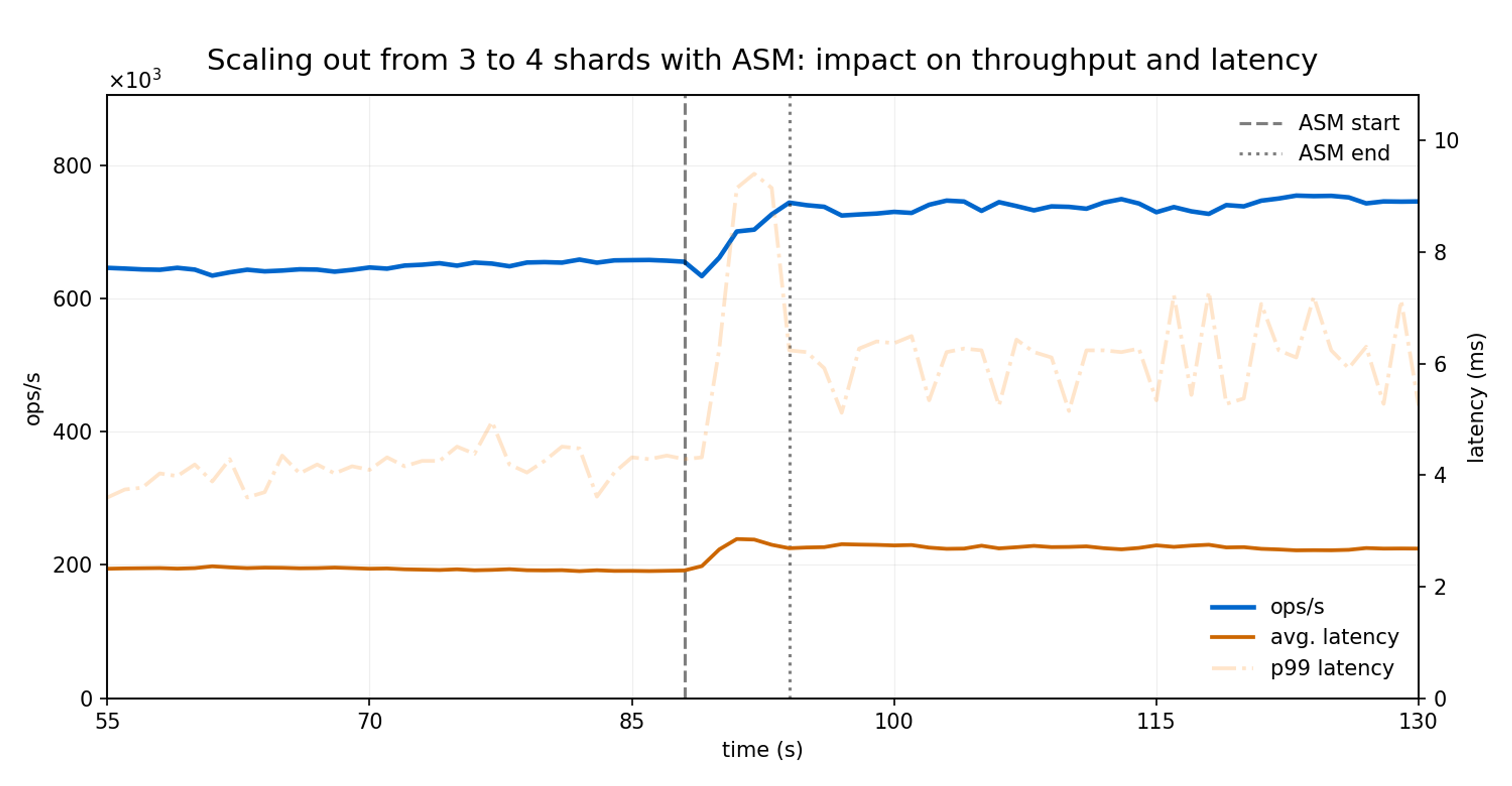
The migration completed in 6.4 seconds in total: 0.9, 2.7, and 2.8 seconds to transfer a third of the slots from the first, second, and third shard respectively.
Throughput (ops/sec) kept increasing steadily as the slot migrations were finalized, quickly reflecting the benefits introduced by the additional shard.
Average latency remained within the normal range, with a temporary increase of less than 5% lasting two seconds, primarily driven by a brief uptick in p99 tail latency.
Scale in: from 4 to 3 shards
For this test, the Redis Cluster was launched with four nodes and scaled in to three, also just after the 85-second mark. Now, ASM was used to redistribute the hash slots from the fourth node to the remaining three nodes.
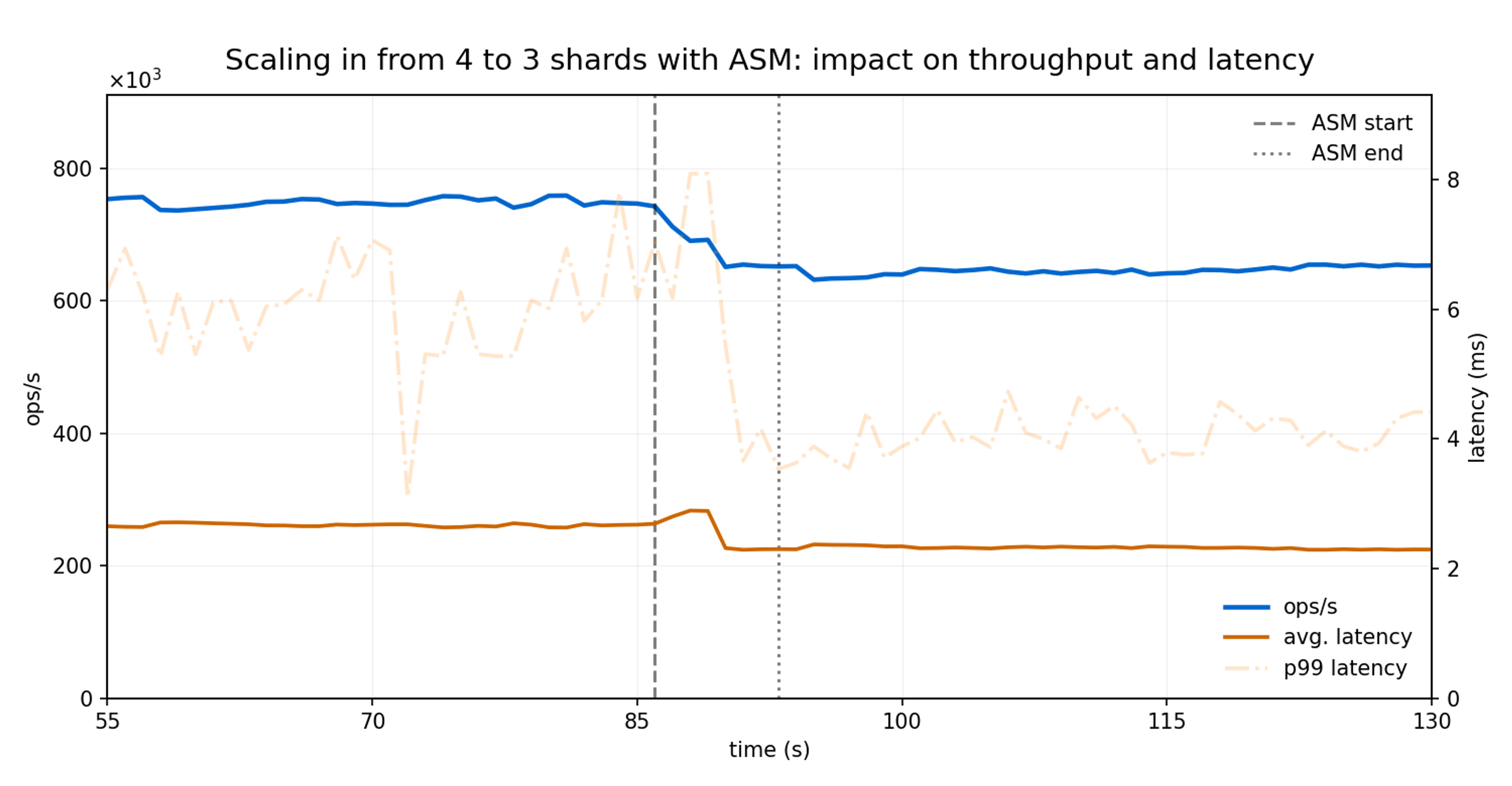
Migrating the slots from the fourth node into the remaining three nodes took 8.6 seconds in total (3.1, 2.8, and 2.7 seconds for each shard, respectively).
As observed during scale-out, the scaling-in process introduced no noticeable impact on throughput. The observed throughput variation is attributable to the change in the number of active nodes rather than to ASM itself.
Latency impact was minimal and short, increasing from 2.3 ms to 2.8 ms during 3 seconds.
ASM vs legacy slot migration: Performance improvements
ASM delivers up to 30x faster migrations, up to 73% lower latency spikes and almost no client redirect compared to legacy slot migration. These improvements stem from ASM’s atomic bulk transfer architecture, which eliminates the key-by-key migration overhead and continuous cluster state updates that impact legacy resharding.
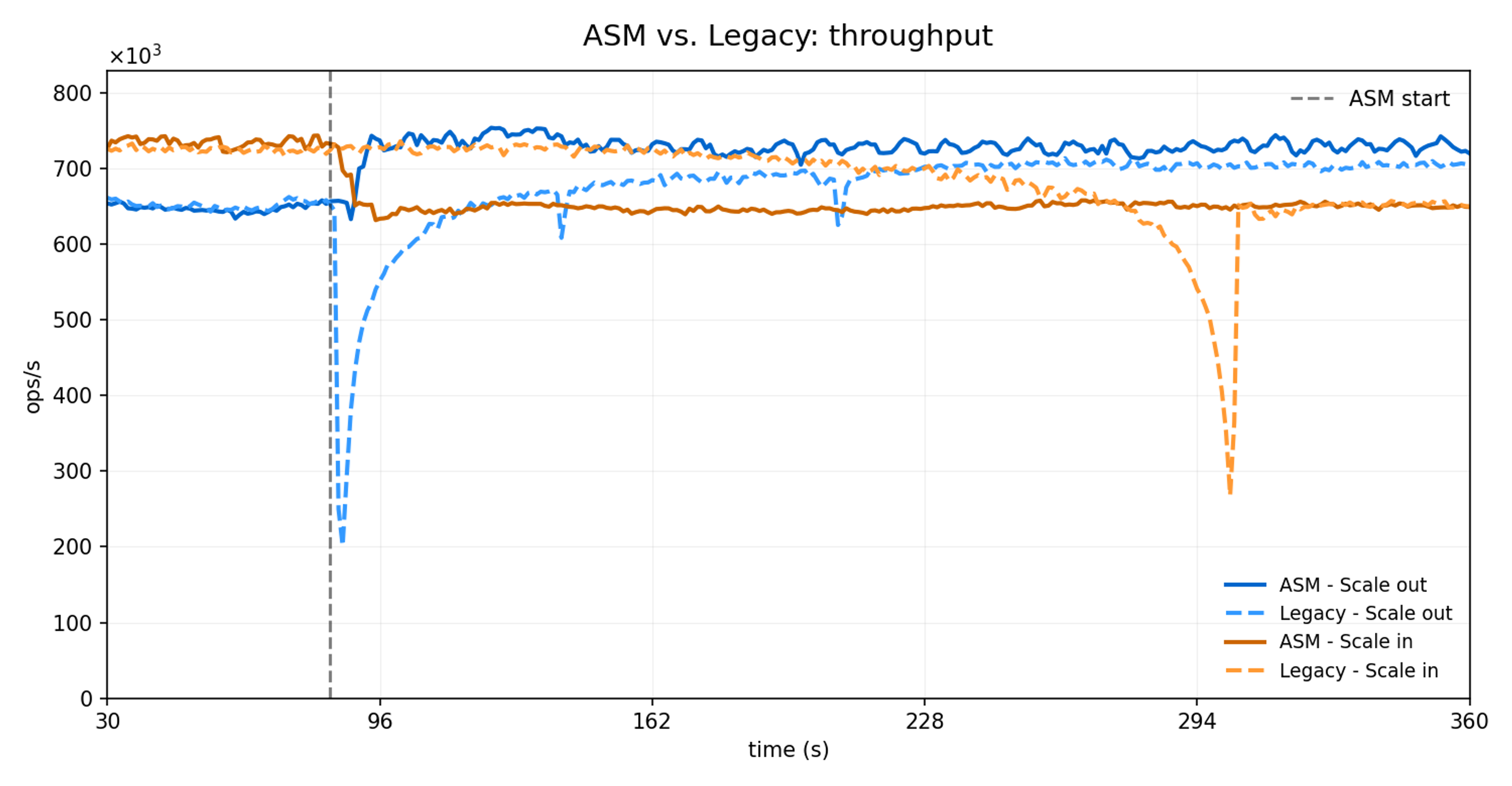
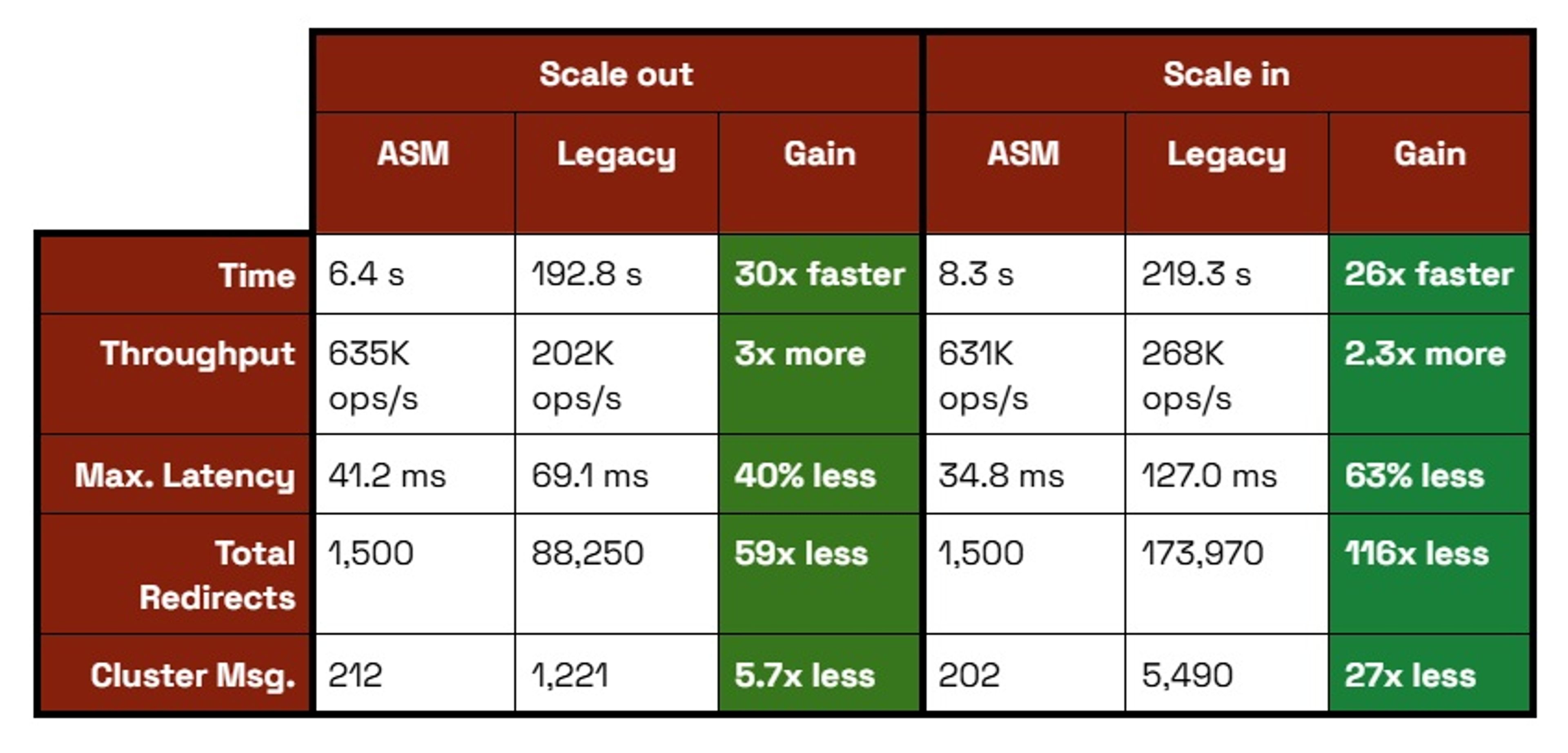
Migration Speed (30x faster): ASM migrates entire slot ranges atomically in 6-8 seconds versus legacy migration, which takes 192-219 seconds using a key-by-key approach. This translates to up to 640 slots/second for ASM versus 21 slots/second for legacy.
Client Impact (98% less disruption): ASM generates 2.1 -MOVED redirects per second. Legacy generates up to 241.6 -MOVED/sec, resulting in up to 116x more total redirects during migration.
Latency Stability (40%+ better): ASM's maximum latency spikes remain under 70 ms, while legacy experiences spikes up to 127ms.
Network Efficiency (94% less overhead): ASM requires only 212 additional cluster messages (one state update per task), while legacy generates up to 5.4K messages through continuous incremental updates.
Under the hood - ASM implementation details
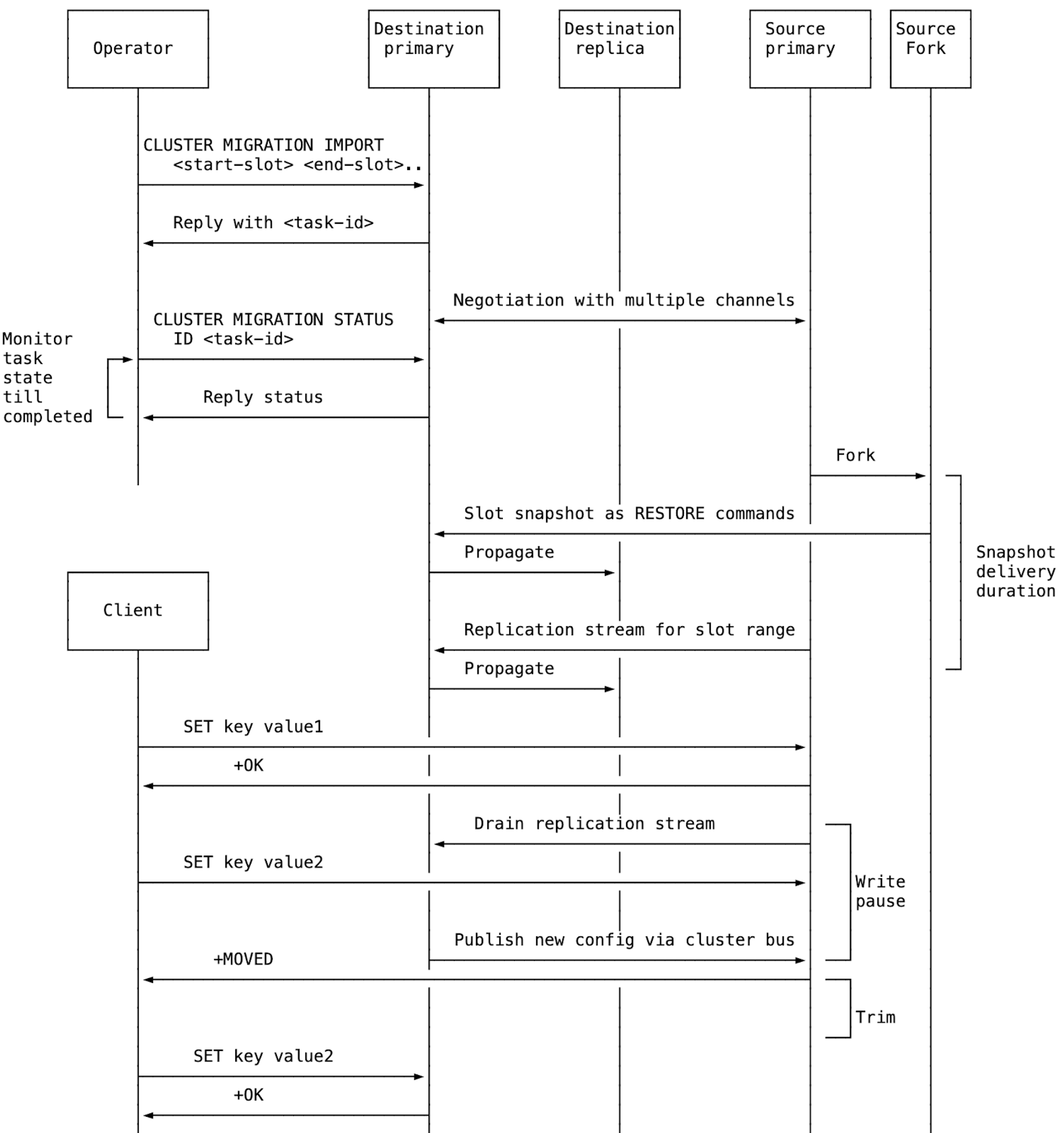
Read on for a peek under the hood at how ASM works.
1. Migration starts from the destination
ASM starts by sending CLUSTER MIGRATION IMPORT <start-slot> <end-slot> to the destination node. The migration is initiated from the destination node, just like the REPLICAOF command.
2. The destination node sets up replication connections
The destination node creates one migration task per source node, regardless of how many slot ranges are specified. It then requests slot replication from the source. Once the source accepts, the destination opens a second dedicated connection so the slot snapshot and the replication stream of new writes to those slots can be received in parallel.
Redis utilizes the new replication mechanism introduced in Redis 8.0 for ASM as well. This implementation provides the same 3 benefits: First, the source node can handle operations at a higher rate during the migration. Second, the size of the buffer required to keep the changes on the source node is lower since memory demands are now divided between the source and the destination. Third, the migration is completed faster.
3. The source begins sending data
The source node forks and sends the slot snapshot over one connection while streaming incremental writes over the other. Snapshot keys are usually delivered as per-key RESTORE commands, but large non-module keys automatically switch to an AOF-style chunked format. This reduces peak memory use and improves migration efficiency (e.g., a large hash is sent as multiple HSET batches instead of one oversized command).
4. The destination consumes replication data
The destination node applies the commands coming from the snapshot connection while accumulating the incremental updates. After the snapshot is delivered and the replication stream drops below a configured threshold, the source briefly pauses client write operations. During this pause, it forwards any remaining updates to the destination and signals that slot ownership can be handed over.
5. The destination takes over slot ownership
After applying all remaining writes, the destination takes over slot ownership by updating the cluster configuration and publishing it over the cluster bus.
6. The source resumes normal operations
When the source node receives the config update, it resumes write traffic. Clients then receive -MOVED replies and continue against the new slot owner. At this point, ASM is effectively complete from the client’s perspective.
7. The source trims old slot data
When a migration completes, the source node deletes the migrated keys. In cluster mode, Redis maintains per-slot data structures for the keys. Redis can detach an entire slot in one step and delete it asynchronously using a background thread (similar to async FLUSHALL/FLUSHDB).
As a result of executing background trimming on a dedicated thread instead of on the main thread, latency and throughput are much less affected during the trimming process.
If modules don’t support per-slot structures, and when CLIENT TRACKING is enabled, Redis automatically falls back to active trimming, which performs incremental deletions in the cron loop of the main thread.
To learn more, check out the Atomic slot migration PR (#14414).
Get started with Redis today
Speak to a Redis expert and learn more about enterprise-grade Redis today.