Blog
n8n's Redis vector store node: what you should know


The Redis vector store node is now available in n8n, adding vector search to n8n workflows by giving users a way to build retrieval, semantic lookup, and caching patterns in a single Redis-backed system. Many teams already rely on Redis for caching or session management, so this integration makes it possible to use the same system for vector workloads without introducing a new database.
In this blog, we’ll describe how Redis performs vector search, explain how the new node exposes these capabilities inside n8n, and walk through two reference workflows that use retrieval and semantic caching patterns.
How Redis handles vector search differently
Vector databases tend to follow two modes. Some systems focus only on vector operations (e.g., Pinecone, Qdrant, Milvus), while others extend a general-purpose database with vector support (e.g., Postgres with pgvector, MongoDB Atlas). Redis is architecturally closer to the second group, but behaves differently because it was built for fast, in-memory operations from the start. That design affects how vector search performs and how it fits into an app stack.
Memory & latency in vector search
Redis stores data in memory, and that design directly impacts vector search latency. Redis Flex extends this model by offering an elastic data plane that can use memory or a combination of SSD and memory, while still supporting fast vector workloads.
Memory access occurs in nanoseconds, while SSD access takes microseconds. When you're computing vector distances across thousands of embeddings, this difference compounds. Benchmarks from Redis show that, in several workloads, this leads to lower query latency and higher throughput than disk-based vector systems.
That difference becomes clear in workflows that perform multiple vector lookups in sequence. For example, if each search takes 50ms instead of 5ms, a workflow with 5 searches goes from 25ms to 250ms total. This gap is noticeable in n8n workflows that wait for each step to finish before moving on.
The in-memory approach does come with tradeoffs. Vector indexes consume RAM, so memory planning remains important, especially as embedding volumes grow. Redis supports configurable snapshotting and append-only file (AOF) logging, and Redis Flex adds SSD-backed options that balance speed and cost. These mechanisms give teams flexibility in how they store and maintain vector data over time.
The multi-model data structure approach
Redis natively supports multiple data structures such as JSON, strings, hashes, lists, sets, sorted sets, streams, and now vectors.
In practice, this design means a single Redis instance can handle:
- Vector search: Hierarchical Navigable Small World (HNSW) index for approximate nearest neighbor (ANN) search
- Chat memory: Lists or streams for conversation history
- Session state: Hashes with TTL or hash-field expiration for user sessions
- Caching: simple strings, hashes or JSON documents for a structured and searchable cache; TTL can be used in combination with all the data structures
- Pub/sub: Built-in messaging channels
- Rate limiting: Sorted sets with timestamp-based cleanup
- Queueing: Using lists or sorted sets to efficiently manage jobs
- Message broker: Streams offer flexibility a and persistent solution
It’s a different model from purpose-built vector databases, which often require a second system to store metadata, session state, or cached content. In n8n workflows, this can simplify the architecture. For example, if you're building a chatbot with Retrieval-Augmented Generation (RAG), you need document retrieval and some way to store conversation history. With Pinecone or Qdrant, you'd typically add Postgres or another database for the chat history.
With Redis, both capabilities are native. Vector search can retrieve the documents, while lists or streams record message history, and hashes maintain session state. Other operational needs, such as caching, pub/sub, or rate limiting, use the same underlying system.
Hybrid search: Combining vector & keyword queries
Redis supports hybrid search, which allows a workflow to combine vector search with metadata filtering in a single query. The vector index handles ANN search, while a secondary index filters documents by fields such as labels, user identifiers, or categories. Filtering reduces the candidate set before ranking, which improves relevance.
This is particularly useful for queries that include both semantic intent and specific identifiers that limit which documents should be searched.
For example, if a user asks about the status of their own request, the filter limits the search to that user’s documents before similarity scoring. The result: a smaller search space, faster lookups, fewer hallucinations, and more accurate responses.
In n8n, the Redis vector store node returns both the retrieved text and any metadata stored with the vector. Workflows can pass this output directly to downstream nodes, so additional lookup steps are often unnecessary. This pattern appears in both reference implementations below.
Two reference implementations
To show how these features work in practice, we built two n8n workflows that use Redis for vector search. In n8n, this functionality is available by adding the n8n Redis vector store node to the flow. These reference patterns are easy to adapt to different data sources or workflow logic, since the structure of embedding, storing, and running similarity search stays the same.
RAG pattern with GitHub issues
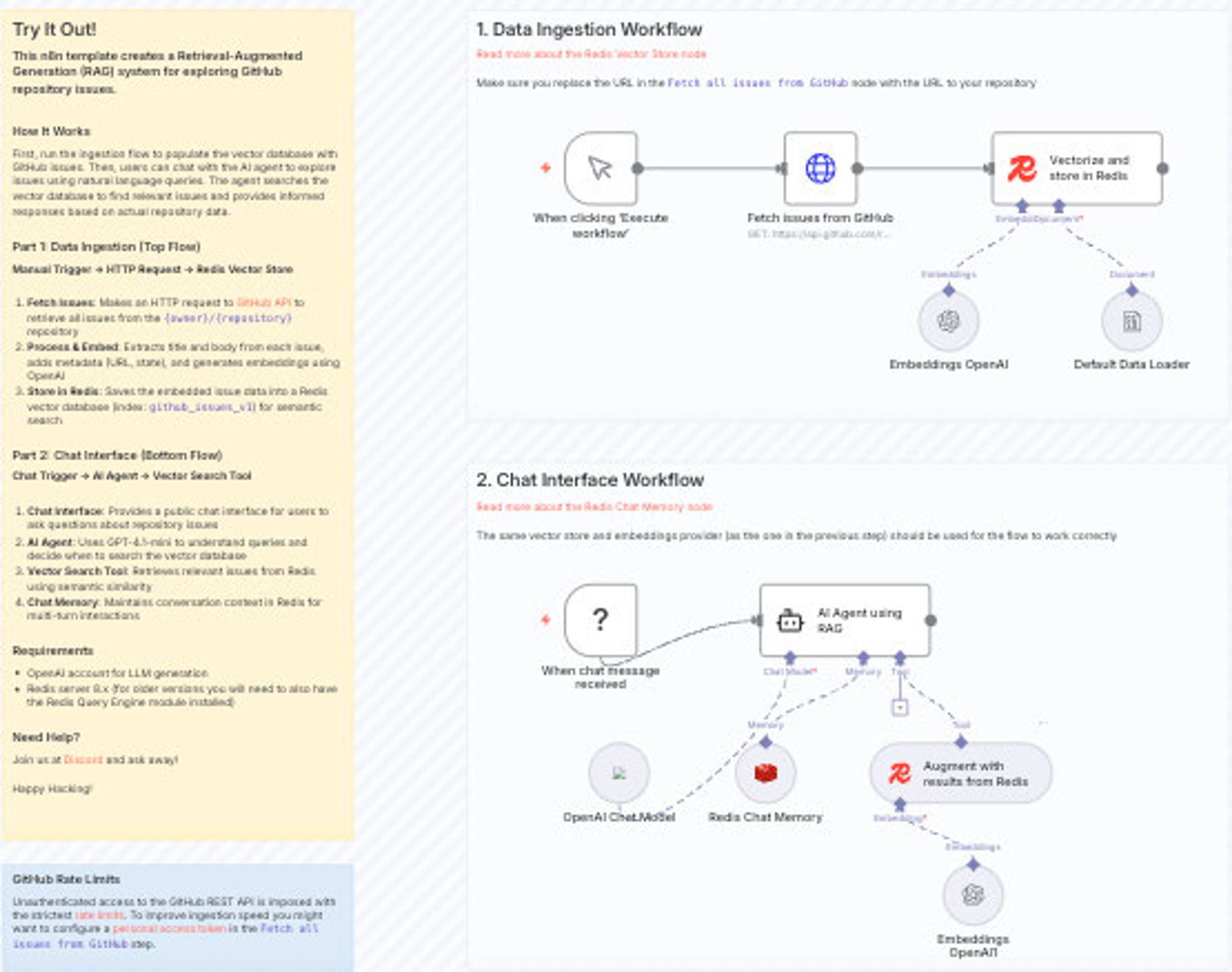
Workflow: Chat with GitHub Issues using OpenAI and Redis Vector Search
This workflow implements a basic RAG pattern and uses a list of repository’s issue as a structured source for retrieval. It ingests issues from a given repo, generates embeddings with OpenAI, and stores both the embeddings and associated metadata (e.g., issue URL, state, labels) in Redis. In the chat step, a user’s natural language query is embedded and used to run similarity search against the Redis index, returning relevant issues for further processing.
Metadata stored with each vector enables workflows to apply filters or use structured fields without additional lookups. Conversation history can also be recorded using Redis lists or streams, keeping all parts of the workflow within the same system.
Semantic caching pattern
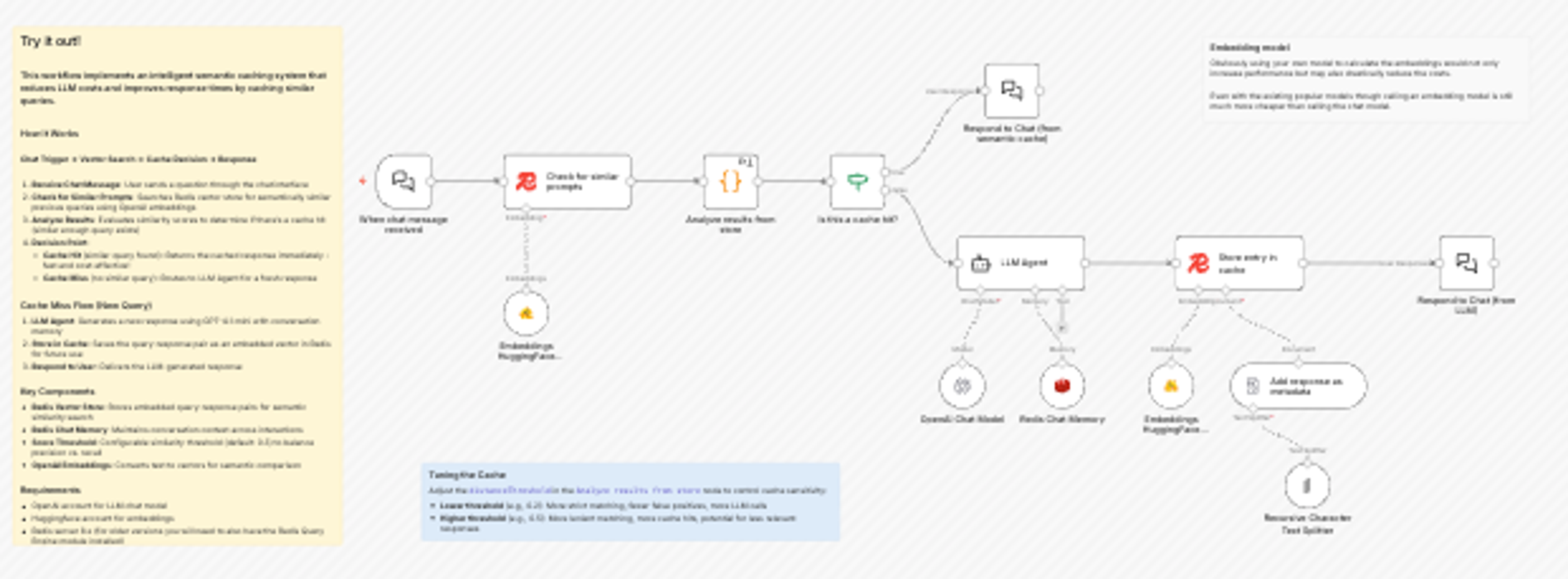
Workflow: Reduce LLM Costs with Semantic Caching using Redis Vector Store and HuggingFace
This workflow implements a semantic cache that checks for previously answered questions before calling an LLM. When a user submits a query, the workflow embeds it and uses Redis vector search to look for semantically similar questions that have been asked in the past. If a similar question exists, the cached answer is returned; if not, the workflow calls the embedder and stores, and then stores the new answer and its vector back in Redis for future reuse.
This reduces repeated calls to the LLM, cutting latency and cost. The workflow also exposes controls such as similarity threshold tuning, letting you adjust how strict the cache hit criteria should be.
Getting started
The Redis vector store node adds vector search to n8n using Redis’ in-memory performance and multi-model capabilities. For teams already using Redis, the new integration makes it easy to extend existing deployments with retrieval or caching workflows. For new users, it offers a simple way to evaluate Redis as a vector store.
You can add the Redis vector store node to a workflow in n8n today and start experimenting with embedding, storage, and retrieval on your own data.
Get started with Redis today
Speak to a Redis expert and learn more about enterprise-grade Redis today.