Tutorial
Streaming LLM Output Using Redis Streams
February 26, 202615 minute read


TL;DR:Use Redis Streams as a message broker between an LLM backend and a browser frontend. The server writes each token from the LLM into a Redis Stream withXADD, a consumer reads them withXREAD, and forwards each chunk to the browser over a WebSocket so the user sees the response appear in real-time.
In this tutorial, we will explore how to stream output (in chunks) from a Large Language Model (LLM) to a browser using Redis Streams.
#What you'll learn
- How Redis Streams work as an append-only log for real-time data
- How to write LLM output token-by-token into a Redis Stream
- How to consume stream entries and push them to a browser with Socket.IO
- How to build a simple chat UI that renders streamed responses
#Prerequisites
- Node.js v18 or later
- A running Redis instance (local or cloud)
- An OpenAI API key
- Basic familiarity with TypeScript, Express, and WebSockets
#What are Redis Streams?
Redis Streams are powerful data structure that allows you to efficiently handle streams of data, similar to message queues or append-only logs.
You can store multiple fields and string values with an automatic ID generated for each stream entry.
#Why use Redis Streams for LLM output?
- Real-time streaming: Redis Streams allow you to stream data in real-time to multiple consumers. In our demo case, user can see the output in real-time as it is generated instead of waiting for the entire LLM output to be generated.
- Scalability: Redis Streams are highly scalable and can handle a large volumes of messages.
- Persistence: Redis Streams provide persistence, allowing for reliable message delivery and replay capabilities in case of failures.
- Consumer groups: Redis Streams support consumer groups, which allow multiple consumers to read from the same stream. Each consumer can read and acknowledge messages independently, ensuring that message is processed only once.
- Easy Integration: Redis Streams can be easily integrated with various clients and servers, making it a versatile choice for streaming data.
- Producer/ Consumer problems: Fast Producer and slow consumer problem can be solved using Redis streams where consumers can read at their own pace but producer can keep producing messages at higher rate without losing any data.
#How does the streaming architecture work?
The architecture flow of the application is as follows:
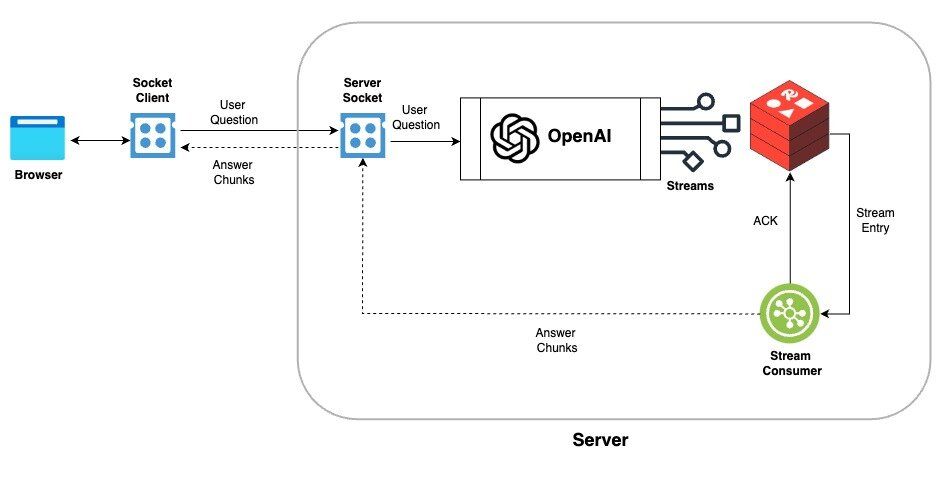
The diagram above shows four components and the data flow between them:
- Browser → Server (WebSocket): The browser sends a user question to the Node.js server over a Socket.IO connection.
- Server → OpenAI (HTTPS): The server forwards the question to the OpenAI API and requests a streamed response.
- OpenAI → Redis Stream (XADD): As tokens arrive from OpenAI, the server writes each chunk into a Redis Stream using the
XADDcommand. - Redis Stream → Browser (XREAD + WebSocket): A stream consumer reads new entries with
XREAD(blocking until data is available) and emits each chunk back to the browser through the WebSocket, where it renders immediately.
#How do I set up the demo?
- Download the source code of demo from the GitHub repository and navigate to the
streaming-llm-outputdirectory.
- Install the dependencies
- Create a
.envfile in the root of the project and add the following environment variables.
- Start the application
- Open
http://127.0.0.1:5400/in your browser to play with demo
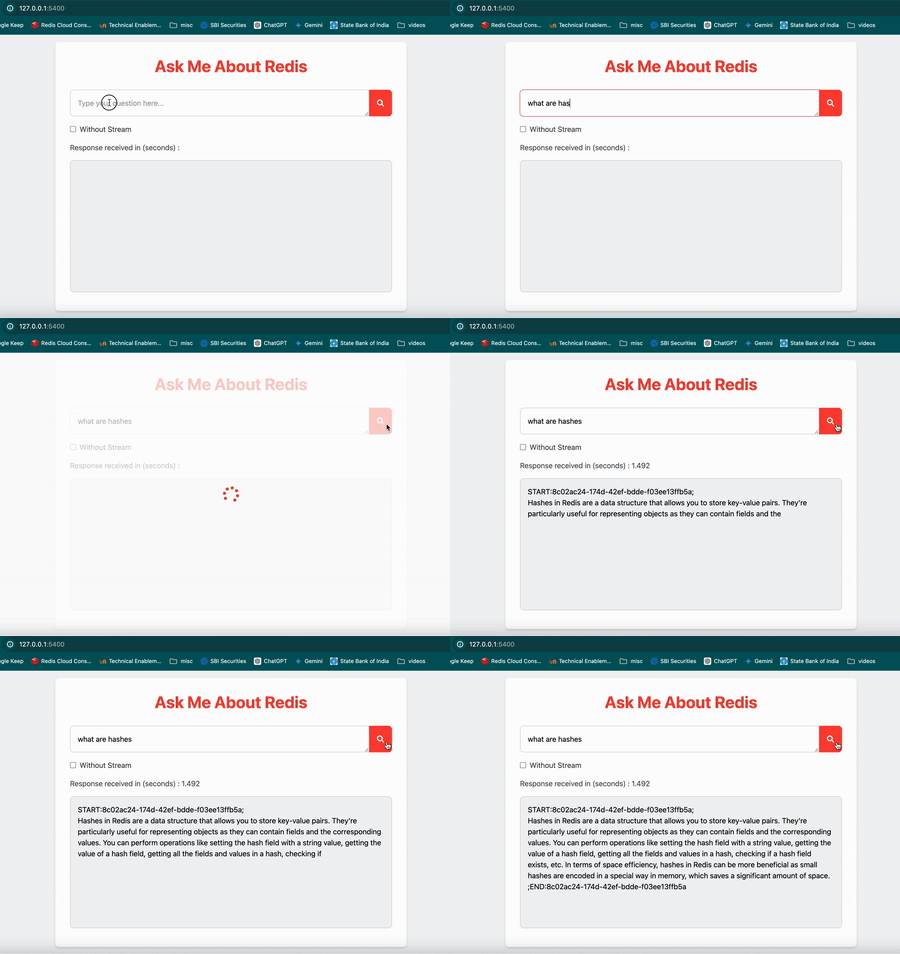
Once you have the application running, you can ask a question in the input box and click on the search button. The application will stream the output from the LLM in real-time instead of waiting for the entire output to be generated.
Now, Select
Without Stream checkbox and click on search button to see the output without streaming. In this case, you will notice a delay in displaying the output as it waits for the entire output to be generated.#How does the code stream LLM tokens through Redis?
Let's dive into the code snippets to understand how we can stream LLM output to the browser using Redis Streams.
#Redis Utilities
This module provides utility functions to interact with Redis Streams.
#LLM Prompting
This module handles creating prompts and streaming responses from the LLM.
#Socket Server
This module sets up a Socket.IO server events to handle real-time communication between the client and server.
#Express Server
This module sets up an Express server and integrates the Socket.IO server.
Now, back end server listens for the
askQuestion socket event from the client (browser) and triggers the askQuestion function to send the question to the LLM and stream the output to the Redis stream.
The readStream function reads the stream data and emits the chunks to the client (browser) using the chunk event.Note : In this tutorial, we are using
xRead command to read the stream data, but you can also use xReadGroup command to read the stream data in consumer groups and handle the consumer acknowledgment and re-reading of the stream data in case of failure. Sample code for xReadGroup is available in the streaming-llm-output/src/socket-x-read-group.ts file in demo source code.#Sample frontend
This module sets up a simple front end to send the question to the server and display the output in real-time.
#How can I monitor the stream with Redis Insight?
Redis Insight is a powerful GUI tool that allows you to interact with Redis data visually.
Let's monitor the Redis stream
OPENAI_STREAM created by the application using Redis Insight.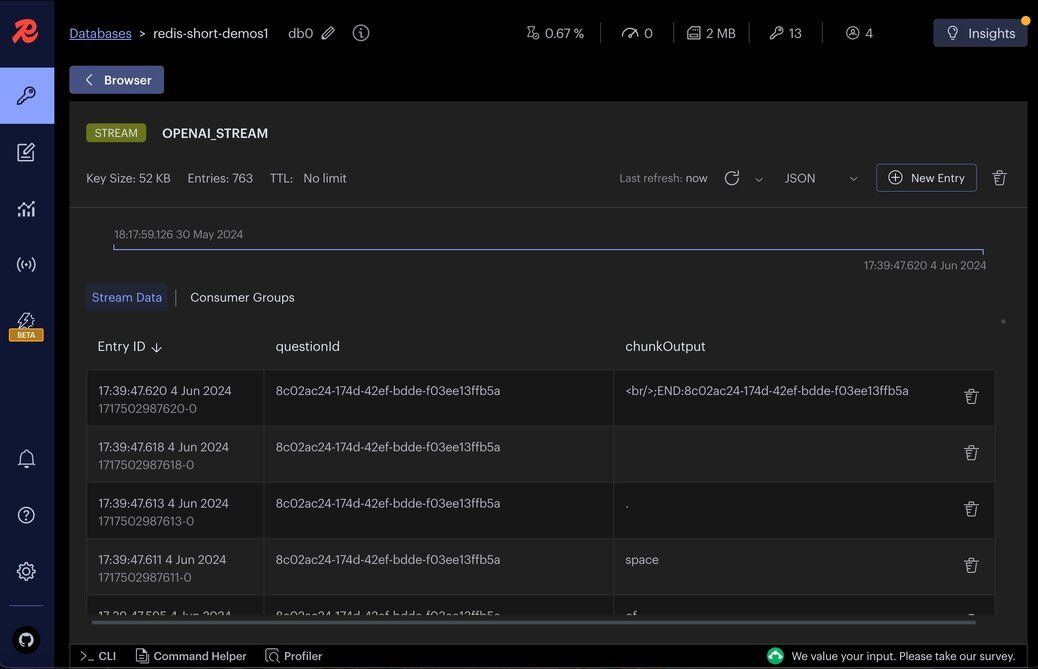
Let's visualize the
question JSON stored in Redis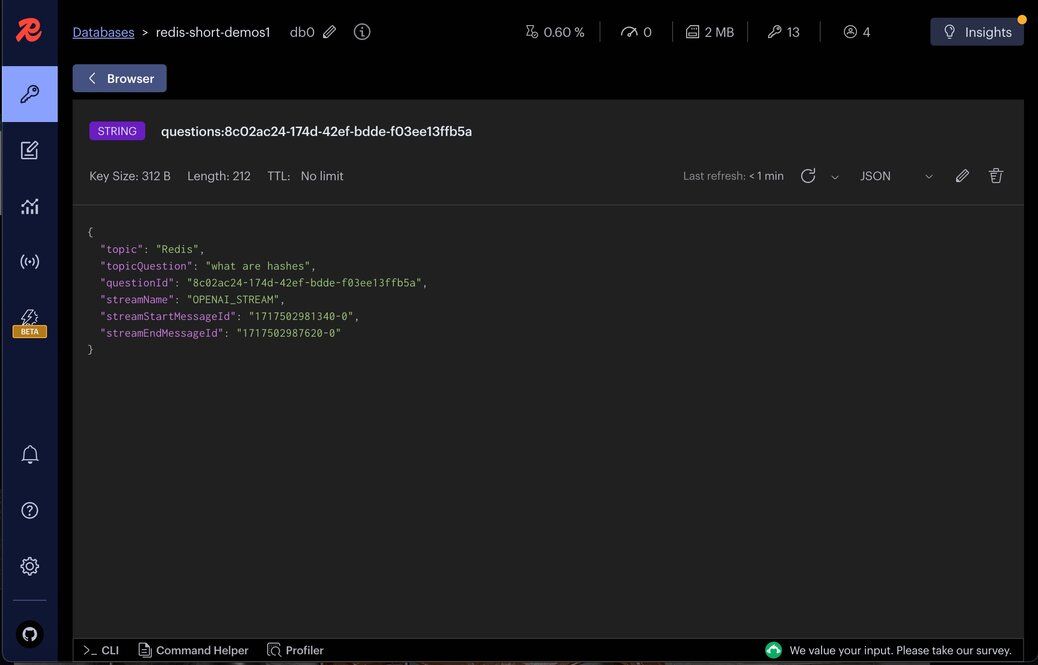
#Conclusion
By leveraging Redis Streams, we can efficiently stream the output from an LLM in real-time. This tutorial demonstrated how to set up the necessary backend and frontend components to achieve this. Redis Streams provide a robust solution for handling real-time data, ensuring that our application can scale and handle large volumes of data efficiently.
#Next steps
Now that you can stream LLM output through Redis, here are some ways to extend this pattern:
- Add agent memory — Persist conversation history so your chatbot remembers earlier turns. See What is Agent Memory? Example using LangGraph and Redis for a hands-on walkthrough.
- Explore Redis Streams in .NET — If your backend is .NET-based, the How to use Redis Streams with .NET tutorial covers the same streaming primitives with the StackExchange.Redis client.
- Use consumer groups — Switch from
XREADtoXREADGROUPso multiple server instances can process the stream in parallel with at-least-once delivery guarantees. - Try Redis University — The free Redis Streams course dives deeper into stream commands, consumer groups, and trimming strategies.
#Additional resources
- Redis Streams documentation
- Redis Insight — Visual GUI for browsing streams and other Redis data structures