Tutorial
Talking to Redis: Clients, Configuration, and Performance Tuning
February 26, 202612 minute read
TL;DR:To optimize Redis client communication, use connection pooling to reduce overhead, pipeline commands to cut network round trips, tunemaxclients,maxmemory, and TCP backlog settings for your workload, and choose a client library that supports these features natively.
#Course Structure
This tutorial is part of the Running Redis at Scale course. You can jump to any section:
- Introduction to Running Redis at Scale
- Talking to Redis ← You are here
- Persistence and Durability - RDB and AOF
- High Availability - Replication and Sentinel
- Scalability - Redis Cluster
- Observability - Metrics and troubleshooting
- Course Conclusion
In this tutorial, you'll learn how to communicate with Redis effectively. We cover the Redis server architecture, command-line tools, configuration options, client libraries, and performance tuning.
#What you'll learn
- How the Redis server processes requests and where multi-threaded I/O fits in
- How to use
redis-cliproductively with tab completion and command history - How to configure Redis at startup and reconfigure it at runtime
- How connection pooling reduces connection overhead and boosts throughput
- How pipelining batches commands to minimize network round-trip latency
- Key tuning parameters (
maxclients,maxmemory, TCP backlog, kernel settings) for running Redis at scale
#Redis Server Overview
As you might already know, Redis is an open source data structure server written in C. You can store multiple data types, like strings, hashes, and streams and access them by a unique key name.
For example, if you have a string value "Hello World" saved under the key name "greeting", you can access it by running the GET command followed by the key name - greeting. All keys in a Redis database are stored in a flat keyspace. There is no enforced schema or naming policy, and the responsibility for organizing the keyspace is left to the developer.
The speed Redis is famous for is mostly due to the fact that Redis stores and serves data entirely from RAM instead of disk, as most other databases do. Another contributing factor is its predominantly single-threaded nature: single-threading avoids race conditions and CPU-heavy context switching associated with threads.
Indeed, this means that open source Redis can't take advantage of the processing power of multiple CPU cores, although CPU is rarely the bottleneck with Redis. You are more likely to bump up against memory or network limitations before hitting any CPU limitations. That said, Redis Cloud does let you take advantage of all of the cores on a single machine.
Let's now look at exactly what happens behind the scenes with every Redis request. When a client sends a request to a Redis server, the request is first read from the socket, then parsed and processed and finally, the response is written back to the socket and sent to the user. The reading and especially writing to a socket are expensive operations, so in Redis version 6.0 multi-threaded I/O was introduced. When this feature is enabled, Redis can delegate the time spent reading and writing to I/O sockets over to other threads, freeing up cycles for storing and retrieving data and boosting overall performance by up to a factor of two for some workloads.
#The Redis Command Line Tool
Redis-cli is a command line tool used to interact with the Redis server. Most package managers include redis-cli as part of the redis package. It can also be compiled from source, and you'll find the source code in the Redis repository on GitHub.
There are two ways to use redis-cli:
- an interactive mode where the user types commands and sees the replies;
- a command mode where the command is provided as an argument to redis-cli, executed, and results sent to the standard output.
Let's use the CLI to connect to a Redis server running at 172.22.0.3 and port 7000. The arguments -h and -p are used to specify the host and port to connect to. They can be omitted if your server is running on the default host "localhost" port 6379.
The redis-cli provides some useful productivity features. For example, you can scroll through your command history by pressing the up and down arrow keys. You can also use the TAB key to autocomplete a command, saving even more keystrokes. Just type the first few letters of a command and keep pressing TAB until the command you want appears on screen.
Once you have the command name you want, the CLI will display syntax hints about the arguments so you don't have to remember all of them, or open up the Redis command documentation.
These three tips can save you a lot of time and take you a step closer to being a power user.
You can do much more with redis-cli, like sending output to a file, scanning for big keys, get continuous stats, monitor commands and so on. For a much more detailed explanation refer to the documentation.
#Configuring a Redis Server
The self-documented Redis configuration file called
redis.conf has been mentioned many times as an example of well written documentation. In this file you can find all possible Redis configuration directives, together with a detailed description of what they do and their default values.You should always adjust the
redis.conf file to your needs and instruct Redis to run based on it's parameters when running Redis in production.The way to do that is by providing the path to the file when starting up your server:
When you're only starting a Redis server instance for testing purposes you can pass configuration directives directly on the command line:
The format of the arguments passed via the command line is exactly the same as the one used in the redis.conf file, with the exception that the keyword is prefixed with
--.Note that internally this generates an in-memory temporary config file where arguments are translated into the format of
redis.conf.It is possible to reconfigure a running Redis server without stopping or restarting it by using the special commands
CONFIG SET and CONFIG GET.Not all the configuration directives are supported in this way, but you can check the output of the command
CONFIG GET * first for a list of all the supported ones.TIPModifying the configuration on the fly has no effect on theredis.conffile. At the next restart of Redis the old configuration will be used instead. If you want to force update theredis.conffile with your current configuration settings you can run theCONFIG REWRITEcommand, which will automatically scan yourredis.conffile and update the fields which don't match the current configuration value.
#Redis Clients
Redis has a client-server architecture and uses a request-response model. Apps send requests to the Redis server, which processes them and returns responses for each. The role of a Redis client library is to act as an intermediary between your app and the Redis server.
Client libraries perform the following duties:
- Implement the Redis wire protocol - the format used to send requests to and receive responses from the Redis server
- Provide an idiomatic API for using Redis commands from a particular programming language
#Managing the Connection to Redis
Redis clients communicate with the Redis server over TCP, using a protocol called RESP (REdis Serialization Protocol) designed specifically for Redis.
The RESP protocol is simple and text-based, so it is easily read by humans, as well as machines. A common request/response would look something like this. Note that we're using netcat here to send raw protocol:
This simple, well documented protocol has resulted in Redis clients for almost every language you can think of. The redis.io client page lists over 200 client libraries for more than 50 programming languages.
To get started with a specific language, see these tutorials:
#Client Performance Improvements
#How does connection pooling work in Redis?
Redis clients are responsible for managing connections to the Redis server. Creating and recreating new connections over and over again, creates a lot of unnecessary load on the server. A good client library will offer some way of optimizing connection management, by setting up a connection pool, for example. With connection pooling, the client library will instantiate a series of (persistent) connections to the Redis server and keep them open. When the app needs to send a request, the current thread will get one of these connections from the pool, use it, and return it when done.
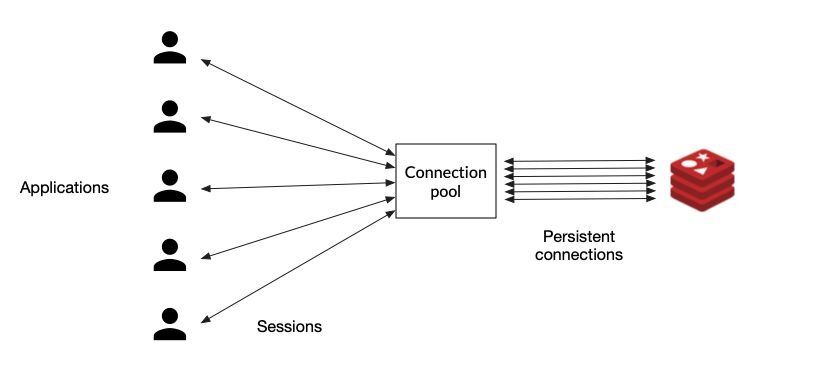
So if possible, always try to choose a client library that supports pooling connections, because that decision alone can have a huge influence on your system's performance.
#What is Redis pipelining?
As in any client-server app, Redis can handle many clients simultaneously. Each client does a (typically blocking) read on a socket and waits for the server response. The server reads the request from the socket, parses it, processes it, and writes the response to the socket. The time the data packets take to travel from the client to the server, and then back again, is called network round trip time, or RTT. If, for example, you needed to execute 50 commands, you would have to send a request and wait for the response 50 times, paying the RTT cost every single time. To tackle this problem, Redis can process new requests even if the client hasn't already read the old responses. This way, you can send multiple commands to the server without waiting for the replies at all; the replies are read in the end, in a single step.
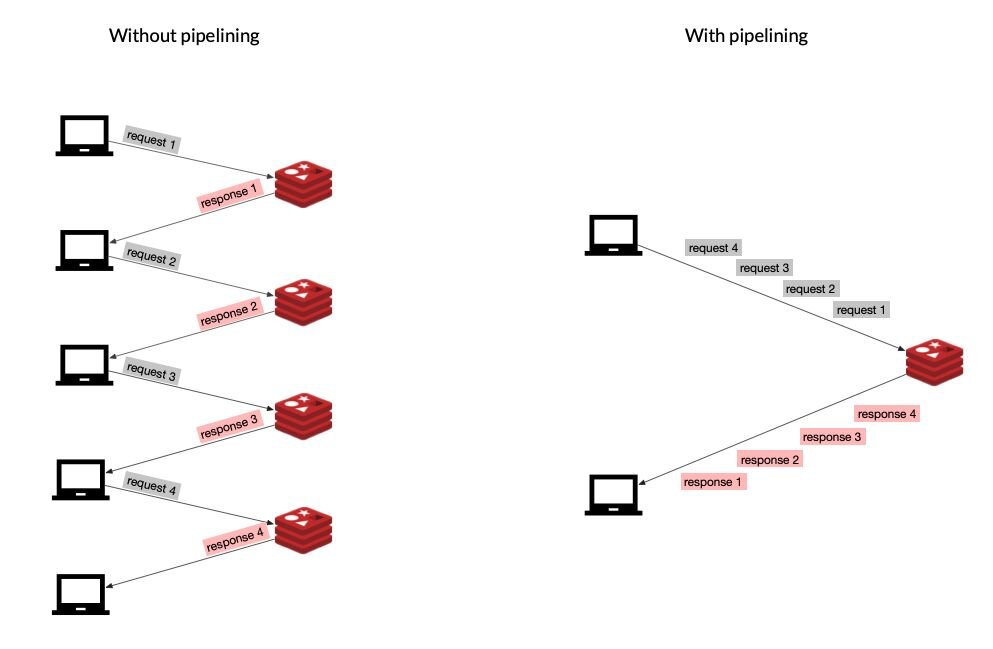
This technique is called pipelining and is another good way to improve the performance of your system. Most Redis libraries support this technique out of the box.
#Supplemental reading about Redis pipelining
- Redis Pipelining
- Redis Client Handling
- Connection Pools for Serverless Functions and Backend Services
#Initial Tuning
We love Redis because it's fast (and fun!), so as we begin to consider scaling out Redis, we first want to make sure we've done everything we can to maximize its performance.
Let's start by looking at some important tuning parameters.
#Max Clients
Redis has a default of max of 10,000 clients; after that maximum has been reached, Redis will respond to all new connections with an error. If you have a lot of connections (or a lot of app instances), then you may need to go higher. You can set the max number of simultaneous clients in the Redis config file:
#Max Memory
By default, Redis has no max memory limit, so it will use all available system memory. If you are using replication, you will want to limit the memory usage in order to have overhead for replica output buffers. It's also a good idea to leave memory for the system. Something like 25% overhead. You can update this setting in Redis config file:
#Set TCP-BACKLOG
The Redis server uses the value of
tcp-backlog to specify the size of the complete connection queue.Redis passes this configuration as the second parameter of the
listen(int s, int backlog) call.If you have many connections, you will need to set this higher than the default of 511. You can update this in Redis config file:
As the comment in
redis.conf indicates, the value of somaxconn and tcp_max_syn_backlog may need to be increased at the OS level as well.#Set Read Replica Configurations
One simple way to scale Redis is to add read replicas and take load off of the primary. This is most effective when you have a read-heavy (as opposed to write-heavy) workload. You will probably want to have the replica available and still serving stale data, even if the replication is not completed. You can update this in the Redis config:
You will also want to prevent any writes from happening on the replicas. You can update this in the Redis config:
#Kernel Memory
Under high load, occasional performance dips can occur due to memory allocation. This is something Salvatore, the creator of Redis, blogged about in the past. The performance issue is related to transparent hugepages, which you can disable at the OS level if needed.
#Kernel Network Stack
If you plan on handling a large number of connections in a high performance environment, we recommend tuning the following kernel parameters:
#File Descriptor Limits
If you do not set the correct number of file descriptors for the Redis user, you will see errors indicating that "Redis can't set maximum open files.." You can increase the file descriptor limit at the OS level.
Here's an example on Ubuntu using systemd:
You will then need to reload the daemon and restart the redis service.
#Enabling RPS (Receive Packet Steering) and CPU Preferences
One way we can improve performance is to prevent Redis from running on the same CPUs as those handling any network traffic. This can be accomplished by enabling RPS for our network interfaces and creating some CPU affinity for our Redis process.
Here is an example. First we can enable RPS on CPUs 0-1:
Then we can set the CPU affinity for redis to CPUs 2-8:
#Next steps
Now that you understand how to communicate with Redis and tune client performance, continue with the course or explore related topics:
- Next in this course: Persistence and Durability — learn about RDB snapshots and AOF for data safety
- Dive deeper into clients: Getting Started with Node.js and Redis or Getting Started with Java and Redis
- Redis CLI reference: redis-cli documentation
- Pipelining deep-dive: Redis Pipelining