Tutorial
Redis Real Time Context Engine : Build a memory-aware AI agent with Redis Agent Memory and Redis Context Retriever
May 18, 202645 minute read

TL;DR: AI agents forget everything when a conversation ends, and can't query structured data without custom code. Redis solves both. Redis Context Retriever turns your entity data into auto-generated MCP tools any agent can discover and call. Redis Agent Memory gives agents persistent session memory and cross-session long-term memory backed by vector search. Together they make Redis a full context engine for AI applications.
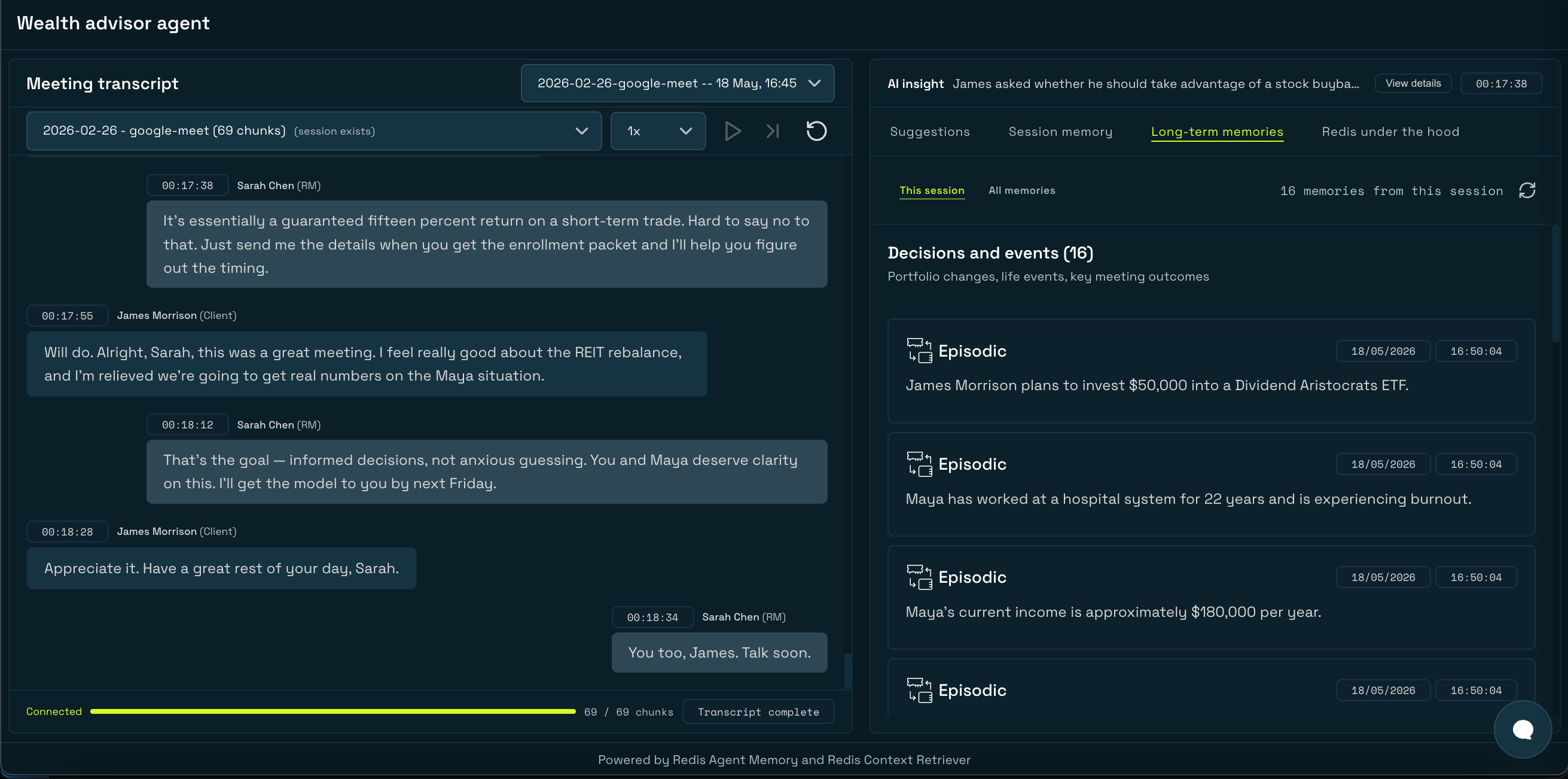
Note: This tutorial uses the code from the following git repository:https://github.com/redis-developer/redis-agent-memory-explorer
When a wealth advisor meets with a client every month, they're expected to remember what was discussed last quarter, the client's risk tolerance, their family situation, and every commitment made across a dozen previous meetings. Without a memory system, every LLM-powered assistant starts blank. The context window fills up fast, the session ends, and everything is forgotten.
This is the memory problem — and it has two distinct parts:
- Conversational memory: what was said, what was decided, what the client revealed across many sessions over time
- Structured knowledge: portfolio holdings, financial goals, pending action items — data that belongs in a queryable store, not a chat log
In this tutorial, you'll build the Wealth Advisor Agent Memory Explorer — a demo that solves both problems using two new Redis Cloud capabilities: Redis Context Retriever for structured data as MCP tools, and Redis Agent Memory for persistent conversational memory. By the end, you'll have a running LangGraph-powered chatbot agent that can answer questions by querying both data layers and showing exactly where each answer came from.
#How the two data layers compare
Before diving in, here's what each layer does and when to reach for it:
| Redis Context Retriever | Redis Agent Memory | |
|---|---|---|
| What it stores | Structured records (entities, facts, records) | Conversational events and extracted memories |
| Data source | Hand-authored JSON, loaded once | Generated from conversation during playback |
| Query style | TAG filters, full-text search, range queries | Semantic vector search, session scoping |
| How agents access it | Auto-generated MCP tools | SDK methods (searchLongTermMemory, buildMemoryPrompt) |
| Grows over time | Static per dataset load | Yes — every session adds more memories |
| Best for | "What are James's holdings?" | "What did James say about bonds last month?" |
#Prerequisites
- A Redis Cloud account with Redis Agent Memory and Redis Context Retriever enabled
- An OpenAI API key
- Docker and Docker Compose
- Node.js 18+
#Setup
Clone the repo and copy the environment template:
Fill in your
.env:Note: LeaveCTX_SURFACE_IDandMCP_AGENT_KEYblank — the app creates and writes them on first run.
Start the app:
Open
http://localhost:3001. On first run, the backend creates a Redis Context Retriever, loads entity records from data/wealth-advisor/client-data.json, and writes CTX_SURFACE_ID and MCP_AGENT_KEY back to .env. Subsequent runs skip this step and reuse the existing retriever(surface).#What you'll build
The Wealth Advisor Agent Memory Explorer is a demo where Sarah Chen, a relationship manager at Acme Bank, plays back recorded meeting transcripts with her client James Morrison. The app stores those conversations in Redis Agent Memory, extracts long-term facts automatically, and exposes structured client data via Redis Context Retriever. A LangGraph ReAct chatbot can then query both layers to answer questions with source attribution.
#Architecture
Note: The app runs as two processes: the API server (port 3001) and the LangGraph server (port 2024). In Docker, these are two separate containers from the same image. Both initialize their own Redis Agent Memory and Redis Context Retriever clients on startup.
#Tech stack
| Layer | Technology |
|---|---|
| Frontend | Next.js 14 (App Router), React, CopilotKit |
| Backend | Node.js, Express |
| Chatbot agent | LangGraph, LangChain, createReactAgent |
| Memory | Redis Agent Memory (Redis Cloud) |
| Structured data | Redis Context Retriever (Redis Cloud) |
| LLM | OpenAI gpt-4o-mini |
| Local auxiliary stores | Redis (JSON store — suggestions, topics, transcript chunks) |
#Redis Context Retriever
#What is Redis Context Retriever?
Redis Context Retriever is a Redis Cloud service that takes your structured entity data and turns it into auto-generated MCP (Model Context Protocol) tools that any agent can discover and call. You define an entity schema, load records, and Redis handles the rest — generating a full set of query tools without any custom API code.
For the wealth advisor demo, the entity schema defines four entities:
Client, Holding, FinancialGoal, and ActionItem. Redis Context Retriever generates tools like filter_holding_by_asset_class, search_financialgoal_by_text, and find_holding_by_current_value_range — each self-describing, each callable by the LangGraph agent at runtime.#Why this matters
| Traditional approach | With Redis Context Retriever |
|---|---|
| Build and maintain a custom API for every data source | Auto-generated MCP tools, no custom API code |
| Hardcode entity knowledge in the agent's system prompt | Tools are self-describing; the agent discovers them at runtime |
| Adding a new queryable field requires code changes | Update the schema and reload records |
| One integration per data source | One retriever (surface) per dataset; the same agent queries them all |
#Key concepts
- Retriever (Surface): A named collection tied to a data source (Redis) and an entity schema. Think of it as a queryable namespace. You can view and manage all your surfaces in the Redis Cloud Console.
- Entity schema: Defines your data model — field names, types, and descriptions. This drives tool generation.
- Admin key: Used to create and manage surfaces and issue agent keys. Generate one from the Context Retriever admin keys page in Redis Cloud and set it as
CTX_ADMIN_KEYin your.env. - Agent key: A scoped key the agent uses to call MCP tools, separate from the admin key used for retriever (surface) management.
- MCP tools: Auto-generated and self-describing. Tool names encode the query pattern —
filter_<entity>_by_<field>,search_<entity>_by_text,get_<entity>_by_id,find_<entity>_by_<field>_range.
Once the wealth-advisor surface is created, the Redis Cloud Console shows the full data model with all four entities —
Client, Holding, FinancialGoal, and ActionItem — and confirms that MCP tools have been generated and are available for AI agents: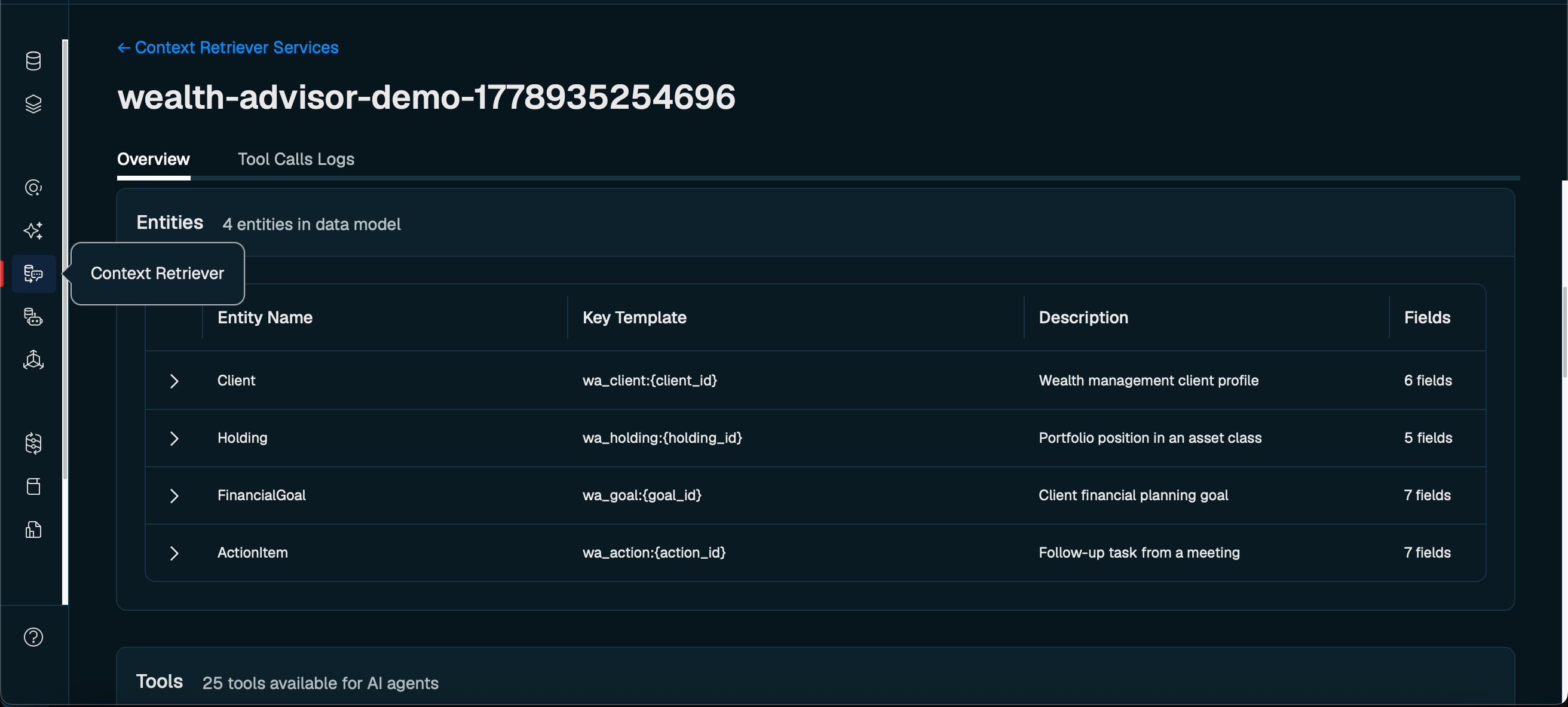
#What the entity schema looks like
Before creating a surface, you define the entity schema in
client-data.json. Each entity declares field names, types, descriptions, and the Redis index type for each field — this is what Context Retriever reads to auto-generate the MCP tools.Here is the
Client entity (the primary entity) and the Holding entity (a related entity linked via client_id):Note: TheredisIndicesfield controls which query tools are generated. Atagfield produces afilter_<entity>_by_<field>tool. Anumericfield produces afind_<entity>_by_<field>_rangetool. Atextfield produces asearch_<entity>_by_texttool.isKeyComponent: trueproduces aget_<entity>_by_idtool.
#What the actual records look like
The
records section of client-data.json holds the data that will be loaded into the surface. For the demo there is one client, James Morrison, with six holdings:Each
Holding record carries a client_id that matches the Client record, which is how filter_holding_by_client_id knows which holdings to return when the agent queries for a specific client.#Creating a context retriever (context surface) and loading records
With the schema and records defined, the backend creates the surface on first run. It reads
CTX_SURFACE_ID and MCP_AGENT_KEY from .env — if they're set, it skips creation and reuses the existing retriever. If either is missing, it creates everything from scratch:After the first run, the surface ID and agent key are printed to the console. Copy these values and set them manually in your
.env:On subsequent runs the backend reads these values from
.env and skips surface creation entirely, reusing the existing retriever.#Discovering and calling MCP tools
At agent startup, the LangGraph server fetches all available tools for the surface and wraps each one as a LangGraph
DynamicStructuredTool:Here's what's happening step by step:
listTools()fetches the current tool list from the MCP server. The tool count and names depend entirely on the entity schema — adding an entity to the schema automatically adds new tools.buildJsonSchemaToZod()converts each tool's JSON Schema parameters into a Zod schema so LangGraph can validate inputs and generate the tool signature for the LLM.cs.callTool()sends a JSON-RPC request to the MCP server and returns the structured result, whichextractMcpText()unwraps to a plain string for the agent.
The agent now has a set of tools it discovered at runtime — no hardcoded queries, no custom API routes.
#Context Retriever tools in the demo
For the wealth advisor entity schema, Redis Context Retriever generates multiple tools. Here are some examples:
| Tool | What it queries |
|---|---|
filter_holding_by_client_id | All portfolio holdings for a client |
filter_holding_by_asset_class | Holdings by equity, bond, or real estate class |
find_holding_by_current_value_range | Holdings above or below a value threshold |
filter_financialgoal_by_client_id | All financial goals for a client |
filter_financialgoal_by_type | Goals by type (retirement, education, etc.) |
search_financialgoal_by_text | Full-text search across goals |
filter_actionitem_by_status | Pending or completed action items |
get_client_by_id | Client profile by primary key |

These tools are available to the agent at runtime — no hardcoded queries, no custom API routes. When a user asks a question that requires structured client data, the agent picks the right tool, calls it, and cites its source in the response.
For example, asking "What is James Morrison's portfolio allocation?" causes the agent to invoke
filter_holding_by_client_id, retrieve the full holdings breakdown, and return the answer with a SOURCE: CONTEXT RETRIEVER label so the user can always see where the data came from: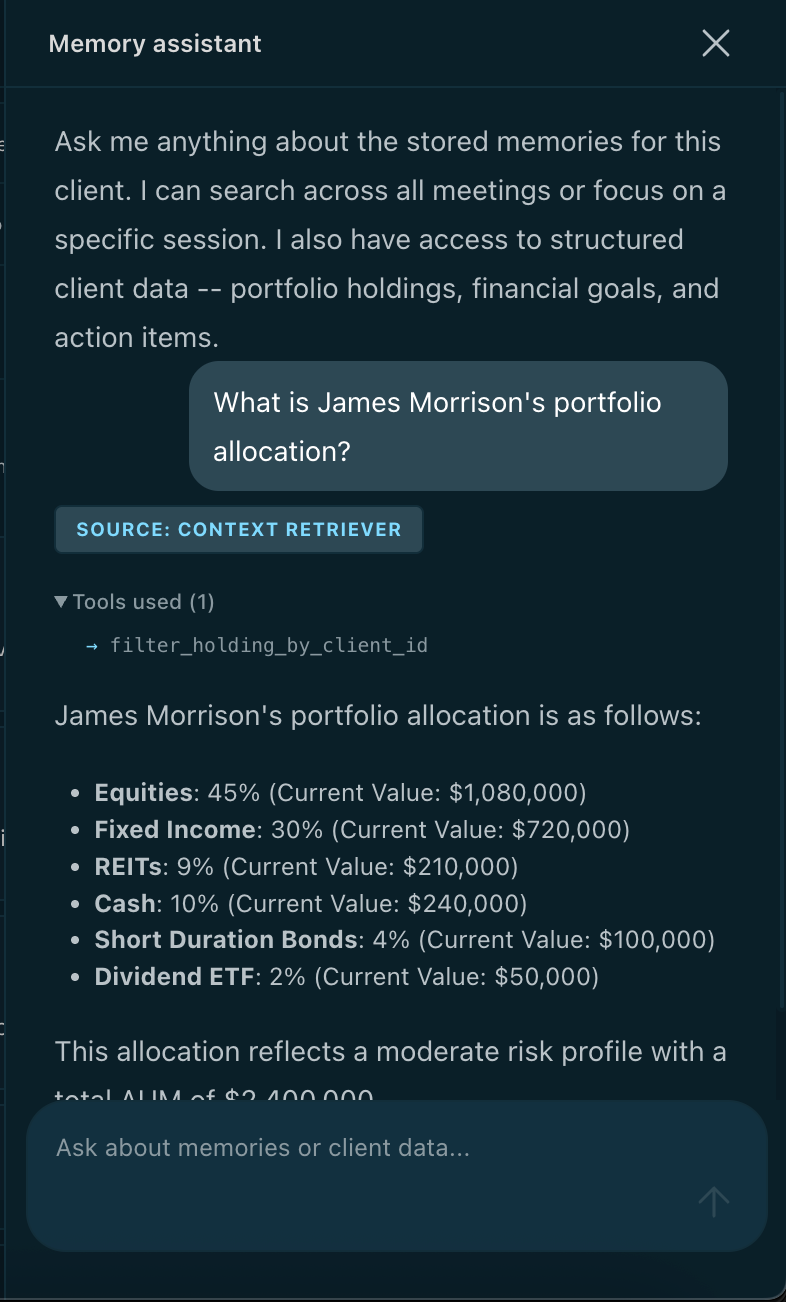
Note: This is where Context Retriever has a meaningful accuracy advantage over a standard RAG approach. If the portfolio data were stored purely as embeddings and retrieved with a single vector search, the agent would get back a semantically close chunk of text — but it would have no guarantee of completeness or precision. It might miss holdings, return stale text, or conflate records from different clients.With Context Retriever, the agent operates against structured records through typed MCP tools. It can callfilter_holding_by_client_idto get every holding for a client, follow up withfind_holding_by_current_value_rangeto narrow by value, and chain further tool calls as the question demands — each returning exact, queryable data rather than an approximation. The agent isn't doing a one-shot retrieval; it's navigating the data the same way a developer would query a database, just driven by the LLM's reasoning at runtime.
#Redis Agent Memory
#What is Redis Agent Memory?
Redis Agent Memory is a Redis Cloud service that gives AI agents two tiers of persistent memory:
- Session memory: The live conversation — an ordered log of events for the current session, scoped by
sessionId. Each event has a role (user,assistant,system), content, and optional metadata. Session memory is ephemeral by design; it exists as long as the session is active. - Long-term memory (LTM): Cross-session, persistent facts and events extracted from conversations. Backed by vector search so agents can retrieve semantically relevant memories regardless of which session produced them.
#Memory types
| Type | What it stores | Example from the demo |
|---|---|---|
episodic | Events with context and time | "Client expressed concerns about REIT exposure in the Feb meeting" |
semantic | Facts, preferences, profile data | "Client has a moderate risk tolerance" |
message | Stored conversation records | Raw dialogue segments |
Note: In this demo, all auto-extracted long-term memories areepisodictype because they come from meeting conversations. Redis Agent Memory extracts them automatically in the background — no code required beyond callingaddSessionEvent. You can also create LTMs manually viacreateLongTermMemories()at any time. This is the right approach when you run your own extraction pipeline — processing documents, emails, call transcripts, or any content outside of a live session — and want to persist the resulting memories directly:Automatic extraction and manual creation coexist — both end up in the same searchable LTM store.
#Session memory — storing a live conversation
When the user presses Play on a transcript, the frontend calls the backend once per chunk. Each chunk is a timestamped dialogue turn from the meeting. The backend formats it and stores it as a session event in Redis Agent Memory:
The session ID is generated when playback starts (
playback-<transcriptId>-<timestamp>) and is unique per playback run. Redis Agent Memory creates the session implicitly on the first addSessionEvent call — there's no separate "create session" API call required.Reading the live session back is equally simple:
The Session memory tab polls this every three seconds during playback, displaying events as they arrive.

#Long-term memory — what Redis remembers across sessions
After a transcript plays, Redis Agent Memory analyzes session events in the background and extracts durable facts as long-term memories. These are available for semantic search across all future sessions.
The Long-term memory tab searches LTMs by user, with optional filters for memory type and topics:
To see only the memories extracted from a specific meeting, filter by
sessionId instead:searchAllLongTermMemory automatically paginates through all results, so you always get the full set regardless of volume.
#The memory prompt — injecting context into any LLM call
The most important Redis Agent Memory method is
buildMemoryPrompt. It assembles a token-budgeted context string from session events plus relevant long-term memories — ready to inject directly into any LLM system prompt.The output format is structured markdown the LLM can immediately use:
How token budgeting works:
- Determine total token budget — from
contextWindowMaxif provided, otherwise a lookup table by model name, otherwise a 128k default - Reserve tokens for the LTM results and formatting overhead
- Spend the remaining budget on session events:
- If all events fit → include verbatim as "Recent Conversation"
- If events exceed the budget and an LLM is configured → summarize via LLM and include as "Session Summary"
- If no LLM is configured → trim oldest events and keep the most recent ones
This means the context string is always safe to inject regardless of session length.
#The AI Copilot — real-time suggestions during playback
The AI Copilot tab generates context-aware suggestions as the transcript plays. Every five chunks, the suggestion pipeline fires automatically:
Here's the core of the pipeline — how it hydrates memory context before invoking the suggestion LLM:
The LLM returns a structured JSON response with a suggestion and topic updates:
Topics have a lifecycle: pre-seeded topics from the transcript metadata start as
pending, move to discussed as the conversation covers them, and become question when the client asks about them directly.The suggestion LLM is also passed all previous suggestions to prevent duplicates — if a theme was already used, it returns
null for the suggestion field.
#The chatbot — querying across both data layers
The CopilotKit chatbot sidebar connects to a LangGraph ReAct agent that has tools from both data layers. This is the centrepiece of the demo: the agent receives a natural language question, reasons about which tools to call, calls them, and synthesizes an answer — citing which data layer it used.

#How the agent is wired
The LangGraph graph is a single-node ReAct agent. At startup it initializes both data clients and fetches all available tools:
The
tools array contains five hand-written RAM tools plus however many MCP tools Redis Context Retriever generated from the entity schema. The agent sees them all as equal — it doesn't know or care which layer a tool queries.#RAM tools
| Tool | When the agent uses it |
|---|---|
getMemoryContext | Primary tool: returns a full buildMemoryPrompt result — session events + LTM combined — for any question about an active session |
searchMemories | Semantic search across all long-term memories, cross-session |
searchMemoriesBySession | Search long-term memories scoped to a specific meeting |
listSessions | When the user references a meeting by date or name |
getSessionState | Session metadata — event count, owner ID |
#The dynamic system prompt
The agent's system prompt is built at startup from the MCP tool definitions, not hardcoded. It parses entity names from tool names (e.g.,
filter_holding_by_* → "Holding") and generates routing guidance dynamically:This means adding a new entity to the schema automatically updates the system prompt — no code changes needed.
#Source attribution
The LLM outputs a structured header the frontend parses into a styled badge and collapsible tools disclosure:
The frontend's custom
AssistantMessage component splits this into a rendered source badge, a collapsible <details> block listing the tools called, and the answer body rendered as markdown.#Sample questions and routing
| Question | Expected tools |
|---|---|
| "What happened in this meeting?" | getMemoryContext |
| "What did James say about bonds last month?" | searchMemories |
| "Summarize the February call" | listSessions → getMemoryContext |
| "What is James's portfolio allocation?" | filter_holding_by_client_id |
| "Are there any pending action items?" | filter_actionitem_by_status |
| "List all holdings worth more than $500K" | find_holding_by_current_value_range |
| "What are his retirement goals and what was discussed about them?" | filter_financialgoal_by_type + searchMemories |
| "Tell me everything you know about James" | Multiple RAM + Context Retriever tools |

#How it all works — the Redis data patterns
All the capabilities in this tutorial are powered by a small set of Redis primitives:
| Feature | Redis mechanism | Used for |
|---|---|---|
| Session memory events | Redis JSON (append-only event log) | Storing transcript chunks per playback session |
| Long-term memory | Redis vector index (RediSearch) | Semantic search across extracted facts and events |
| Redis Context Retriever | Redis + RediSearch + MCP server | Structured entity queries via auto-generated tools |
| Suggestion store | Redis JSON | Persisting generated AI Copilot suggestions |
| Topic store | Redis JSON | Tracking topic lifecycle (pending → discussed → question) |
| Transcript chunk store | Redis JSON | Recent chunk buffer for the suggestion pipeline |
The key insight: Redis is doing a different job at each layer. Session memory uses Redis as an ordered event log. Long-term memory uses Redis's vector search to find semantically relevant facts. Context Retriever uses Redis as the backing store for a structured, MCP-queryable entity index. All three coexist in the same Redis Cloud instance.
#Running the demo
Open
http://localhost:3001. The app loads the wealth advisor configuration — branding, participant roles, suggestion types — from the backend.- Select a transcript from the dropdown in the left panel and click Play
- Watch session memory fill in the Session memory tab (right panel) as each chunk is stored
- Watch long-term memories appear in the Long-term memory tab after extraction runs in the background
- Check the AI Copilot tab for context-aware suggestions generated every five chunks
- Open the chatbot sidebar (top-right button) and ask questions across both data layers
Try a combined question like: "What is James's current equity allocation and what did he say about rebalancing in the last meeting?" — the agent should call
filter_holding_by_asset_class for the portfolio data and getMemoryContext or searchMemories for the conversation context, then synthesize the answer.Click Reset to clear all sessions, long-term memories, and copilot stores for a clean run.
#Next steps
Now that you have a running memory-aware AI agent, here are ways to extend it:
- Add a new entity type. Edit
data/wealth-advisor/dataset.config.jsonto add an entity tocontextSurfaces.entities, add matching records toclient-data.json, and restart. Redis Context Retriever generates new tools automatically — the agent picks them up with no code changes. - Seed known facts as long-term memories. Use
ram.createLongTermMemories()at setup time to pre-load facts about clients. CombineMemoryType.SEMANTICfacts withMemoryType.EPISODICevents for a richer memory base. - Adjust the memory prompt budget. Change
MEETING_MEMORY_CONTEXT_WINDOW_MAXin.envto control how many tokens are reserved for memory context in LLM calls. - Explore with Redis Insight. Connect Redis Insight to your local Redis instance to browse session events, topic stores, and suggestion stores as JSON documents in real time.
- Build your own persona. The app is dataset-driven — all labels, roles, branding, suggestion types, and entity schemas come from
dataset.config.json. Clone thewealth-advisorfolder, edit the config, and swap in your own transcript data and entity records.