
In Redis 8.4, we have built upon improvements from 8.2 that make it easier to build with Redis Streams and strings.
We continued to simplify how to use streams with multiple consumer groups. We introduced a new optional argument to the XREADGROUP command to allow consuming both idle pending entries and incoming entries in a single command.
We extended the SET command and introduced the DELEX and DIGEST commands to offer atomic compare-and-set and compare-and-delete for string keys. These additions make it easy to implement single-key optimistic concurrency control. Lastly, we introduced MSETEX to allow setting multiple string keys and updating their expiration in a single command.
Streams
Pending messages
Pending entries are messages that have been delivered to a consumer in a consumer group but not yet acknowledged. Pending entries are kept in the consumer group’s Pending Entries List (PEL) until they are acknowledged (with XACK or XACKDEL) or deleted (with XDELEX DELREF). When a message stays pending for a long time, something likely went wrong. The client consuming the message may have crashed while handling or before acknowledging it, the message may be “problematic” (e.g., causes a deadlock or takes too long to handle), the client may be buggy (e.g., “forgot” to acknowledge or acknowledged the wrong message id), or the issue may be due to communication problems between the client and Redis.
Under a normal flow, apps expect each message to be acknowledged within a given time after it was consumed. If it isn’t acknowledged, it is an idle pending message, and consumers can try to consume it again.
Handling pending messages before Redis 8.4
Since stream message processing can go wrong, a simple and robust recovery logic is required. That’s why consumers need to both:
- Monitor the Pending Entity List (PEL) of consumer groups, claim idle pending messages, and handle them.
- Handle new incoming entries.
Before Redis 8.4, consuming both idle pending and incoming messages, messages required clients to alternate between:
- Sample the consumer group’s PEL, search for idle pending entries, then claim and consume them: Call XPENDING to get a list of idle pending entries and XCLAIM to claim them, or call XAUTOCLAIM to claim and consume them.
- Call XREADGROUP to claim incoming entries.
This logic could be quite complex to implement, especially when consuming from multiple streams. While XREADGROUP supports multiple stream keys, XPENDING, XCLAIM, and XAUTOCLAIM do not. A client consuming multiple streams would then need to:
- Call XPENDING+XCLAIM / XAUTOCLAIM for each stream.
- Call XREADGROUP against all the streams (note: all specified stream keys must be in the same hash slot in a Redis Cluster).
Extending the XREADGROUP command
In Redis 8.4 we introduce a simple yet powerful extension to XREADGROUP:
When CLAIM min-idle-time is specified, from the consumer group group of each specified stream key, Redis will first try to claim messages that have been pending for at least min-idle-time milliseconds (equivalent to the min-idle-time parameter value in XPENDING, XCLAIM, and XAUTOCLAIM). The pending messages with the highest idle time would be claimed first. If there are no such pending messages, Redis consumes incoming messages as usual.
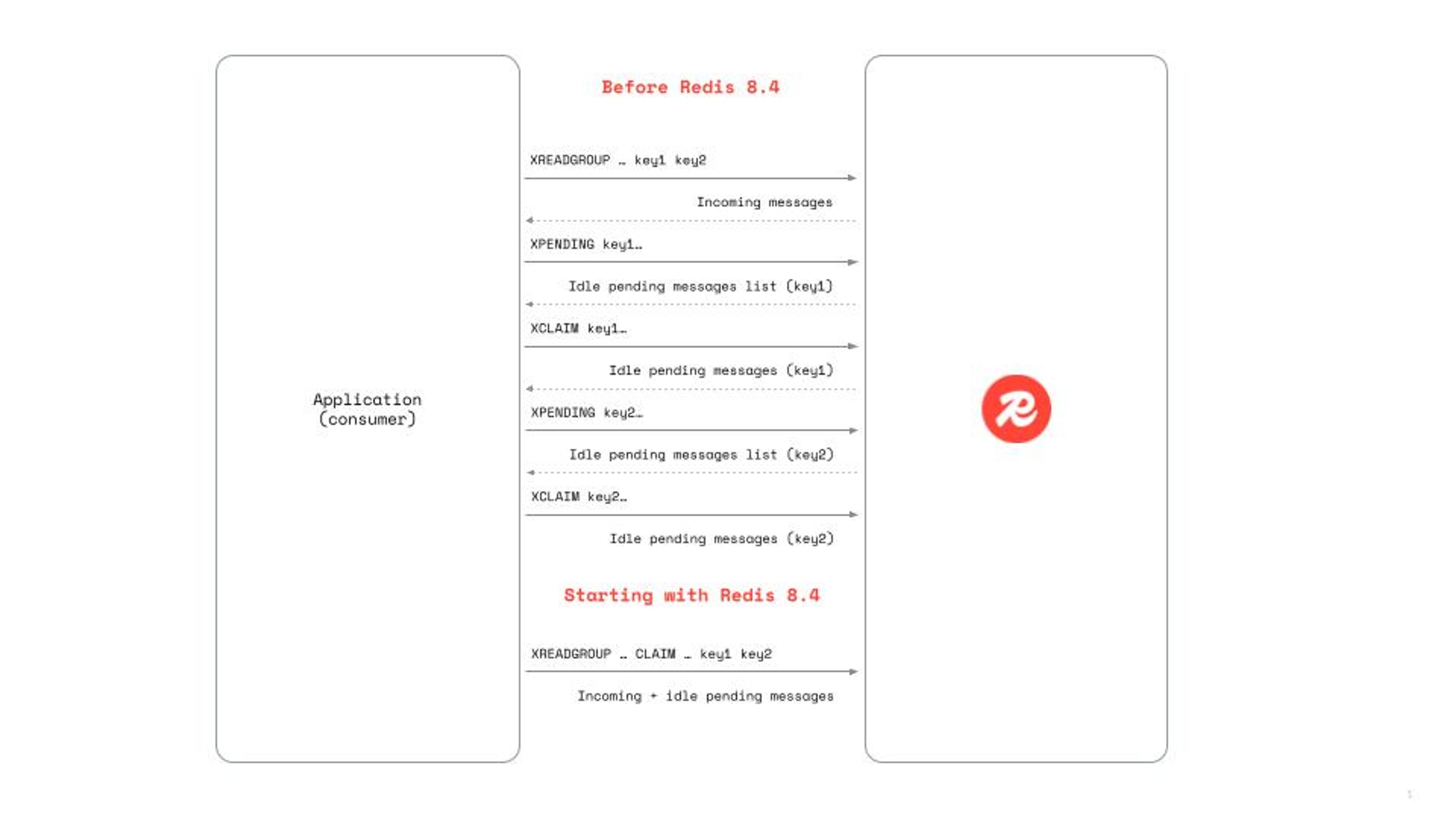
When an id is >, without CLAIM, the consumer retrieves only messages that have never been delivered to any other consumer (i.e.,new messages). When an id is >, with CLAIM, the consumer retrieves those messages plus any pending entries idle for at least min-idle-time milliseconds. CLAIM min-idle-time is ignored for keys for where the specified id is not >.
When CLAIM min-idle-time is specified, the reply contains additional information for each pending message retrieved (similar to XPENDING):
This information lets consumers determine if specific pending messages should be handled differently. For example, to detect poison pills: a message with a delivery counter above a given threshold may be defined as a “poison pill” and handled accordingly.
Strings
Single-key optimistic concurrency control
Compare-and-set — also known as check-and-set, compare-and-swap, or CAS — and compare-and-delete are atomic methods often used to implement single-key optimistic concurrency control.
With compare-and-set, a client:
- Fetches a value from the server, and keeps it as “old value” on the app side.
- Modifies the local copy of the value.
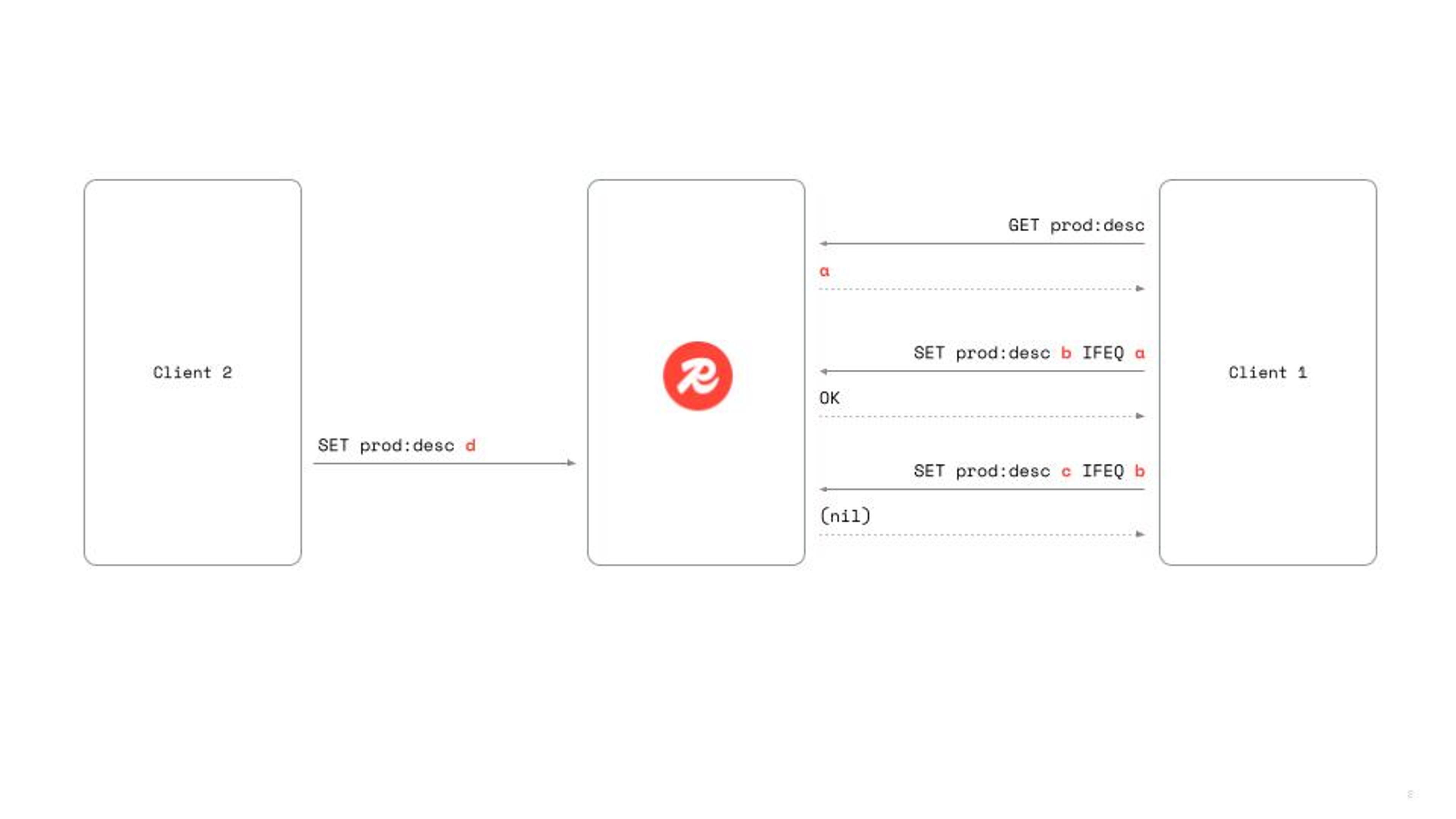
- Compare-and-set: applies the local changes to the server, but only if the server’s value hasn’t changed by another client (i.e., the value on the server is still equal to the old value).
For example, suppose you store product descriptions in a Product: Description string key and you want to enable users to edit the description (e.g., via a web form). Because edits are infrequent, you may want to use optimistic concurrency control. In simpler words, you want to set the new value only if it hasn’t changed by another client since it was fetched.
Before Redis 8.4, writing the new product description atomically required transactions or Lua scripts. Starting in Redis 8.4, clients can simply call: SET Product: Description newValue IFEQ match-value where match-value is the old value kept on the app side.
IFEQ match-value ensures that Redis sets the value to new Value only if the value on the server is equal to match-value.
Sometimes, storing the old value in the client’s memory and passing it back to the server isn’t ideal, especially when the value is large (e.g., a large JSON string or BLOB). Keeping both old and new values in the client is a memory waste. In Redis 8.4, clients can avoid storing the old value by using digests:
- GET Product:Description
- On the client side, calculate the digest of the value using a newly introduced client-side method, and keep it as “old digest”.
- Edit the product description (e.g., via a web form).
- SET Product:Description newValue IFDEQ match-digest
IFDEQ match-digest specifies that Redis should set the value to newValue only if the hash digest of the old value is equal to match-digest (i.e., the value on the server hasn’t changed since the client fetched it). Redis uses the XXH3 hash function.
While the user is editing the product description, the client can periodically call DIGEST Product:Description and abort the edit if the digest was changed. The new DIGEST key command retrieves the digest of the value stored on the server.
Continuing our example, let’s say we also want to allow the client to delete the Product:Description key (e.g., suppose a product with no description means it isn’t available anymore). As with updates, we want to ensure the key is deleted only if the description hasn't been changed by another client.
Redis introduces DELEX exactly for this purpose. Clients can now simply call DELEX Product:Description IFEQ match-value or DELEX Product:Description IFDEQ match-digest, which performs an atomic compare-and-delete and removes the key only if it hasn’t been modified by another client since the last read.
While the atomic compare-and-set and compare-and-delete can also be implemented with transactions and Lua scripts, the new SET optional arguments and DELEX command are much simpler and faster to use for common single-key optimistic concurrency control use cases.
Atomically set multiple keys and set their expiration
The MSETEX command introduced in Redis 8.4 allows you to atomically create or update multiple string keys and optionally set a common expiration. It extends—and effectively replaces—both MSET and MSETNX by adding optional arguments already available in the SET command.
With [EX seconds | PX milliseconds | EXAT unix-time-seconds |PXAT unix-time-milliseconds | PERSIST], you can set the expiration time or the time-to-live for all the specified keys.
With XX, the values and expiration are set only if all specified keys already exist, and with NX, the values and expiration are set only if none of the specified keys exist.
Getting started
All these enhancements are generally available on Redis 8.4 today. You can start using the new commands by downloading Redis 8.4 and experimenting with them in your existing stream and string workflows.
Have feedback or questions? Join the discussion on our Discord server or reach out to your account manager.
Get started with Redis today
Speak to a Redis expert and learn more about enterprise-grade Redis today.