Tutorial
How to build a car dealership AI agent with Google ADK and Redis Agent Memory Server
March 25, 202618 minute read


TL;DR:Build a car dealership AI agent that remembers customer preferences across sessions using Google ADK and Redis Agent Memory Server. The agent uses a three-stage pipeline — memory recall, journey state update, and sales response — orchestrated by Google ADK'sSequentialAgent. Redis stores both working memory (session events) and long-term memory (cross-session preferences via vector search), giving the agent persistent context without stitching together separate stores.
Note: This tutorial uses the code from the following git repository:
#What you'll learn
- How to use Redis Agent Memory Server for long-term and working memory in an AI agent
- How to wire Google ADK with Redis memory using the
adk-redispackage - How to build a multi-stage sequential agent pipeline (memory recall, journey state, sales response)
- How to persist customer preferences across sessions with Redis-backed vector search
- How to serve the full stack with Docker Compose
#What you'll build
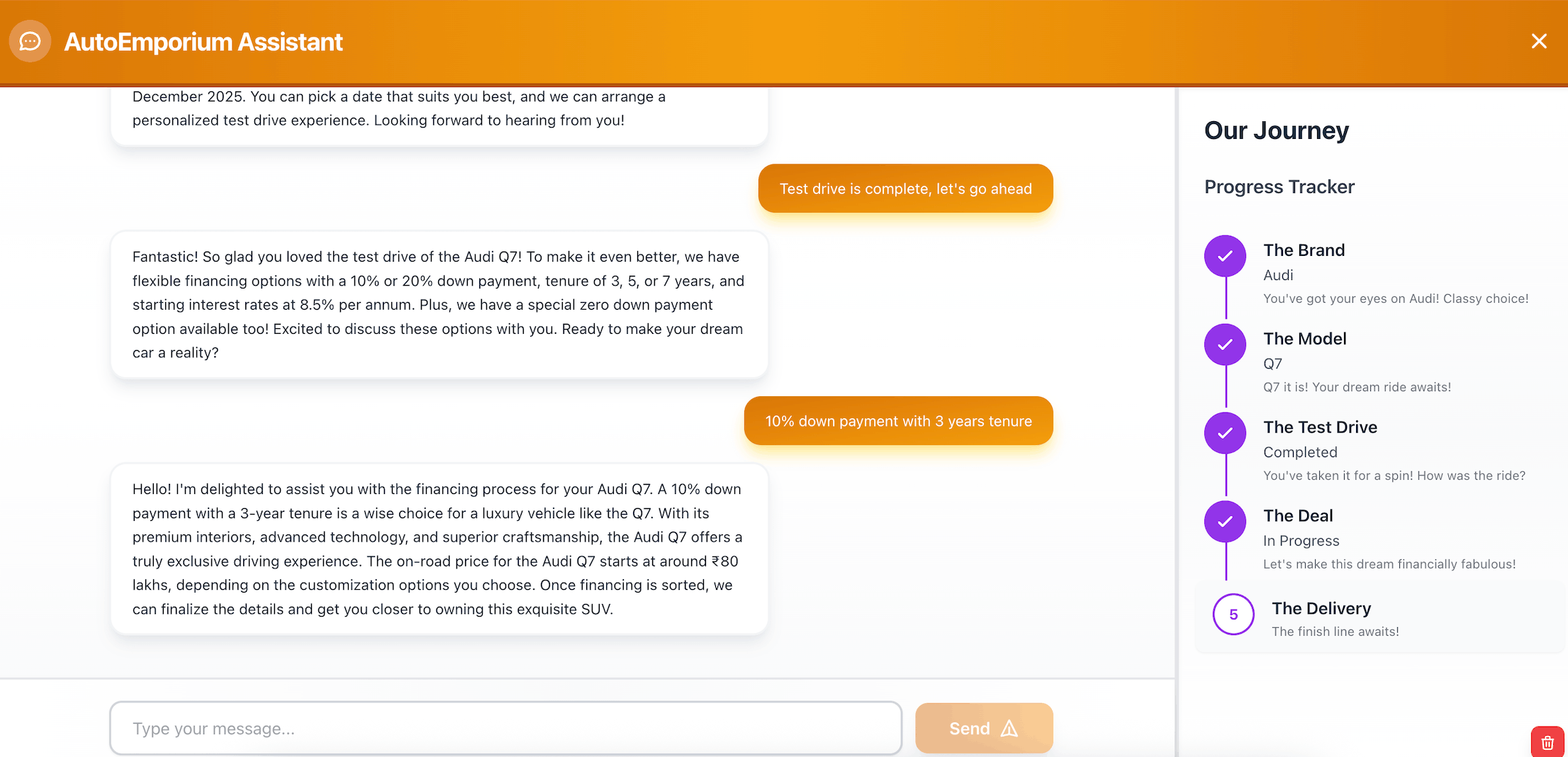
You'll build a car dealership chatbot called AutoEmporium. A customer logs in, tells the agent what kind of car they want, and the agent walks them through a five-stage purchase journey:
- Needs analysis — collect preferences (body type, seats, fuel)
- Shortlist — recommend matching vehicles from a catalog
- Test drive — schedule and confirm a test drive
- Financing — present financing options after the drive
- Delivery — plan the handover and pickup after financing is settled
The agent remembers everything. If a customer says "I want a diesel SUV with 7 seats" today and comes back next week, the agent recalls those preferences from long-term memory and picks up where the conversation left off.
#What is Google ADK?
Google ADK (Agent Development Kit) is an open source framework for building AI agents. It provides primitives like
LlmAgent for LLM-powered reasoning steps, SequentialAgent for chaining multiple agents into a pipeline, and Runner for executing the pipeline with session management. ADK handles the orchestration loop — sending messages, collecting structured outputs, and passing state between agents — so you can focus on the agent logic itself.This app uses ADK to chain three specialized agents into a single pipeline that runs on every user message.
#What is Redis Agent Memory Server?
Redis Agent Memory Server is a standalone service that provides a REST API for storing and retrieving AI agent memory. It runs as a Docker container and connects to a Redis instance for persistence. The server handles two types of memory:
- Working memory — session-scoped events (the current conversation history). Stored and retrieved through the session API.
- Long-term memory — cross-session knowledge (user preferences, past interactions). Stored as vector embeddings and retrieved through semantic search.
The memory server handles embedding generation, extraction strategies, and search ranking. Your app talks to it over HTTP — no direct Redis commands needed from the app layer.
#What is the adk-redis package?
The
adk-redis package bridges Google ADK with Redis Agent Memory Server. It provides two service classes that plug directly into ADK's Runner:RedisWorkingMemorySessionService— implements the ADK session interface, storing and retrieving session events through the memory server APIRedisLongTermMemoryService— implements the ADK memory interface, enabling semantic search over past interactions
With
adk-redis, you configure the memory server URL and namespace once, and ADK handles the rest — reading memory before each turn and writing memory after.#Why use Redis for AI agent memory?
Redis fits agent memory because a single data layer handles everything the agent needs:
- Session state for active conversations
- Vector search for semantic recall of past preferences
- Low-latency reads for real-time agent workflows (sub-millisecond)
- Persistence so memory survives restarts
That means one fast system instead of separate stores for sessions, vectors, and chat history. Redis Agent Memory Server wraps this into a clean API, and
adk-redis wires it into Google ADK with minimal configuration.#Prerequisites
- Python 3.11+
- Node.js 18+
- Docker and Docker Compose
- A Redis Cloud account (free tier works)
- An OpenAI API key
If you need a Redis refresher first, start with the Redis quick start.
#Step 1. Clone the repo
#Step 2. Configure environment variables
Copy the example environment file:
Then edit
.env with your values:Here's what each variable does:
| Variable | Purpose |
|---|---|
OPENAI_API_KEY | Your OpenAI API key for LLM calls |
ADK_MODEL_NAME | The model to use, prefixed with the provider (e.g. openai/gpt-4o-mini) |
REDIS_URL | Connection string for your Redis Cloud instance |
REDIS_MEMORY_SERVER_URL | URL for the memory server, used by the adk-redis integration (use http://memory-server:8000 inside Docker) |
VITE_API_URL | The backend URL that the browser uses (use http://localhost:8001 for local dev) |
Note:REDIS_MEMORY_SERVER_URLuses the Docker service namememory-serverbecause the backend container talks to the memory server over the Docker network. If you run the backend outside Docker, change it tohttp://localhost:8000.
#Step 3. Start all services with Docker Compose
Build and start the full stack:
Docker Compose starts three services:
| Service | Port | Role |
|---|---|---|
memory-server | 8000 | Redis Agent Memory Server |
backend | 8001 | FastAPI app with Google ADK |
frontend | 3000 | React UI served by Nginx |
Once the services are healthy, open http://localhost:3000 in your browser. Log in with any username and start chatting with the agent.
Note: The backend waits for the memory server health check to pass before starting. If the memory server takes a while to initialize, the backend will retry automatically.
#How does the ADK agent pipeline work?
The app uses Google ADK's
SequentialAgent to chain three specialized agents into a single pipeline. Each agent runs in order on every user message, passing structured output to the next agent through ADK's state system.Here are the three agents and what each one does:
- memory_recall_agent — searches long-term memory for the user's prior preferences using ADK's built-in
load_memory_tool. Outputs a summary and a list of salient facts. - journey_state_agent — reads the recalled memory and the latest user message to update the customer journey state (body type, seats, fuel, brand, model, stage). Outputs a structured
JourneyStatePayload. - sales_response_agent — takes the journey state and memory context to draft the dealership reply. Outputs a response, a recommendation branch, and a next step.
The code below shows how the app constructs these agents and wires them into a
Runner:Each
LlmAgent uses output_schema to enforce structured output and output_key to write its result into ADK's shared state. The {memory_recall} and {journey_state} placeholders in the instructions reference those keys, so each agent can read the output of the previous one.The
Runner ties everything together. It takes the root agent, a session service for conversation state, and a memory service for long-term recall. When the backend calls runner.run(), ADK executes the three agents in sequence, persists memory automatically, and returns the final response.#How does Redis store agent memory?
The app uses two Redis-backed memory services, both provided by the
adk-redis package. These services talk to Redis Agent Memory Server over HTTP, and the memory server handles the actual Redis operations.Working memory stores session events — the messages exchanged during a conversation. The
RedisWorkingMemorySessionService handles this:Long-term memory stores cross-session knowledge — preferences, past interactions, and facts extracted from conversations. The
RedisLongTermMemoryService handles this:Both services point to the same memory server URL and share a namespace. The
extraction_strategy controls how the memory server extracts facts from conversations — the preferences strategy is tuned for pulling out user preferences like "diesel SUV with 7 seats."The
distance_threshold, semantic_weight, and recency_weight parameters control how vector search results are ranked. A lower distance threshold means stricter matching. The recency boost gives recent memories a slight edge over older ones.#How does the agent recall long-term memory?
The
memory_recall_agent uses ADK's built-in load_memory_tool. When the agent decides that prior context would help, it calls the tool, which searches the RedisLongTermMemoryService for semantically relevant memories. The results come back as a MemoryRecallPayload with a summary and a list of salient facts:The journey state agent and sales response agent can then reference
{memory_recall} in their instructions to incorporate those facts.Under the hood, a query goes to the memory server, the server runs a vector search against Redis, and matching memories come back ranked by semantic similarity and recency.
#How does the agent persist conversation memory?
Memory persistence is handled automatically by ADK's
Runner. When the Runner is constructed, it receives a memory_service (the RedisLongTermMemoryService):After each conversation turn, ADK internally processes the session events and sends them to the memory server through the long-term memory service. The memory server then extracts relevant facts (using the configured extraction strategy) and stores them as vector embeddings in Redis. Future searches from
load_memory_tool can find these memories.This is how the agent builds up knowledge over time. Each conversation turn contributes new facts to the memory store, and the vector embeddings make those facts searchable by semantic similarity rather than exact keyword match.
#How does the customer journey state machine work?
The app tracks the customer's progress through the car-buying process using a set of slots and a deterministic stage transition function. The slots represent the customer's preferences:
| Slot | Type | Example values |
|---|---|---|
body | string | suv, sedan, coupe, convertible |
seats_min | int | 5, 7 |
fuel | string | petrol, diesel, electric, hybrid |
brand | string | BMW, Audi, Mercedes-Benz |
model | string | X5, Q7, GLS |
test_drive_completed | bool | true, false |
The stage is computed from the filled slots using a simple priority chain:
This means:
- If the customer has moved past financing into handover planning, move to delivery
- If the customer has completed a test drive, move to financing
- If brand and model are known, move to test drive
- If body type is known, move to shortlist (present matching vehicles)
- Otherwise, stay in needs analysis (ask clarifying questions)
The
journey_state_agent handles slot extraction and stage computation using LLM reasoning. When ADK's session state is sparse (fewer than two populated slots), the backend reconstructs the journey state deterministically from the full session history and memory context.#How does namespace isolation prevent data leakage?
The app uses a hierarchical namespace to scope all memory operations. Every memory read and write includes a namespace derived from the app name, environment, configured namespace, user ID, and session ID:
This scoping means:
- User Alice's memories are isolated from user Bob's memories
- Session-level data doesn't leak across sessions for the same user
- Different environments (dev, staging, production) don't share memory
All namespace segments are sanitized to alphanumeric characters, hyphens, and underscores to prevent injection through user-supplied values.
#Troubleshooting
#The backend can't reach the memory server
Check that
REDIS_MEMORY_SERVER_URL is set correctly. Inside Docker Compose, it should be http://memory-server:8000. If you're running the backend outside Docker, use http://localhost:8000.Verify the memory server is running:
#OpenAI calls fail
Verify that
OPENAI_API_KEY is set correctly in your .env file and that the key has active billing. The ADK runtime will fail at startup if the key is missing or invalid.#Docker Compose fails to start
The compose file requires
REDIS_URL to be set. If it's missing, you'll see an error like REDIS_URL must be set to your Redis Cloud connection string. Make sure your .env file has a valid Redis Cloud connection string.#The agent returns an empty response
Check the backend logs for errors:
Common causes:
- The Google ADK packages aren't installed (check
requirements.txt) - The model name is incorrect (it should be prefixed with the provider, e.g.
openai/gpt-4.1) - The memory server is unhealthy (check
docker compose ps)
#Next steps
- Explore how agent memory works in depth with the agent memory with LangGraph and Redis tutorial
- Build a document agent with the Redis, RAG, and agent memory tutorial
- Build a RAG chatbot from scratch with the RAG GenAI chatbot with Redis tutorial
- Learn the basics of vector search with the vector search getting started guide
- Try Redis Cloud free to deploy Redis for your GenAI workloads
#FAQ
#What is agent memory in AI?
Agent memory is the mechanism that lets an AI agent retain and recall information across interactions. Short-term (working) memory holds the current conversation, while long-term memory persists user preferences and knowledge between sessions. This app uses Redis Agent Memory Server to handle both types, with vector search powering the semantic recall of long-term memories.
#How does Redis Agent Memory Server work?
Redis Agent Memory Server runs as a standalone Docker container that exposes a REST API for memory operations. It connects to a Redis instance and handles embedding generation, fact extraction, and vector search. Your app sends conversation events to the server, and it automatically extracts relevant facts and stores them as vector embeddings. When the app needs context, it queries the server with a search string and gets back semantically relevant memories ranked by similarity and recency.
#What is the difference between working memory and long-term memory?
Working memory stores the events within a single session — the back-and-forth messages in one conversation. It's scoped to a session ID and typically has a TTL. Long-term memory stores extracted facts and preferences that persist across sessions. It uses vector embeddings so the agent can find relevant past knowledge through semantic search, not just exact key lookups.
#Can I use a different LLM provider instead of OpenAI?
Yes. The app uses LiteLLM under the hood, which supports multiple providers. Change
ADK_MODEL_NAME to use a different provider prefix (e.g. anthropic/claude-haiku-4.5 or groq/llama-3.3-70b-versatile) and set the corresponding API key. The provider prefix tells LiteLLM which API to call.#Do I need Redis Cloud to run this tutorial?
The memory server requires a Redis instance with the Search and JSON modules. Redis Cloud (including the free tier) provides these out of the box. You can also use a local Redis instance with the necessary modules installed, but Redis Cloud is the easiest path.
#How is this different from a simple chatbot?
A simple chatbot answers questions from a fixed prompt and forgets everything between sessions. This agent tracks structured state (body type, fuel preference, selected model), progresses through a multi-stage workflow, and recalls preferences from past sessions through vector search. The memory layer makes it stateful across time, not just within a single conversation.
#What is Google ADK?
Google ADK (Agent Development Kit) is an open source framework for building AI agents. It provides building blocks like
LlmAgent for LLM-powered reasoning, SequentialAgent for chaining agents into pipelines, and Runner for executing those pipelines with session and memory management. This app uses ADK to orchestrate a three-stage dealership agent.