Tutorial
How to Search Movies Database with Redis
February 25, 202612 minute read
TL;DR:
In this tutorial, you'll learn how to use Redis Search to index and query a movies database. You'll start with basic data modeling, create search indexes, run queries, and work your way up to advanced aggregations and a sample application.
#What you'll learn
- How to model data in Redis Hashes for search
- How to create a search index with
FT.CREATE - How to run full-text, numeric, and TAG queries with
FT.SEARCH - How to use fuzzy matching and negation in queries
- How to manage indexes (inspect, alter, drop)
- How to aggregate data with
FT.AGGREGATE(grouping, sorting, filtering) - How to create filtered indexes for specialized queries
#Prerequisites
Before starting, make sure you have Redis running. You can follow the Redis quick start guide to set up Redis using Docker, Redis Cloud, or other methods.
For this tutorial, the quickest way is to use Docker:
Note: The container will automatically be removed when it exits (--rmparameter).
#How should I model movie data in Redis?
#Sample Dataset
In this tutorial, you'll work with a simple dataset describing movies. A movie is represented by the following attributes:
movie_id: The unique ID of the movie, internal to this databasetitle: The title of the movieplot: A summary of the moviegenre: The genre of the movie (single genre per movie for simplicity)release_year: The year the movie was released as a numerical valuerating: A numeric value representing the public's rating for this movievotes: Number of votesposter: Link to the movie posterimdb_id: ID of the movie in the IMDB database
#Key Structure
A common way of defining keys in Redis is to use specific patterns. For this application, we'll use:
business_object:key
For example:
movie:001for the movie with the id 001user:001for the user with the id 001
#Data Structure
For movie information, we'll use a Redis Hash. A Redis Hash allows the application to structure all the movie attributes in individual fields, and Redis Search will index these fields based on the index definition.
#How do I insert movie data into Redis?
Let's add some movies to the database using
redis-cli or Redis Insight.Connect to your Redis instance and run the following commands:
Now you can retrieve information from the hash using the movie ID:
Output:
You can also increment the rating:
Output:
But how do you find movies by year of release, rating, or title? This is where Redis Search comes in.
#How do I create a search index in Redis?
Redis Search provides a simple and automatic way to create secondary indices on Redis Hashes. For background on indexing strategies in Redis, see the Indexing and Querying guide.
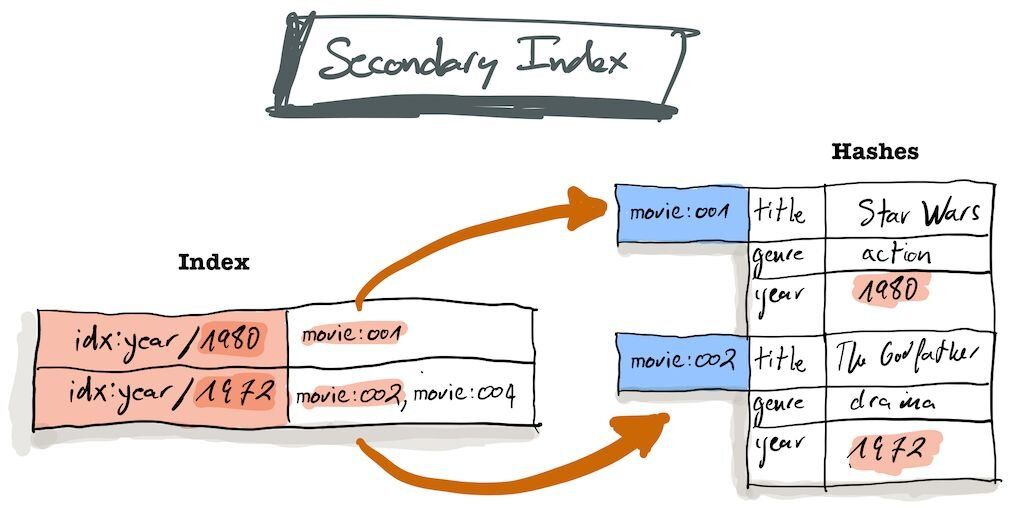
When using Redis Search, you must first index the fields you want to query. Let's index:
- Title
- Release Year
- Rating
- Genre
#Creating the index with FT.CREATE
Let's break down this command:
FT.CREATE: Creates an index with the given specidx:movie: The name of the indexON hash: The type of structure to be indexedPREFIX 1 "movie:": Index all keys starting withmovie:. You can specify multiple prefixes, e.g.,PREFIX 2 "movie:" "tv_show:"SCHEMA ...: Defines the schema with field types:TEXT: Full-text searchable fields (tokenized and stemmed)NUMERIC: Numeric fields for range queriesTAG: Exact match fieldsSORTABLE: Enables sorting on the field
Inspect the index:
Warning: Do not index all fieldsIndexes take space in memory and must be updated when the primary data is updated. Create indexes carefully and only for fields you need to query.
#How do I query data with FT.SEARCH?
Now let's run some queries using FT.SEARCH.
#Text Search
Find all movies containing "war":
Output:
The movie "Star Wars" is found even though you searched for "war" because the title is indexed as TEXT, meaning it's tokenized and stemmed.
#Limiting Returned Fields
Use
RETURN to specify which fields to return:Output:
#Field-Specific Search
Use
@field: syntax to search specific fields:#Negation
Use
- to exclude terms:Output:
#Fuzzy Matching
Output:
#TAG Filters
The
genre field is indexed as a TAG for exact match queries:Output:
Multiple TAG values (OR):
Learn more about Tag filters.
#Combined Conditions
Thriller or Action movies without "Jedi" in the title:
#Numeric Range Queries
Movies released between 1970 and 1980:
Using FILTER parameter:
Using query string:
Exclude a value with
(:#How do I manage Redis Search indexes?
#List All Indexes
Output:
#Inspect an Index
This returns detailed information about the index including field definitions and document count.
#Add Fields to an Index
Use
FT.ALTER to add new fields:The
WEIGHT parameter declares the importance of this field when calculating result accuracy (default is 1). Here, the plot is weighted less than the title.Now you can search the plot field:
#Drop an Index
Note: Dropping an index does not delete the underlying data. The movie hashes remain in the database.
Verify the data still exists:
Output:
Tip: Add theDDparameter toFT.DROPINDEXto also delete the indexed documents.
#How does Redis Search handle document changes?
Redis Search automatically indexes new, updated, and deleted documents.
#Insert and Auto-Index
Output:
1) (integer) 4Output:
1) (integer) 5The new movie is automatically indexed:
#Update Documents
Output:
#Document Expiration
When a document expires (TTL), it's automatically removed from the index:
After 20 seconds:
Output:
1) (integer) 0Tip: This is useful for "Ephemeral Search" use cases like caching, session content, etc.
#How do I import a full movies dataset?
Now let's import a larger dataset to explore more advanced features.
#Dataset Overview
We'll import three datasets:
| Dataset | Records | Description |
|---|---|---|
| Movies | 922 | Movie hashes with title, plot, genre, rating, etc. |
| Theaters | 117 | New York theater locations with geospatial data |
| Users | 5,996 | User profiles with demographics and login data |
- Movie fields:
movie:id(key),title,plot,genre,release_year,rating,votes,poster,imdb_id - Theater fields:
theater:id(key),name,address,city,zip,phone,url,location(longitude,latitude for geo queries) - User fields:
user:id(key),first_name,last_name,email,gender,country,country_code,city,longitude,latitude,last_login(EPOC timestamp),ip_address
#Import the Data
First, flush the database:
Then import using
redis-cli:Verify the import:
Output:
Output:
Output:
Use
DBSIZE to see the total number of keys.#Create Production Indexes
Movies Index:
Verify with
FT.INFO "idx:movie" - should show 922 documents.Theaters Index (with Geospatial):
Verify with
FT.INFO "idx:theater" - should show 117 documents.Users Index:
#How do I write advanced search queries?
With the full dataset, let's explore more advanced query techniques.
#Conditions
Find all movies containing "heat" (in title or plot):
This returns 4 movies because:
- It searches all TEXT fields (title and plot)
- It finds related words like "heated" due to stemming
- Results are sorted by score (title has weight 1.0, plot has 0.5)
Search only in title:
Returns only 2 movies.
Title contains "heat" but NOT "california":
Returns 1 movie ("Heat").
Note: Without parentheses,-californiaapplies to ALL text fields:
#How do I aggregate data with FT.AGGREGATE?
Beyond retrieving documents, you often need to aggregate data. Redis provides FT.AGGREGATE for this.
#Group By & Sort By
Number of movies by year:
Number of movies by year (descending):
Movies by genre with total votes and average rating:
Count female users by country:
#Apply Functions
Number of logins per year and month:
Logins by day of week:
#Filter Expressions
Use FILTER to filter results after aggregation.
Female users by country (except China, with more than 100 users):
Logins per month for year 2020:
#How do I create filtered indexes?
You can create indexes with FILTER expressions to index only a subset of documents.
Create an index for Drama movies from the 1990s:
Run
FT.INFO idx:drama to see the index definition and statistics.Notes:
- The
PREFIXis required even when using FILTER- This index is useful for specialized queries but may be redundant with
idx:movie
Verify both indexes return the same count:
Output:
1) (integer) 24Output:
1) (integer) 24#How do I build an application with Redis Search?
Now let's run a complete sample application that demonstrates Redis Search in action.
#Clone the Repository
#Run with Docker Compose
This starts:
- Redis on port 6380 with all data and indexes
- Java REST Service on port 8085
- Node REST Service on port 8086
- Python REST Service on port 8087
- Frontend on port 8084
#Access the Application
- Frontend: http://localhost:8084
- Java API: http://localhost:8085/api/1.0/movies/search?q=star&offset=0&limit=10
- Node API: http://localhost:8086/api/1.0/movies/search?q=star&offset=0&limit=10
- Python API: http://localhost:8087/api/1.0/movies/search?q=star&offset=0&limit=10
#Cleanup
Stop and remove all containers:
#Next steps
Now that you know how to search structured data with Redis, explore these related topics:
- Indexing and Querying patterns in Redis — learn about indexing strategies using core data structures
- Vector Similarity Search with Redis — go beyond full-text search with vector embeddings
- Semantic Text Search with LangChain and Redis — combine LLMs and Redis for semantic search
- Getting started with vector sets — learn the basics of Redis vector sets for similarity search