Tutorial
How to Build a Social Network Application using Redis and NodeJS
February 26, 202614 minute read

Julian Mateu
Manuel Aguirre
TL;DR:You can build a social network with Redis by storing user profiles as hashes, indexing skills and locations with Redis Search, and querying for matches using tag and geo filters. Pair this with a Node.js/Express backend to expose a REST API for creating users and finding complementary skill matches in real time.

#What you'll learn
- How to model user profiles as Redis hashes with tags and geo coordinates
- How to create a Redis Search index for efficient user matching
- How to query by tags (interests, expertises) and geo-radius filters
- How to build a Node.js/Express REST API backed by Redis
- How to containerize and run the full stack with Docker Compose
#Prerequisites
- Docker installed and running
- Node.js (v14 or later) and npm
- Basic familiarity with TypeScript and Express
- A Redis instance (this tutorial uses the Redis Docker image)
In this tutorial you'll build a social network application using Redis and Node.js. This is the idea behind Skillmarket.
The goal of the application is to match users with complementary skills. It will allow users to register and provide some information about themselves, like location, areas of expertise and interests. Using search in Redis it will match two users who are geographically close, and have complementary areas of expertise and interests, e.g., one of them knows French and wants to learn Guitar and the other knows Guitar and wants to learn French.
The full source code of our application can be found in GitHub (note that we used some features like
FT.ADD which is now FT.CREATE):We will be using a more condensed version of the backend which can be found in the Skillmarket Blogpost GitHub repo.
Refer to the official tutorial for more information about search in Redis.
#How do you set up Redis Search in a Docker container?
Let's start by launching Redis from the Redis image using Docker:
Here we use the
docker run command to start the container and pull the image if it is not present. The -d flag tells docker to launch the container in the background (detached mode). We provide a name with --name redis which will allow us to refer to this container with a friendly name instead of the hash or the random name docker will assign to it.Once the image starts, we can use
docker exec to launch a terminal inside the container, using the -it flag (interactive tty) and specifying the redis name provided before when creating the image, and the bash command:Once inside the container, let's launch a
redis-cli instance to familiarize ourselves with the CLI:You will notice the prompt now indicates we're connected to
127.0.0.1:6379#How do you store user profiles as Redis hashes?
We'll use a Hash as the data structure to store information about our users. This will be a proof of concept, so our application will only use Redis as the data store. For a real life scenario, it would probably be better to have a primary data store which is the authoritative source of user data, and use Redis as the search index which can be used to speed up searches.
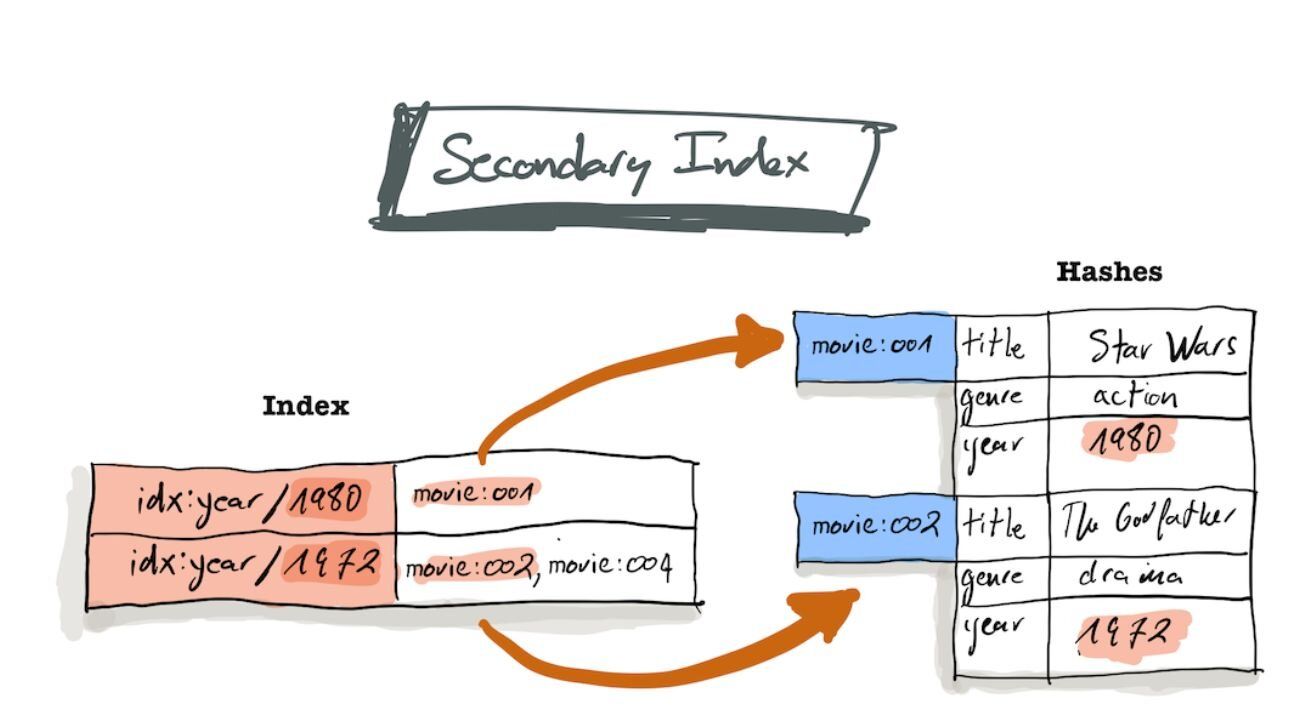
In a nutshell, you can think of a hash as a key/value store where the key can be any string we want, and the values are a document with several fields. It's common practice to use the hash to store many different types of objects, so they can be prefixed with their type, so a key would take the form of "object_type:id".
An index will then be used on this hash data structure, to efficiently search for values of given fields. The following diagram taken from the search docs exemplifies this with a database for movies:
Use the
help @hash command (or refer to the documentation) to get a list of commands that can be used to manipulate hashes. To get help for a single command, like HSET let's type help HSET:As we see, we can provide a key and a list of
field value pairs.We'll create a user in the hash table by using
user:id as the key, and we'll provide the fields expertises, interests and location:#How do you query Redis to match users by skills and location?
Here we can see the power of the search index, which allows us to query by tags (we provide a list of values, such as interests, and it will return any user whose interests match at least one value in the list), and Geo (we can ask for users whose location is at a given radius in km from a point).
To be able to do this, we have to instruct search to create an index:
We use the
FT.CREATE command to create a full text search index named idx:users. We specify ON hash to indicate that we're indexing the hash table, and provide PREFIX 1 "users:" to indicate that we should index any document whose key starts with the prefix "users:". Finally, we indicate the SCHEMA of the index by providing a list of fields to index, and their type.Finally, we can query the index using the
FT.SEARCH command (see the query syntax reference):In this case we're looking for matches for Alice, so we use her expertises in the
interests field of the query, and her interests in the expertises field. We also search for users in a 5km radius from her location, and we get Bob as a match.If we expand the search radius to 500km we'll also see that Charles is returned:
#Cleaning up
We can now remove the docker instance and move on to building the web application, running the following command from outside the instance:
#How do you build a Node.js backend for a Redis-powered social network?
After understanding how the index works, let's build a minimal backend API in Node.js that will allow us to create a user, and query for matching users.
NOTEThis is just an example, and we're not providing proper validation or error handling, nor other features required for the backend (e.g. authentication).
#How do you connect to Redis from Node.js?
We'll use the node-redis package to create a client:
All the functions in the library use callbacks, but we can use
promisify to enable the async/await syntax:Finally, let's define a function to create the user index, as we did before in the CLI example:
#How do you create, retrieve, and match users with a controller?
Let's define the functions that the controller will use to expose a simple API on top of Redis. We'll define 3 functions: -
findUserById(userId) - createUser(user) - findMatchesForUser(user)But first let's define the model we'll use for the users:
Let's start with the function to create a user from the model object:
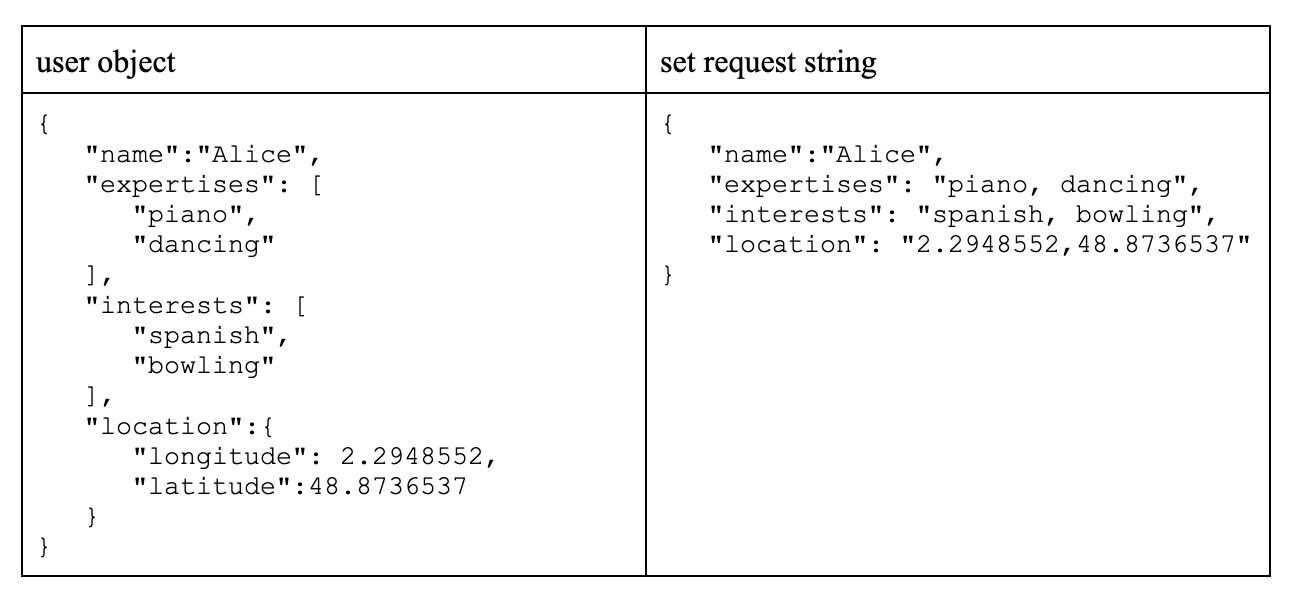
We will create a UUID for the user, and then transform the TAG and GEO fields to the redis format. Here's an example of how these two formats look like:
Let's now look at the logic to retrieve an existing user from the Hash table using
HGETALL:Here we have the inverse logic, where we want to split the TAG and GEO fields into a model object. There's also the fact that
HGETALL returns the field names and values in an array, and we need to build the model object from that.Let's finally take a look at the logic to find matches for a given user:
Here we swap interests and expertises to find the complementary skill set, and we build the query that we used previously in the CLI example. we finally call the
FT.SEARCH function, and we build the model object from the response, which comes as an array. Results are filtered to exclude the current user from the matches list.#How do you expose the user matching API with Express?
Finally, we can build a trivial web API using express, exposing a
POST /users endpoint to create a user, a GET /users/:userId endpoint to retrieve a user, and a GET /users/:userId/matches endpoint to find matches for the given user (the desired radiusKm can be optionally specified as a query parameter)#How do you run the full example with Docker Compose?
The code used in this tutorial can be found in the GitHub repo. The backend together with redis can be launched using docker compose:
The backend API will be exposed on port
8080. We can see the logs with docker compose logs, and use a client to query it. Here's an example using httpie:Finally cleanup the environment:
#Next steps
Now that you've built a skill-matching social network with Redis, explore these related tutorials to expand your Redis application skills:
- Build a real-time chat application with Redis — Learn how to use Redis Pub/Sub for messaging and user presence in a chat app.
- Build a real-time leaderboard with Redis — Use Redis Sorted Sets to implement ranking and score tracking.
You can also dive deeper into the features used in this tutorial: