Tutorial
Microservices Communication with Redis Streams
February 26, 202620 minute read


TL;DR:Use Redis Streams as a lightweight message broker for interservice communication in microservices. Each service produces events to a named stream usingXADD, and downstream services consume them via consumer groups withXREADGROUP. Redis Streams gives you message persistence, consumer groups for load balancing, and message acknowledgment—making it a simpler alternative to Kafka for event-driven architectures.
GITHUB CODEBelow is a command to the clone the source code for the application used in this tutorialgit clone --branch v1.0.0 https://github.com/redis-developer/redis-microservices-ecommerce-solutions
#What you'll learn
- What interservice communication is and why streaming beats pub/sub for microservices
- How Redis Streams compares to Kafka and Redis Pub/Sub for message brokering
- How to produce events to a Redis Stream with
XADD - How to consume events using consumer groups with
XREADGROUPandXACK - How to build a complete order-to-payment event flow between two microservices
#What is interservice communication?
When building a microservices application, people use a variety of options for communication between services. Among them:
- Publish/Subscribe model: In the pub/sub model (fire and forget), a publisher produces messages, and subscribers that are active at the time consume those messages. Inactive subscribers cannot receive the messages at a later point in time.
- Streaming: Most microservices apps use an event-streaming solution because of:
- Message persistence: Unlike the pub/sub model, messages stored in streams can be read by multiple consumers at any time; they fan out. So consumers can read messages at a later point in time, even if they were not active when the message was originally appended to the stream.
- Inherent replayability: Even if a subscriber crashes during the message processing, it can re-read the exact same unacknowledged message from the stream. For example, say the crashed subscriber never comes back online; the consumer group feature allows consumers to process unacknowledged messages of other consumers after a specified time.
- Separation of concerns: Producers can produce messages to stream at high speed separately and consumers can process messages at their own speed separately. This separation of concerns solves both the "fast producer -> slow consumer" and "slow producer -> fast consumer" problem, allowing for the scaling of those services independently.
In an event-driven microservices architecture, you might have some services that publish an API, and other services that are simply producers and consumers of events with no external API.
#Why should you use Redis for interservice communication?
Consider the following scenario: You have an e-commerce application with an architecture that is broken down into different microservices including as
create an order, create an invoice, process a payment, fulfill and order, and so on. Microservices allow you to separate these commands into different services to scale independently, enabling more customers to get their orders processed quickly and simultaneously, which results in a better user experience, higher sales volume, and less-cranky customer service staff.When you use microservices, you need a tool for interservice communication. Initially, you might consider using a product like Kafka for streaming, but setting it up is rather complicated. What many people don't know about Redis is that it supports streams in the same way Kafka does. Given that you are likely already using Redis for caching, it makes sense to also use it for stream processing. To reduce the complexity of application architecture and maintenance, Redis is a great option for interservice communication. Here we break down the process of using Redis with streams for interservice communication.
#How do Redis Streams, Pub/Sub, and Kafka compare?
When choosing a messaging layer for microservices, it helps to understand the trade-offs between Redis Streams, Redis Pub/Sub, and Apache Kafka:
| Feature | Redis Pub/Sub | Redis Streams | Apache Kafka |
|---|---|---|---|
| Message persistence | No — messages are fire-and-forget | Yes — messages are stored in a log | Yes — messages are stored in partitions |
| Consumer groups | No | Yes — built-in consumer group support | Yes — partition-based consumer groups |
| Message replay | No — missed messages are lost | Yes — consumers can re-read from any point | Yes — offset-based replay |
| Delivery guarantees | At-most-once | At-least-once (with XACK) | At-least-once or exactly-once |
| Operational complexity | Low — built into Redis | Low — built into Redis | High — requires ZooKeeper/KRaft, brokers, and separate infrastructure |
| Latency | Sub-millisecond | Sub-millisecond | Low milliseconds |
| Best suited for | Real-time notifications, chat | Event-driven microservices, task queues | High-throughput log processing, large-scale event streaming |
Redis Streams sits in a sweet spot for many microservices architectures: it provides message persistence, consumer groups, and replay capability with the operational simplicity of Redis. If you're already running Redis for caching, adding Streams requires no additional infrastructure. Kafka remains the better choice for extremely high-throughput scenarios (millions of events per second) or when you need exactly-once semantics, but for most microservices communication patterns, Redis Streams delivers comparable functionality with significantly less complexity.
#What does a microservices architecture look like for an e-commerce application?
The e-commerce microservices application discussed in the rest of this tutorial uses the following architecture:
products service: handles querying products from the database and returning them to the frontendorders service: handles validating and creating ordersorder history service: handles querying a customer's order historypayments service: handles processing orders for paymentdigital identity service: handles storing digital identity and calculating identity scoreapi gateway: unifies services under a single endpointmongodb: serves as the primary database, storing orders, order history, products, etc.redis: serves as the stream processor and caching database
This diagram illustrates how Redis Streams is used as the message broker between the
orders service and the payments service: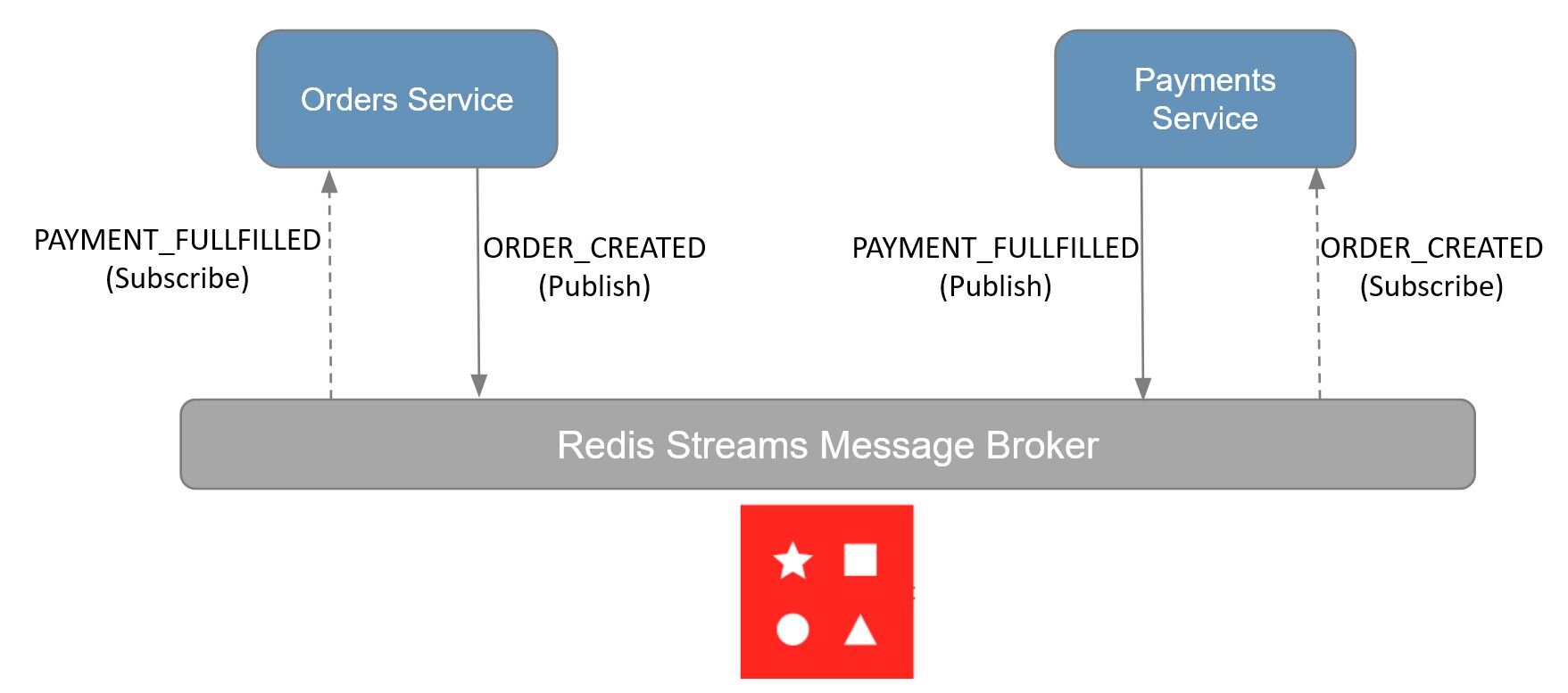
TIPRedis Streams is more cost-effective than using Kafka or other similar technologies. With sub-millisecond latency and a lightweight Streams log data structure, Redis is easier to deploy, develop, and operate.
#How does Redis enable interservice communication in an event-driven architecture?
The following event flow diagram illustrates how the orders service and payments service communicate through Redis with streams:
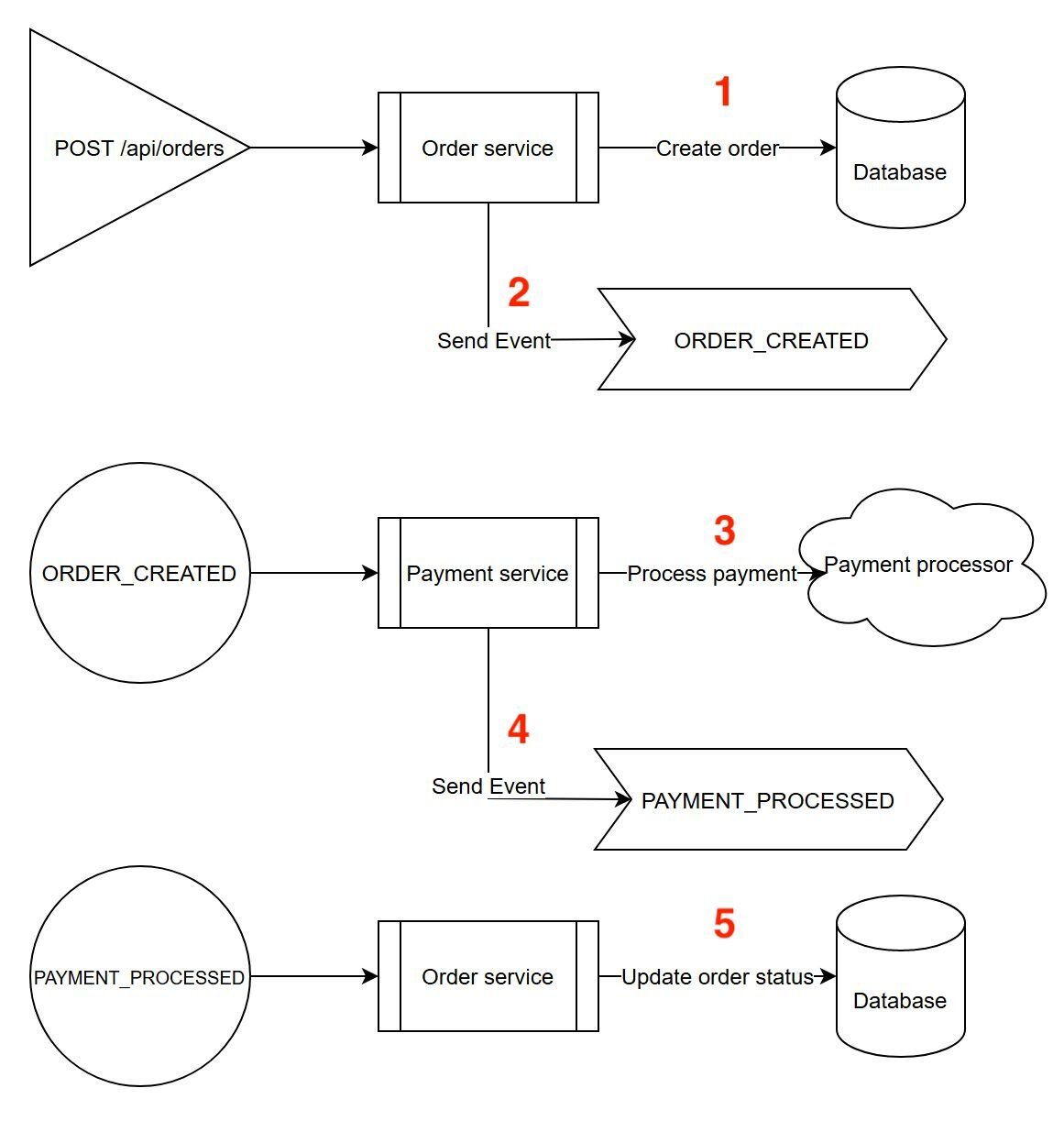
Let's outline the streams and events used below:
- The
orders serviceinserts order data into the database.
2. The
orders service also appends minimal data (orderId, orderAmount, and userId) to the ORDERS_STREAM to signal new order creation (i.e., it acts as PRODUCER of the ORDERS_STREAM).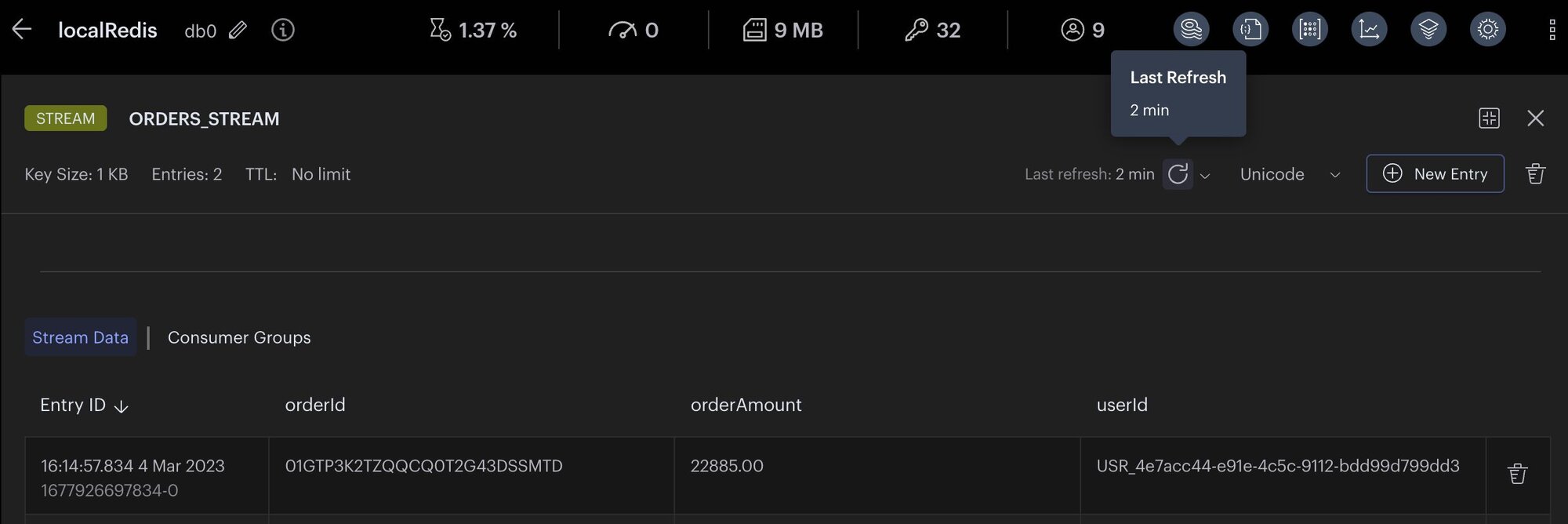
3. The
payments service listens to the ORDERS_STREAM and processes payments for new orders, then inserts payment data into the database (i.e, it acts as the CONSUMER of the ORDERS_STREAM).4. The
payments service appends minimal data (orderId, paymentId, orderStatusCode, and userId) to the PAYMENTS_STREAM to signal a new payment (i.e., it acts as the PRODUCER of the PAYMENTS_STREAM).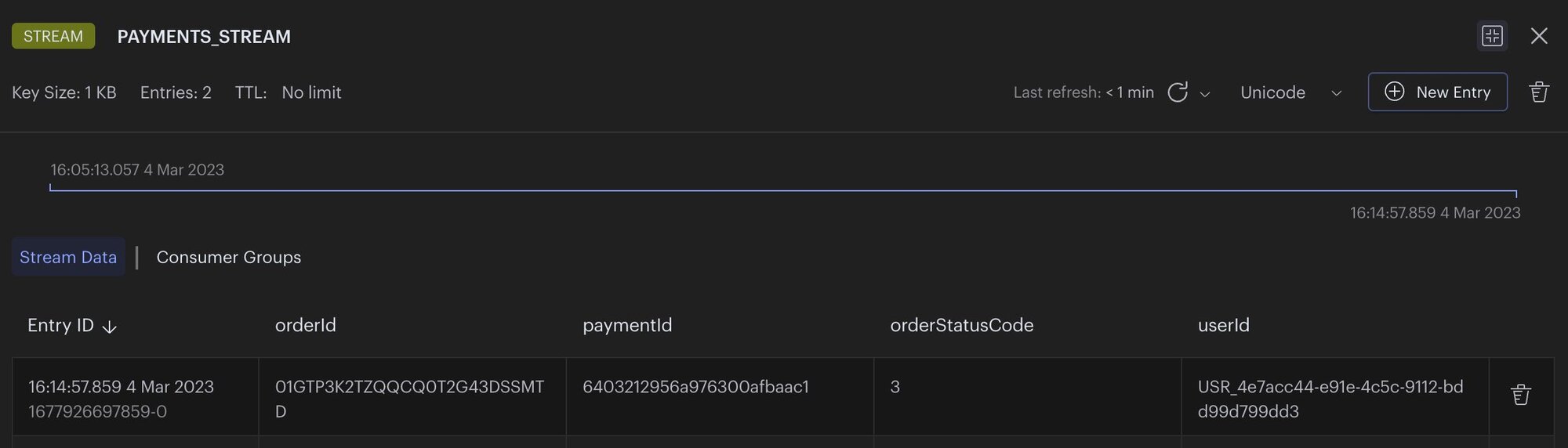
5. The
orders service listens to the PAYMENTS_STREAM and updates the orderStatus and paymentId for orders in the database accordingly as the order payment is fulfilled (i.e., it acts as the CONSUMER of the PAYMENTS_STREAM).#What does the e-commerce application frontend look like?
The e-commerce microservices application consists of a frontend, built using Next.js with TailwindCSS. The application backend uses Node.js. The data is stored in Redis and MongoDB. Below you will find screenshots of the frontend of the e-commerce app:
Dashboard: Shows the list of products with search functionality
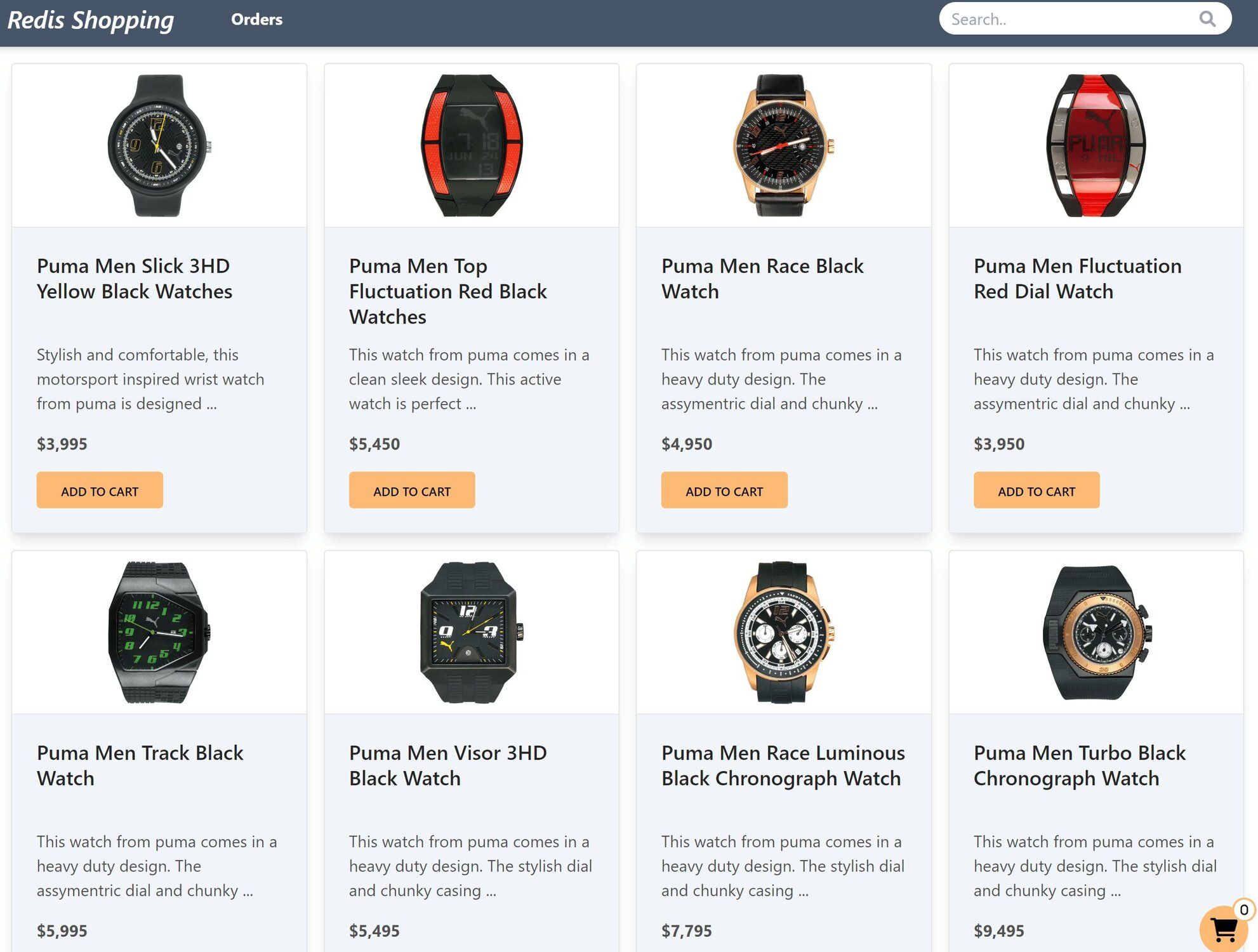
Shopping Cart: Add products to the cart, then check out using the "Buy Now" button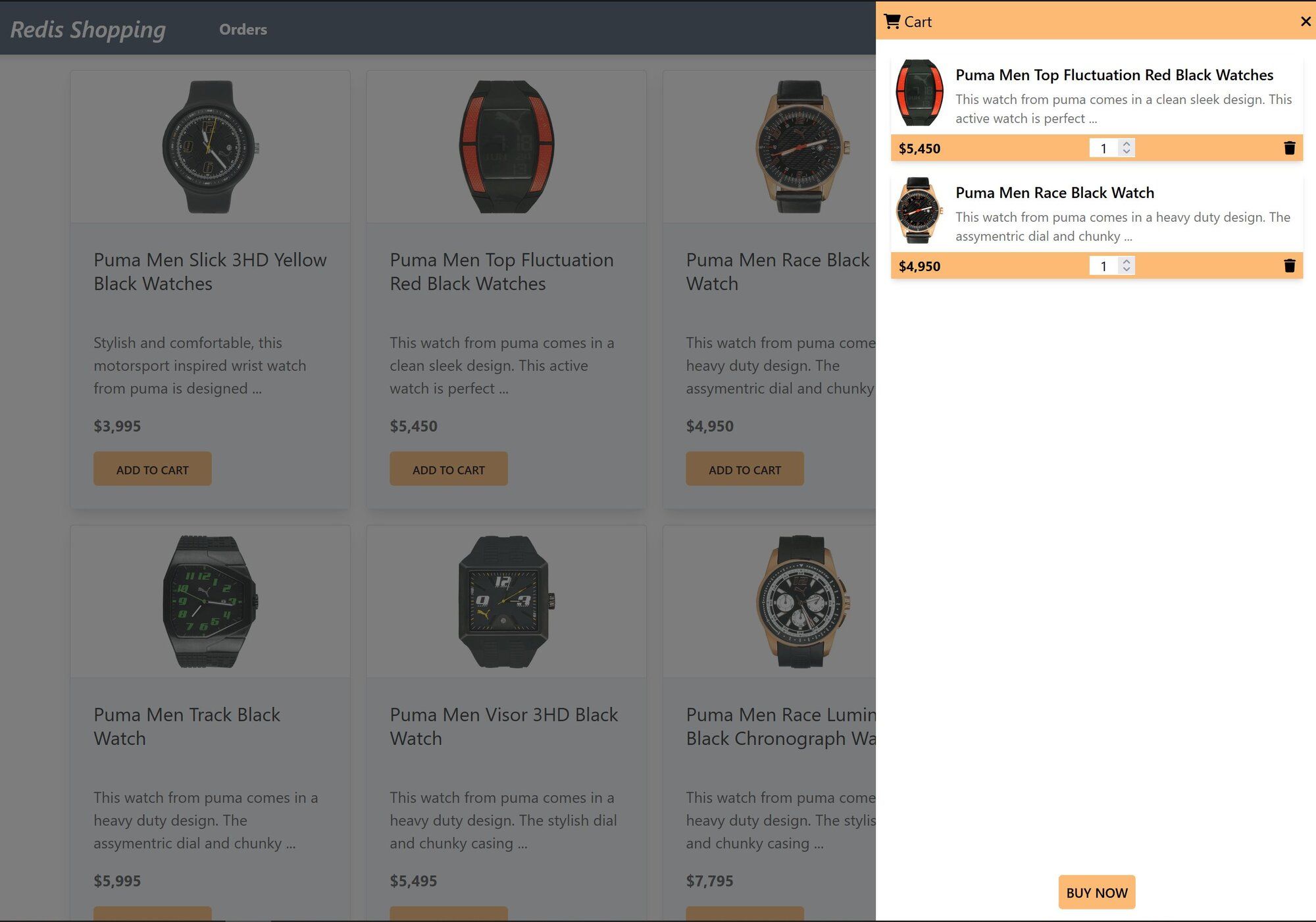
Order history: Once an order is placed, the Orders link in the top navigation bar shows the order status and history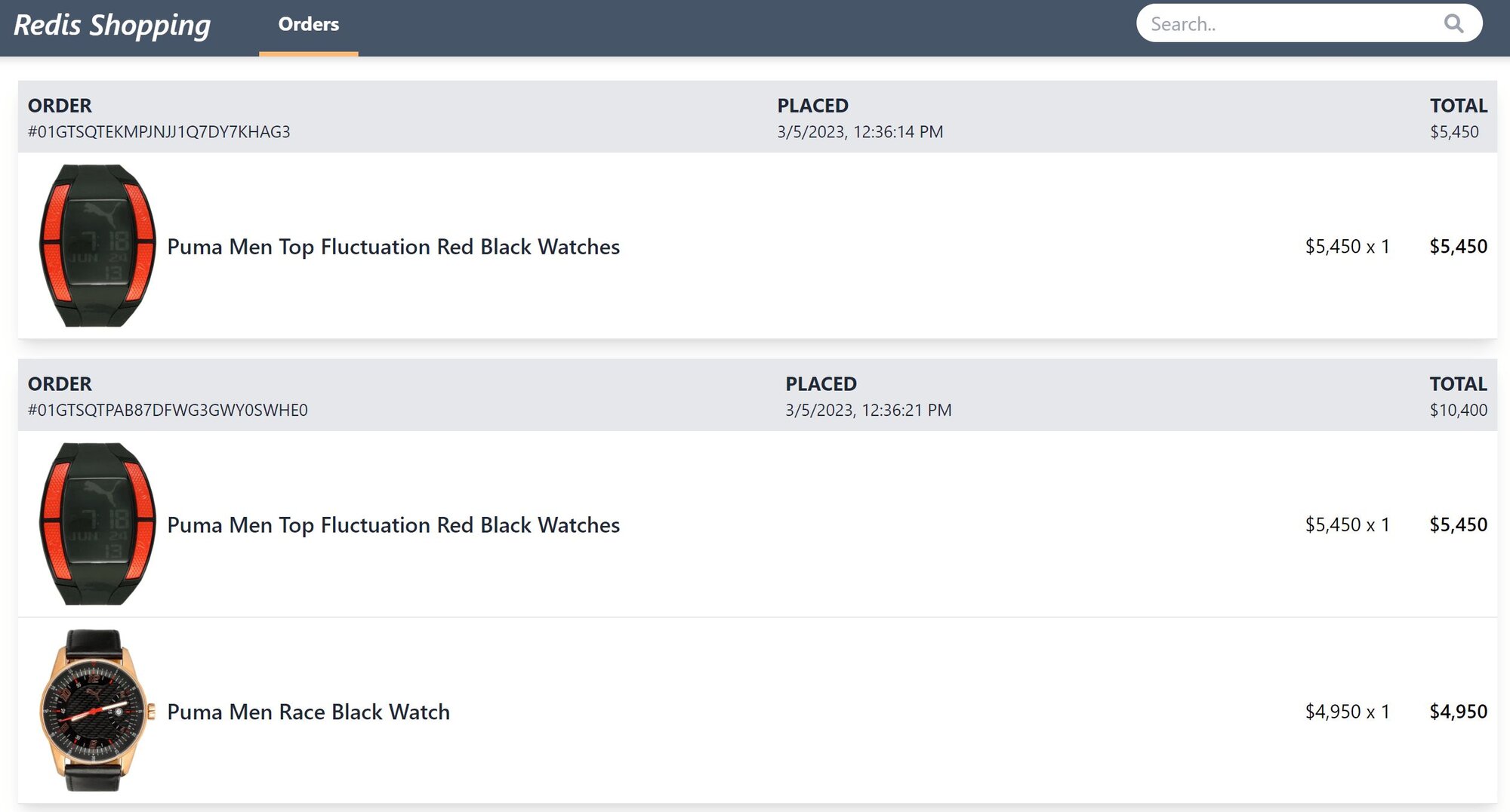
GITHUB CODEBelow is a command to the clone the source code for the application used in this tutorialgit clone --branch v1.0.0 https://github.com/redis-developer/redis-microservices-ecommerce-solutions
#How do you build an interservice communication application with Redis?
We use Redis to broker the events sent between the orders service and the payments service.
#Producer 1 (orders service)
Let's look at some of the code in the orders service to understand how it works:
- Orders are created.
- After order creation, the
orders serviceappends minimal data to theORDERS_STREAMto signal new order creation.
#Consumer 1 (payments service)
3. The
payments service listens to the ORDERS_STREAMTIPThere are a few important things to note here:
- Make sure the stream group doesn't exist prior to creating it.
- Use
isolated: true, in order to use the blocking version ofXREADGROUPin isolated execution mode.- Acknowledge individual messages after you process them to remove the messages from the pending orders queue and to avoid processing them more than once.
#Producer 2 (payments service)
4. The payments service appends minimal data to PAYMENTS_STREAM to signal that a payment has been fulfilled.
#Consumer 2 (orders service)
5. The orders service listens to the PAYMENTS_STREAM and updates the order when payments are fulfilled.
TIPIt's a best practice to validate all incoming messages to make sure you can work with them.
For the purposes of our application, we make a call to update the order status in both Redis and primary database in the same service (For simplicity, we are not using any synchronization technique between databases rather focusing on how the data is stored and accessed in Redis). Another common pattern is to have your services write to one database, and then separately use a CDC mechanism to update the other database. For example, you could write directly to Redis, then use Triggers and Functions to handle synchronizing Redis and primary database in the background.
TIPIf you use Redis Cloud, you will find that Redis Streams is available on the same multi-tenant data platform you already use for caching. Redis Cloud also has high availability, message persistence, support for multiple clients, and resiliency with primary/secondary data replication… all built in.
#What are the next steps for using Redis Streams in microservices?
You now know how to use Redis Streams for interservice communication as both a producer and a consumer. Here are some ways to continue building on what you've learned:
#Next steps
- Try the CQRS pattern with Redis: Learn how to separate read and write models in your microservices using Redis in the CQRS tutorial.
- Explore Redis Streams in .NET: If you work with .NET, see How to use Redis Streams with .NET for a hands-on guide to stream basics with C#.
- Add caching to your microservices: Improve performance with query caching or API gateway caching.
- Get started with Redis Cloud: Try Redis Cloud for free to get managed Redis Streams with built-in high availability and data replication.
#Additional resources
Redis Streams
- Explore streams in detail in the Redis University course on Redis Streams
- Check out our e-book on Understanding Streams in Redis and Kafka: A Visual Guide
General
- Redis YouTube channel
- Clients like Node Redis and Redis om Node help you to use Redis in Node.js apps.
- Redis Insight : To view your Redis data or to play with raw Redis commands in the workbench