Tutorial
Redis Scalability: Clustering, Sharding, and Hash Slots
February 26, 202618 minute read
TL;DR:Scale Redis by sharding data across multiple nodes using Redis Cluster. Each key maps to one of 16,384 hash slots, and slots are distributed across primary shards. Add read replicas for high availability and increased read throughput. Use horizontal scaling (more shards) when you outgrow a single server's memory or CPU, and vertical scaling (bigger hardware) for quick capacity bumps.
#Course Structure
This tutorial is part of the Running Redis at Scale course. You can jump to any section:
- Introduction to Running Redis at Scale
- Talking to Redis - CLI, clients, and tuning
- Persistence and Durability - RDB and AOF
- High Availability - Replication and Sentinel
- Scalability ← You are here
- Observability - Metrics and troubleshooting
- Course Conclusion
#What you'll learn
- The difference between vertical and horizontal scaling for Redis
- How sharding and algorithmic hashing distribute keys across nodes
- What hash slots are and why Redis uses 16,384 of them
- How Redis Cluster provides automatic sharding and failover
- How to prevent split-brain situations with replicas
- How to create, expand, and reshard a Redis Cluster step by step
- How cluster-aware client libraries route requests to the right shard
Before we jump into the details, let's first address the elephant in the room: DBaaS offerings, or "database-as-a-service" in the cloud. No doubt, it's useful to know how Redis scales and how you might deploy it. But deploying and maintaining a Redis cluster is a fair amount of work. So if you don't want to deploy and manage Redis yourself, then consider signing up for Redis Cloud, our managed service, and let us do the scaling for you. Of course, that route is not for everyone. And as I said, there's a lot to learn here, so let's dive in.
#What is Redis clustering and how does it enable scalability?
We'll start with scalability. Here's one definition:
Note"Scalability is the property of a system to handle a growing amount of work by adding resources to the system." Wikipedia
#What is the difference between vertical and horizontal scaling?
The two most common scaling strategies are vertical scaling and horizontal scaling. Vertical scaling, or also called "Scaling Up", means adding more resources like CPU or memory to your server. Horizontal scaling, or "Scaling out", implies adding more servers to your pool of resources. It's the difference between just getting a bigger server and deploying a whole fleet of servers.
Let's take an example. Suppose you have a server with 128 GB of RAM, but you know that your database will need to store 300 GB of data. In this case, you'll have two choices: you can either add more RAM to your server so it can fit the 300GB dataset, or you can add two more servers and split the 300GB of data between the three of them. Hitting your server's RAM limit is one reason you might want to scale up, or out, but reaching the performance limit in terms of throughput, or operations per second, is also an indicator that scaling is necessary.
#How does Redis sharding work?
Since Redis is mostly single-threaded, Redis cannot make use of the multiple cores of your server's CPU for command processing. But if we split the data between two Redis servers, our system can process requests in parallel, increasing the throughput by almost 200%. In fact, performance will scale close to linearly by adding more Redis servers to the system. This database architectural pattern of splitting data between multiple servers for the purpose of scaling is called sharding. The resulting servers that hold chunks of the data are called shards.
#What is algorithmic sharding?
This performance increase sounds amazing, but it doesn't come without some cost: if we divide and distribute our data across two shards, which are just two Redis server instances, how will we know where to look for each key? We need to have a way to consistently map a key to a specific shard. There are multiple ways to do this and different databases adopt different strategies. The one Redis chose is called "Algorithmic sharding" and this is how it works:
In order to find the shard on which a key lives we compute a numeric hash value out of the key name and modulo divide it by the total number of shards. Because we are using a deterministic hash function the key "foo" will always end up on the same shard, as long as the number of shards stays the same.
But what happens if we want to increase our shard count even further, a process commonly called resharding? Let's say we add one new shard so that our total number of shards is three. When a client tries to read the key "foo" now, they will run the hash function and modulo divide by the number of shards, as before, but this time the number of shards is different and we're modulo dividing with three instead of two. Understandably, the result may be different, pointing us to the wrong shard!
Resharding is a common issue with the algorithmic sharding strategy and can be solved by rehashing all the keys in the keyspace and moving them to the shard appropriate to the new shard count. This is not a trivial task, though, and it can require a lot of time and resources, during which the database will not be able to reach its full performance or might even become unavailable.
#What are Redis hash slots and why does Redis use 16,384 of them?
Redis chose a very simple approach to solving this problem: it introduced a new, logical unit that sits between a key and a shard, called a hash slot.
One shard can contain many hash slots, and a hash slot contains many keys. The total number of hash slots in a database is always 16384 (16K). This time, the modulo division is not done with the number of shards anymore, but instead with the number of hash slots, that stays the same even when resharding and the end result will give us the position of the hash slot where the key we're looking for lives. And when we do need to reshard, we simply move hash slots from one shard to another, distributing the data as required across the different redis instances.
#How does Redis Cluster differ from Redis Sentinel?
Now that we know what sharding is and how it works in Redis, we can finally introduce Redis Cluster. Redis Cluster provides a way to run a Redis installation where data is automatically split across multiple Redis servers, or shards. Redis Cluster also provides high availability. So, if you're deploying Redis Cluster, you don't need (or use) Redis Sentinel. For more on Sentinel-based failover, see the High Availability tutorial earlier in this course.
Redis Cluster can detect when a primary shard fails and promote a replica to a primary without any manual intervention from the outside. How does it do it? How does it know that a primary shard has failed, and how does it promote its replica to be the new primary shard? We need to have replication enabled. Say we have one replica for every primary shard. If all our data is divided between three Redis servers, we would need a six-member cluster, with three primary shards and three replicas.
All 6 shards are connected to each other over TCP and constantly PING each other and exchange messages using a binary protocol. These messages contain information about which shards have responded with a PONG, so are considered alive, and which haven't.
When enough shards report that a certain primary shard is not responding to them, they can agree to trigger a failover and promote the shard's replica to become the new primary. How many shards need to agree that a shard is offline before a failover is triggered? Well, that's configurable and you can set it up when you create a cluster, but there are some very important guidelines that you need to follow.
#How do you prevent split-brain in Redis Cluster?
If you have an even number of shards in the cluster, say six, and there's a network partition that divides the cluster in two, you'll then have two groups of three shards. The group on the left side will not be able to talk to the shards from the group on the right side, so the cluster will think that they are offline and it will trigger a failover of any primary shards, resulting in a left side with all primary shards. On the right side, the three shards will see the shards on the left as offline, and will trigger a failover on any primary shard that was on the left side, resulting in a right side of all primary shards. Both sides, thinking they have all the primaries, will continue to receive client requests that modify data, and that is a problem, because maybe client A sets the key "foo" to "bar" on the left side, but a client B sets the same key's value to "baz" on the right side.
When the network partition is removed and the shards try to rejoin, we will have a conflict, because we have two shards - holding different data claiming to be the primary and we wouldn't know which data is valid.
This is called a split brain situation, and is a very common issue in the world of distributed systems. A popular solution is to always keep an odd number of shards in your cluster, so that when you get a network split, the left and right group will do a count and see if they are in the bigger or the smaller group (also called majority or minority). If they are in the minority, they will not try to trigger a failover and will not accept any client write requests.
Note: Here's the bottom line: to prevent split-brain situations in Redis Cluster, always keep an odd number of primary shards and two replicas per primary shard.
#Exercise: Creating a Redis Cluster
#Step 1: Minimal Configuration
To create a cluster, we need to spin up a few empty Redis instances and configure them to run in cluster mode.
Here's a minimal configuration file for Redis Cluster:
On the first line we specify the port on which the server should run, then we state that we want the server to run in cluster mode, with the
cluster-enabled yes directive. cluster-config-file defines the name of the file where the configuration for this node is stored, in case of a server restart. Finally, cluster-node-timeout is the number of milliseconds a node must be unreachable for it to be considered in failure state.#Step 2: Create Directories
Let's create a cluster on your localhost with three primary shards and three replicas (remember, in production always use two replicas to protect against a split-brain situation). We'll need to bring up six Redis processes and create a
redis.conf file for each of them, specifying their port and the rest of the configuration directives above.First, create six directories:
#Step 3: Copy Configuration Files
Then create the minimal configuration
redis.conf file from above in each one of them, making sure you change the port directive to match the directory name.To copy the initial
redis.conf file to each folder, run the following:You should end up with the following directory structure:
#Step 4: Start Redis Instances
Open six terminal tabs and start the servers by going into each one of the directories and starting a Redis instance:
#Step 5: Create the Cluster
Now that you have six empty Redis servers running, you can join them in a cluster:
Here we list the ports and IP addresses of all six servers and use the
create command to instruct Redis to join them in a cluster, creating one replica for each primary. redis-cli will propose a configuration; accept it by typing yes. The cluster will be configured and joined, which means, instances will be bootstrapped into talking with each other.Finally, you should see a message saying:
This means that there is at least a master instance serving each of the 16384 slots available.
#Step 6: Add a New Shard
Let's add a new shard to the cluster, which is something you might do when you need to scale.
First, as before, we need to start two new empty Redis instances (primary and its replica) in cluster mode. We create new directories
7006 and 7007 and in them we copy the same redis.conf file we used before, making sure we change the port directive in them to the appropriate port (7006 and 7007).Update the port numbers in the files
./7006/redis.conf and ./7007/redis.conf to 7006 and 7007, respectively.#Step 7: Start New Instances
Let's start the Redis instances:
#Step 8: Join Primary to Cluster
In the next step we join the new primary shard to the cluster with the
add-node command. The first parameter is the address of the new shard, and the second parameter is the address of any of the current shards in the cluster.NOTEThe Redis commands use the term "Nodes" for what we call "Shards" in this training, so a command named "add-node" would mean "add a shard".
#Step 9: Join Replica to Cluster
Finally we need to join the new replica shard, with the same
add-node command, and a few extra arguments indicating the shard is joining as a replica and what will be its primary shard. If we don't specify a primary shard Redis will assign one itself.We can find the IDs of our shards by running the cluster nodes command on any of the shards:
The port of the primary shard we added in the last step was
7006, and we can see it on the first line. It's id is 46a768cfeadb9d2aee91ddd882433a1798f53271.The resulting command is:
The flag
cluster-slave indicates that the shard should join as a replica and --cluster-master-id 46a768cfeadb9d2aee91ddd882433a1798f53271 specifies which primary shard it should replicate.#Step 10: Reshard the Cluster
Now our cluster has eight shards (four primary and four replica), but if we run the cluster slots command we'll see that the newly added shards don't host any hash slots, and thus - data. Let's assign some hash slots to them:
We use the command
reshard and the address of any shard in the cluster as an argument here. In the next step we'll be able to choose the shards we'll be moving slots from and to.The first question you'll get is about the number of slots you want to move. If we have 16384 slots in total, and four primary shards, let's get a quarter of all shards, so the data is distributed equally. 16384 ÷ 4 is 4096, so let's use that number.
The next question is about the receiving shard id; the ID of the primary shard we want to move the data to, which we learned how to get in the previous Step, with the cluster nodes command.
Finally, we need to enter the IDs of the shards we want to copy data from. Alternatively, we can type "all" and the shard will move a number of hash slots from all available primary shards.
Once the command finishes we can run the cluster slots command again and we'll see that our new primary and replica shards have been assigned some hash slots:
#How do you connect redis-cli to a Redis Cluster?
When you use
redis-cli to connect to a shard of a Redis Cluster, you are connected to that shard only, and cannot access data from other shards. If you try to access keys from the wrong shard, you will get a MOVED error.There is a trick you can use with
redis-cli so you don't have to open connections to all the shards, but instead you let it do the connect and reconnect work for you. It's the redis-cli cluster support mode, triggered by the -c switch:When in cluster mode, if the client gets an
(error) MOVED 15495 127.0.0.1:7002 error response from the shard it's connected to, it will simply reconnect to the address returned in the error response, in this case 127.0.0.1:7002.Now it's your turn: use
redis-cli cluster mode to connect to your cluster and try accessing keys in different shards. Observe the response messages.#Which client libraries support Redis Cluster?
To use a client library with Redis Cluster, the client libraries need to be cluster-aware. Clients that support Redis Cluster typically feature a special connection module for managing connections to the cluster. The process that some of the better client libraries follow usually goes like this:
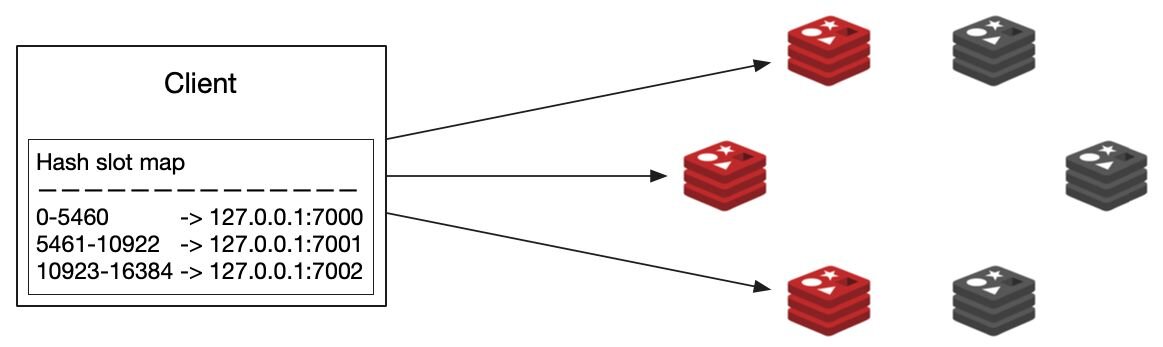
The client connects to any shard in the cluster and gets the addresses of the rest of the shards. The client also fetches a mapping of hash slots to shards so it can know where to look for a key in a specific hash slot. This hash slot map is cached locally.
#How do cluster-aware clients route requests?
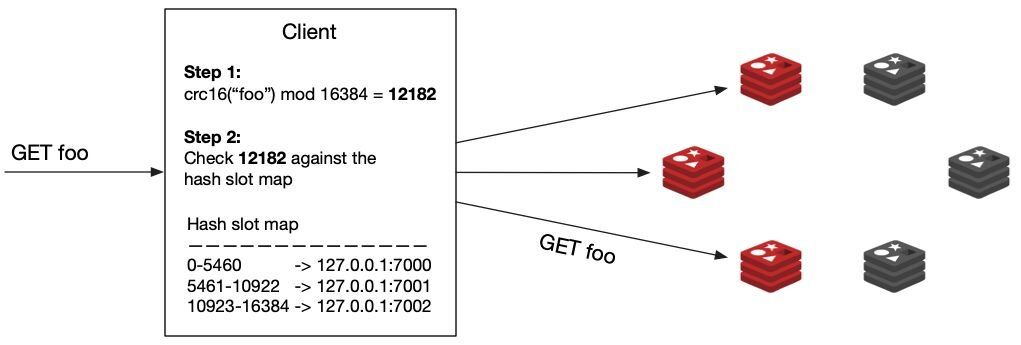
When the client needs to read/write a key, it first runs the hashing function
(crc16) on the key name and then modulo divides by 16384, which results in the key's hash slot number.In the example below the hash slot number for the key "foo" is 12182. Then the client checks the hash slot number against the hash slot map to determine which shard it should connect to. In our example, the hash slot number 12182 lives on shard
127.0.0.1:7002.Finally, the client connects to the shard and finds the key it needs to work with.
If the topology of the cluster changes for any reason and the key has been moved, the shard will respond with an
(error) MOVED 15495 127.0.0.1:7006 error, returning the address of the new shard responsible for that key. This indicates to the client that it needs to re-query the cluster for its topology and hash slot allocation, so it will do that and update its local hash slot map for future queries.Not every client library has this extra logic built in, so when choosing a client library, make sure to look for ones with cluster support.
Another detail to check is if the client stores the hash slot map locally. If it doesn't, and it relies on the
(error) MOVED response to get the address of the right shard, you can expect to have a much higher latency than usual because your client may have to make two network requests instead of one for a big part of the requests.#Supported Client Libraries
Examples of clients that support Redis cluster:
- Java: Jedis
- .NET: StackExchange.Redis
- Go: Radix, go-redis/redis
- Node.js: node-redis, ioredis
- Python: redis-py
Here's a list of Redis Clients: https://redis.io/clients
#Next steps
Now that you understand how to scale Redis horizontally with clustering and sharding, continue building your operational knowledge:
- Observability — Learn how to monitor your Redis Cluster with metrics, alerts, and troubleshooting techniques so you can spot scaling bottlenecks before they impact users.
- High Availability — Review replication and Redis Sentinel for deployments that don't require full cluster-level sharding but still need automatic failover.
- Course Conclusion — Wrap up the Running Redis at Scale course and review key takeaways.