Enable OSS Cluster API
| Redis Software |
|---|
Review OSS Cluster API to determine if you should enable this feature for your database.
Prerequisites
The OSS Cluster API is supported only when a database meets specific criteria.
The database must:
- Use the standard hashing policy.
- Have the proxy policy set to either All primary shards or All nodes.
In addition, the database must not:
- Use node
includeorexcludein the proxy policy. - Use RediSearch, RedisTimeSeries, or RedisGears modules.
The OSS Cluster API setting applies to individual databases instead of the entire cluster.
Enable OSS Cluster API support
You can use the Cluster Manager UI, the rladmin utility, or the REST API to enable OSS Cluster API support for a database.
When you enable OSS Cluster API support for an existing database, the change applies to new connections but does not affect existing connections. Clients must close existing connections and reconnect to apply the change.
When you use the Cluster Manager UI to enable the OSS Cluster API, it automatically configures the prerequisites.
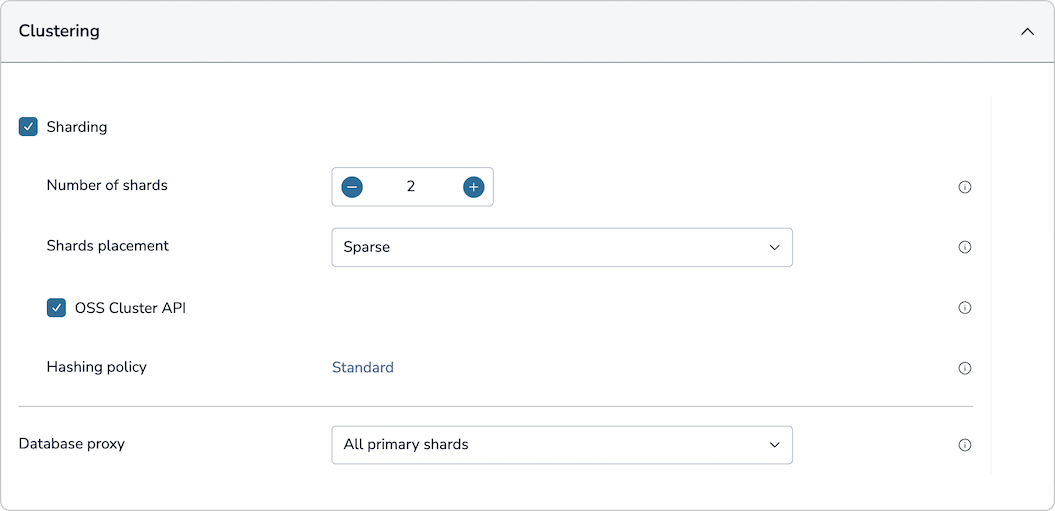
To enable the OSS Cluster API for an existing database in the Cluster Manager UI:
-
From the database's Configuration tab, click Edit.
-
Expand the Clustering section.
-
Enable Sharding.
-
Select OSS Cluster API.
-
Click Save.
You can also use the Cluster Manager UI to enable the setting when creating a new database.
Active-Active databases
The OSS Cluster API setting applies to all instances of the Active-Active database across participating clusters. To enable the OSS Cluster API for Active-Active databases, use the Cluster Manager UI or the crdb-cli utility.
When you use the Cluster Manager UI to enable the OSS Cluster API, it automatically configures the prerequisites.
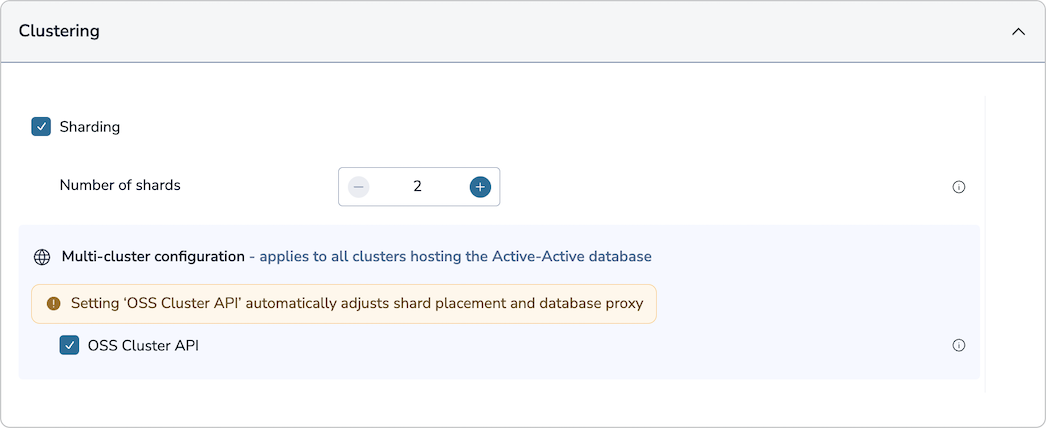
To enable the OSS Cluster API for an existing Active-Active database in the Cluster Manager UI:
-
From the database's Configuration tab, click Edit.
-
Expand the Clustering section.
-
Sharding must be enabled during Active-Active database creation.
-
Select OSS Cluster API.
-
Click Save.
You can also use the Cluster Manager UI to enable the setting when creating a new database.
Change preferred IP type
By default, using CLUSTER SLOTS and CLUSTER SHARDS in a Redis Enterprise Software cluster exposes the internal IP addresses for databases with the OSS Cluster API enabled.
To use external IP addresses instead of internal IP addresses, run the following rladmin tune db command for each affected database:
$ rladmin tune db db:<database-id> oss_cluster_api_preferred_ip_type external
Turn off OSS Cluster API support
To deactivate OSS Cluster API support for a database, use one of the following methods:
To turn off the OSS Cluster API for standard databases or Active-Active databases in the Cluster Manager UI:
-
From the database's Configuration tab, click Edit.
-
Expand the Clustering section.
-
Clear the OSS Cluster API checkbox.
-
Click Save.
When you turn off OSS Cluster API support for an existing database, the change applies to new connections but does not affect existing connections. Clients must close existing connections and reconnect to apply the change.
Multi-key command support
When you enable the OSS Cluster API for a database, multi-key commands are only allowed when all keys are mapped to the same slot.
To verify that your database meets this requirement, make sure that the CLUSTER KEYSLOT reply is the same for all keys affected by the multi-key command. To learn more, see multi-key operations.