Tutorial
Context Engineering Workshop for Java Developers
February 26, 202659 minute read

TL;DR:Context engineering is the discipline of designing and optimizing the full information pipeline feeding an LLM — memory, retrieval, ranking, caching, and token budgets — so the model consistently produces accurate, relevant responses. This workshop teaches it hands-on across 9 labs: you'll build a Java AI application with LangChain4J and Redis that progresses from a stateless chatbot to a production-ready system with short- and long-term memory, RAG, query compression, content reranking, few-shot prompting, token management, and semantic caching.
#Introduction
Welcome to this hands-on workshop, where you'll learn to implement sophisticated context-engineering patterns. Context Engineering is the practice of strategically designing, structuring, and optimizing the information provided to AI models (particularly LLMs) to achieve desired outputs. It goes beyond simple prompt engineering by considering the entire context window and how data is organized, presented, and sequenced to maximize model performance. In this workshop, you will learn how to implement this using Java, LangChain4J, and Redis.
#Why context engineering?
LLMs have limited context windows and no inherent memory between conversations. Without proper context engineering:
- Models lose track of conversation history
- Responses lack relevant domain knowledge
- Token limits are exceeded, causing failures
- Repeated API calls increase costs
This workshop teaches you patterns to solve these challenges systematically.
#What you'll build
By the end of this workshop, you'll have built a complete AI application featuring:
- LLM integration using OpenAI, Spring Boot, and LangChain4J
- Vector embeddings for semantic search with a chunking strategy
- RAG (Retrieval-Augmented Generation) with knowledge bases
- Dual-layer memory architecture (short-term and long-term memory)
- Query compression techniques for efficient context retrieval
- Content Reranking to optimize the relevance of retrieved information
- Few-shot learning pattern for improved generated responses
- Dynamic context window management based on token limits
- Semantic caching to optimize performance and reduce LLM costs
#Prerequisites
#Required knowledge
- Basic understanding of Java programming — if you're new to Redis with Java, start with the Java getting-started tutorial
- Basic knowledge of LLMs and AI concepts — for a gentler intro to RAG, see the AI-powered chatbot tutorial
- Familiarity with command-line interfaces
- Basic understanding of Docker and Git
- Familiarity with RESTful APIs
#Required software
#Required accounts
| Account | Description | Cost |
|---|---|---|
| OpenAI | LLM that will power the responses for the AI application | Free trial sufficient |
| Redis Cloud | Semantic caching service powered by Redis LangCache | Free tier sufficient |
NOTENote on OpenAI costs: While OpenAI occasionally offers free trial credits to new accounts, this workshop assumes pay-as-you-go pricing. The estimated cost of $1-3 covers all 9 labs. You can monitor your usage in the OpenAI dashboard to track costs in real-time.
#Workshop structure
This workshop has an estimated duration of 2 hours and is organized into 9 progressive labs, each building on the previous one. Each lab introduces a specific context engineering challenge, which is then addressed in the subsequent lab.
| Lab | Topic | Duration | Branch |
|---|---|---|---|
| 1 | Set up and deploy the AI application | 25 mins | lab-1-starter |
| 2 | Enabling short-term memory with chat memory | 10 mins | lab-2-starter |
| 3 | Knowledge base with embeddings, parsers, and splitters | 10 mins | lab-3-starter |
| 4 | Implementing basic RAG with knowledge base data | 15 mins | lab-4-starter |
| 5 | Enabling on-demand context management for memories | 10 mins | lab-5-starter |
| 6 | Implementing query compression and context reranking | 15 mins | lab-6-starter |
| 7 | Implementing a few-shot into the system prompt design | 05 mins | lab-7-starter |
| 8 | Enabling token management to handle token limits | 05 mins | lab-8-starter |
| 9 | Implementing semantic caching for conversations | 25 mins | lab-9-starter |
Each lab also contains a corresponding
lab-X-solution branch with the completed code for reference. You can use this branch to compare your current implementation using git diff {lab-X-solution}. Alternatively, you can switch to the solution branch at any time during the lab if you are falling behind or to get unstuck.#Getting started
#Step 1: Clone the repository
#Step 2: Verify your environment
Ensure you have Java, Maven, Node.js, Docker, and Git installed. You can check their versions with:
#Step 3: Begin your first lab
Navigate to the cloned repository.
#Lab 1: Set up and deploy the AI application
#Learning objectives
By the end of this lab, you will:
- Set up a complete AI application development environment with LangChain4J
- Deploy the base Spring Boot application with OpenAI integration
- Deploy the base Node.js frontend application for testing purposes
- Understand the core architecture for LangChain4J-based AI applications
- Play with the AI application to verify correct LLM connectivity
Estimated Time: 25 minutes
#What you're building
In this foundational lab, you'll deploy a basic AI chat application that will serve as the platform for implementing context engineering patterns throughout the workshop. This includes:
- Node.js Frontend: Simple chat interface for testing purposes
- Spring Boot Application: RESTful API backend for AI interactions
- LangChain4J Integration: Framework for LLM orchestration
- OpenAI Connection: GPT model for generating responses
#Architecture overview

#Prerequisites check
Before starting, ensure you have:
- Java 21+ properly installed
- Maven 3.9+ installed
- Docker up and running
- Git configured and authenticated
- Node.js 18+ and npm installed
- OpenAI API key ready
- Your IDE (IntelliJ IDEA, VS Code, or Eclipse)
#Setup instructions
#Step 1: Switch to the lab 1 branch
#Step 2: Create an environment file
#Step 3: Define your OpenAI API key
#Step 4: Build the backend application
#Step 5: Execute the backend application
#Step 6: Install the NPM dependencies
#Step 7: Start the frontend application
#Testing your setup
#API health check
Test the health endpoint
Expected response:
#Basic chat test
Test basic chat functionality
You should receive a streaming response.
#Frontend verification
- Open http://localhost:3000 in your browser
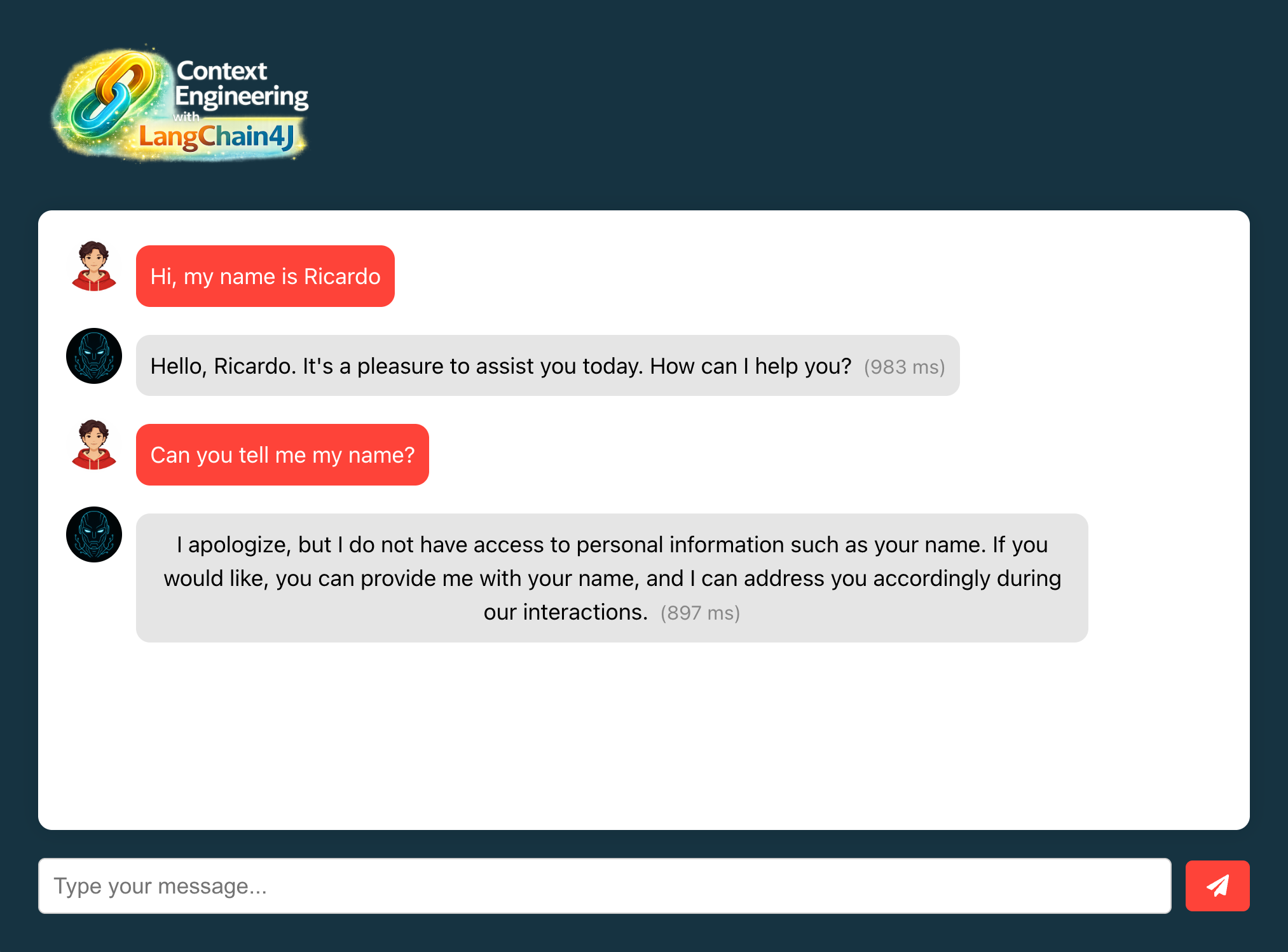
- Type "Hi, my name is {{your-name}}" in the chat
- Verify you receive a response from the AI
- Type "Can you tell me my name?" in the chat
- Verify if the AI don't remember your name
#Understanding the code
#1. BasicChatAssistant.java
- Simple AI Service interface using LangChain4J
- Uses Reactive Flux for streaming responses
#2. ChatController.java
- REST endpoint for chat interactions
- Currently returns simple string responses
#3. GeneralConfig.java
- Provides CORS configuration for web frontend
#4. application.properties
- Leverages the Spring Boot starter for LangChain4J
- Set the OpenAI API key and model parameters
#What's missing? (Context engineering perspective)
At this stage, your application lacks:
- No Short Memory: Each conversation is isolated
- No Context Awareness: No previous message history
This is intentional. We'll add these capabilities in the next lab.
#Lab 1 troubleshooting
Error: "API key not valid" from OpenAI
Solution:
- Verify your API key in the
.envfile - Ensure the key has proper permissions
- Check if you have credits in your OpenAI account
Error: "Connection refused" on localhost:8080
Solution:
- Ensure the Spring Boot application is running
- Check if port 8080 is already in use
- Review application logs for startup errors
Error: "npm: command not found"
Solution:
- Install Node.js from nodejs.org
- Verify installation:
node --version - Restart your terminal after installation
#Lab 1 completion
Congratulations. You've successfully:
- Set up the development environment
- Deployed the base AI application
- Verified LLM integration is working
#Additional resources
#Lab 2: Enabling short-term memory with chat memory
#Learning objectives
By the end of this lab, you will:
- Set up the Redis Agent Memory Server using Docker
- Implement short-term memory using LangChain4J's ChatMemory
- Enable conversation continuity within a single chat session
- Understand how chat memory stores maintain conversation context
- Test memory retention across multiple message exchanges
Estimated Time: 10 minutes
#What you're building
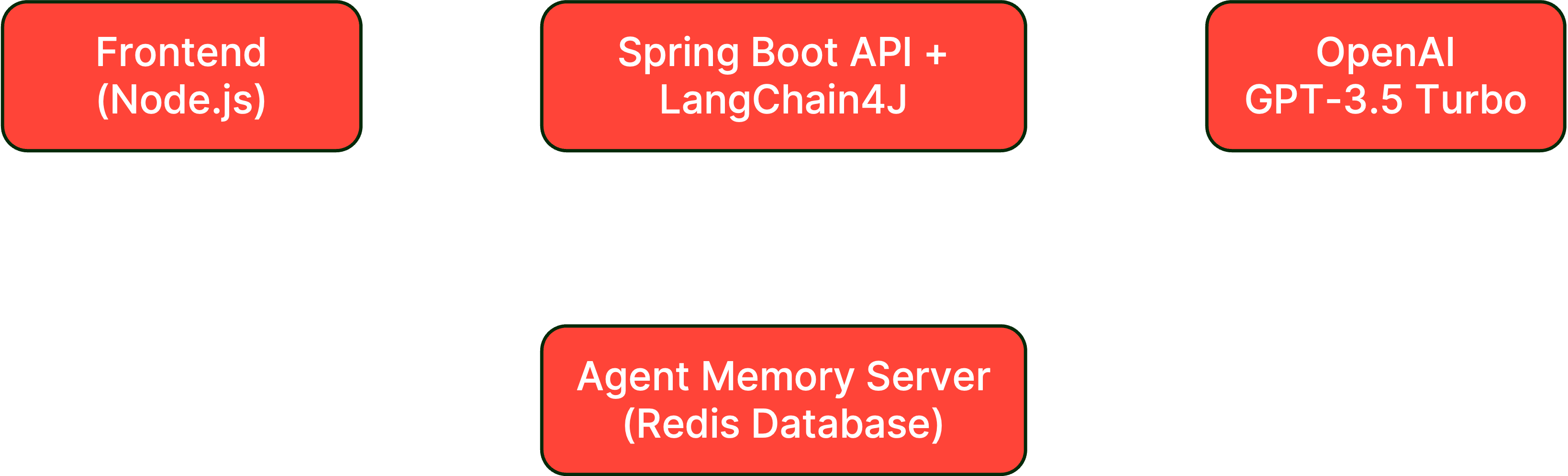
In this lab, you'll enhance the basic chat application with short-term memory capabilities, allowing the AI to remember previous messages within a conversation session. This includes:
- ChatMemoryStore: LangChain4J implementation for the Agent Memory Server
- Context Preservation: Maintaining conversation flow across messages
- Memory Configuration: Setting up memory boundaries and constraints
#Architecture overview
#Prerequisites check
Before starting, ensure you have:
- Completed Lab 1 successfully
- Backend application running without errors
- Frontend application accessible at http://localhost:3000
- OpenAI API key configured and working
#Setup instructions
#Step 1: Switch to the lab 2 branch
#Step 2: Define the Redis Agent Memory Server URL
#Step 3: Start Redis Agent Memory Server
#Step 4: Verify if the containers are running
You should see something like this:
#Step 5: Review the ChatMemoryStore implementation
Open
backend-layer/src/main/java/io/redis/devrel/workshop/extensions/WorkingMemoryStore.java and review the code.This is a wrapper around the Redis Agent Memory Server REST APIs implemented using the support for chat memory stored from LangChain4J.
#Step 6: Implement the ChatMemoryStore bean
Open
backend-layer/src/main/java/io/redis/devrel/workshop/memory/ShortTermMemory.java and implement the method chatMemoryStore().Change from this:
To this:
This bean will provide the persistence layer for the chat memory, taking care of storing and retrieving messages from the Redis Agent Memory Server.
#Step 7: Implement the ChatMemory bean
Open
backend-layer/src/main/java/io/redis/devrel/workshop/memory/ShortTermMemory.java and implement the method chatMemory().Change from this:
To this:
This bean will manage the chat memory for each user session, using the
WorkingMemoryStore to persist messages.#Step 8: Rebuild and run the backend
#Step 9: Keep the frontend running
The frontend should still be running from Lab 1. If not:
#Testing your memory implementation
#Memory retention test
- Open http://localhost:3000 in your browser
- Clear any previous conversations (refresh the page)
- Type "Hi, my name is {{your-name}}" in the chat
- Verify you receive a response acknowledging your name
- Type "What is my name?" in the chat
- Verify the AI now remembers your name (unlike in Lab 1)
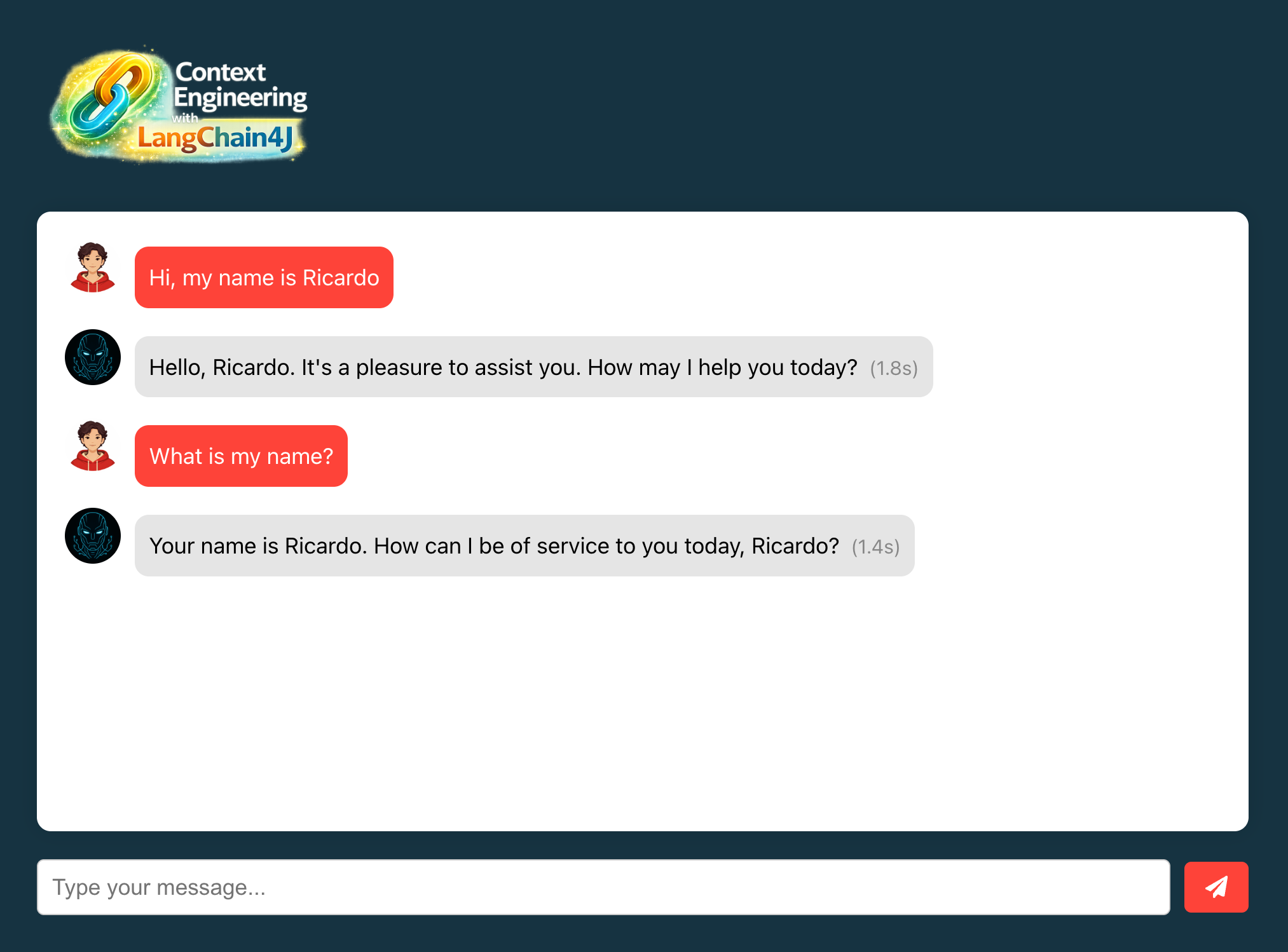
As you can see, the AI now remembers your name within the same session, demonstrating that short-term memory is functioning correctly. This is possible because now the code is leveraging the Redis Agent Memory Server to store and retrieve conversation history.
If you want to verify the stored messages, you can use Redis Insight to connect to the Redis database and inspect the stored keys and values. Open your browser and type the following:
Click on the database
redis-database:6379 and expand the Keys section to see the stored messages. You should see the following key: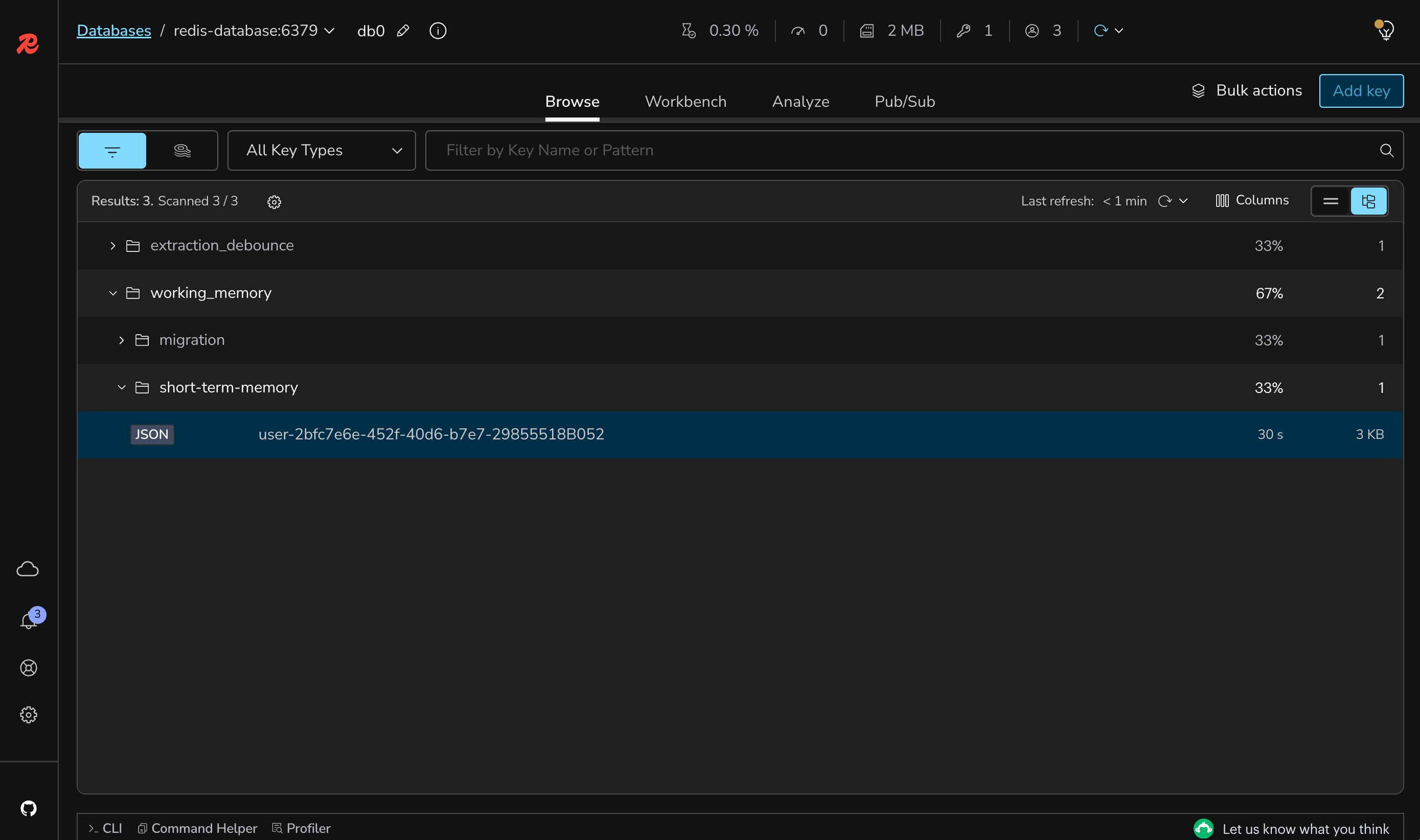
If you click on the key, you can see the stored messages in JSON format.
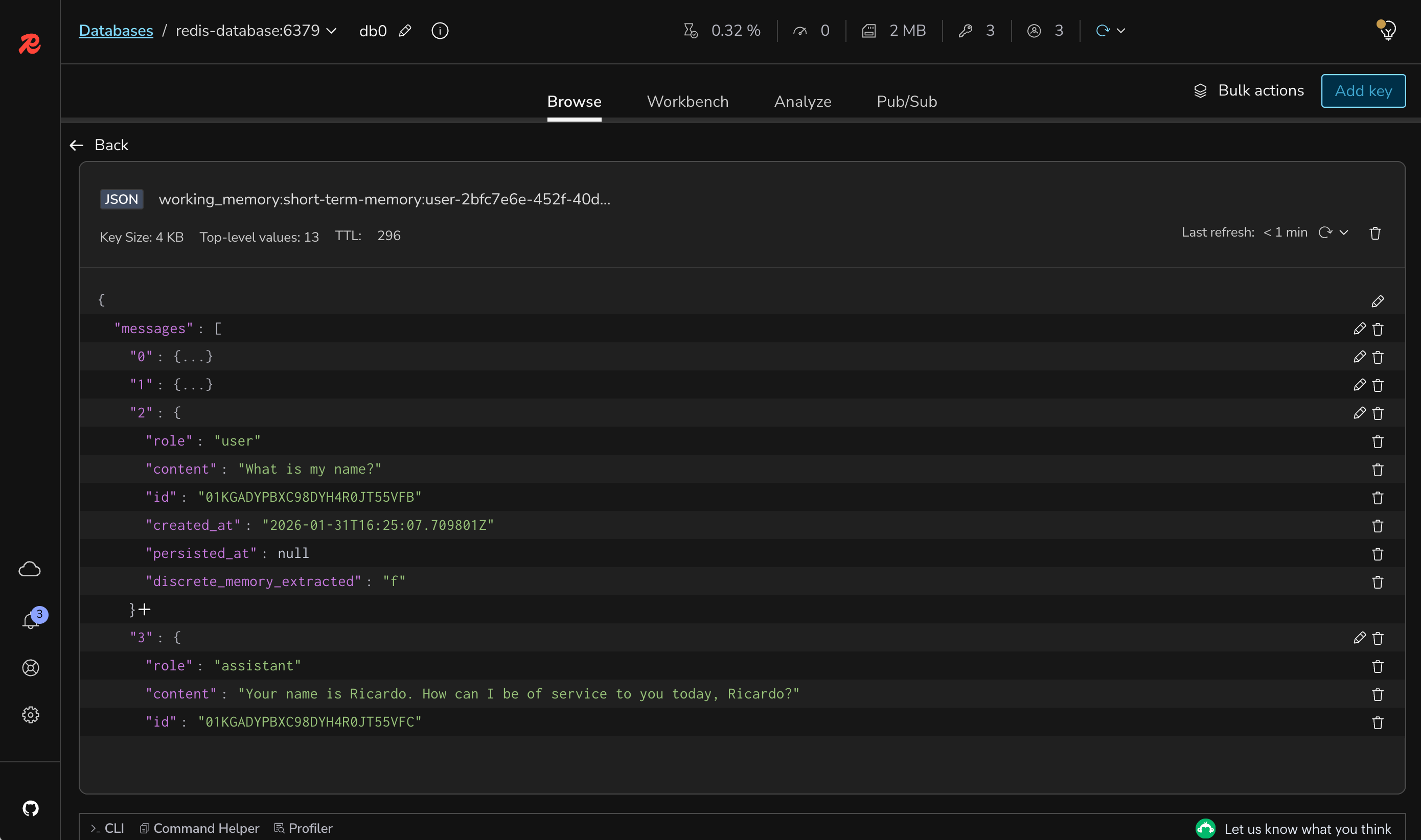
With this implementation of short-term memory, your chat application can now maintain context within a session, providing a more natural and engaging UX. This will happen even if the backend layer is restarted.
However, keep in mind that these messages are still short-term, meaning that they are shorted-lived. By default, the implementation of the ChatMemoryStore updates the working memory to be active for 5 minutes. This is controlled by the TTL property of the key.
#Understanding the code
#1. ChatMemoryStore
- Storage implementation for the Agent Memory Server
- Session-based memory isolation with dedicated namespace
- Temporary storage for conversations (up to 5 minutes)
#2. ChatMemory
- Pass-through implementation of a chat memory
- Always keeps all the messages in-memory
- Implemented for testing purposes (not production)
#3. Memory integration
- Automatically injected into the AI service
- Maintains conversation context transparently
- No changes needed to
BasicChatAssistant
#What's still missing? (Context engineering perspective)
Your application now has short-term memory, but still lacks:
- ❌ No Long-term Memory: Memory is lost between sessions
- ❌ No Knowledge Base: No knowledge besides the conversation
- ❌ No Semantic Search: Cannot retrieve relevant information
Next labs will address these limitations.
#Lab 2 troubleshooting
Error: "ChatMemory bean not found"
Solution:
- Ensure
@Configurationannotation is present on ShortTermMemory class - Verify all
@Beanmethods are properly annotated - Check that component scanning includes the memory package
AI still doesn't remember previous messages
Solution:
- Verify ChatMemoryStore bean is properly configured
- Check that the same userId is being used across messages
- Check if the Agent Memory Server is running and accessible
Memory seems to cut off too early
Solution:
- Check if you are not having network issues (unlikely with local setup)
- Review token limit configuration in your OpenAI account
- Consider the model's token limit (gpt-3.5-turbo has 4096 tokens)
#Lab 2 completion
Congratulations. You've successfully:
- ✅ Implemented short-term chat memory
- ✅ Enabled conversation continuity within sessions
- ✅ Tested memory retention across messages
#Additional resources
#Lab 3: Knowledge base with embeddings, parsers, and splitters
#Learning objectives
By the end of this lab, you will:
- Configure document parsing for PDF files using Apache PDFBox
- Implement document splitting strategies for optimal chunk sizes
- Create vector embeddings for semantic search capabilities
- Store processed documents in the Redis Agent Memory Server
- Understand how document processing enables knowledge-augmented AI
Estimated Time: 10 minutes
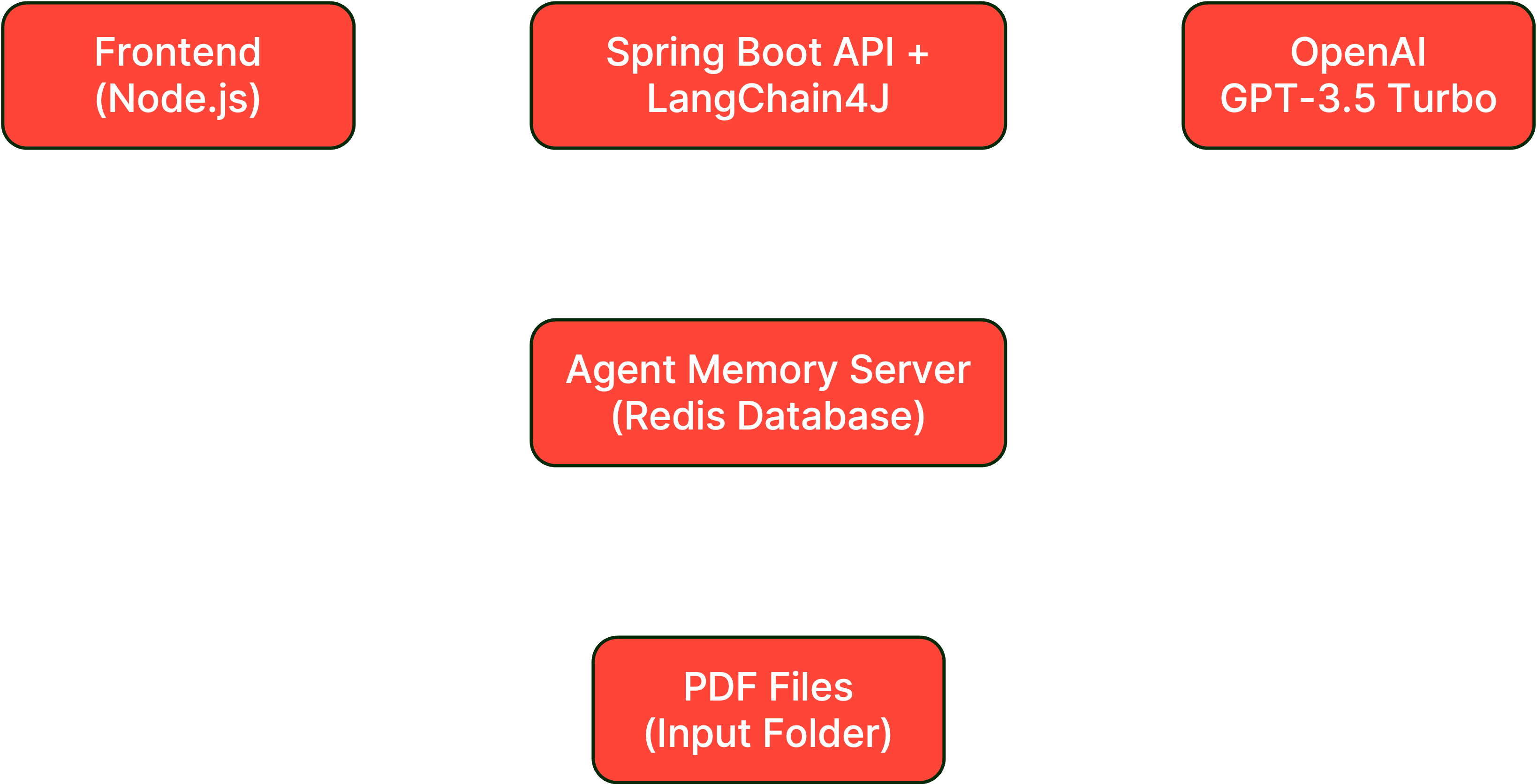
#What you're building
In this lab, you'll add document processing capabilities to your AI application, allowing it to ingest PDF documents and create a searchable knowledge base. This includes:
- Document Parser: Apache PDFBox for extracting text from PDFs
- Document Splitter: Paragraph-based splitting for optimal chunks
- Embeddings Generation: Converting text to vector representations
- Knowledge Storage: Persisting document chunks for semantic retrieval
#Architecture overview
#Prerequisites check
Before starting, ensure you have:
- Completed Lab 2 successfully
- Redis Agent Memory Server running (from Lab 2)
- Backend application configured with memory support
- Sample PDF documents ready for testing
#Setup instructions
#Step 1: Switch to the lab 3 branch
#Step 2: Configure the knowledge base input directory
Add to your
.env file:#Step 3: Add sample PDF documents
Place at least one or more PDF files in the
KNOWLEDGE_BASE_INPUT_FILES directory. For testing, you can use any PDF document that has multiple pages and paragraphs.#Step 4: Review the FilesProcessor implementation
Open
backend-layer/src/main/java/io/redis/devrel/workshop/services/FilesProcessor.java and review the document processing logic:As you can see, the
scanForPdfFiles() method is scheduled to run every 5 seconds to check for new PDF files in the input directory. Once a file is detected, it calls the processFile() method to handle the document.#Step 5: Implement the document processing
Open
backend-layer/src/main/java/io/redis/devrel/workshop/services/FilesProcessor.java and implement the PDF file processing behavior. You won't need to implement everything, just the parts that are pending.In the
processFile() method, change from this:To this:
In the
scanForPdfFiles() method, change from this:To this:
With these changes, your application is now set up to automatically detect and process PDF files placed in the specified input directory. The parser and the splitter implementations used here were provided by the LangChain4J framework.
#Step 6: Rebuild and run the backend
#Step 7: Monitor document processing
Watch the console logs to see your PDFs being processed:
#Testing your knowledge base
#Document processing verification
- Place a PDF file in the
KNOWLEDGE_BASE_INPUT_FILESdirectory - Wait 5-10 seconds for the scheduled scanner to detect it
- Check the logs for processing confirmation
- Verify the file is renamed to
.processed
#Verify knowledge base storage
Using Redis Insight (http://localhost:5540):
- Connect to the Redis database
- Look for keys with the pattern
knowledge.entry.* - Inspect the stored document segments
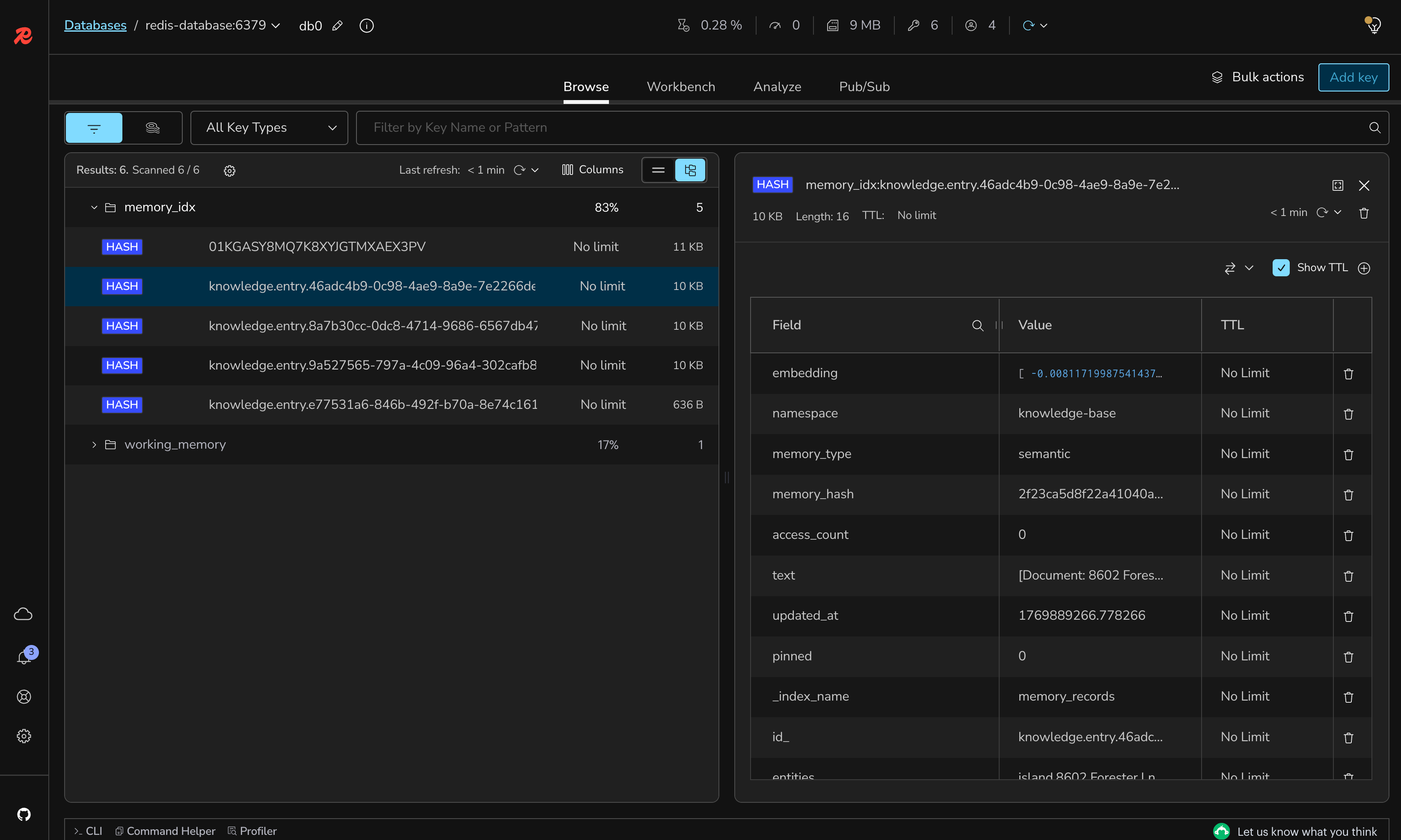
#Test document chunks
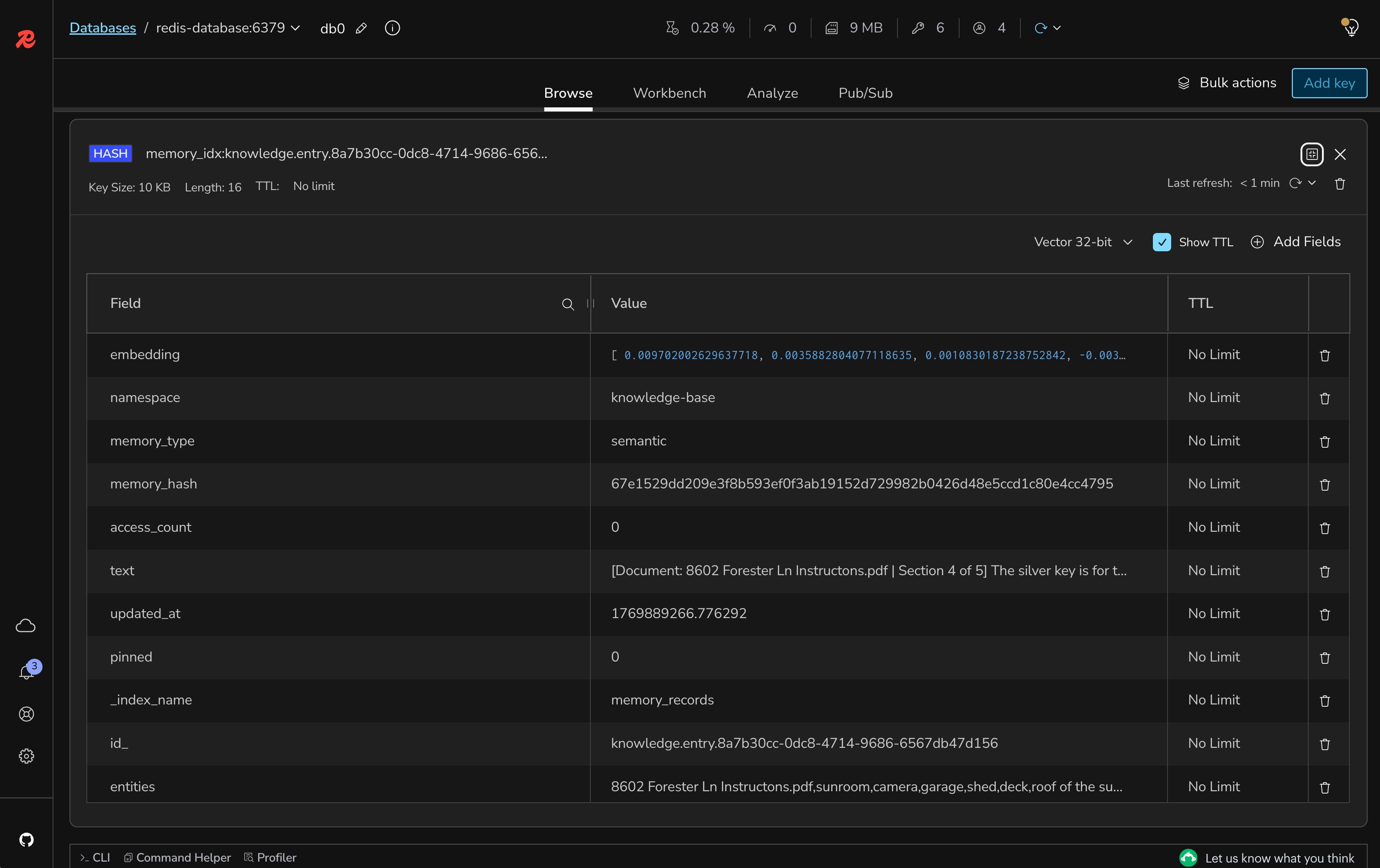
Each chunk should contain:
- Document metadata (filename, section number)
- The actual text content from the created chunk
- An embedding field containing the vector data
#Processing multiple documents
- Add 2-3 PDF files to the input directory
- Monitor the logs to see batch processing
- Verify all documents are processed and renamed
- Check Redis for multiple knowledge entries
#Understanding the code
#1. ApachePdfBoxDocumentParser
- Extracts text content from PDF files
- Preserves document structure and formatting
- Handles various PDF encodings and formats
#2. DocumentByParagraphSplitter
- Splits documents into manageable chunks (1000 chars)
- Maintains 100-character overlap for context continuity
- Preserves paragraph boundaries when possible
#3. MemoryService.createKnowledgeBaseEntry()
- Stores document chunks in dedicated namespace
- Creates vector embeddings for semantic search
- Mark the document as semantic data for retrieval
#4. Automatic processing
- Scheduled task runs every 5 seconds
- Processes new PDFs automatically
- Renames files to
.processedto avoid reprocessing
#What's still missing? (Context engineering perspective)
Your application now has a knowledge base, but still lacks:
- ❌ No Retrieval: Can't search or retrieve relevant documents
- ❌ No RAG Integration: Knowledge isn't used in responses
- ❌ No Query Routing: Can't determine when to use knowledge
Next lab will implement RAG to use this knowledge.
#Lab 3 troubleshooting
PDF files not being detected
Solution:
- Verify the
KNOWLEDGE_BASE_INPUT_FILESpath is correct - Ensure PDF files have
.pdfextension (lowercase) - Check file permissions for read access
- Review logs for directory scanning errors
Document parsing fails
Solution:
- Ensure PDF is not corrupted or password-protected
- Check if PDF contains extractable text (not just images)
- Verify Apache PDFBox dependencies are properly included
- Try with a simpler PDF document first
Segments not being stored
Solution:
- Verify Redis Agent Memory Server is running
- Check network connectivity to Redis
- Ensure segments meet minimum length (50 characters)
- Review logs for storage errors
#Lab 3 completion
Congratulations. You've successfully:
- ✅ Configured document parsing for PDFs
- ✅ Implemented intelligent document splitting
- ✅ Created a searchable knowledge base
- ✅ Stored document embeddings for semantic retrieval
#Additional resources
- LangChain4J Document Loaders
- Apache PDFBox docs
- Document Splitting Strategies
- Vector Embeddings Explained
#Lab 4: Implementing basic RAG with knowledge base data
#Learning objectives
By the end of this lab, you will:
- Implement Retrieval-Augmented Generation (RAG) using your knowledge base
- Implement a content retriever to search for data in your knowledge base
- Set up a retrieval augmentor to inject relevant context
- Enable the AI to answer questions using document knowledge
- Test RAG functionality with document-specific queries
Estimated Time: 20 minutes
#What you're building
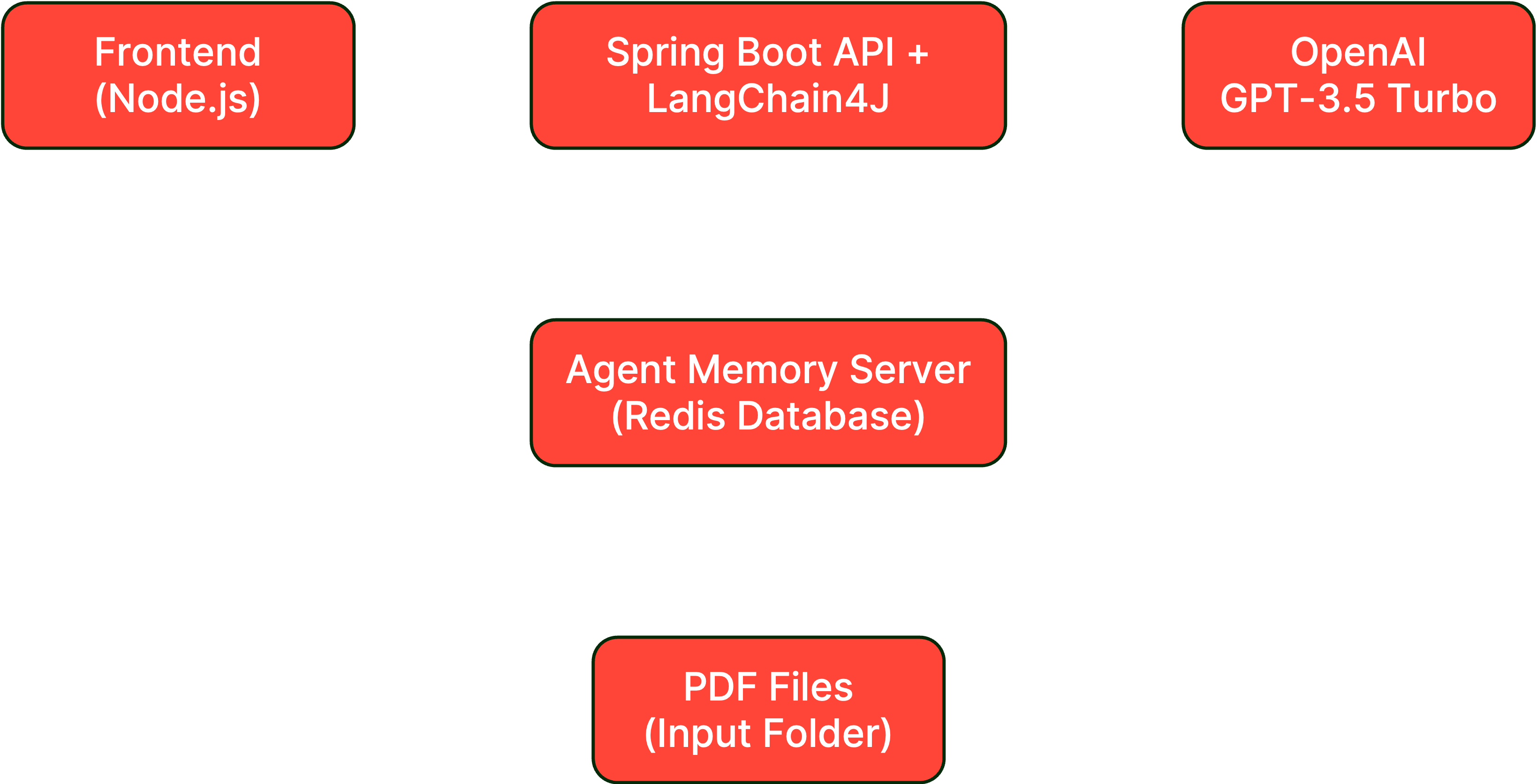
In this lab, you'll connect your knowledge base to the chat interface, enabling the AI to retrieve and use relevant document information when answering questions. This includes:
- Content Retriever: Searches the knowledge base for relevant information
- Content Injection: Formats retrieved documents for optimal LLM understanding
- RAG Pipeline: Complete flow from query to augmented response using query routing
#Architecture overview
#Prerequisites check
Before starting, ensure you have:
- Completed Lab 3 successfully
- At least one PDF processed in your knowledge base
- Redis Agent Memory Server running with stored documents
- Backend application with document processing enabled
#Setup instructions
#Step 1: Switch to the lab 4 branch
#Step 2: Review the LongTermMemory configuration
Open
backend-layer/src/main/java/io/redis/devrel/workshop/memory/LongTermMemory.java and review the RAG configuration structure:#Step 3: Implement the knowledge base content retriever
In
LongTermMemory.java, locate and implement the getGeneralKnowledgeBase() method.Change from this:
To this:
#Step 4: Configure the RAG pipeline
In the
getRetrievalAugmentor() method, implement the content injector configuration.Change from this:
To this:
#Step 5: Rebuild and run the backend
#Step 6: Keep the frontend running
The frontend should still be running. If not:
#Testing your RAG implementation
#Basic RAG test
- Open http://localhost:3000 in your browser
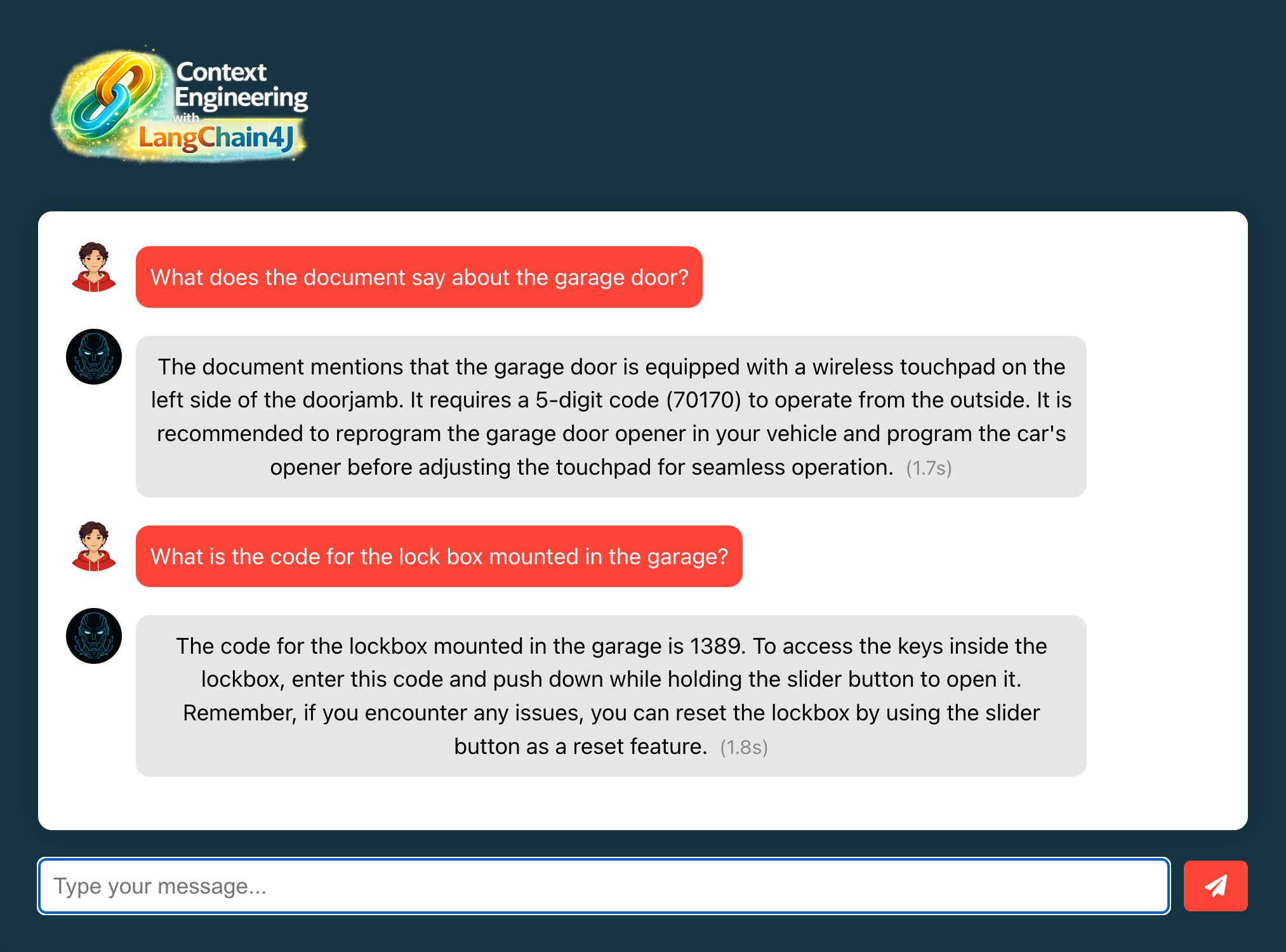
- Ask a question about content from your uploaded PDF
- Verify the AI uses document information in its response
Example test queries (adjust based on your PDF content):
- "What does the document say about [specific topic]?"
- "Can you summarize the main points from the uploaded documents?"
- "What information is available about [specific term from PDF]?"
For example, consider the following text from a sample PDF:
This is how you can interact with the AI:
#Understanding the code
#1. ContentRetriever
- Searches the knowledge base using semantic similarity
- Returns only relevant document chunks for the query
- Leverages vector embeddings for accurate retrieval
#2. DefaultContentInjector
- Formats retrieved content for LLM consumption
- Uses template to structure context and query
- Maintains clear separation between context and user message
#3. QueryRouter
- Determines which retriever to use for queries
- Routes to knowledge base for factual questions
- Can be extended for multiple knowledge sources
#4. DefaultRetrievalAugmentor
- Orchestrates the complete RAG pipeline
- Combines retrieval, injection, and generation
- Manages the flow from query to response
#5. ChatController
- Contains an optimized version of the system prompt
- Provides instructions about how to read the context
- Provides guidelines for generating accurate responses
#What's still missing? (Context engineering perspective)
Your application now has basic RAG, but still lacks:
- ❌ No User Memories: Can't store personal preferences
- ❌ No Query Optimization: No compression or transformation
- ❌ No Content Reranking: Retrieved content isn't prioritized
- ❌ No Dynamic Routing: Can't choose between memory types
Next labs will add these advanced features.
#Lab 4 troubleshooting
AI doesn't use document knowledge
Solution:
- Verify PDFs were successfully processed (check
.processedfiles) - Ensure knowledge base entries exist in Redis
- Check retriever configuration in LongTermMemory
- Review logs for retrieval errors
Retrieved content seems irrelevant
Solution:
- Check if embeddings were properly generated
- Verify the semantic search is working
- Try with more specific queries
- Ensure document chunks are meaningful
Response time is slow
Solution:
- Check Redis connection latency
- Verify number of retrieved documents (may be too many)
- Monitor OpenAI API response times
- Consider implementing caching (coming in Lab 9)
#Lab 4 completion
Congratulations. You've successfully:
- ✅ Implemented Retrieval-Augmented Generation
- ✅ Connected your knowledge base to the chat interface
- ✅ Enabled document-aware AI responses
- ✅ Tested RAG with real document queries
#Additional resources
- LangChain4J RAG Tutorial
- Understanding RAG Systems
- Content Retriever Concepts
- Content Injection Strategies
#Lab 5: Enabling on-demand context management for memories
#Learning objectives
By the end of this lab, you will:
- Implement long-term memory storage for user-specific information
- Enable users to explicitly store personal preferences and facts
- Use the LLM to route queries between knowledge base and user memories
- Integrate user memories with the RAG pipeline for personalized responses
- Test memory persistence across different chat sessions
Estimated Time: 10 minutes
#What you're building
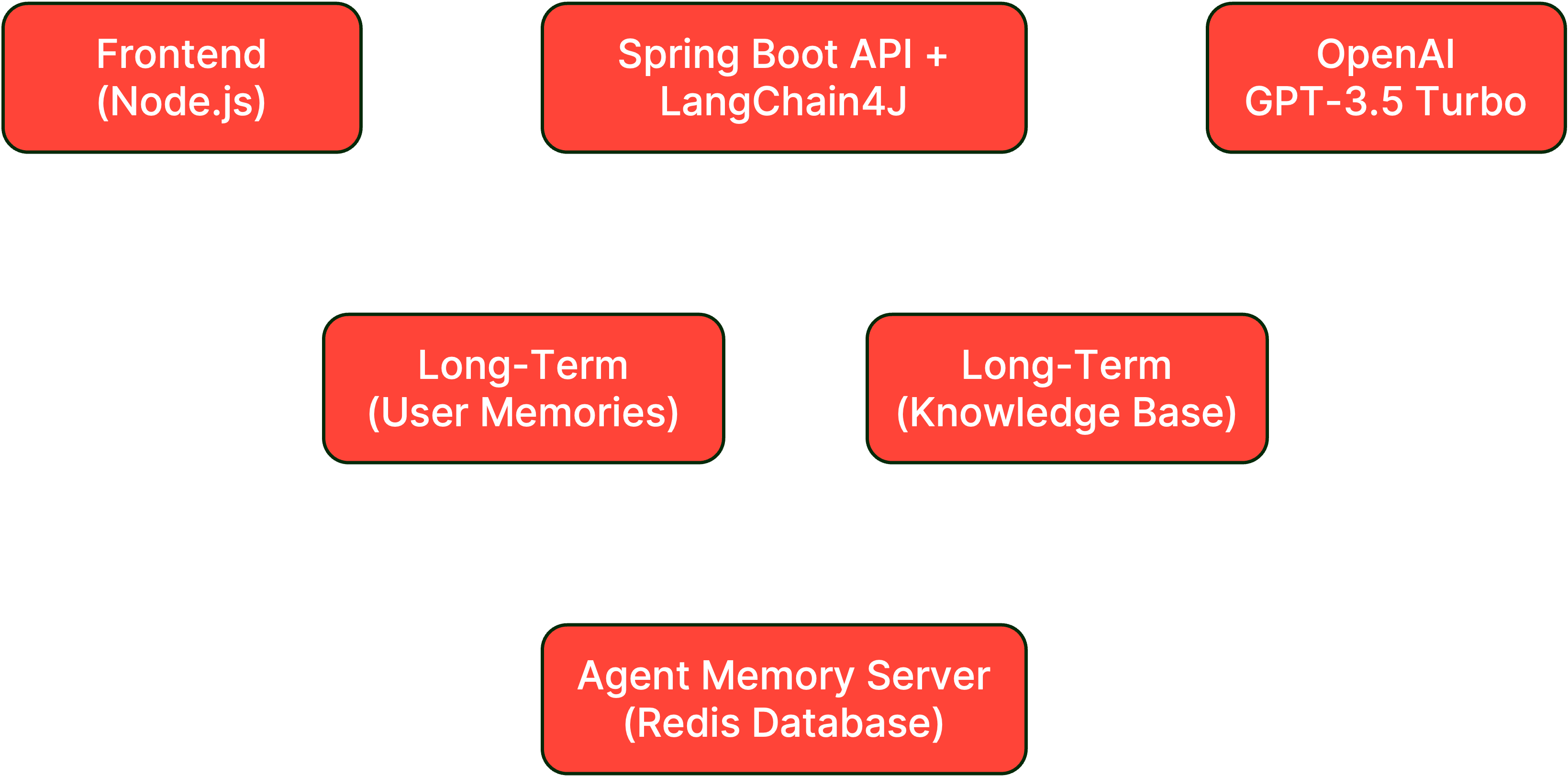
In this lab, you'll add long-term memory capabilities that allow users to explicitly store personal information, preferences, and important facts that persist across sessions. This includes:
- Long-term Memory Storage: Persistent user-specific memories
- Memory Management: Ability to create and retrieve user memories
- Personalized RAG: Integrating user memories with knowledge retrieval
#Architecture overview
#Prerequisites check
Before starting, ensure you have:
- Completed Lab 4 successfully
- RAG pipeline working with knowledge base
- Redis Agent Memory Server running
- Basic chat memory functioning from Lab 2
#Setup instructions
#Step 1: Switch to the lab 5 branch
#Step 2: Review the memory service
Open
backend-layer/src/main/java/io/redis/devrel/workshop/services/MemoryService.java and review the method to search long-term memories.#Step 3: Implement user memory retriever
Open
backend-layer/src/main/java/io/redis/devrel/workshop/memory/LongTermMemory.java and implement the getLongTermMemories() method.Change from this:
To this:
#Step 4: Update the query router for dual memory
In the
getRetrievalAugmentor() method, update the query router to include both knowledge base and user memories.Change from this:
To this:
#Step 5: Add ChatModel parameter
Update the
getRetrievalAugmentor() method signature to accept a ChatModel:#Step 6: Rebuild and run the backend
#Step 7: Keep the frontend running
The frontend should still be running. If not:
#Testing your long-term memory
#Store personal information
Use curl to store a new personal memory directly into the Redis Agent Memory Server:
Alternatively, you can use the sample HTTP request available in the
rest-api-calls folder. There are examples for IDEs (IntelliJ and VS Code) and Postman.#Test memory retrieval
- Open http://localhost:3000 in your browser
- Ask "Which programming language do I enjoy coding in?"
- Verify the AI recalls "Java" from stored memory
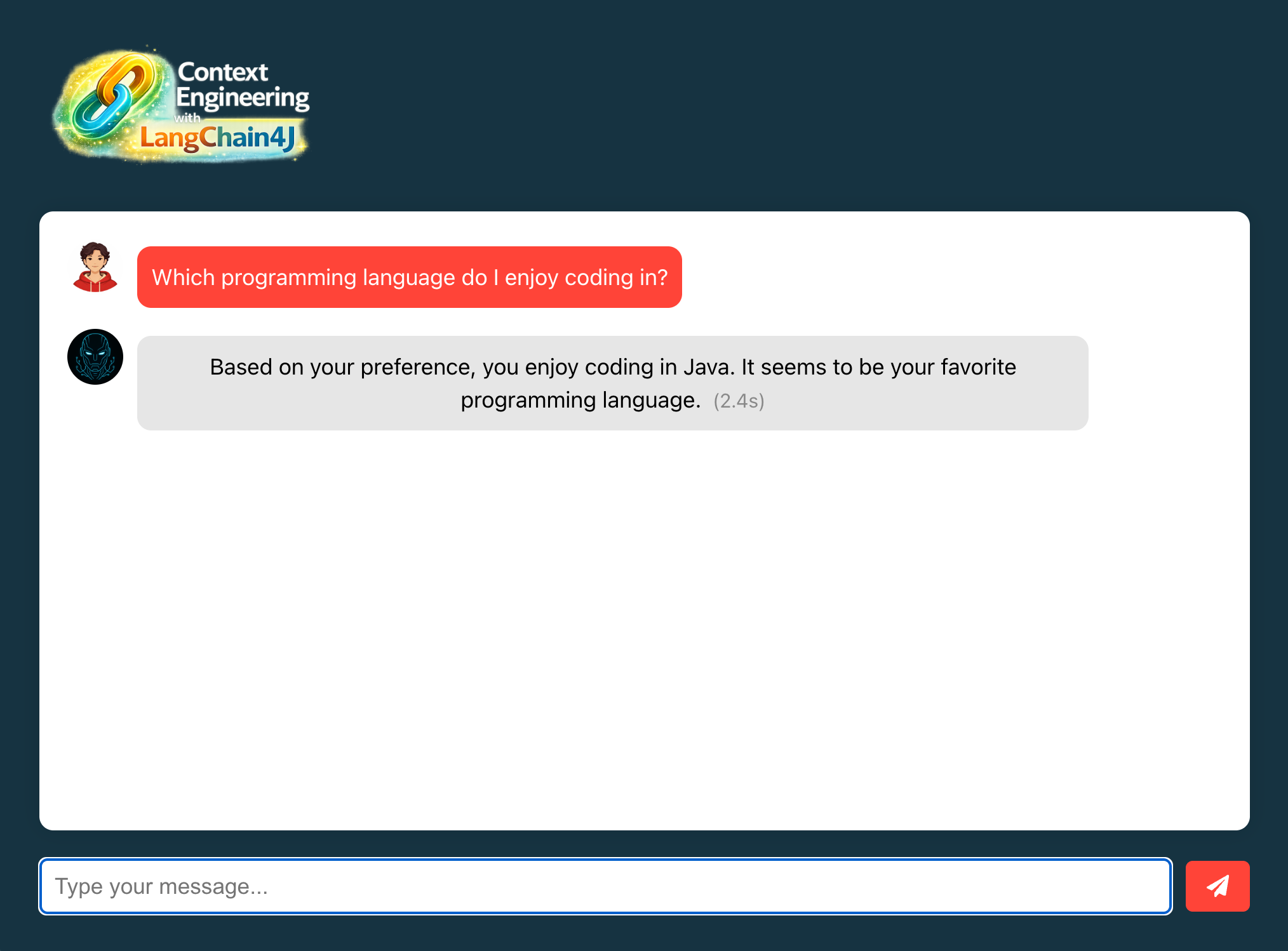
One interesting aspect of this lab is how the short-term chat memory (from Lab 2) and the long-term user memory (from this lab) work together. But you may notice that now the context provided to the LLM may be filled with multiple memories. For instance:
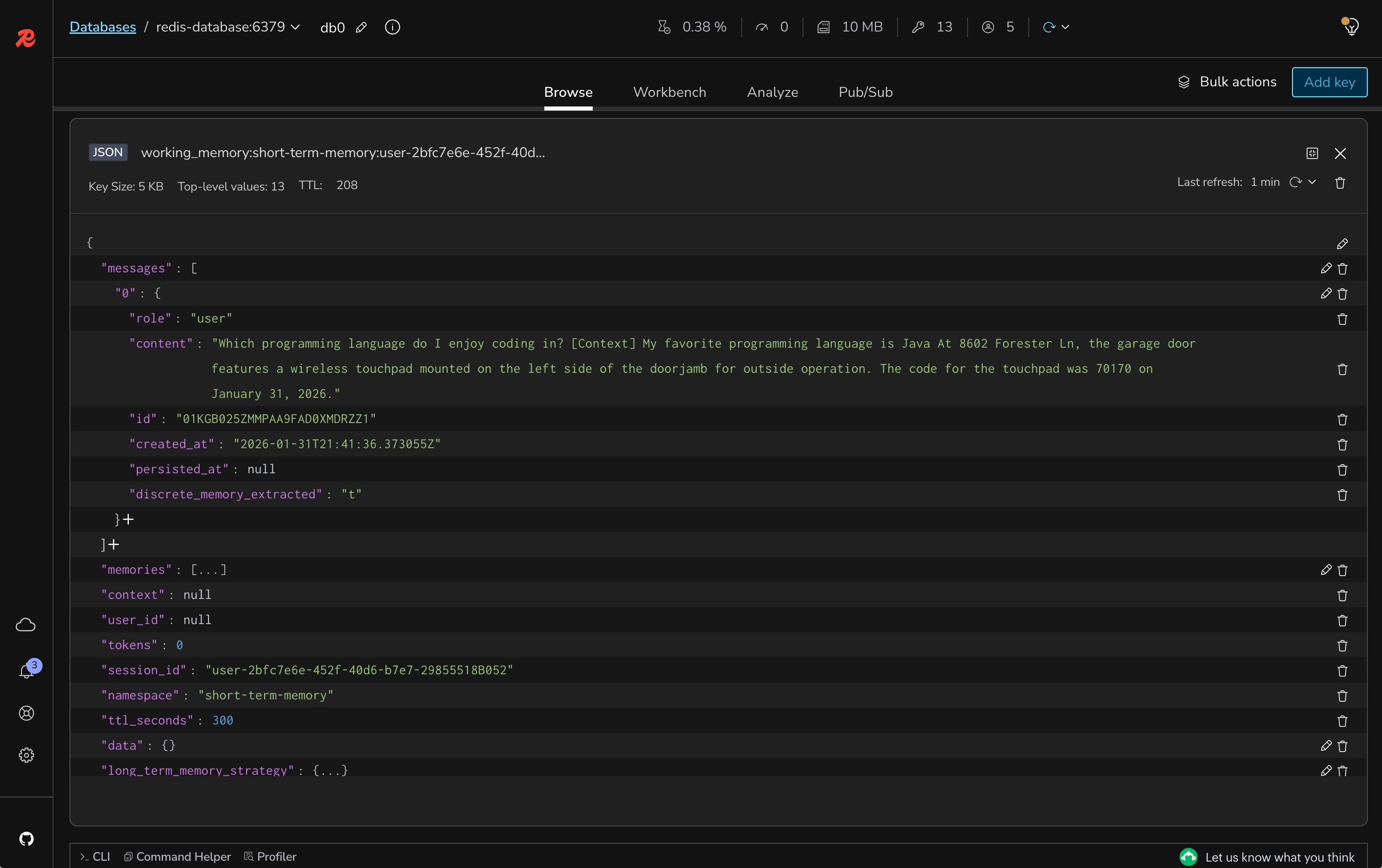
The LLM will then receive multiple memories in the context, which may be beneficial for answering more complex questions. But sometimes it may lead to a larger context filled with irrelevant data. Don't worry, we will fix this in the next lab.
#Store multiple memories
Store various types of personal information:
#Test context combination
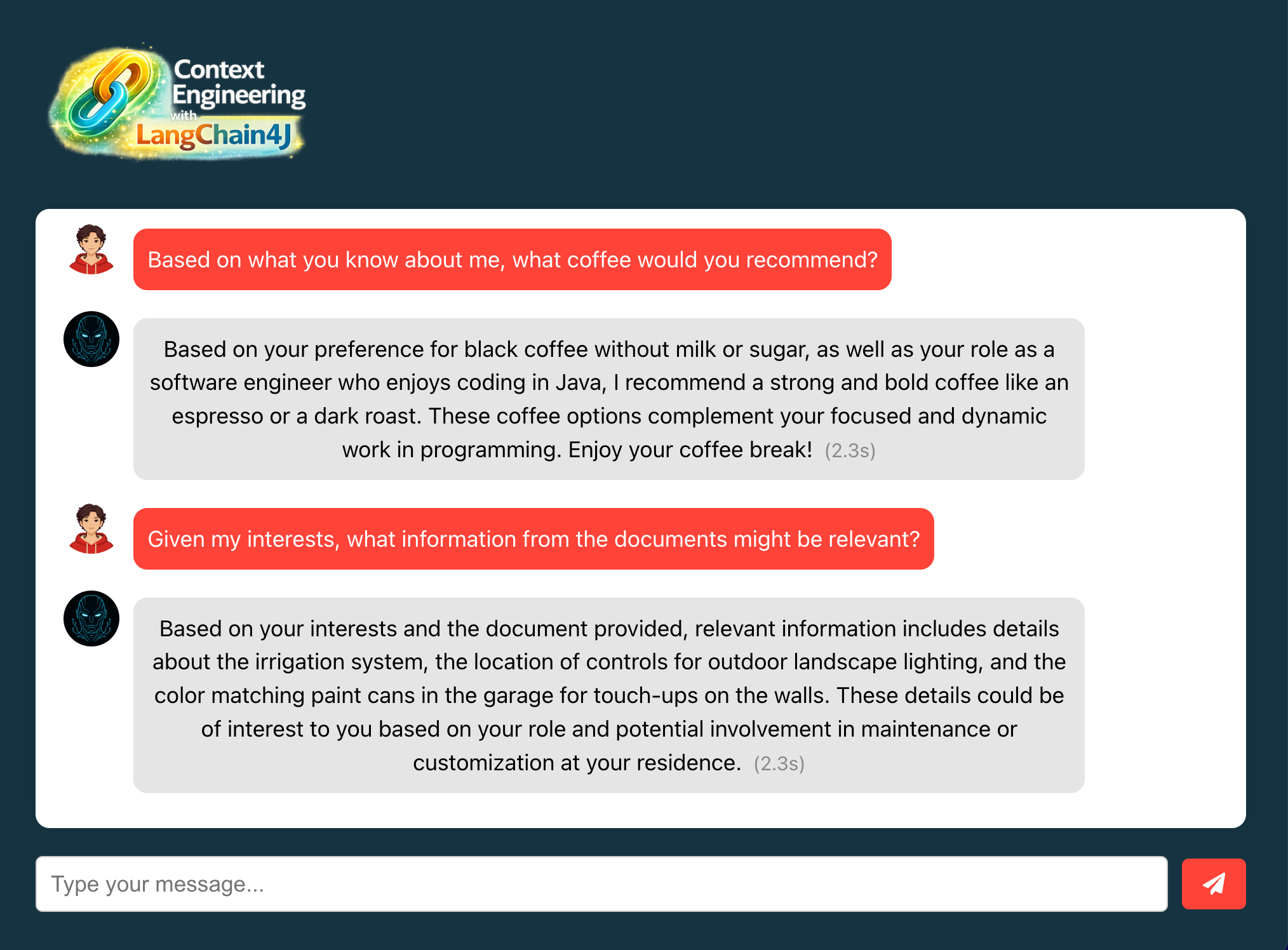
Ask questions that require both memories and knowledge base:
- "Based on what you know about me, what coffee would you recommend?"
- "Given my interests, what information from the documents might be relevant?"
#Verify memory persistence
- Stop and restart the backend application
- Ask about previously stored information
- Confirm memories persist across sessions
#Understanding the code
#1. MemoryService.searchUserMemories()
- Searches user memories using semantic similarity
- Filters by user ID for privacy and isolation
- Returns relevant memories based on query
- Combines multiple memory types (preferences, facts, events)
#2. LanguageModelQueryRouter
- Intelligently routes queries to appropriate retrievers
- Uses LLM to determine if query needs user memory or knowledge
- Falls back to searching all sources when uncertain
- Provides descriptions to help routing decisions
#3. Dual-layer memory architecture
- Short-term: Recent conversation context (Lab 2)
- Long-term: Persistent user memories (this lab)
- Knowledge base: Document information (Lab 3-4)
- All layers work together for comprehensive context
#What's still missing? (Context engineering perspective)
Your application now has dual-layer memory, but still lacks:
- ❌ No Query Compression: Queries aren't optimized
- ❌ No Content Reranking: Retrieved content isn't prioritized
- ❌ No Few-shot Learning: No examples in prompts
- ❌ No Token Management: No handling of context limits
Next labs will add these optimization features.
#Lab 5 troubleshooting
Memories not being stored
Solution:
- Check Redis Agent Memory Server is running
- Verify the POST request format is correct
- Check if the
idfield is not being duplicated - Ensure memory text is not empty
AI doesn't recall stored memories
Solution:
- Verify memories exist in Redis using Redis Insight
- Check the userId matches between storage and retrieval
- Ensure query router is properly configured
- Test with more specific memory-related questions
Wrong retriever being used
Solution:
- Check LanguageModelQueryRouter configuration
- Verify retriever descriptions are clear
- Review fallback strategy settings
- Monitor logs to see routing decisions
#Lab 5 completion
Congratulations. You've successfully:
- ✅ Implemented long-term user memory storage
- ✅ Enabled explicit memory management
- ✅ Integrated user memories with RAG pipeline
- ✅ Created a dual-layer memory architecture
#Additional resources
#Lab 6: Implementing query compression and context reranking
#Learning objectives
By the end of this lab, you will:
- Implement query compression to optimize retrieval queries
- Configure content reranking to prioritize relevant information
- Set up ONNX scoring models for semantic similarity
- Reduce context noise by filtering low-relevance content
- Test the impact of compression and reranking on response quality
Estimated Time: 15 minutes
#What you're building
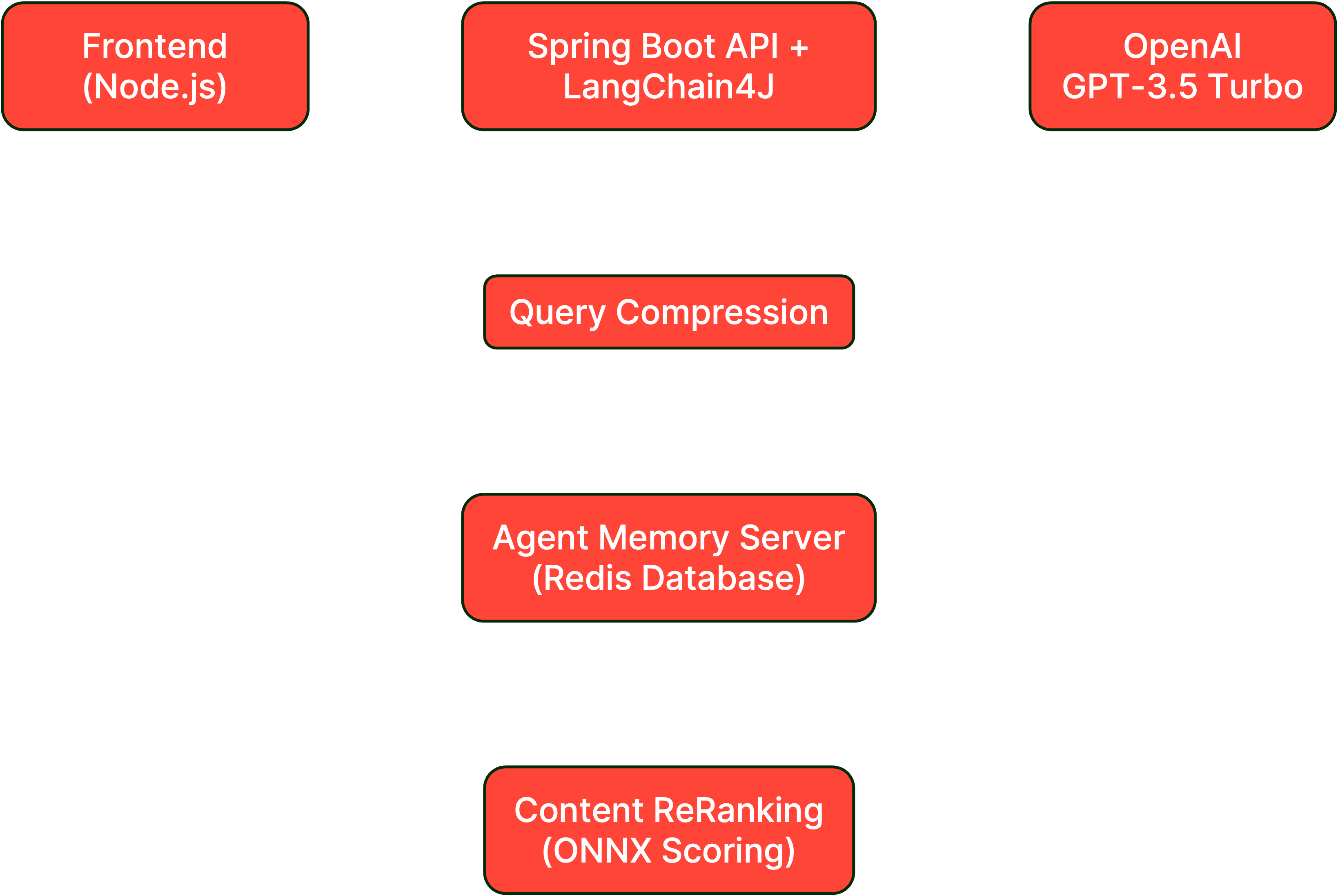
In this lab, you'll optimize the RAG pipeline by adding query compression and content reranking, ensuring that only the most relevant information reaches the LLM. This includes:
- Query Compression: Simplifying queries while preserving intent
- Content Reranking: Scoring and ordering retrieved content by relevance
- ONNX Scoring Model: Using pre-trained models for similarity scoring
- Context Optimization: Filtering out low-scoring content
#Architecture overview
#Prerequisites check
Before starting, ensure you have:
- Completed Lab 5 successfully
- Dual-layer memory working (short-term and long-term)
- RAG pipeline functioning with knowledge base
- Multiple memories and documents stored for testing
#Setup instructions
#Step 1: Switch to the lab 6 branch
#Step 2: Review the ModelManager configuration
Open
backend-layer/src/main/java/io/redis/devrel/workshop/config/ModelManager.java and review how ONNX models are extracted and managed:#Step 3: Implement query compression
Open
backend-layer/src/main/java/io/redis/devrel/workshop/memory/LongTermMemory.java and add query compression.Change from this:
To this:
#Step 4: Implement content reranking
Still in
LongTermMemory.java, add the content aggregator with reranking.Change from this:
To this:
#Step 5: Rebuild and run the backend
#Step 6: Keep the frontend running
The frontend should still be running. If not:
#Testing query compression and reranking
#Test query compression
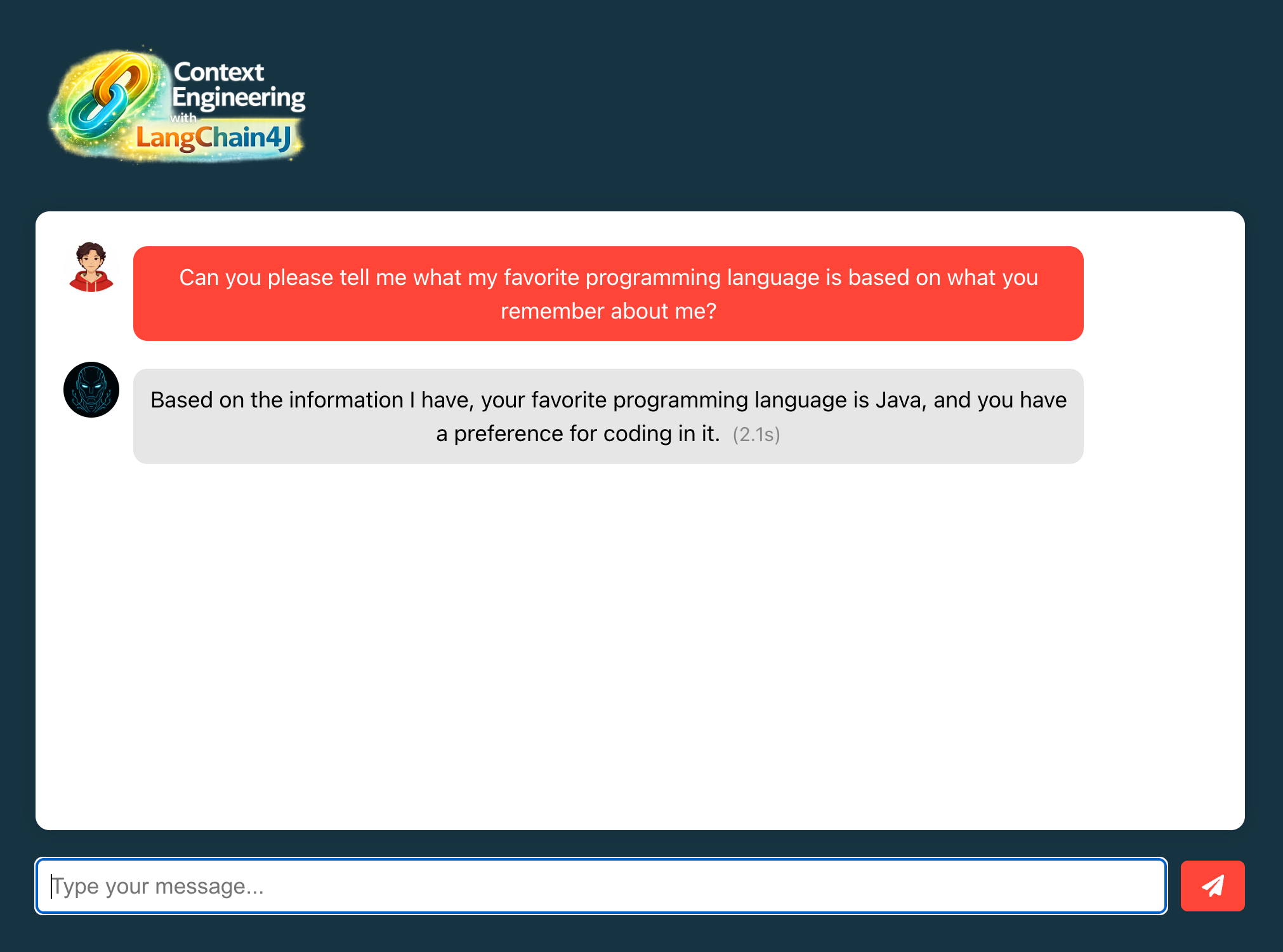
- Open http://localhost:3000 in your browser
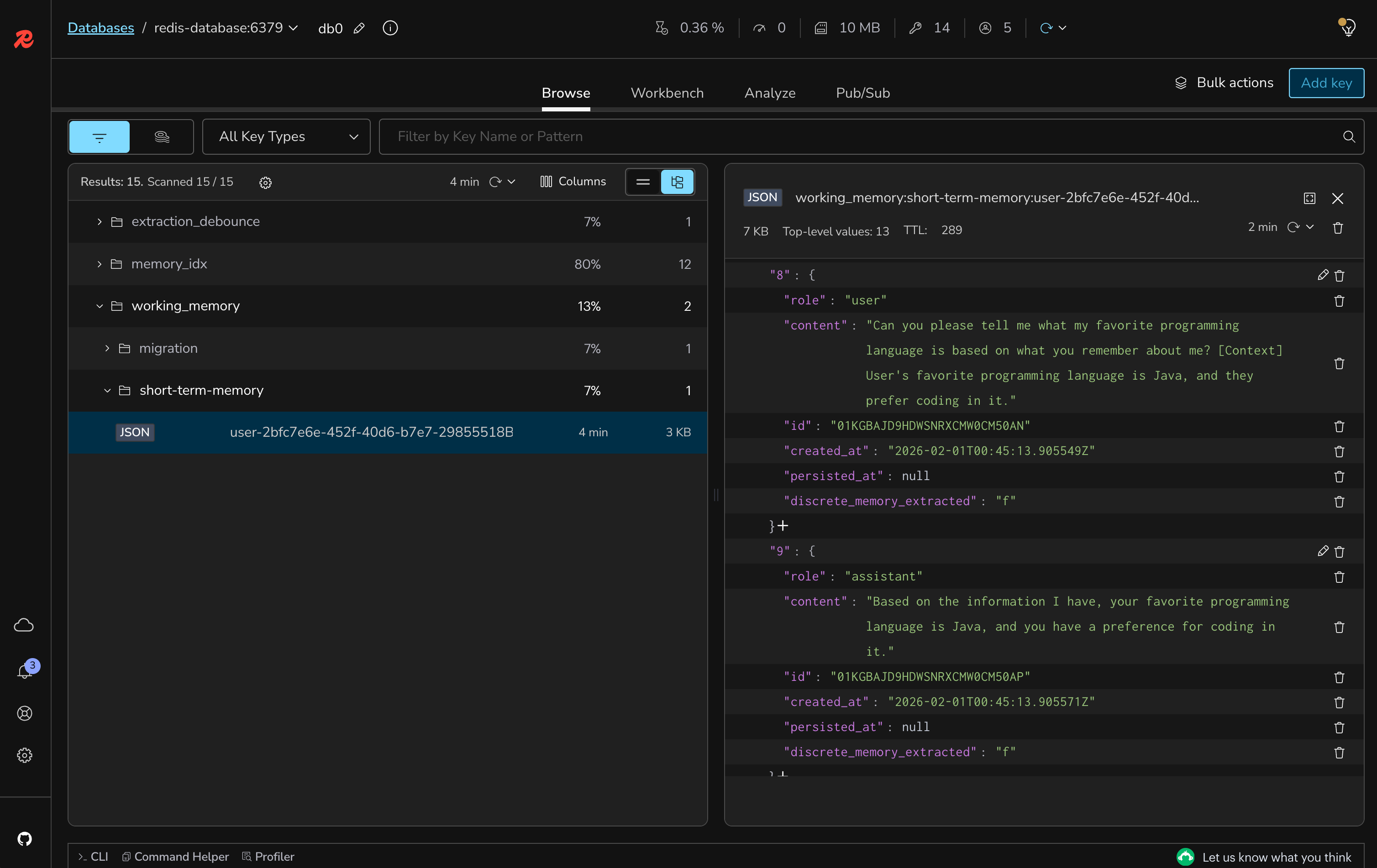
- Ask a verbose question: "Can you please tell me what my favorite programming language is based on what you remember about me?"
- Check the short-memory details using Redis Insight
- Verify the response still uses the correct memory
#Test content reranking
- Ask a question that might retrieve multiple memories
- Observe that only the most relevant content appears in the context
- Check that low-relevance content is filtered out
Besides checking the context details using Redis Insight, you can use one of the HTTP requests available in the
rest-api-calls folder. It will reproduce the same query sent to the Agent Memory Server, so you can have an idea about what context was retrieved, and how it compares to the one reranked.#Understanding the code
#1. CompressingQueryTransformer
- Uses the ChatModel to simplify verbose queries
- Preserves query intent while removing redundancy
- Reduces tokens sent to retrieval system
- Improves retrieval accuracy with focused queries
#2. OnnxScoringModel
- Pre-trained model for semantic similarity scoring
- Compares query against retrieved content
- Provides relevance scores (0-1 range)
- Lightweight and fast for real-time scoring
#3. ReRankingContentAggregator
- Scores all retrieved content against the query
- Orders content by relevance score
- Filters out content below minimum threshold (0.8)
- Ensures only high-quality context reaches LLM
#4. Model files
model.onnx: The scoring model weightstokenizer.json: Tokenization configuration- Extracted to temp directory at startup
- MS MARCO MiniLM model for cross-encoder scoring
#What's still missing? (Context engineering perspective)
Your application now has optimized retrieval, but still lacks:
- ❌ No Few-shot Learning: No examples in prompts
- ❌ No Token Management: No handling of context limits
- ❌ No Semantic Caching: Redundant queries still hit LLM
Next labs will add these final optimizations.
#Lab 6 troubleshooting
ONNX model loading fails
Solution:
- Verify model files exist in resources folder
- Check temp directory permissions
- Ensure sufficient disk space for extraction
- Review ModelManager initialization logs
All content filtered out (empty context)
Solution:
- Lower the minScore threshold (try 0.6 or 0.7)
- Check if queries are too specific
- Verify content is being retrieved before reranking
- Test with more general queries
Query compression removing important terms
Solution:
- Check the ChatModel configuration
- Review compression prompts in logs
- Consider adjusting the CompressingQueryTransformer
- Test with simpler initial queries
#Lab 6 completion
Congratulations. You've successfully:
- ✅ Implemented query compression for optimized retrieval
- ✅ Added content reranking with ONNX scoring models
- ✅ Filtered low-relevance content from context
- ✅ Improved overall response quality and relevance
#Additional resources
#Lab 7: Implementing few-shot learning in system prompts
#Learning objectives
By the end of this lab, you will:
- Understand few-shot learning patterns for LLMs
- Implement example-based prompting in system messages
- Improve response consistency with structured examples
- Guide the AI's output format and style through demonstrations
- Test the impact of few-shot learning on response quality
Estimated Time: 5 minutes
#What you're building
In this lab, you'll enhance the system prompt with few-shot examples to guide the AI's responses more effectively. This includes:
- Few-shot Examples: Adding input-output pairs to demonstrate desired behavior
- Format Consistency: Ensuring responses follow a predictable structure
- Context Handling: Teaching the AI how to use retrieved context properly
- Style Guidelines: Establishing consistent tone and personality
#Architecture overview
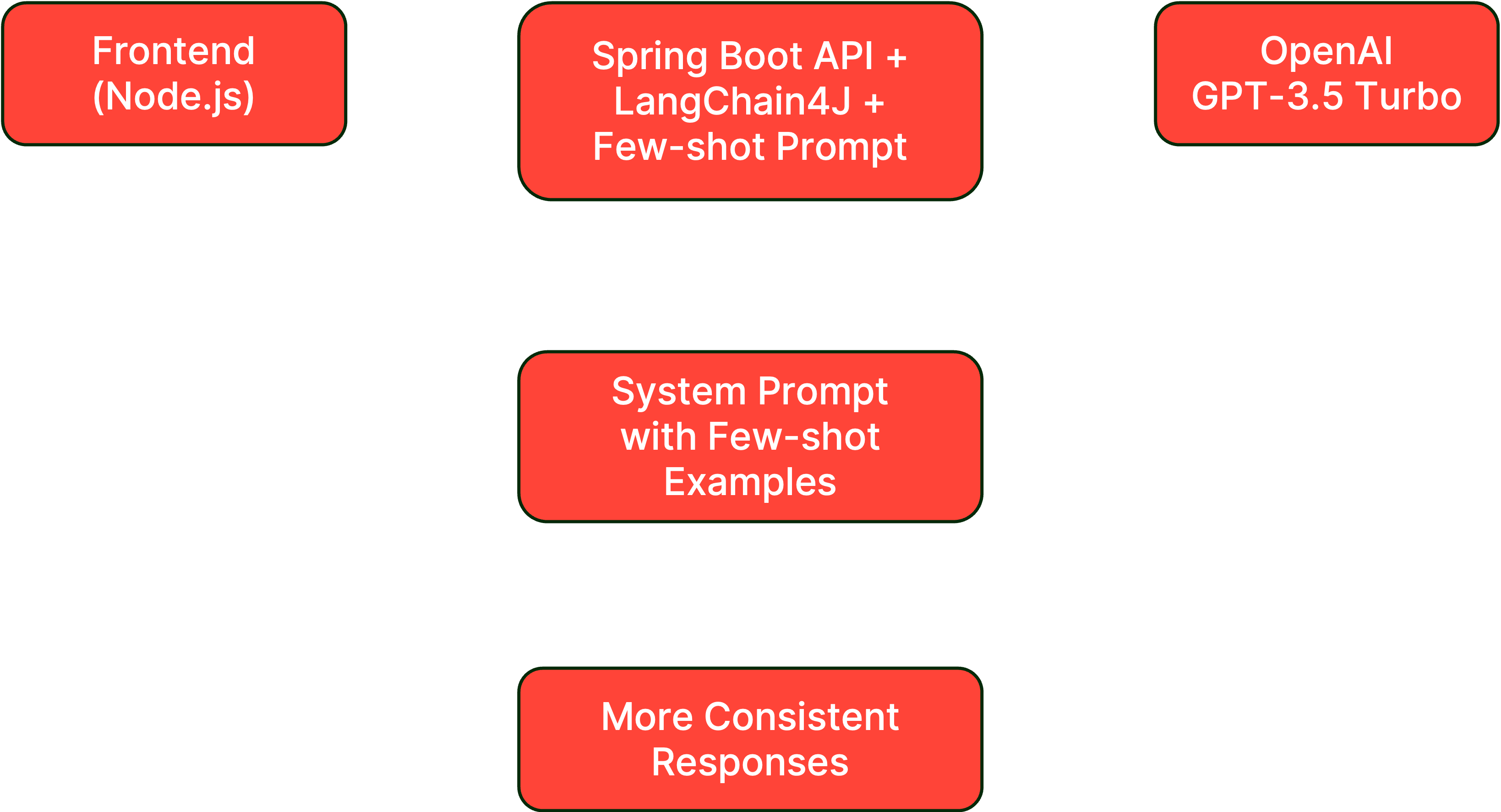
#Prerequisites check
Before starting, ensure you have:
- Completed Lab 6 successfully
- Query compression and reranking working
- System prompt accessible in ChatController
- Test queries ready for comparison
#Setup instructions
#Step 1: Switch to the lab 7 branch
#Step 2: Review the current system prompt
Open
backend-layer/src/main/java/io/redis/devrel/workshop/controller/ChatController.java and locate the SYSTEM_PROMPT constant:#Step 3: Add few-shot examples to the system prompt
Replace the existing
SYSTEM_PROMPT with an enhanced version that includes few-shot examples.Change from the current prompt to:
#Step 4: Rebuild and run the backend
#Step 5: Keep the frontend running
The frontend should still be running. If not:
#Testing few-shot learning impact
#Test context selection
- Open http://localhost:3000 in your browser
- Test with queries that have mixed relevant/irrelevant context
- Verify the AI focuses only on relevant information
Example test:
- Ask: "What's my favorite programming language?"
- The response should mention only Java, ignoring other stored memories
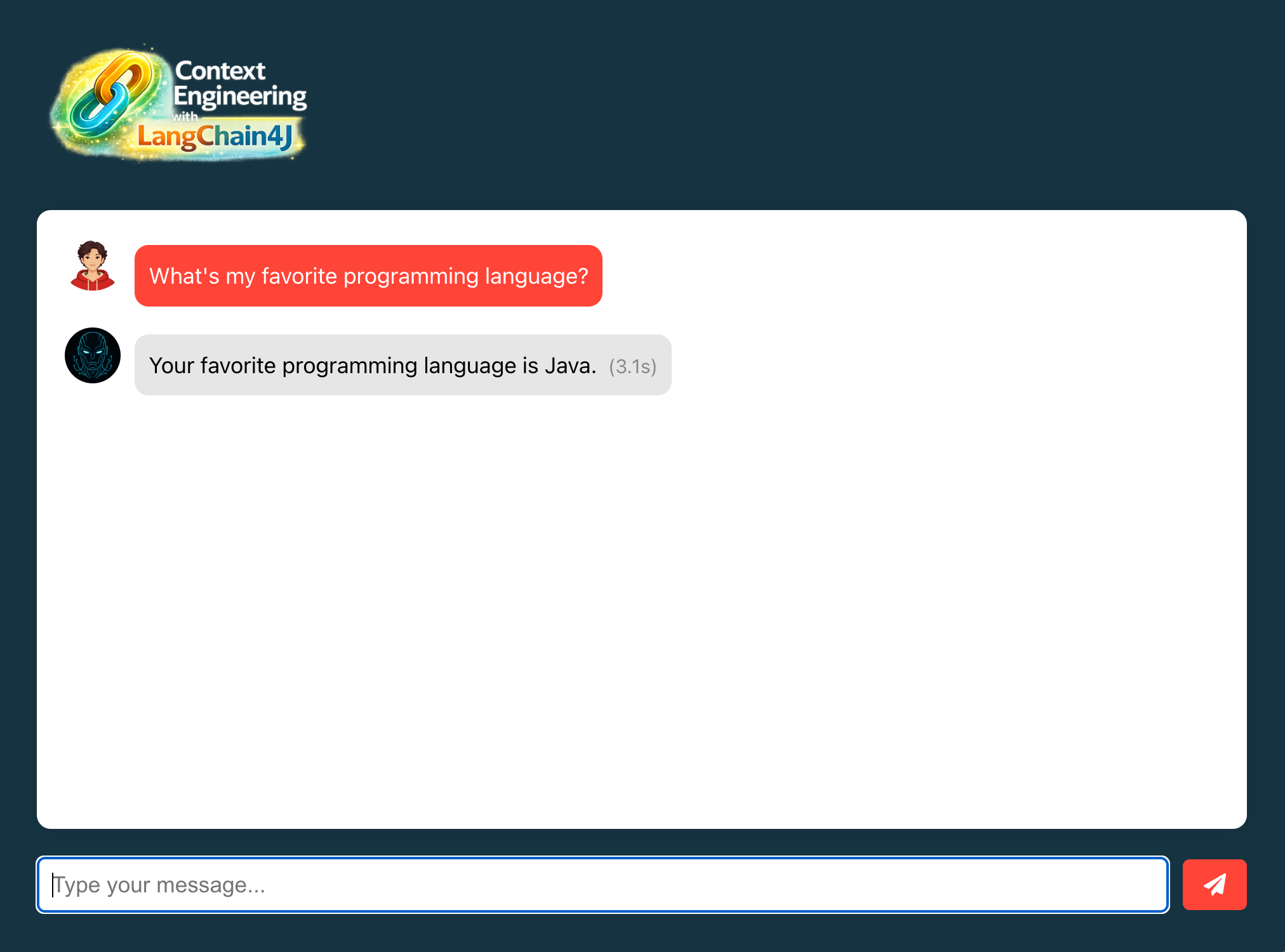
As you can see, this is a very objective response. Even though the context created was this:
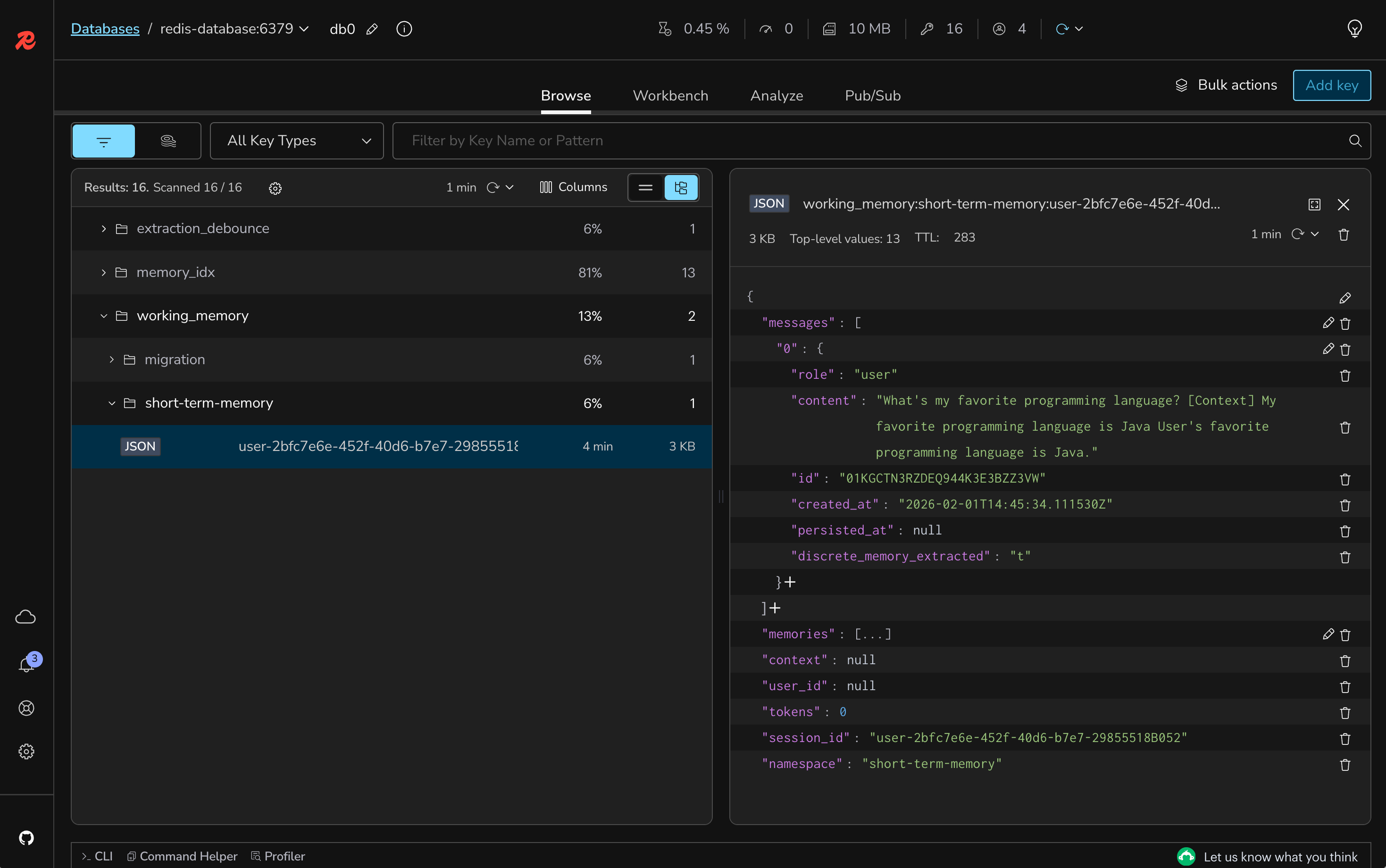
#Test response conciseness
- Ask questions that previously generated long responses
- Verify responses now stay within 3 sentences
- Check that responses maintain clarity despite brevity
#Test edge cases
Test scenarios from the few-shot examples:
- Ask about information not in context (should acknowledge limitation)
- Ask about weather or current events (should explain lack of real-time data)
- Ask for multiple pieces of information (should combine relevant memories)
#Compare before and after
Notice improvements in:
- Consistency: More predictable response format
- Relevance: Better focus on pertinent information
- Brevity: Shorter, more direct answers
- Accuracy: Improved context interpretation
#Understanding the code
#1. Few-shot learning pattern
- Provides concrete examples of desired behavior
- Shows input-output pairs for different scenarios
- Teaches context selection through demonstration
- Establishes response format expectations
#2. Example categories
- Relevant context usage: Shows how to use available information
- Irrelevant context filtering: Demonstrates ignoring noise
- Missing information handling: How to acknowledge limitations
- Multiple context combination: Merging related information
#3. Impact on AI behavior
- More consistent response structure
- Better context discrimination
- Improved handling of edge cases
- Maintained personality while following guidelines
#4. Prompt engineering best practices
- Clear instructions before examples
- Diverse example scenarios
- Consistent format across examples
- Balance between guidance and flexibility
#What's still missing? (Context engineering perspective)
Your application now has few-shot learning, but still lacks:
- ❌ No Token Management: No handling of context limits
- ❌ No Semantic Caching: Redundant queries still hit LLM
Next labs will add these final optimizations.
#Lab 7 troubleshooting
AI not following few-shot examples
Solution:
- Verify the system prompt is properly updated
- Check that examples are clear and consistent
- Ensure no conflicting instructions in the prompt
- Test with simpler queries first
Responses too rigid or robotic
Solution:
- Balance examples with personality instructions
- Don't over-constrain with too many examples
- Allow some flexibility in response format
- Maintain the J.A.R.V.I.S personality guidance
Context still being misused
Solution:
- Add more specific examples for your use case
- Make context labels clearer in examples
- Verify context is properly formatted
- Check RAG pipeline is working correctly
#Lab 7 completion
Congratulations. You've successfully:
- ✅ Implemented few-shot learning in system prompts
- ✅ Added concrete examples for better guidance
- ✅ Improved response consistency and relevance
- ✅ Enhanced context selection accuracy
#Additional resources
#Lab 8: Enabling token management to handle token limits
#Learning objectives
By the end of this lab, you will:
- Implement token window management for context optimization
- Configure dynamic message pruning based on token limits
- Use OpenAI token count estimation for accurate measurement
- Handle long conversations within model constraints
- Test token overflow scenarios and automatic pruning
Estimated Time: 10 minutes
#What you're building
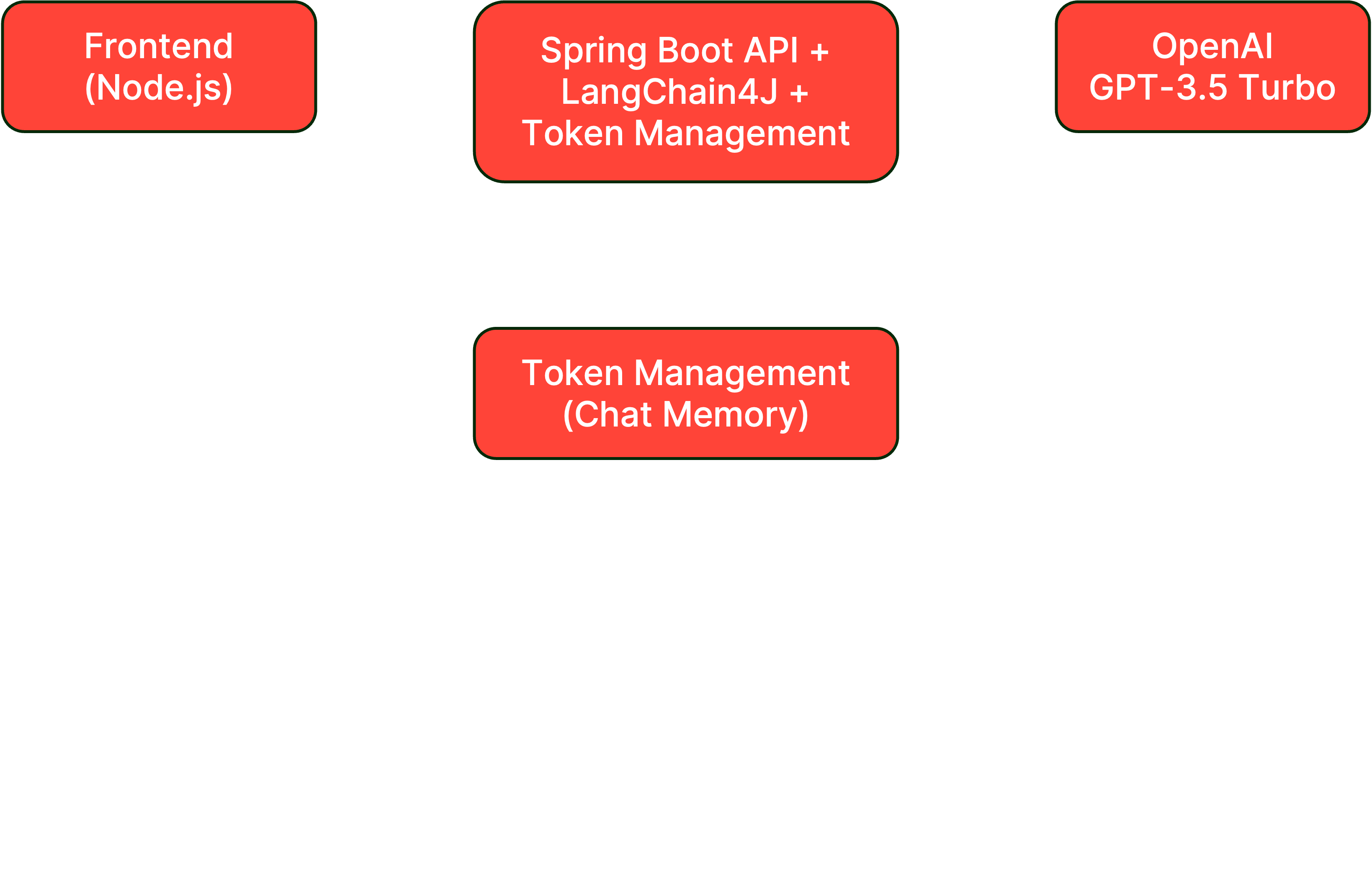
In this lab, you'll implement token management to ensure your application handles context window limits effectively, maintaining conversation quality even in lengthy exchanges. This includes:
- Token Window Management: Automatic pruning of older messages
- Token Count Estimation: Accurate measurement of context size
- Dynamic Context Adjustment: Keeping most relevant messages within limits
- Overflow Handling: Graceful degradation when approaching limits
#Architecture overview
#Prerequisites check
Before starting, ensure you have:
- Completed Lab 7 successfully
- Few-shot learning system prompt in place
- Understanding of token limits (GPT-3.5: 4096 tokens)
- Redis Agent Memory Server running
#Setup instructions
#Step 1: Switch to the lab 8 branch
#Step 2: Review token configuration
Open
backend-layer/src/main/java/io/redis/devrel/workshop/memory/ShortTermMemory.java and review the token-related configuration:#Step 3: Implement token window chat memory
In
ShortTermMemory.java, update the chatMemory() method to use token-based memory management.Change from this:
To this:
#Step 4: Configure token limits
Include the following property to your
.env file:The
max-tokens value of 768 is very low for production environments but is suitable for testing token management behavior. This will give you a good testing experience so you won't have to create lenghty conversations with the AI to see the message pruning in action.#Step 5: Rebuild and run the backend
#Step 6: Keep the frontend running
The frontend should still be running. If not:
#Testing token management
#Test token window behavior
- Open http://localhost:3000 in your browser
- Have a long conversation (1-5 messages)
- Notice older messages being automatically pruned
- Verify recent context is preserved
Example long message test:
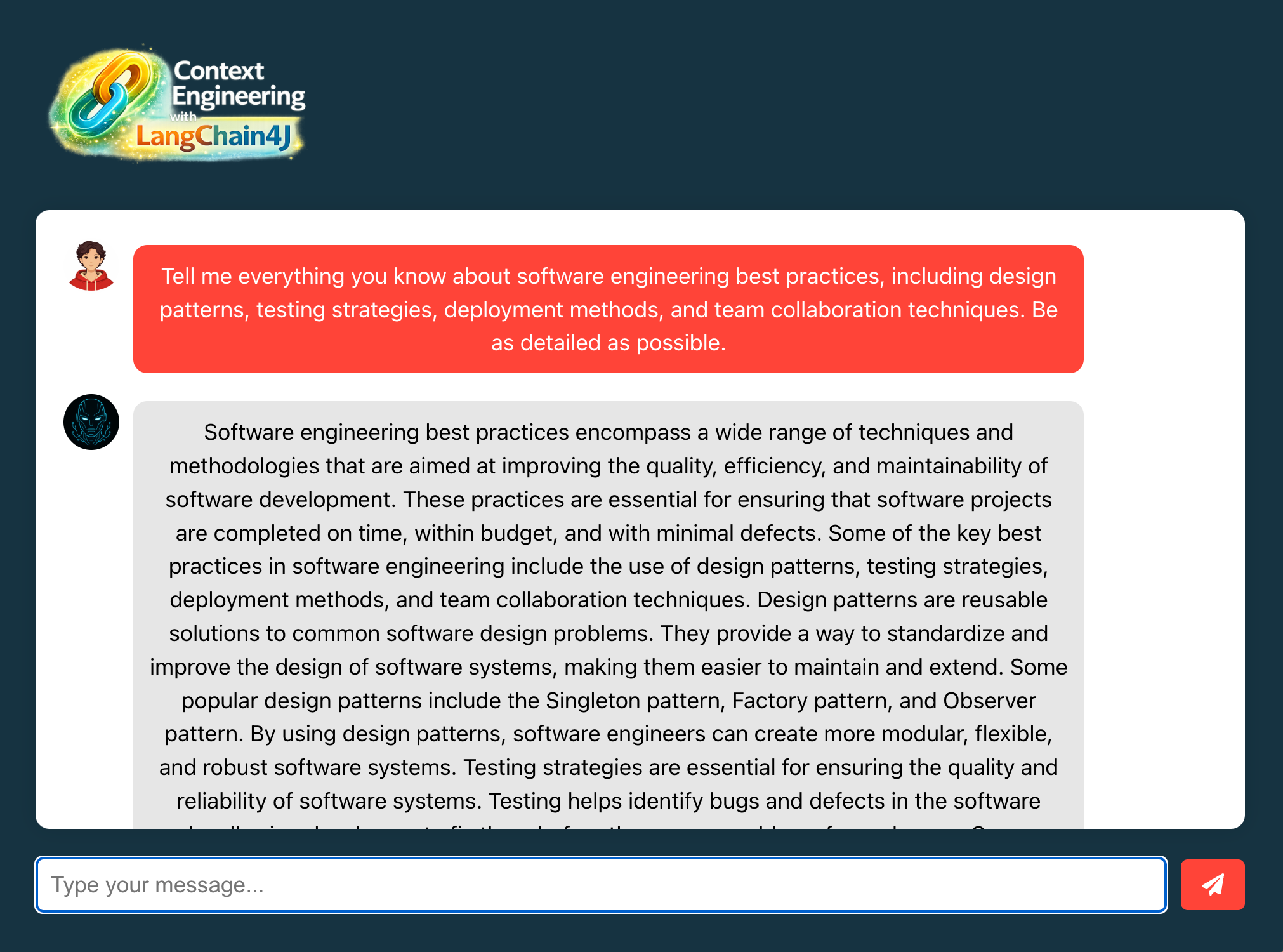
With Redis Insight, you will see a couple of messages there:
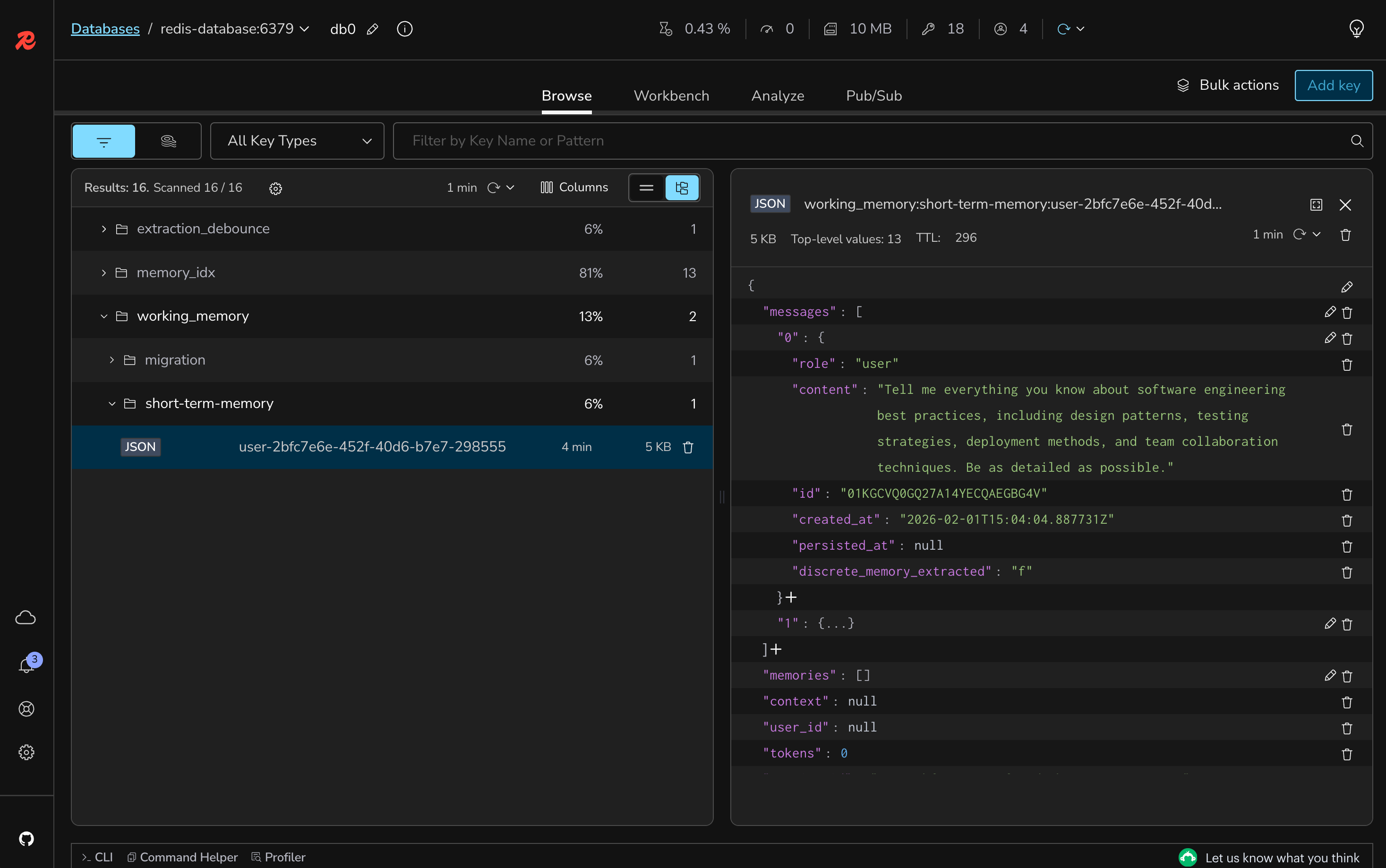
#Verify context preservation
Using Redis Insight:
- Check the working memory before token limit
- Send more messages to exceed the limit
- Verify older messages are removed
- Confirm recent messages remain
#Test with different token limits
Temporarily adjust
CHAT_MEMORY_MAX_TOKENS in .env:- Try 100 tokens (more aggressive pruning)
- Try 3000 tokens (less frequent pruning)
- Observe behavior differences
#Understanding the code
#1. TokenWindowChatMemory
- Maintains conversation within token limits
- Automatically removes oldest messages when limit approached
- Preserves most recent and relevant context
- Uses sliding window approach
#2. OpenAiTokenCountEstimator
- Accurately estimates tokens for OpenAI models
- Accounts for special tokens and formatting
- Model-specific tokenization rules
- Helps prevent context overflow
#3. Token budget allocation
- System Prompt: ~500 tokens (including few-shot)
- Chat History: 2000 tokens (configured limit)
- Retrieved Context: ~500 tokens (from RAG)
- Response Space: ~1000 tokens
- Total: Within 4096 token limit
#4. Pruning strategy
- First-In-First-Out (FIFO) approach
- Removes complete message pairs (user + assistant)
- Maintains conversation coherence
- Keeps most recent exchanges
#What's still missing? (Context engineering perspective)
Your application now has token management, but still lacks:
- ❌ No Semantic Caching: Redundant queries still hit LLM
The final lab will add this last optimization.
#Lab 8 troubleshooting
Messages disappearing too quickly
Solution:
- Increase max-tokens value in application.properties
- Check if messages are unusually long
- Verify token estimation is accurate
- Consider using a model with larger context window
Token limit exceeded errors
Solution:
- Reduce max-tokens to leave more buffer
- Check total of all token consumers
- Monitor actual token usage
- Adjust system prompt length if needed
Conversation losing important context
Solution:
- Store critical information in long-term memory
- Adjust token window size
- Consider message importance weighting
- Use summary techniques for older messages
#Lab 8 completion
Congratulations. You've successfully:
- ✅ Implemented token window management
- ✅ Configured automatic message pruning
- ✅ Added token count estimation
- ✅ Handled long conversations within limits
#Additional resources
#Lab 9: Implementing semantic caching for conversations
#Learning objectives
By the end of this lab, you will:
- Set up Redis LangCache for semantic caching of LLM responses
- Implement cache lookup before making LLM calls
- Store AI responses with semantic similarity matching
- Reduce costs and latency through intelligent caching
- Measure cache hit rates and performance improvements
Estimated Time: 25 minutes
#What you're building
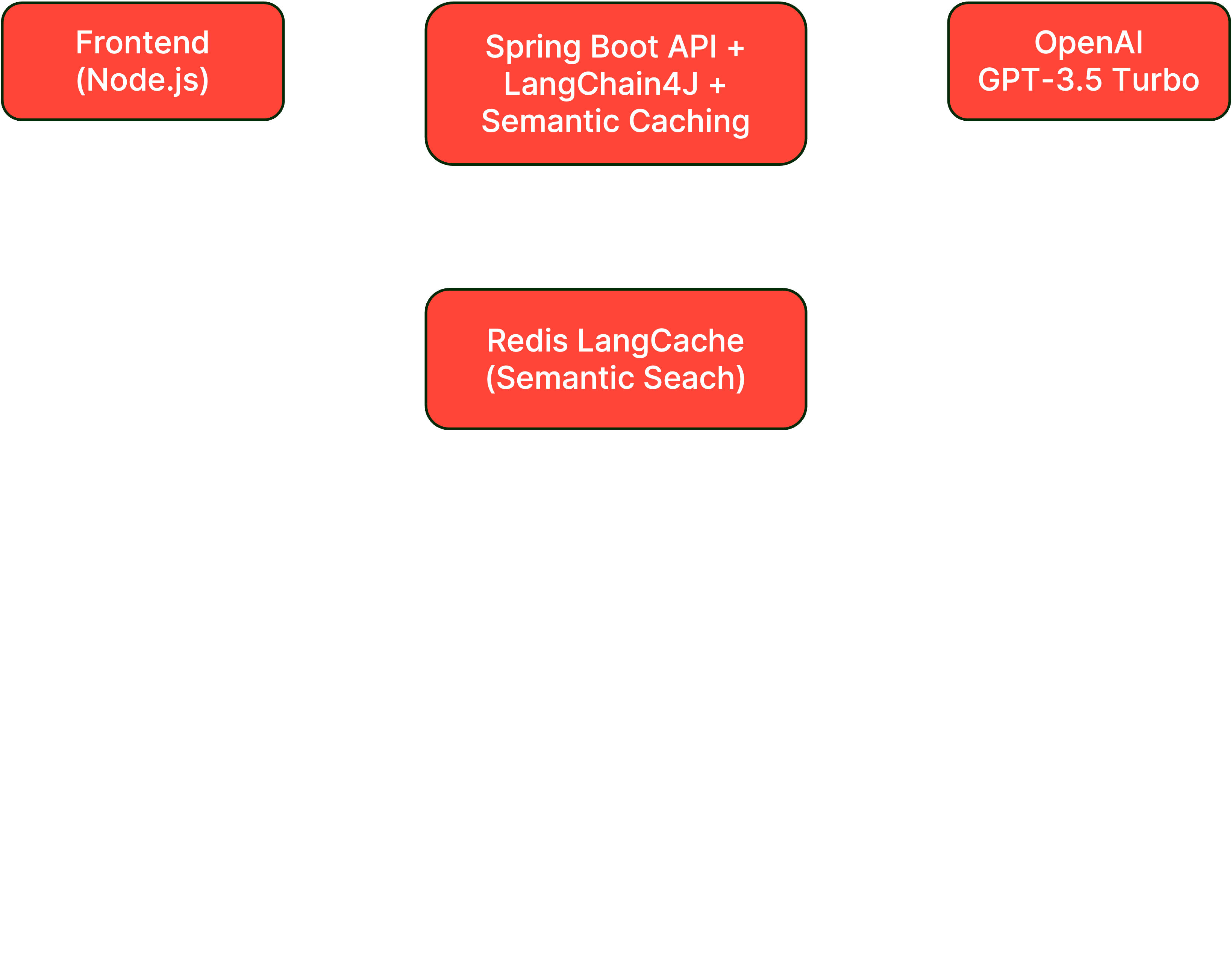
In this final lab, you'll implement semantic caching to avoid redundant LLM calls when users ask similar questions, significantly reducing costs and improving response times. This includes:
- Redis LangCache Integration: Cloud-based semantic caching service
- Similarity Matching: Finding cached responses for similar queries
- Cache Management: TTL-based expiration and user isolation
- Performance Optimization: Instant responses for cached queries
#Architecture overview
#Prerequisites check
Before starting, ensure you have:
- Completed Lab 8 successfully
- Token management configured and working
- Redis Cloud account (free tier is sufficient)
- Understanding of semantic similarity concepts
#Setup instructions
#Step 1: Switch to the lab 9 branch
#Step 2: Review the LangCacheService
Open
backend-layer/src/main/java/io/redis/devrel/workshop/services/LangCacheService.java and review the caching methods:Key configuration values:
- TTL: 60 seconds (for testing, production would be higher)
- Similarity Threshold: 0.7 (70% similarity required for cache hit)
#Step 3: Create Redis LangCache service
- Go to Redis Cloud Console
- Navigate to the LangCache section in the left menu
- Create a new service with
Quick service creation - Note down:
- Base URL
- API Key
- Cache ID
#Step 4: Configure LangCache properties
Add to your
.env file:#Step 5: Implement cache check in ChatController
Open
backend-layer/src/main/java/io/redis/devrel/workshop/controller/ChatController.java and update the chat() method.Change from this:
To this:
#Step 6: Rebuild and run the backend
#Step 7: Keep the frontend running
The frontend should still be running. If not:
#Testing semantic caching
#Test cache miss and store
- Open http://localhost:3000 in your browser
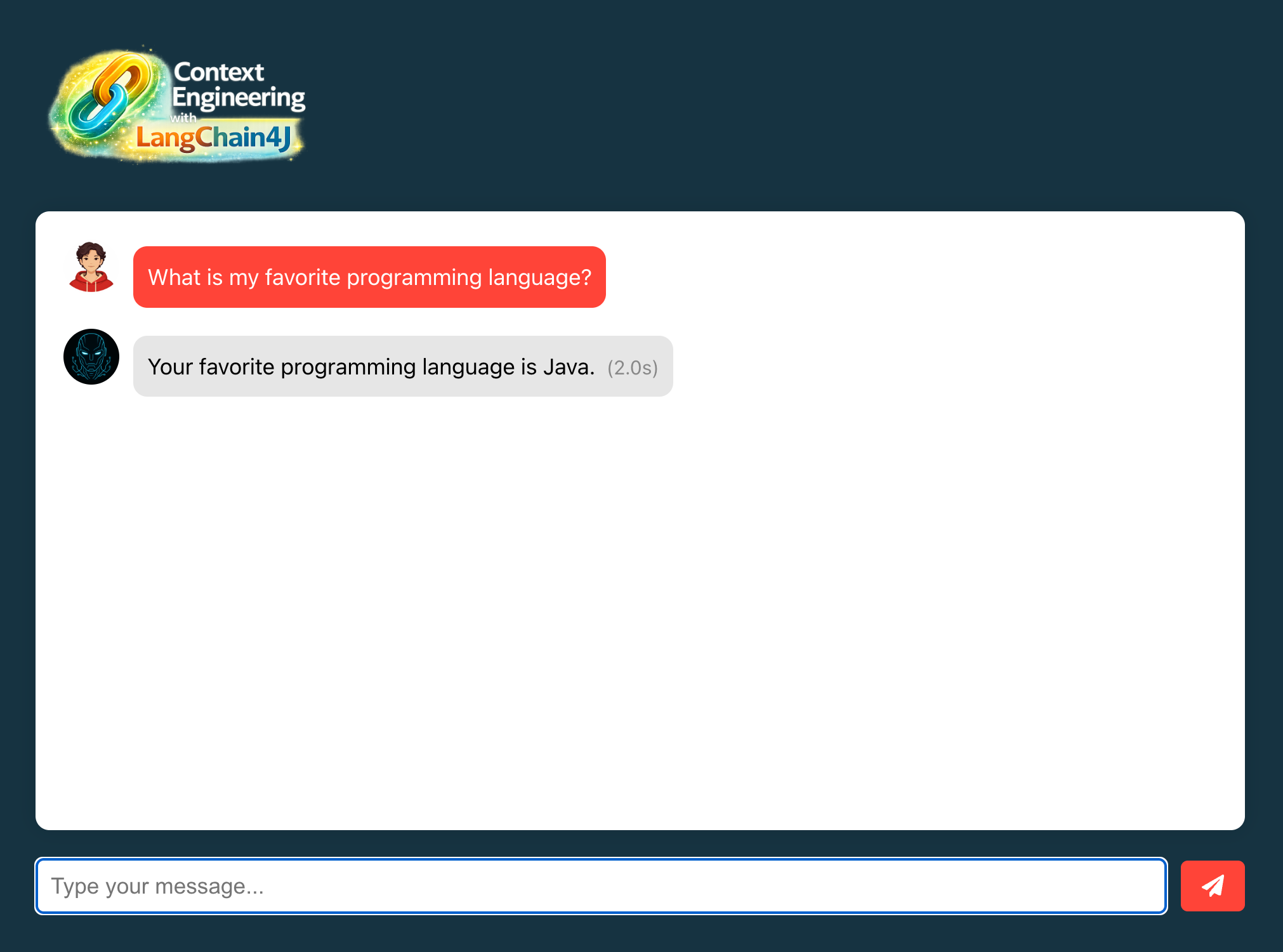
- Ask a unique question: "What is my favorite programming language?"
- Note the response time (first call hits LLM)
#Test exact match cache hit
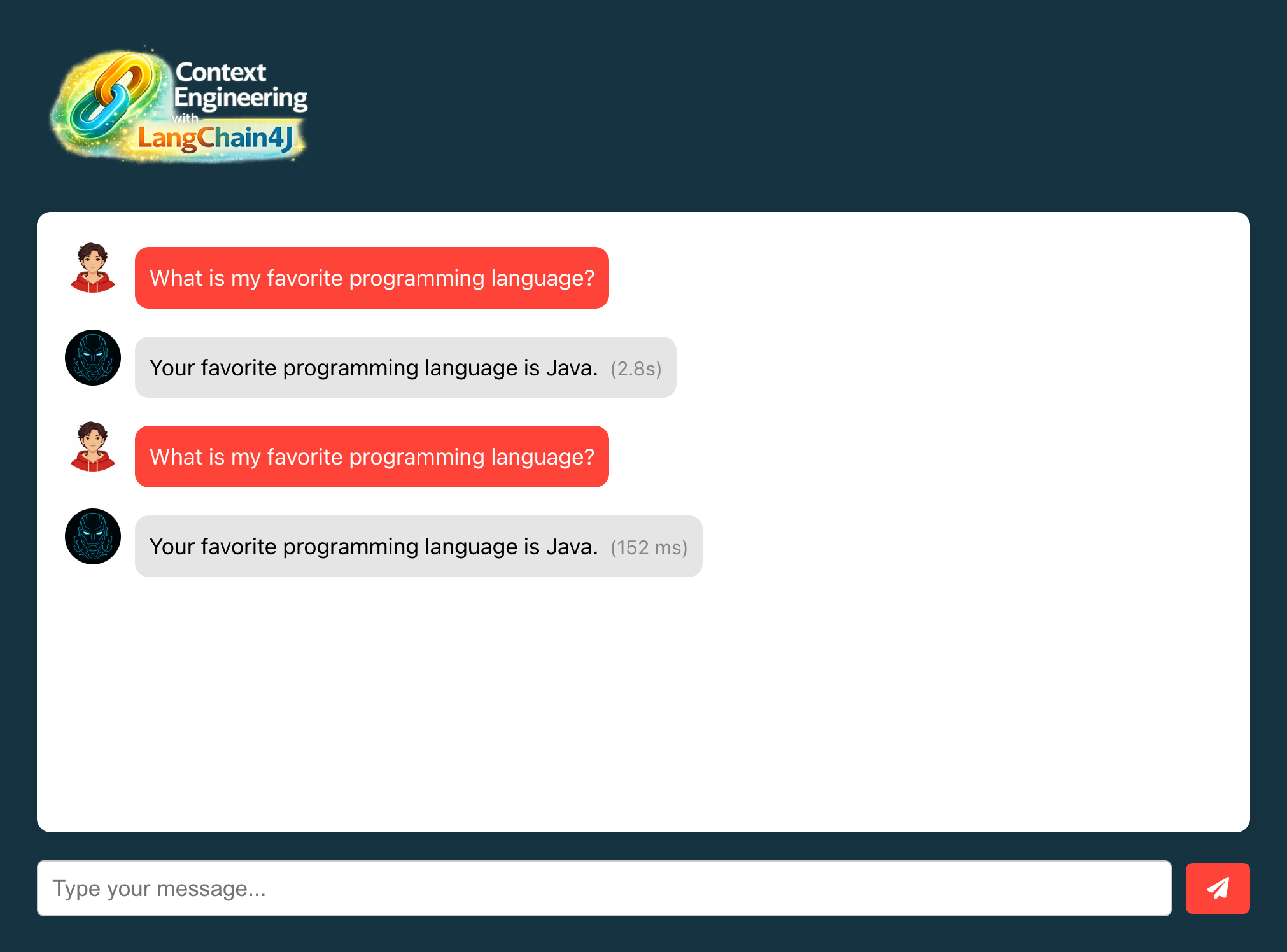
- Ask the exact same question: "What is my favorite programming language?"
- Notice the instant response (now served from cache)
#Test semantic similarity
Test with similar but not identical queries:
Original: "What's my favorite programming language?"
Variations to test:
- "Which programming language do I prefer?"
- "Tell me my preferred coding language"
- "What language do I like to program in?"
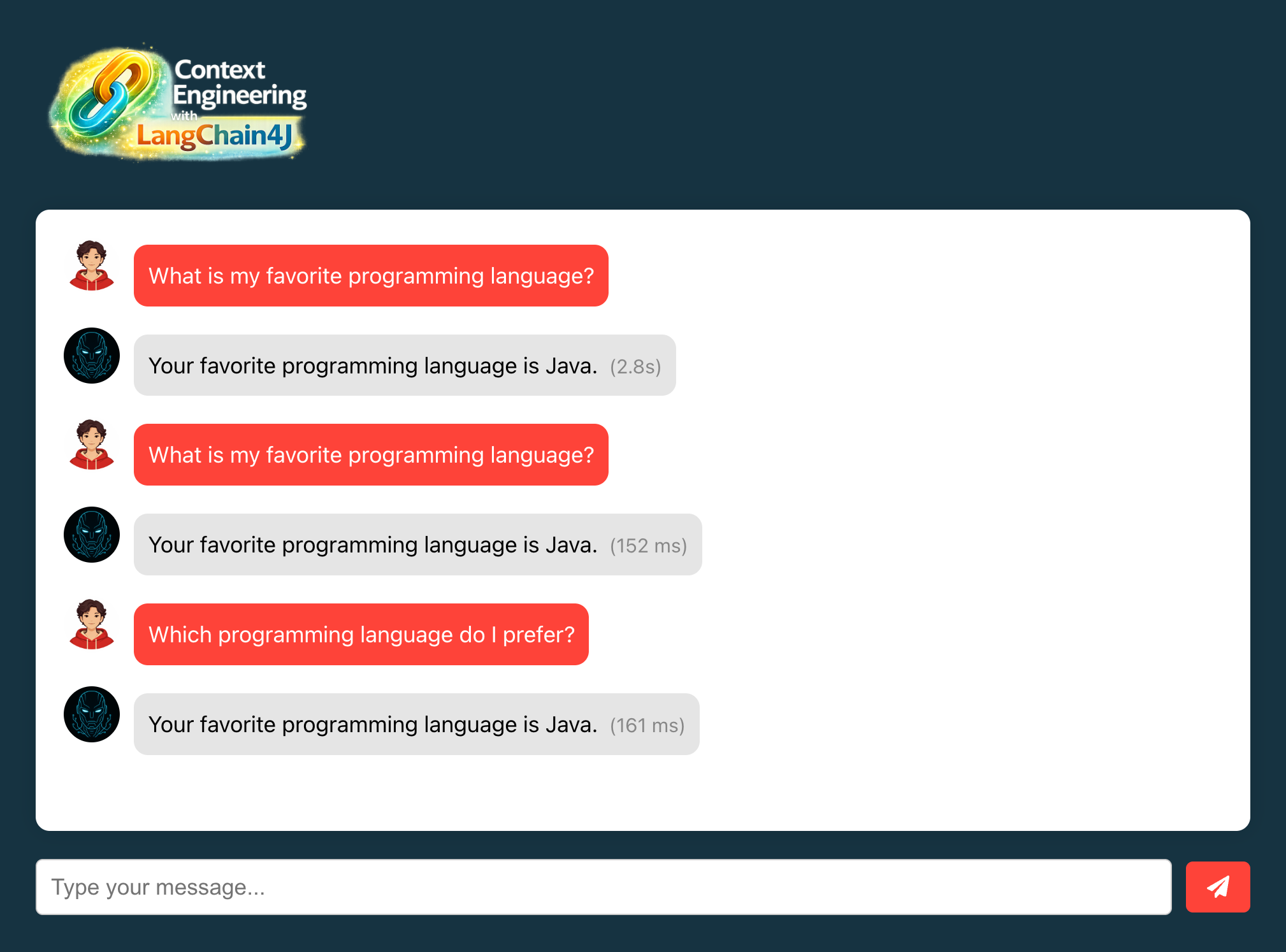
Each should return cached response if similarity > 70%
#Test cache expiration
- Ask a question and get a response
- Wait 60+ seconds (TTL expiration)
- Ask the same question again
- Verify it hits the LLM again (cache expired)
#Monitor cache performance
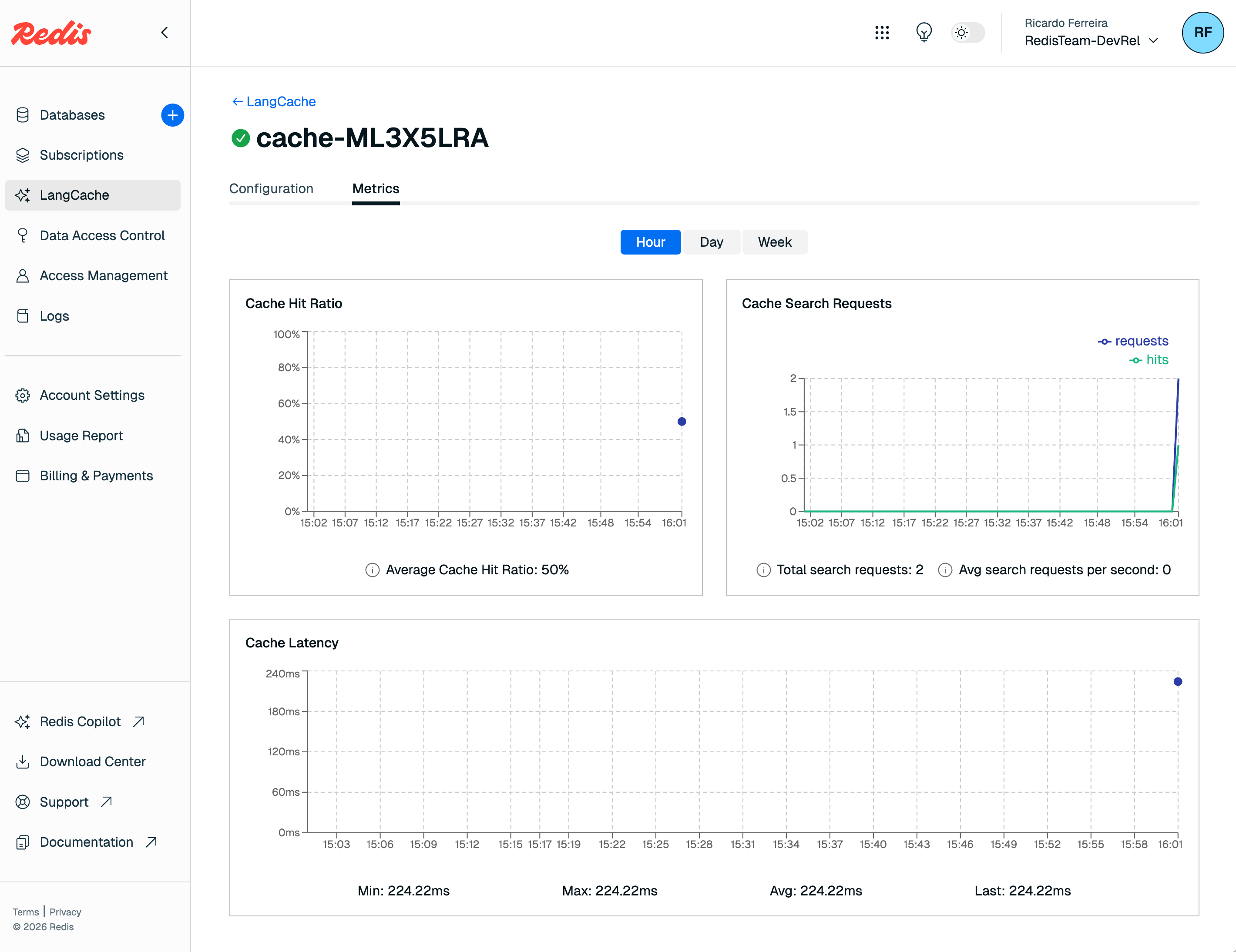
Using the
Metrics tab of your LangCache service, observe these metrics:- Cache Hit Ratio: Cache hits vs total requests
- Cache Search Requests: Number of cache lookups
- Cache Latency: Time taken for cache searches
#Understanding the code
#1. LangCacheService
- HTTP client for Redis LangCache API
- Semantic search using vector embeddings
- TTL-based automatic expiration
#2. Cache search process
- Converts query to embedding
- Searches for similar cached prompts
- Returns response if similarity > threshold
- Falls back to LLM if no match
#3. Cache storage process
- After LLM generates response
- Stores prompt-response pair
- Sets TTL for automatic cleanup
#4. Similarity threshold
- 0.7 (70%) - Good balance for testing
- Higher values = more exact matches required
- Lower values = more cache hits but less accuracy
- Production typically uses 0.8-0.9
#Performance impact
#Before semantic caching
- Every query hits OpenAI API
- ~2-3 seconds response time
- ~$0.002 per query cost
- No redundancy optimization
#After semantic caching
- Similar queries served from cache
- ~50ms response time for cache hits
- Zero cost for cached responses
- 40-60% typical cache hit rate
#Lab 9 troubleshooting
Cache always misses
Solution:
- Verify Redis LangCache credentials
- Check network connectivity to Redis Cloud
- Lower similarity threshold (try 0.6)
- Ensure cache ID is correct
- Check TTL hasn't expired
Wrong responses from cache
Solution:
- Increase similarity threshold (try 0.8 or 0.9)
- Clear cache and rebuild
- Verify user isolation is working
- Check cache entries in Redis Cloud console
Cache service connection errors
Solution:
- Verify API key and base URL
- Check Redis Cloud service status
- Review firewall/proxy settings
- Test with curl directly to API
#Lab 9 completion
Congratulations. You've successfully:
- ✅ Implemented semantic caching with Redis LangCache
- ✅ Reduced redundant LLM calls
- ✅ Improved response times dramatically
- ✅ Added cost optimization through caching
#Additional resources
#Congratulations
You've successfully completed the Context Engineering Workshop for Java Developers and built a sophisticated AI application that demonstrates industry-leading practices in context management for Large Language Models (LLMs). This complete implementation showcases how to architect, optimize, and scale AI applications using Java, LangChain4J, and Redis.
#What you've built
#Complete context engineering system
Your application now implements a comprehensive context engineering solution with:
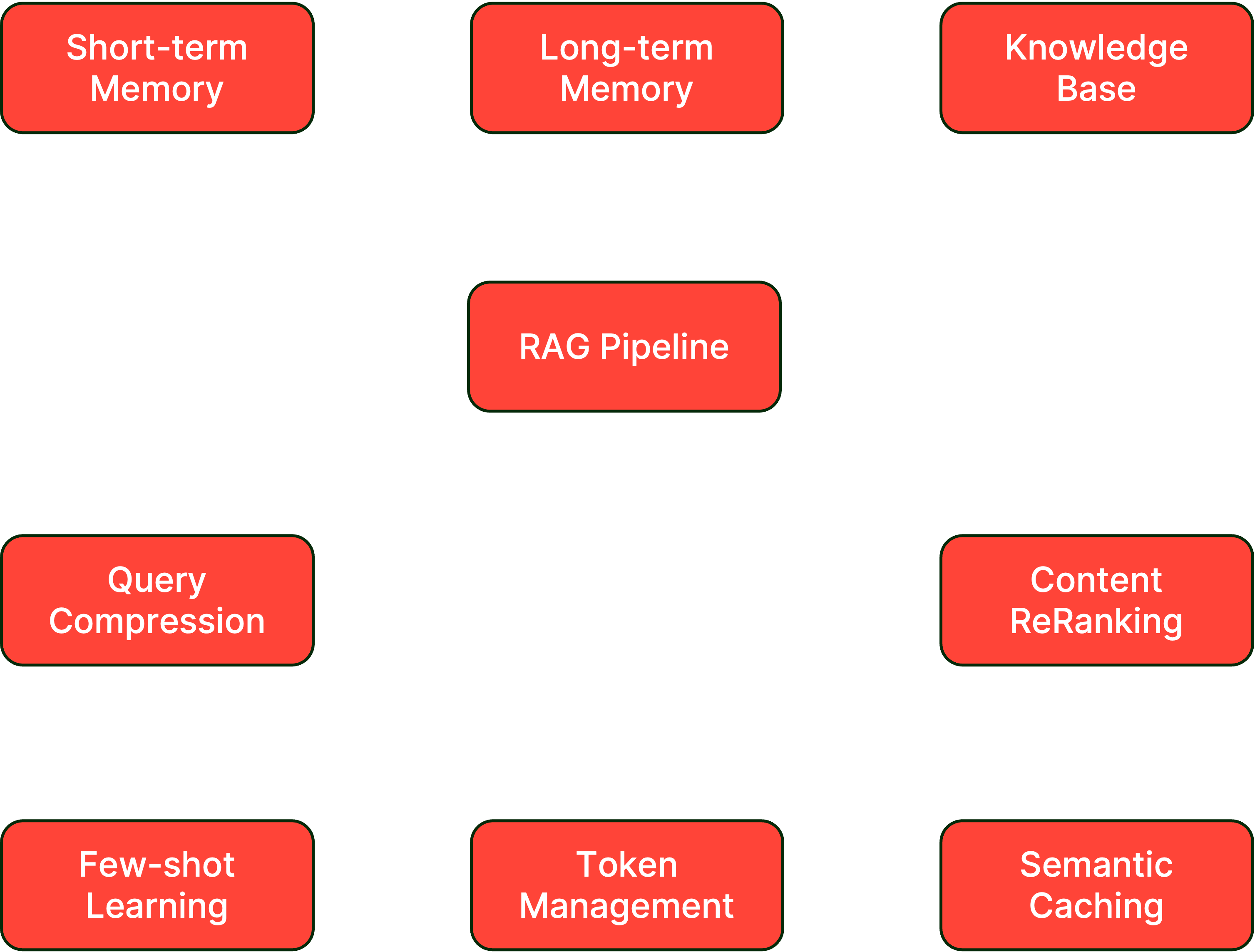
#Context engineering techniques implemented
#1. Memory architectures (Labs 2 & 5)
- Technique: Hierarchical Memory Systems
- Implementation: Dual-layer memory with short-term (conversation) and long-term (persistent) storage
- Reference: Memory-Augmented Neural Networks
- Benefits:
- Maintains conversation coherence
- Preserves user preferences across sessions
- Enables personalized interactions
#2. Retrieval-augmented generation (RAG) (Labs 3 & 4)
- Technique: Dynamic Context Injection
- Implementation: Vector-based semantic search with document chunking
- Reference: RAG: Retrieval-Augmented Generation
- Benefits:
- Access to external knowledge
- Reduced hallucination
- Up-to-date information retrieval
#3. Query optimization (Lab 6)
- Technique: Query Compression and Expansion
- Implementation: LLM-based query reformulation for better retrieval
- Reference: Query Expansion Techniques
- Benefits:
- Improved retrieval accuracy
- Reduced noise in search results
- Better semantic matching
#4. Content reranking (Lab 6)
- Technique: Cross-Encoder Reranking
- Implementation: ONNX-based similarity scoring with MS MARCO models
- Reference: Dense Passage Retrieval
- Benefits:
- Higher relevance in retrieved content
- Reduced context pollution
- Better answer quality
#5. Few-shot learning (Lab 7)
- Technique: In-Context Learning (ICL)
- Implementation: Example-based prompting in system messages
- Reference: Language Models are Few-Shot Learners
- Benefits:
- Consistent output format
- Better instruction following
- Reduced prompt engineering effort
#6. Token management (Lab 8)
- Technique: Sliding Window Attention
- Implementation: Dynamic pruning with token count estimation
- Reference: Efficient Transformers
- Benefits:
- Prevents context overflow
- Maintains conversation flow
- Optimizes token usage
#7. Semantic caching (Lab 9)
- Technique: Vector Similarity Caching
- Implementation: Redis LangCache with embedding-based matching
- Reference: Semantic Caching for LLMs
- Benefits:
- 40-60% reduction in LLM calls
- Sub-100ms response times for cached queries
- Significant cost savings
#Technology stack mastered
#Core technologies
- Java 21: Modern Java with virtual threads and records
- Spring Boot 3.x: Reactive programming with WebFlux
- LangChain4J: Comprehensive LLM orchestration
#AI/ML components
- OpenAI GPT-3.5/4: Large language model integration
- ONNX Runtime: Cross-platform model inference
- Vector Embeddings: Semantic similarity search
- MS MARCO: State-of-the-art reranking models
#Infrastructure
- Docker: Containerized deployment
- Redis Cloud: Semantic caching via LangCache service
- Agent Memory Server: Distributed memory management
#Advanced concepts learned
- Context Window Optimization: Balancing information density with token limits
- Semantic Similarity: Understanding and implementing vector-based search
- Prompt Engineering: Crafting effective system prompts with examples
- Memory Hierarchies: Designing multi-tier memory systems
- Query Understanding: Reformulating user intent for better retrieval
- Cache Strategies: Implementing intelligent caching with semantic matching
- Token Economics: Optimizing cost vs. performance in LLM applications
#Next steps for your journey
#Continue learning with Redis tutorials
- Java getting-started tutorial — deepen your Redis + Java fundamentals
- Build an AI-powered chatbot — explore a complementary RAG architecture with Redis vector search
#Immediate enhancements
1. Implement Conversation Summarization
2. Add Multi-Modal Support
- Integrate image processing with LangChain4J
- Add support for PDF charts and diagrams
- Implement audio transcription for voice queries
3. Enhance Memory Management
- Implement memory importance scoring
- Add memory consolidation strategies
- Create user-controlled memory editing
#Advanced features
1. Implement Agents and Tools
2. Implement Hybrid Search
- Combine vector search with keyword search
- Add metadata filtering for better precision
- Implement BM25 + dense retrieval fusion
#Production considerations
1. RAG Observability and Monitoring
LangChain4J provides a comprehensive observability framework to monitor LLM and embedding model calls.
2. Security and Privacy
- Implement PII detection and masking
- Add conversation encryption
- Create audit logs for compliance
- Implement user consent management
3. Scale and Performance
- Implement distributed caching with Redis Cluster
- Add connection pooling for LLM calls
- Use async processing for document ingestion
- Implement circuit breakers for resilience
#Learning resources
#Research papers
#Online courses
#Community and contribution
#Join the community
#Contribute back
- Share your improvements as PRs
- Write blog posts about your learnings
- Create video tutorials
- Help others in community forums
#Certification of completion
You've demonstrated proficiency in:
- ✅ Context Window Management
- ✅ Memory System Architecture
- ✅ Retrieval-Augmented Generation
- ✅ Query Optimization Techniques
- ✅ Semantic Caching Strategies
- ✅ Token Economics and Management
- ✅ Production-Ready AI Applications
#Acknowledgments
This workshop was made possible by:
- The LangChain4J community
- Redis Developer Relations team
- All workshop participants and contributors
#Feedback and support
- Workshop Issues: GitHub Issues
- Improvements: PRs are welcome.
Thank you for joining us on this context engineering journey.
You're now equipped with the knowledge and tools to build sophisticated, production-ready AI applications. The future of context-aware AI is in your hands. Go forth and build amazing things.