

TL;DR:Redis is an open-source, in-memory data store used as a database, cache, and message broker. To get started, install Redis via Docker or Redis Cloud, connect withredis-clior a client library in your language of choice, and begin storing and retrieving data with simpleSETandGETcommands. Then go further based on what you want to do.
#What you'll learn
- How to install Redis (Docker, Cloud, or native)
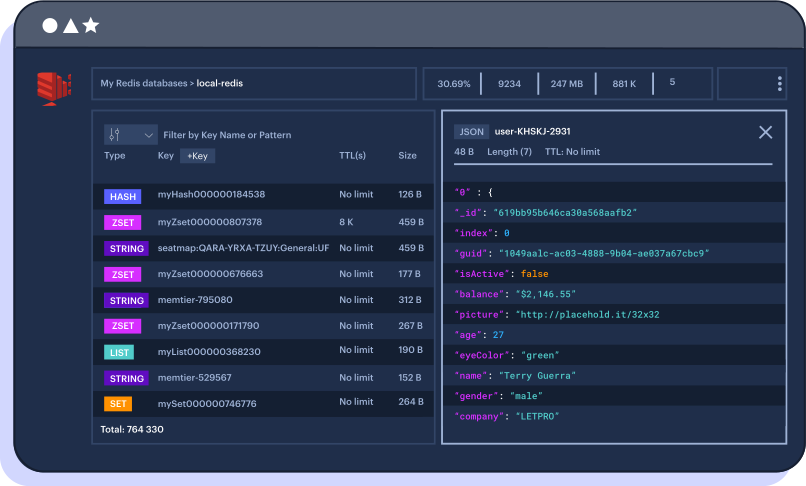
- How to connect to Redis via the CLI or Redis Insight
- How to perform basic CRUD operations (SET, GET, DEL)
- How to work with Redis JSON documents
- How to create indexes and search your data
- How to use probabilistic data structures
- How to store and query time-series data
Welcome to the getting started for the official Redis Developer Hub!
If you are new to Redis, we recommend starting with the "Get started with Redis" course on Redis University. It is an introductory course, perfect for developers new to Redis. In this course, you'll learn about the data structures in Redis, and you'll see how to practically apply them in the real world.
If you have questions related to Redis, come join the Redis Discord server. Our Discord server is a place where you can learn, share, and collaborate about anything and everything Redis. Connect with users from the community and Redis University. Get your questions answered and learn cool new tips and tricks! Watch for notifications of the latest content from Redis and the community. And share your own content with the community.
#How do I install Redis?
There are essentially two ways you can use Redis:
#Redis Cloud
- Cloud Redis: A hosted and serverless Redis database-as-a-service (DBaaS). The fastest way to deploy Redis Cloud via Amazon AWS, Google Cloud Platform, or Microsoft Azure.
- On-prem/local Redis: Self-managed Redis using your own server and any operating system (Mac OS, Windows, or Linux).
If you choose to use local Redis we strongly recommend using Docker. If you choose not to use Docker, use the following instructions based on your OS:
#Docker
The
docker run command below exposes redis-server on port 6379 and Redis Insight on port 8001. You can use Redis Insight by pointing your browser to http://localhost:8001.You can use
redis-cli to connect to the server at localhost:6379. If you don't have redis-cli installed locally, you can run it from the Docker container like below:#Older methods
If you do not want to use Redis Cloud or Docker, see the install archive for how to run Redis natively.
#How do I connect to Redis?
#CLI
- Connect to Redis using CLI or Redis Insight (a GUI tool to visualize data and run commands, see below)
- Basic CLI / Redis Insight workbench commands
- Detailed CLI instructions
- Redis commands
#Javascript
- See the node-redis Github repo for more information
- For a deeper dive, see Getting Started with Node and Redis
#Python
- See the redis-py Github repo for more information
- For a deeper dive, see Getting Started with Redis OM for Python or Using Redis with FastAPI
#C# / .NET
The .NET Community has built many client libraries to help handle requests to Redis Server. In this guide, we'll mostly be concerned with using the StackExchange.Redis client library. As the name implies the StackExchange client is developed by StackExchange for use on popular websites like StackOverflow.
- See the StackExchange.Redis Github repo for more information
- For a deeper dive, see Using Redis OM .NET
#How do I use Redis JSON and query data?
#CLI
Redis supports JSON.
More details can be found in the Redis docs
Redis has a query and indexing engine, providing secondary indexing, full-text search and aggregations capabilities.
- We have to create index on schema to be able to search on its data
- More details on indexing JSON
Once index is created, any pre-existing/ new/ modified JSON document is automatically indexed.
- Search
- Search & project required fields
More details on query syntax
- Drop index
- Redis and JSON explained (Revisited in 2022) video
- Redis University, Storing, Querying, and Indexing JSON at Speed
#Javascript
The following example uses Redis OM Node, but you can also use Node Redis, IO Redis, or any other supported client
- create RedisOM Client & connect to redis
- Create Entity, Schema & Repository
- Insert example
- Read example
- Update example
- Update location sample
- Search examples
- Delete example
#Python
The following example uses Redis OM Python, but you can also use redis-py or any other supported client
Create a JSON model
- Insert example
- Read example
- Update example
- Update embedded JSON example
- Search examples
- Delete example
#C# / .NET
The following example uses Redis OM .NET, but you can also use any other supported client. The examples also use the synchronous methods of Redis OM .NET, but it is recommended that you use the asynchronous methods in a production application.
- Create a JSON model
- Setup your main program
The rest of the code will be inside of
Main.- Create your provider used to call into Redis
- Conditionally create index necessary for searching
- Initialize your collection
- Insert example
- Read example
- Update example
- Update location example
- Search examples
- Delete example
#How do I use probabilistic data structures in Redis?
Redis supports probabilistic data types and queries. Below you will find a stock leaderboard example:
More details in docs
#How do I store and query time-series data in Redis?
Redis supports time-series use cases such as IoT, stock prices, and telemetry. You can ingest and query millions of samples and events at the speed of Redis. You can also use a variety of queries for visualization and monitoring with built-in connectors to popular tools like Grafana, Prometheus, and Telegraf.
The following example demonstrates how you might store temperature sensor readings in Redis:
More details in docs
#Next steps
Now that you have Redis up and running, explore these tutorials to go deeper:
- Redis Quick Start Cheat Sheet -- a handy reference for the most common Redis commands
- Rate Limiting with Redis -- learn how to build a rate limiter using Redis
- Building a Leaderboard with Redis -- create a real-time leaderboard backed by Redis Sorted Sets
- Getting Started with Node and Redis -- build your first Node.js app with Redis
- Getting Started with Java and Redis -- connect Redis to a Java application
- Getting Started with Redis OM for Python -- model and query Redis data with Python
#Additional Resources
- Join the community
- Redis Insight