
Tutorial
Build a Slack bot with Chat SDK and Redis distributed locking
March 20, 202621 minute read

TL;DR: How do you prevent duplicate replies and race conditions in a multi-worker Slack bot?Use Chat SDK with Redis to build Slack bots that survive retries and horizontal scaling. RedisSET NXclaims each Slack event ID so retries are silently dropped. Redis-backed per-thread leases ensure only one worker processes a given thread at a time. The Chat SDK Redis state adapter handles subscriptions, thread state, and lock lifecycle—all backed by a single Redis instance.
Note: This tutorial uses the code from the following git repository:https://github.com/redis-developer/chat-sdk-slackbot-distributed-locking
Slack bots break in production for two reasons that have nothing to do with your business logic. First, Slack retries webhook events when your server responds slowly—so the bot posts the same triage card twice. Second, if you run more than one worker (or your serverless runtime spins up concurrent instances), two workers can process the same thread at the same time and race each other to post conflicting replies. Redis solves both problems with two coordination primitives: atomic event claims via
SET NX and per-thread distributed leases via short-lived locks.In this tutorial you'll build a Slack support triage bot that uses Chat SDK for webhook normalization, Redis for coordination and state persistence, and OpenAI (optionally) for AI-powered issue classification. By the end you'll understand how to make any Slack bot safe under retries and horizontal scaling.
#What you'll learn
- How to use Chat SDK to normalize Slack webhooks into consistent thread and message objects
- How to use Redis
SET NXto deduplicate Slack webhook retries (event idempotency) - How to implement per-thread distributed leases with Redis to prevent race conditions across workers
- How to persist triage state across workers using a Chat SDK Redis state adapter
- How to wire event idempotency and locking into a Next.js webhook route
#Coordination pattern overview
| Pattern | Redis primitive | Purpose | TTL | Key format |
|---|---|---|---|---|
| Event idempotency | STRING via SET NX | Prevent duplicate processing when Slack retries an event | 10 min | triage:event:{eventId} |
| Per-thread lease | STRING via acquireLock | Ensure only one worker processes a thread at a time | 15 sec | triage:lease:{threadId} |
| Thread state | JSON via state adapter | Persist triage decisions, status, and case metadata across requests | None (persistent) | Managed by @chat-adapter/state-redis |
#Prerequisites
- Node.js (v24+)
- pnpm
- Docker (optional, for running Redis locally)
- A Redis instance—either local via Docker or a free Redis Cloud database
- A Slack workspace where you can install apps
- An OpenAI API key (optional—the app falls back to a deterministic heuristic analyzer without one)
#Setup
Clone the repo and install dependencies:
Copy the example env file:
Your
.env.local should contain:Note: If you use Redis Cloud, replace theREDIS_URLwith your Redis Cloud connection string. See the connecting to a Redis Cloud database doc for details.
Start Redis and the app:
Open
http://localhost:3000 for setup instructions.#Create the Slack app
- Open the Slack app manifest flow.
- Paste the contents of
slack-manifest.ymlfrom the repo. - Replace the placeholder URL with your public webhook URL:
- Install the app to your workspace.
- Copy the bot token and signing secret into
.env.local.
For local development, expose the app with a tunnel:
#How Chat SDK and Redis work together
The app has three layers:
-
Webhook route and Chat SDK normalization. The Next.js API route at
app/api/webhooks/[platform]/route.tsreceives Slack payloads and passes them to Chat SDK, which normalizes events into consistent thread and message objects. -
Redis coordination. Before any business logic runs, the app uses Redis to deduplicate events and acquire per-thread leases. This prevents duplicate replies and race conditions across workers.
-
Triage service. The service analyzes the message (via OpenAI or a heuristic fallback), merges the result into Redis-backed thread state, and posts a triage card back to Slack.
#What is Chat SDK?
Chat SDK is a TypeScript framework for building bots that work across messaging platforms like Slack, Discord, and Microsoft Teams. It normalizes webhook payloads into consistent thread and message objects, manages platform adapters, and provides a pluggable state layer. When paired with a Redis state adapter (
@chat-adapter/state-redis), Chat SDK stores thread subscriptions, message history, and app state in Redis—giving you shared, durable state across multiple workers or serverless function instances.#What is distributed locking?
Distributed locking is a coordination pattern that ensures only one process can access a shared resource at a time, even when multiple processes run across different machines. Redis is a natural fit for distributed locks because its single-threaded command execution guarantees atomicity—
SET key value NX PX ttl either claims the lock or fails, with no race window. For a deeper look at the pattern, see the Redis distributed locks docs.#Why Redis for bot coordination
Building a Slack bot that works in a demo is straightforward. Building one that works in production—with retries, multiple workers, and restarts—requires coordination. Redis provides the two primitives this bot needs.
#Duplicate replies from Slack retries
Slack expects a
200 response within three seconds. If your server is slow—because the AI call takes a moment, or a cold start delays the response—Slack retries the same event. Without dedup, the bot processes the event again and posts a second triage card.An in-memory
Set of seen event IDs would catch this on a single process, but it fails after a restart (the set is gone) and across multiple workers (each has its own set). Redis SET NX with a TTL gives you a shared, durable, atomic claim that survives restarts and works across any number of workers. This same atomic pattern powers Redis rate limiters—fixed window, sliding window, and token bucket all build on SET NX or similar atomic Redis operations.#Race conditions across workers
When two workers receive the same thread event (or two messages arrive in the same thread nearly simultaneously), both attempt to read state, run the analyzer, and write back. Without coordination, both succeed—posting duplicate or conflicting triage cards.
Redis-backed leases solve this. A worker acquires a short-lived lock on the thread ID before processing. If another worker tries to acquire the same lock, it gets
null and drops the event. The lock auto-expires after 15 seconds, so a crashed worker never holds a lease forever. This lease pattern applies to any event-driven microservices architecture where multiple consumers can receive the same event.#1. Event idempotency
#How it works
Each Slack event carries a unique
event_id. The bot uses Redis SET NX (set-if-not-exists) to atomically claim that ID. The first worker to call SET NX wins—Redis returns true. Any subsequent attempt with the same key returns false, and the bot skips processing. A 10-minute TTL auto-cleans the key after the retry window passes.#Redis data structure
STRING—one key per event. The key format is
triage:event:{eventId} and the value is a JSON object with the event ID and a claimedAt timestamp. The 10-minute TTL matches Slack's retry window.#Code walkthrough
The
EventIdempotencyStore wraps the Redis state adapter's setIfNotExists method:The webhook gateway calls
claim() before delegating to Chat SDK:Here's what's happening step by step:
- Atomic claim.
setIfNotExistsmaps to RedisSET key value NX PX ttlMs. If the key already exists, Redis returnsfalsewithout modifying it. No race window, no retry loop. - Silent 200 on duplicate. When
claim()returnsfalse, the gateway responds200immediately. Slack sees a success and stops retrying. The bot never processes the duplicate. - 503 on Redis failure. If Redis is unreachable, the gateway returns
503. Slack will retry later when Redis recovers—better than silently dropping events. - TTL auto-cleanup. The 10-minute TTL means event keys expire shortly after Slack's retry window closes. No manual cleanup needed.
#Two-layer dedup
This app deduplicates at two levels. The webhook gateway deduplicates the raw Slack
event_id before Chat SDK even sees the payload. Inside the triage service, handleThreadMessage() calls claim() again with the Chat SDK message ID. This second layer catches duplicates that arrive through different code paths (for example, a Slack interactivity payload that carries the same logical event).#Trade-offs
- Pros: Zero-contention atomic claim in a single Redis round trip. No retry loops. Automatic key expiration.
- Cons: The 10-minute TTL window means an event ID can't be reprocessed within that window, even intentionally. If Redis is down, the bot returns
503rather than risking duplicate replies—a deliberate safety trade-off.
#2. Per-thread distributed leasing
#How it works
Before processing a thread, the bot acquires a 15-second lease (distributed lock) on the thread ID. Only the worker holding the lease can read state, run the analyzer, and write back. If a second worker tries to acquire the same lease, it gets
null and drops the event. The lease auto-expires after 15 seconds, so a crashed worker never blocks a thread permanently.#Redis data structure
STRING—one key per active thread lease. The key format is
triage:lease:{threadId}. The state adapter's acquireLock method handles the atomic set-if-not-exists and TTL assignment under the hood. The Lock object returned on success contains the key and a unique token used to verify ownership on release.#Code walkthrough
The
ThreadLeaseManager wraps three state adapter methods—acquireLock, extendLock, and releaseLock:The triage service uses the lease manager in an acquire-process-release pattern. Both
handleThreadMessage() and applyControlCommand() acquire a lease before mutating thread state, so concurrent button clicks or simultaneous message processing never race:Key details:
acquireLockis atomic. The state adapter usesSET NX PXunder the hood—the same atomic pattern as event idempotency, but with a shorter TTL and a unique lock token.nullmeans conflict. Whenacquire()returnsnull, another worker holds the lease. The service returnslock-conflictand moves on. No retry, no blocking.finallyguarantees release. The lease is released in afinallyblock so it's freed even if the analyzer or state write throws. Release errors are logged rather than silently swallowed—if the lease already expired, there's nothing to release.extendLockfor long-running work. If the triage flow ever needs more than 15 seconds (for example, a slow AI call), the service can callextend()to push the TTL forward without releasing and re-acquiring.- Control commands are also lease-protected.
applyControlCommand()uses the same acquire-process-release pattern, preventing races when two users click "Hand off to human" and "Close triage" at the same time.
#Trade-offs
- Pros: Crash-safe (auto-expiry), no deadlocks, single Redis round trip per acquire/release. The
onLockConflict: "drop"setting in the Chat SDK bot config means conflicting events are silently dropped rather than queued. - Cons: The 15-second TTL is a tuning decision. Too short and the lease expires mid-processing. Too long and a crashed worker blocks the thread for longer than necessary. For most triage flows (which complete in under a second), 15 seconds provides generous headroom.
#3. Triage service orchestration
The
TriageService in src/triage/service.ts composes the Redis coordination primitives into a single flow. Every branch in handleThreadMessage() maps to a Redis-backed decision:The return type captures every possible outcome:
Four of the five branches are Redis coordination results:
duplicate-event—RedisSET NXreturnedfalse. The event was already claimed.lock-conflict—RedisacquireLockreturnednull. Another worker holds the thread lease.coordination-unavailable—Redis threw an error. The bot can't safely proceed.closed/human-review—Redis-backed thread state shows the thread is no longer active.
Only the
"processed" branch runs the analyzer, writes state via thread.setState() (a Redis write), and posts the reply card.#4. Redis wiring
The
src/lib/redis.ts module creates singletons for the three Redis-backed components. Each singleton shares the same RedisStateAdapter connection:The event idempotency store and thread lease manager are built on top of this adapter:
Key details:
- Single connection.
getRedisStateAdapter()creates oneRedisStateAdapterand reuses it. The event store, lease manager, and Chat SDK bot all share this connection. - Awaited connect. The
connect()call is properly awaited before the adapter is returned. The connect promise is stored so concurrent callers don't create duplicate connections. keyPrefixscoping. The adapter usesslackbot-triageas its top-level prefix. The event store and lease manager add their own prefixes (triage:event,triage:lease), so keys never collide.- Lazy initialization. Each getter creates its singleton on first call. In serverless environments (like Vercel), this means the Redis connection is established on the first request and reused for the lifetime of the function instance.
The bot itself also uses this adapter for thread subscriptions, message history, and state persistence:
The
onLockConflict: "drop" setting tells Chat SDK to silently discard events when it can't acquire a lock, rather than queuing or retrying. This aligns with the lease-based coordination model—if a worker can't get the lease, another worker already has it.#AI analysis, reply card, and control commands
These components handle the business logic that runs after Redis coordination succeeds. They don't interact with Redis directly.
#AI analysis
The analyzer in
src/triage/ai.ts classifies each message into a TriageDecision with a category (bug, billing, access, question), priority (high, medium, low), summary, labels, and next action. When OPENAI_API_KEY is set, it uses OpenAI structured output parsing with a Zod schema. Without the key, a deterministic heuristic analyzer uses regex patterns to produce the same decision shape. This means the bot works locally without any API key.Reply card
The
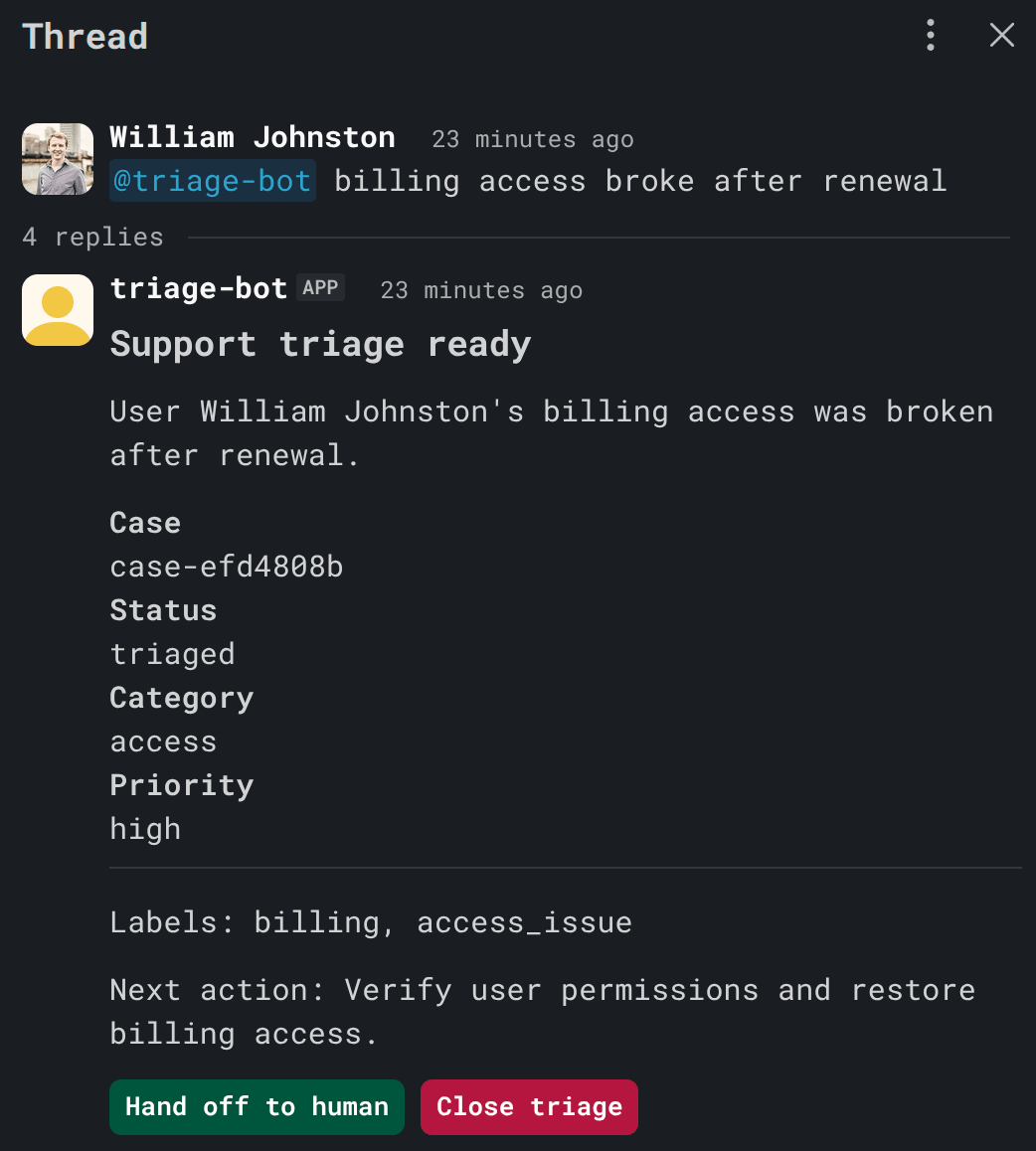
renderTriageReply() function in src/triage/reply-card.tsx uses Chat SDK's JSX components (<Card>, <Fields>, <Button>) to build a Slack card with triage details and two action buttons: Hand off to human and Close triage.#Control commands
The bot supports two interaction paths:
- Button actions. Clicking "Hand off to human" sets the thread status to
human-reviewand assigns the actor. Clicking "Close triage" sets the status toclosedand unsubscribes the bot from the thread. - Slash commands.
/triage-status,/triage-handoff, and/triage-closeprovide the same controls outside the triage card—useful for threads where the card has scrolled out of view.
Both paths go through
applyControlCommand(), which acquires a per-thread lease before mutating state—the same coordination pattern used by handleThreadMessage(). This prevents races when two users click different buttons at the same time.#Tests
The test suite in
src/triage/__tests__ covers the Redis coordination path:- A new support thread gets exactly one triage reply
- The same Slack event is claimed only once (idempotency)
- A second worker can take over after lease expiry
- Human handoff stops automated triage updates
- Closing a thread unsubscribes the bot
Run the tests:
#Running the demo
#Docker
Run the full stack:
This starts the Next.js app on
http://localhost:3000 and Redis on redis://localhost:6379.#Manual testing
Once the app and Slack bot are connected:
- Mention the bot in a Slack thread:
- Watch the bot post a triage card with category, priority, summary, labels, and next action.
- Add more context in the thread and confirm the same case updates (not a new case).
- Click Hand off to human and verify that the bot stops responding to new messages.
- Click Close triage and verify that the bot unsubscribes from the thread.
#Conclusion
This tutorial demonstrated how to build a production-safe Slack bot using Chat SDK and Redis. Two Redis primitives—
SET NX for event idempotency and short-lived distributed leases for per-thread coordination—eliminate duplicate replies and race conditions across any number of workers. Chat SDK handles webhook normalization and platform adapters, while the Redis state adapter gives you shared, durable state without managing your own persistence layer. These patterns aren't specific to Slack bots—any multi-worker system that processes external events benefits from the same coordination approach.#Next steps
- Deploy with Redis Cloud. Sign up for a free Redis Cloud database and point
REDIS_URLat it. The coordination primitives work the same way in production. - Add a queue for long-running flows. If the triage flow becomes fan-out heavy or retry-heavy, add a Redis-backed queue between the webhook gateway and the triage service.
- Monitor with Redis Insight. Use Redis Insight to watch key creation, TTL expiration, and lock acquisition in real time.
- Extend with more event types. The bot currently handles
app_mentionand subscribed thread messages. Add handlers for reactions, file uploads, or channel joins using the same coordination pattern. - Build a real-time chat app. Apply similar Redis coordination patterns to a chat app with Redis Pub/Sub.
- Stream AI responses in real time. The triage bot returns a card after analysis. For token-by-token streaming, see Streaming LLM output using Redis Streams.
- Explore event-driven microservices. The lease and idempotency patterns here extend naturally to microservices communication with Redis Streams.
#References
- Redis
SETcommand - theNXandPXoptions power both event idempotency and lock acquisition - Redis
EXPIREcommand - automatic key expiration used for TTL-based cleanup - Redis distributed locks - the locking pattern used by the thread lease manager
- Redis Cloud free tier - get a free Redis database to try this tutorial
- Redis docs - comprehensive Redis docs