
Blog
Stop repeating yourself: integrate Azure Managed Redis with your databases


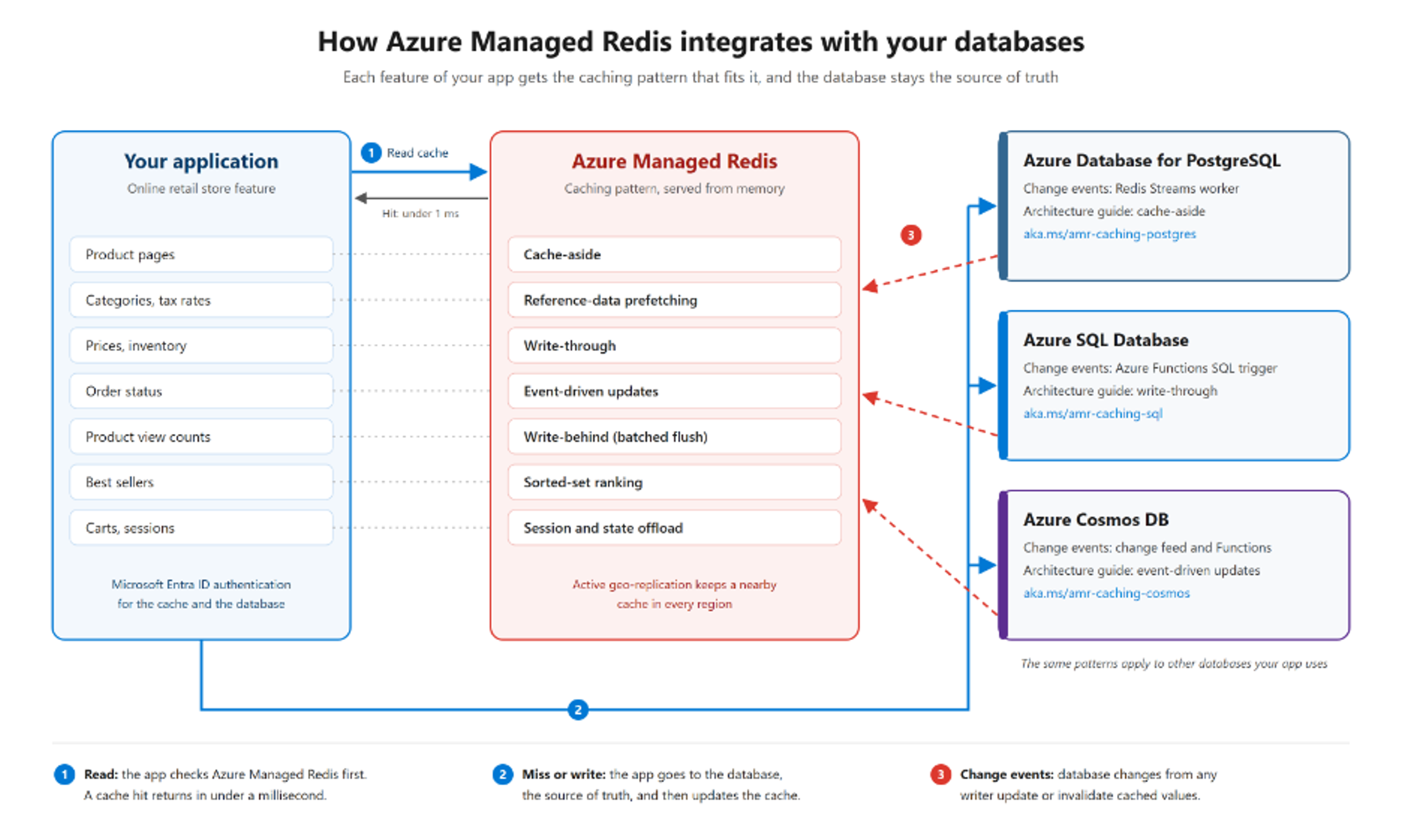
Azure Managed Redis sits between your application and your databases. Reads check the cache first. Cache misses and writes go to the database, and change events update or invalidate cached values.
It's 9:00 AM on the first day of a big sale. Within seconds, thousands of shoppers open the same 50 product pages on your online store. Every page view runs the same joins, the same price lookups, and the same "only 3 left" inventory check. Your database ends up answering the same question 40,000 times a minute.
A cache fixes this. When data is read far more often than it changes, serving it from memory takes the repeat work off your database, lowers latency, and keeps response times steady during traffic spikes.
To show how, we've published integration samples and architecture guides that pair Azure Managed Redis with Azure Database for PostgreSQL, Azure SQL Database, and Azure Cosmos DB. The patterns work with any database. All three samples build the same online retail store, so you can see which caching pattern fits each feature, and how the implementation changes from one database to the next.
Why add a cache when my database already has one?
Each of these databases caches data in memory. PostgreSQL has its buffer cache, Azure SQL Database has its buffer pool, and Azure Cosmos DB has fast point reads plus an optional integrated cache. But a built-in cache shares memory with the database's own work, and it's tied to the database's servers. Azure Managed Redis runs outside the database and gives your application:
- Sub-millisecond reads for hot data. Popular product pages, menus, and configuration come straight from memory.
- Fewer expensive queries. One key lookup replaces a multi-table join and aggregate. On Azure SQL Database and PostgreSQL, that saves CPU, workers, and IOPS. On Azure Cosmos DB, it saves Request Units (RUs) on every repeated read.
- Room to grow without scaling up. A cache can absorb a traffic spike that would otherwise push you to a bigger compute tier.
- Steadier reads during failover and maintenance. Reads for cached data keep succeeding while database connections drop and reconnect, and while the database's own cache warms up again.
- Data structures that databases don't provide efficiently. Counters, sorted sets for rankings, rate limits, and session state.
- Control over what's cached. You choose what to cache and for how long, one cache can serve every service in your app, and the cache scales separately from your database.
The database stays the source of truth. Azure Managed Redis holds copies of the data your app reads most, and the patterns below keep those copies fresh.
Caching patterns, explained with an online store
Take an online retail store as an example. Each feature of the store reads and writes data differently, so each one needs its own caching pattern. In every pattern, the database stays the source of truth.
| Store feature | Caching pattern | How it works |
|---|---|---|
| Product detail pages | Cache-aside | Check Redis first. On a miss, read the database and cache the result with a time to live (TTL). It's the most common pattern, and the easiest place to start. |
| Categories, tax rates, shipping options | Reference-data prefetching | Load stable data that every page needs into the cache up front, and refresh it when the source changes. |
| Price and stock changes made in your app | Write-through | Commit the change to the database, then write the new value to the cache, so shoppers see it right away. |
| Order status and stock changes made by other systems | Event-driven updates | A change in the database raises an event, and a worker or Azure Function updates or removes the cached entry. |
| Product view counts | Write-behind | Count in Redis right away, then flush the totals to the database in batches. Use it where losing a few increments is acceptable. |
| Best sellers and top-rated lists | Sorted-set ranking | A Redis sorted set keeps items in order by score, so rankings are ready to read instead of recomputed on every request. |
| Shopping carts and sessions | Session and state offload | Keep short-lived state that changes on every request in Redis, off your system of record. |
| A global storefront | Multi-region caching | Active geo-replication keeps a cache in each region in sync, so shoppers read from a nearby cache. |
Reference architectures for each pattern
Most apps combine several of these patterns, one for each kind of data. In the online store, product pages use cache-aside, prices use write-through, and orders use event-driven updates.
The Azure Architecture Center has a reference architecture for three of these patterns. Each one covers the diagram, data flow, components, and reliability, security, and cost considerations.
| Pattern | Use it when you need | Reference architecture |
|---|---|---|
| Cache-aside | The simplest setup, and can tolerate briefly stale data | Azure Managed Redis + PostgreSQL |
| Write-through | Fresh values right after your own app writes | Azure Managed Redis + Azure SQL Database |
| Event-driven updates | Cache updates for changes from any writer, without slowing writes | Azure Managed Redis + Azure Cosmos DB |
Each reference architecture uses one database as an example, and the same design works on the others. For example, cache-aside works the same way on Azure SQL Database and Azure Cosmos DB.
Sample code for each pattern, on each database
The amr-caching-pattern-samples repository builds the same online retail store on three databases, and each sample deploys with a single azd up. Together, the samples cover seven of the eight patterns:
| Caching pattern | Azure Database for PostgreSQL | Azure SQL Database | Azure Cosmos DB |
|---|---|---|---|
| Cache-aside | ✅ | ✅ | ✅ |
| Reference-data prefetching | ✅ | ✅ | ✅ |
| Write-through | ✅ | ✅ | ✅ |
| Event-driven updates | ✅ Redis Streams worker | ✅ Azure Functions SQL trigger | ✅ Change feed with Azure Functions |
| Write-behind | ✅ | ||
| Sorted-set ranking | ✅ | ||
| Session and state offload | ✅ |
Multi-region caching isn't in the samples, because each one deploys to a single region.
Secure by default
Every sample uses Microsoft Entra ID authentication instead of access keys, for both Azure Managed Redis and the database. DefaultAzureCredential uses the app's managed identity when the code runs in Azure, and your developer credential, such as your Azure CLI sign-in, when it runs on your machine. There are no secrets in your code or configuration.
The architecture guides go further, with private endpoints and virtual network integration so your app reaches the cache and the database over a private network. To learn more, see Use Microsoft Entra ID for authentication with Azure Managed Redis.
Tips from building the samples
- Cache what's read often and changes rarely. Product pages, menus, prices, and lookup tables are great candidates. Write-heavy data with little reuse usually isn't.
- Set TTLs by how much staleness your business can accept. Ask how stale a value can be before it causes a problem, then set the TTL to match. Add a little random jitter so many keys don't expire at the same moment.
- Treat the cache as an optimization. If the cache is unavailable, the app should fall back to the database. Build in retry logic for both services.
- Put everything in the same region. Co-locate your app, Azure Managed Redis, and your database to avoid extra network round trips.
- Watch the right numbers. Track cache hit ratio, evictions, and latency on the Redis side, and CPU, workers, IOPS, or RUs on the database side. A low hit ratio or high evictions usually means TTLs are too short or the cache is too small for your working set.
Get started in minutes
1. Install the Azure Developer CLI (azd) and the Azure CLI, then sign in with az login and azd auth login.
2. Clone the samples, pick a database, and deploy. Use a different azd environment name for each sample so one deployment doesn't overwrite another.
3. Open the storefront and follow the walkthrough in the sample's README to see each pattern in action.
4. The samples deploy Azure resources that bill while they run. When you're done, run azd down --purge --force.
Heading to Microsoft Ignite?
Catch Beyond the cache: How Sitecore builds to scale on Azure Managed Redis (BRK374) on Thursday, November 19, 2026, at 5:15 PM PT, in person at Moscone Center or online. You'll hear a real-world customer story and practical caching patterns for database-backed applications. Then stop by the Cosmos DB, DocumentDB & Redis on Azure booth in the Expo Hall to talk through your own architecture with our team.
Next steps
- Deploy a sample:
- PostgreSQL: PostgreSQL retail sample
- Azure SQL Database: aka.ms/amr-caching-sql
- Azure Cosmos DB: aka.ms/amr-caching-cosmos
- Read the PostgreSQL how-to guide: aka.ms/amr-caching-postgres
- New to Azure Managed Redis? Read the overview and create your first instance.
- Learn the pattern behind it all: Cache-Aside pattern in the Azure Architecture Center
Have a database or pattern you'd like us to cover next? Tell us in the comments, or open an issue in the samples repository. We'd love to see what you build.
Get started with Redis today
Speak to a Redis expert and learn more about enterprise-grade Redis today.