
Blog
Build Google ADK Agents with persistent, real-time memory on Redis

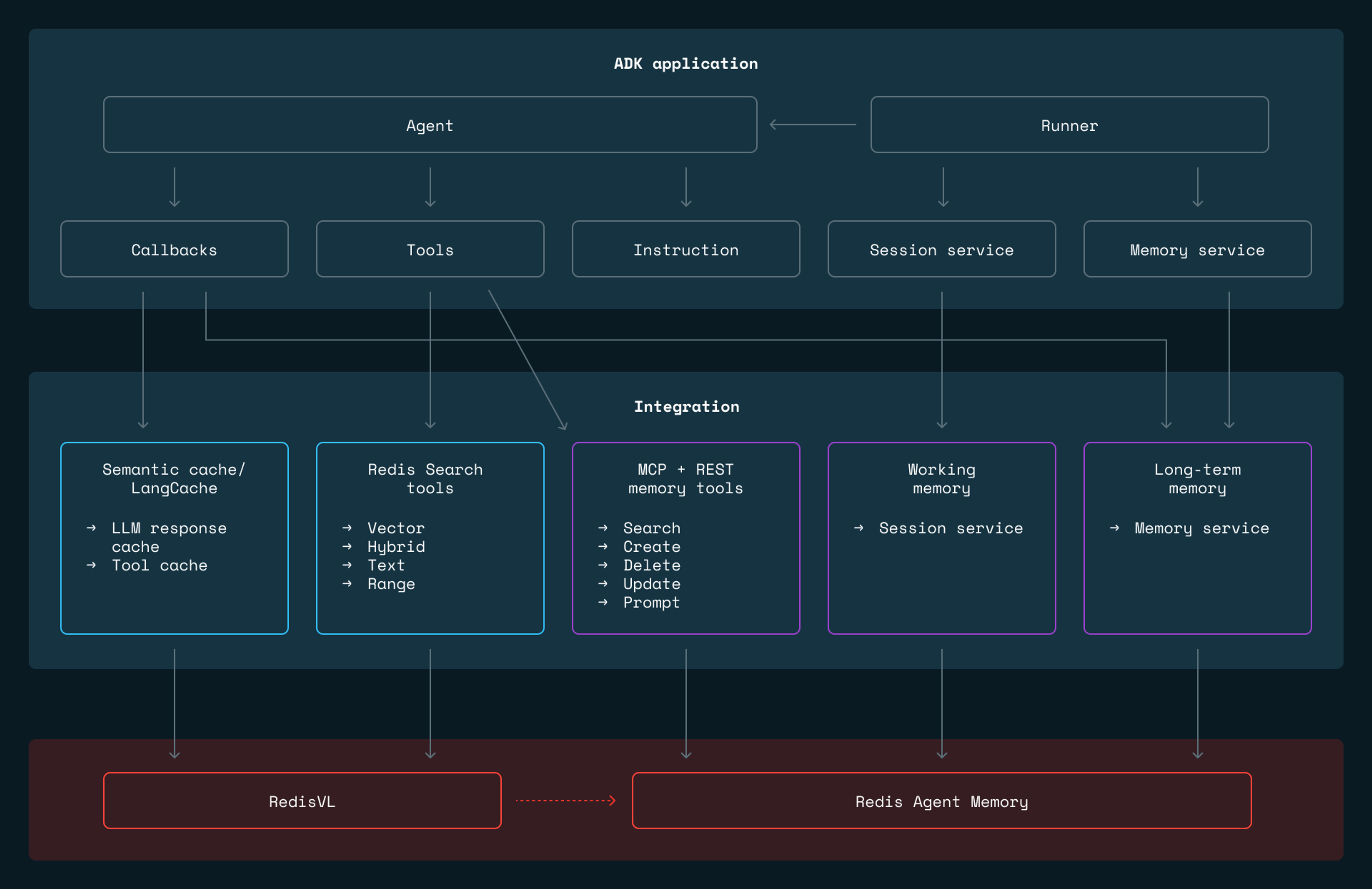
Google’s Agent Development Kit (ADK) delivers clean abstractions for building AI agents. It defines interfaces for memory, sessions, tools, and callbacks. But the default implementations store everything in process memory, which means the state disappears on restart and there is no path from prototype to production without replacing the storage layer.
We built adk-redis to be that storage layer. It is a Python package that implements ADK’s BaseMemoryService, BaseSessionService, and tool interfaces using Redis, giving agents persistent two-tier memory, semantic search for RAG, and response caching, all without requiring changes to agent logic. The package connects to Redis Agent Memory for long-term memory extraction and to RedisVL, the vector library that provides a Python client for vector similarity, hybrid search, and semantic caching on top of Redis, for all retrieval and caching operations. Together, these let agents built with ADK move from a local demo to a deployed system by swapping a few service configurations.
For teams already running Redis, this means first-class ADK integration on top of infrastructure you already operate and understand. And for teams that want to avoid tying their agent stack to a single cloud provider, adk-redis provides an alternative that runs anywhere Redis runs, whether that is Docker on a laptop, a managed Redis service on any cloud, or bare-metal servers in your own data center.
Let’s walk through the different parts of adk-redis.
Agent memory: how agents remember
Agent memory operates at two timescales. During a conversation, the agent needs fast access to the full dialogue context. Across conversations, it needs to retain and retrieve facts from potentially thousands of past interactions. These are different problems: session context is linear, append-heavy, and bounded by the context window; long-term memory is associative, read-heavy, and grows without bound.
adk-redis separates them into two tiers, backed by the Redis Agent Memory for session management and memory extraction, and RedisVL for search and caching.
Working memory (RedisWorkingMemorySessionService) handles the current conversation. Every message is stored in the Redis Agent Memory. When the conversation grows long enough to approach the model’s context limit, older messages are automatically summarized, compressing them while preserving recent exchanges in full. This avoids the hard tradeoff between truncating context and blowing through token limits.
Long-term memory (RedisLongTermMemoryService) is where persistent intelligence lives. After each conversation, Redis Agent Memory extracts structured information:
- “The user prefers window seats.”
- “The user is vegetarian.”
- “The user visited Kansas last March.”
These facts are embedded as vectors and stored in Redis, searchable across all past sessions.
These two tiers work together. Working memory keeps the current session fast and focused. Long-term memory ensures the agent remembers what matters across sessions. A recency-boosting system ensures that recent preferences outweigh outdated ones. If a user said “I love Italian food” three years ago but “I’ve been getting into Japanese cuisine” last week, the recent preference surfaces first or the memories might be updated to show progression.
Wire both tiers to an ADK Runner, and memory management becomes automatic. Messages flow into working memory as the conversation happens. Background extraction pushes facts into long-term memory. In subsequent sessions, relevant memories are retrieved before the agent responds.
Three ways to connect agents to memory
One of the more interesting design decisions in adk-redis is that it offers three distinct integration patterns, each with different tradeoffs.
1. Framework-managed services (simplest)
Framework-managed services are the simplest approach. You configure the session and memory services, pass them to the Runner, and the framework handles everything automatically. Memory extraction happens in the background. Search happens before each agent turn. The agent code never directly touches memory. Best for apps where memory should be invisible infrastructure.
2. LLM-controlled REST tools (most control)
LLM-controlled REST tools give the agent explicit control. Instead of relying on the framework, the LLM calls tools like SearchMemoryTool, CreateMemoryTool, and DeleteMemoryTool directly, deciding when to search, what to store, and what to update. This requires more prompt engineering, but it gives the agent genuine autonomy over its own memory.
3. MCP tools (most portable)
MCP (Model Context Protocol) tools use a standardized protocol layer. You point ADK’s McpToolset at RedisAgent Memory’s SSE endpoint, and tool discovery happens automatically. This is the most portable approach. Swap memory backends without changing agent code.
An effective configuration is often a hybrid: the framework services handle session persistence and automatic extraction, while tools give the LLM explicit CRUD control on top. The travel agent example in the repo demonstrates this hybrid approach.
Search tools for RAG
Memory covers what the agent knows from past conversations. But agents also need access to external knowledge such as product catalogs, documentation, knowledge bases. adk-redis provides four search tools that wrap RedisVL (the Redis vector library) into ADK-compatible tools the LLM can call directly.
adk-redis provides four search tools wrapping RedisVL query types:
| Tool | Query type | When to use |
|---|---|---|
| RedisVectorSearchTool | KNN vector similarity | Conceptual, semantic queries |
| RedisHybridSearchTool | Vector & full-text keyword search | Queries mixing concepts with specific terms |
| RedisTextSearchTool | Full-text keyword search | Exact terms, error messages, IDs |
| RedisRangeSearchTool | Distance threshold | Exhaustive retrieval within a radius |
Each tool is self-describing. The LLM reads the tool’s name and description to decide when to use it. You can wire multiple search tools into a single agent, as shown in this example, each covering a different retrieval strategy, and let the LLM choose the right one for each query.
Semantic caching
LLM API calls are slow and expensive. If your agent handles support queries, many incoming questions will be semantically similar. “How do I reset my password?” and “I need to change my password” should produce the same response. There is no reason to pay for two LLM calls.
adk-redis provides semantic caching at two levels. LLM response caching intercepts model calls through ADK’s callback system, checking whether a semantically similar prompt already exists in Redis. Tool result caching does the same for tool executions. If your agent calls an external API with the same arguments repeatedly, the cached result is returned instead.
Both levels work through ADK’s callback system, meaning you enable caching without touching your agent’s core logic.
Two cache providers are available: RedisVLCacheProvider (local embeddings, you manage the Redis instance) and LangCacheProvider (managed service from Redis LangCache, server-side embeddings, no local vectorizer needed).
Checkout the semantic cache and Redis LangCache examples in the repo.
Get started
adk-redis is open source and available on GitHub. Install it with:
The repository includes a setup script that spins up Redis and Redis Agent Memory , detailed docs covering every deployment option, and complete examples—from a minimal two-tier memory agent to a full travel agent with web search, semantic caching, and multi-user support.
For a more guided introduction, the car dealership agent tutorial walks through building AutoEmporium end-to-end using ADK's SequentialAgent, adk-redis session and long-term memory services, and Docker Compose against Redis Cloud.
The library docs cover the full surface area, MCP integration, all search modalities, and caching variants, so you can adapt any of these patterns to your own stack.
If you run into issues or want to contribute, open an issue or pull a request on the repo. We’d love to see what you build.
Get started with Redis today
Speak to a Redis expert and learn more about enterprise-grade Redis today.