

The Redis Active-Active architecture supports geographically distributed applications, providing real-time performance when apps are co-located with an Active-Active database member and ensuring strong eventual consistency through the Conflict-Free Replicated Datatype (CRDT) based conflict resolution.
In addition to this unique support, Redis Active-Active can be used for disaster recovery, with many use cases successfully developed thanks to its strong eventual consistency model. Several options exist for designing a disaster recovery strategy to ensure that the application can connect to an available Active-Active database member and execute workloads at any time. Load balancing solutions, global traffic managers, or software proxy solutions connect apps to a healthy dataset replica, increase application resiliency, and maximize service availability, especially for multi-region deployments.
Alongside infrastructure-based approaches such as load balancers, DNS routing, and proxies, failover can also be handled in the client. In Redis, this is supported through client-side geographic failover, which lets a client library monitor multiple Active-Active member endpoints and switch to the next healthy endpoint when the current one becomes unavailable.
With client-side geographic failover, client libraries can detect database failures based on a combination of the circuit breaker pattern and a configurable health check mechanism, and redirect the workload to the next healthy endpoint. The overall experience is that the application does not perceive any disruption and connects to the desired Redis A-A database member.
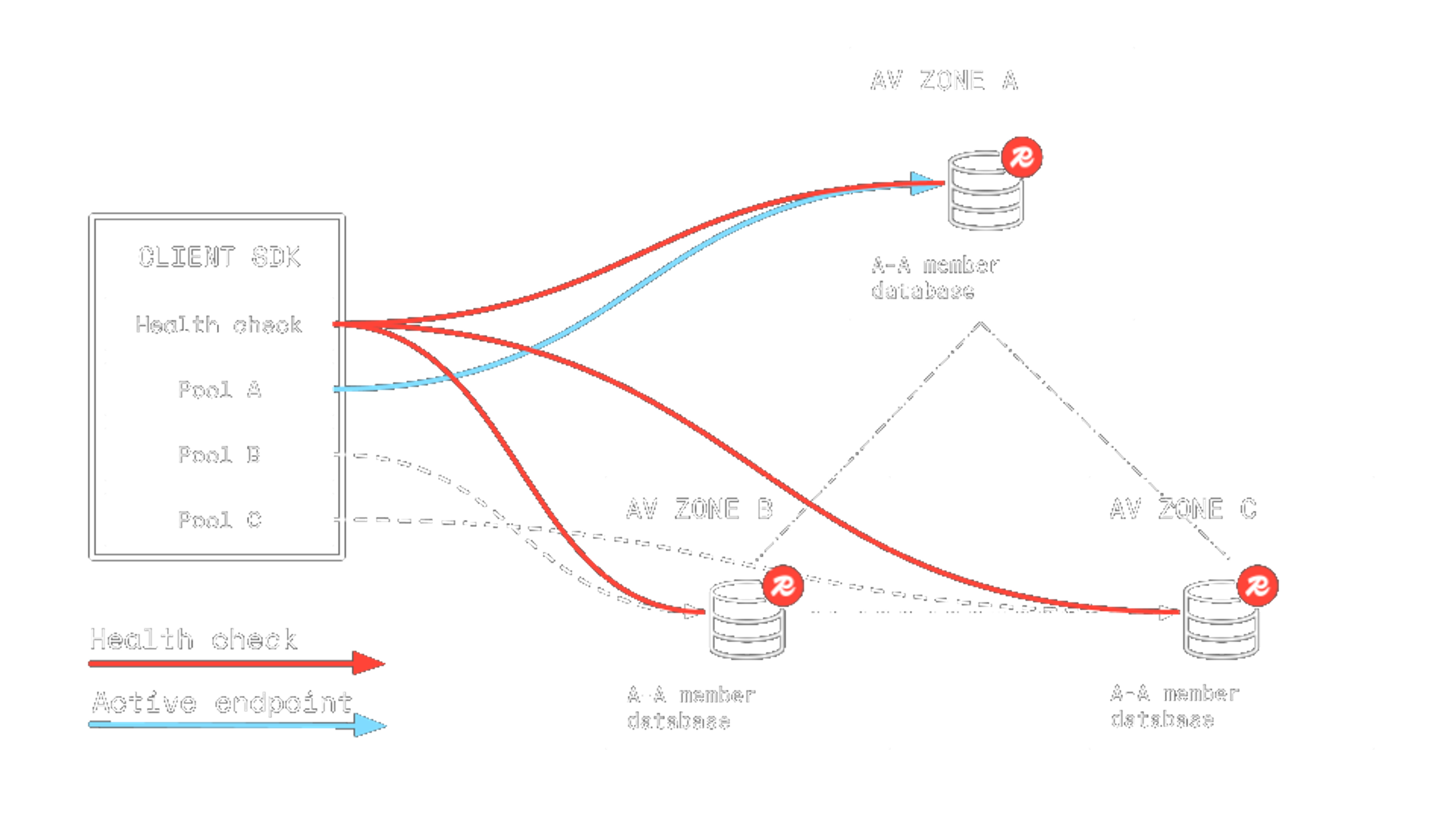
Jedis and redis-py support client-side geographic failover, and now it has been added to Lettuce as well. See the Lettuce 7.4.0 release notes to learn more.
Features
The client-side geographic failover feature includes the following components and configurations:
- Weighted endpoints. The user can specify a list of endpoints with associated integer priorities. When the application starts, the client library monitors all endpoints according to the configured health check criteria and routes traffic to the highest-priority healthy endpoint.
- Circuit breaker. The active endpoint health is monitored. If the workload starts failing, the circuit breaker kicks in and raises an alert (depending on the sensitivity of the circuit breaker configuration).
- Health check. By default, client libraries set up a simple health check mechanism using the PING command. REST API availability requests can be configured for more control, and a custom health check can also be designed and configured (e.g., relying on a different logic or external service).
- Failover. When either the circuit breaker or the health check detects a failure, failover to the next healthy endpoint on the priority list is triggered, minimizing the downtime and making the switch transparent to the application.
- Failback. The client library continuously monitors all A-A database members, including those currently marked as unhealthy. If the highest-priority instance becomes healthy again, the client automatically fails back to it.
- Manual failover/failback. Client libraries expose an API to perform a manual failover or failback to the desired replica at any time.
- Custom actions. The client library can execute a custom action when failovers or failbacks happen.
Client-side geographic failover complements existing mechanisms for handling disconnections, latency spikes, and unstable connectivity. It maximizes availability while abstracting the underlying complexity from the application.
Testing client-side geographic failover
To test, first choose the desired client library: Jedis, Lettuce, or redis-py (more official client libraries will be supported soon), and read the docs to get started. Testing the feature is as easy as configuring the endpoints and using the default configuration. A quick example using redis-py follows.
- To test the feature, you can configure a Redis Software test deployment on your machine using the official Redis Software Docker image. You can follow instructions to setup two clusters on your laptop or testing environment. Follow the instructions to run Redis Software on Docker and create an Active-Active database. To test the feature, you can create two single-node clusters (not recommended for production environments)
- Create a Python virtual environment, then install redis-py and the circuit breaker library
python3 -m venv testvenvsource testvenv/bin/activatepip install redispip install pybreaker - Consider the Python script below and configure the desired endpoints for the two Active-Active database members. For simplicity, the script relies on the default health check mechanism, the PingHealthCheck (available in both Redis Software and Redis Cloud). For advanced users, the LagAwareHealthCheck is available (Redis Software only) and offers control over the consistency of the member databases in a failback scenario.
- Then, start the script: as you can see, the first endpoint points to a Redis database running on port 15000, and has a higher priority (weight=1.0) than the database running on port 15001.
- Now, let’s simulate a failure on the first Active-Active database member. In Redis Software, you can achieve this by stopping services on the cluster.
- Wait a few seconds, the failure and subsequent automatic failover will be reported by the log.
Restart the services on the cluster and observe the log.
This simple test application will log the two main events. First, the failure is detected, and a failover to the Redis Server instance running on port 15001 is done. When the former database member is operational again, the health check detects it, and failback is executed.
Remember that when using client-side geographic failover, you can achieve a more refined failback strategy by configuring the lag-aware health check, which offers the desired data consistency on failback.
Getting started with client-side geographic failover
Learn more about this feature from the docs:
- High-level explanation of client-side geographic failover
- Jedis documentation
- Lettuce documentation
- redis-py documentation
And stick around, as we’re launching this feature for other client libraries.
Get started with Redis today
Speak to a Redis expert and learn more about enterprise-grade Redis today.