
Tutorial
How to build agent memory with Redis Agent Memory and LangGraph
May 18, 202630 minute read


TL;DR: In this tutorial, you will build a LangGraph travel agent that uses Redis Agent Memory for both short-term and long-term memory. Short-term session memory keeps the active conversation coherent, while long-term memory stores durable user facts and preferences across sessions.
Note: This tutorial uses the code from the following GitHub repository:https://github.com/redis-developer/redis-agent-memory-with-langgraph-demo
Agent memory helps AI apps move beyond single-turn prompts. A useful agent should remember the current conversation, recall durable preferences, and avoid treating every detail as something it should store forever.
Redis fits this problem because memory retrieval needs to be fast and scoped correctly. In this demo, Redis Agent Memory handles session memory, long-term memory, and vector-backed recall behind a Python client API. You will build a small travel agent with Python, FastAPI, LangGraph, OpenAI, Docker, and the
redis-agent-memory client.#Memory model comparison
| Memory layer | Backed by | Lifetime | Used for | Demo UI panel | Key code |
|---|---|---|---|---|---|
| Short-term memory | Redis Agent Memory session APIs | One session ID | Current conversation continuity | Current Session | retrieve_session_context(), add_session_event() |
| Long-term memory | Redis Agent Memory long-term APIs | Across sessions for an owner and namespace | Durable facts and preferences | Retrieved Long-Term Memory | search_long_term_memory() |
| Extracted memory candidates | Structured LLM output before write | One turn unless accepted | Proposed durable memories | Extracted Long-Term Memory | MemoryExtraction, bulk_create_long_term_memories() |
| Transient task details | Kept in short-term memory, not extracted | Current session | Active itinerary details, dates, and requests | Current Session | Extraction prompt rules |
Store durable preferences in long-term memory. Keep active task context in short-term memory. Filter and dedupe candidates before you write new durable memories.
#Prerequisites
- Docker and Docker Compose.
- An OpenAI API key.
- A Redis Agent Memory data-plane URL, store ID, and API key.
- Redis Insight for optional inspection.
- Basic familiarity with Python, FastAPI, and LangGraph.
Note: The demo does not start a local Redis instance or deploy Redis Agent Memory. It expects an existing Redis Agent Memory service endpoint.
#Setup
Clone the demo repo and create an environment file:
Set these values in
.env:| Variable | Required | Description |
|---|---|---|
OPENAI_API_KEY | Yes | API key used by the LangGraph agent. |
AGENT_MEMORY_SERVER_URL | Yes | Redis Agent Memory data-plane base URL obtained from Redis Cloud. |
AGENT_MEMORY_STORE_ID | Yes | Store ID used by the Redis Agent Memory API. |
AGENT_MEMORY_API_KEY | Yes | API key used by the Redis Agent Memory API. |
OPENAI_MODEL | No | OpenAI model used for responses and memory extraction. |
DEMO_OWNER_ID | No | Stable user identifier for long-term memories. |
DEMO_NAMESPACE | No | Logical namespace for this demo's memories. |
DEMO_AGENT_ID | No | Actor ID used when writing assistant session events. |
Build and run the app:
Open
http://localhost:8080.#How the demo works
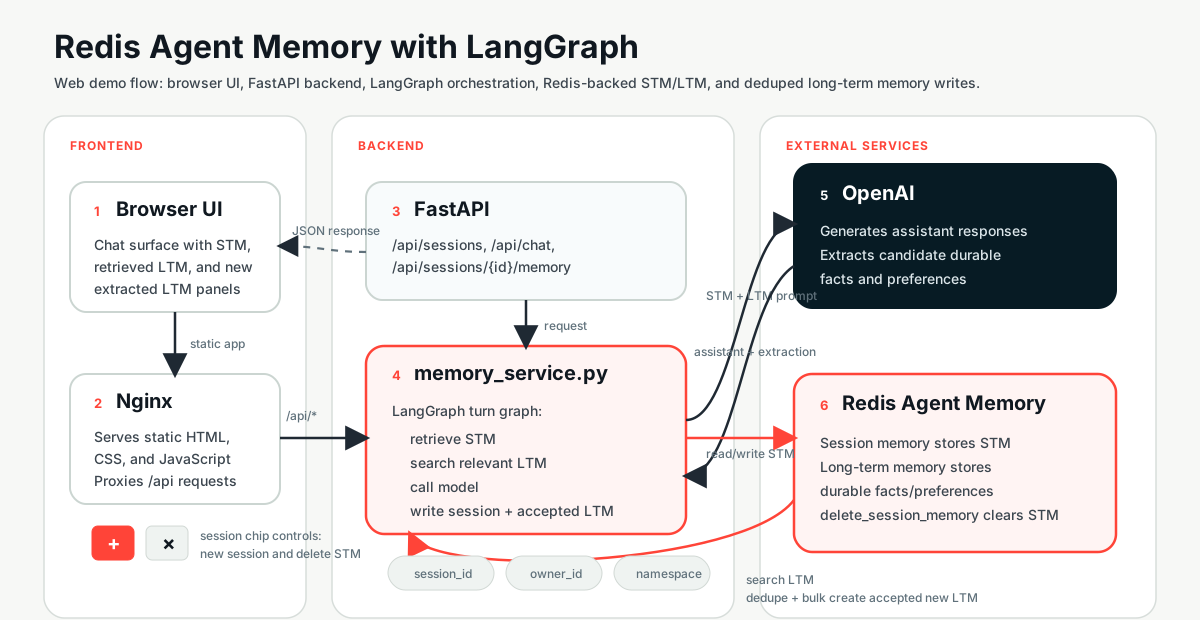
The web app has three parts:
- Nginx serves the static frontend.
- FastAPI handles
/api/*routes. - The backend creates a Redis Agent Memory client per request, then calls
RedisAgentMemoryService.run_turn()to run one LangGraph workflow.
Each chat request returns the assistant response and the memory state needed by the UI:
The UI renders the assistant output plus three memory panels: current session memory, retrieved long-term memory, and newly extracted long-term memory.
#Why Redis Agent Memory?
Redis Agent Memory gives the app one client interface for two different memory scopes. The app stays responsible for deciding what to retrieve, what to pass to the LLM, and what to write.
#Session-scoped memory
Session memory stores events for one
session_id. The demo uses get_session_memory() to read previous events, add_session_event() to append the latest user and assistant messages, and delete_session_memory() to clear the current session.This gives the agent continuity without making the frontend resend the full chat history on every request.
#Durable long-term memory
Long-term memory stores owner- and namespace-scoped facts and preferences. The demo uses
search_long_term_memory() to recall relevant memories before the LLM call and bulk_create_long_term_memories() to write accepted new memories after the LLM responds.The app does not need to manage the Redis data structures or vector search implementation directly. Redis Agent Memory exposes memory operations at the agent layer.
#App-level control
The demo uses Redis Agent Memory session APIs rather than LangGraph's native checkpointer. LangGraph organizes the turn, while Redis Agent Memory stores and retrieves the memory.
That split gives the app clear control over:
- Which session events go into the prompt.
- Which long-term memories match the current user request.
- Which extracted facts deserve durable storage.
- Which owner and namespace isolate memory for this user and app.
#Trade-offs to keep in mind
- Redis Agent Memory must be reachable from the backend.
- LLM-based extraction can vary by model and phrasing.
- Bad owner IDs or namespaces can mix users' memories.
- Long-term memory should store durable preferences, not every conversational detail.
#1. Configure the FastAPI app and memory client
#How it works
The backend loads configuration once, builds a service around that configuration, and opens a Redis Agent Memory client inside each API request that needs memory.
#Data flow
load_config()reads.envand environment variables.get_service()creates and cachesRedisAgentMemoryService.agent_memory_client()builds the Redis Agent Memory client from the cached config.- FastAPI routes use the client inside a context manager.
#Code walkthrough
The full implementation lives in
backend/memory.py and backend/app.py.The backend exposes these endpoints:
| Endpoint | Purpose |
|---|---|
POST /api/sessions | Start a new session. |
POST /api/chat | Run one agent turn. |
GET /api/sessions/{id}/memory | Read current session short-term memory. |
DELETE /api/sessions/{id}/memory | Delete current session short-term memory. |
GET /api/health | Check backend liveness. |
GET /api/ready | Check backend readiness, including Redis Agent Memory. |
The readiness endpoint calls Redis Agent Memory before it reports success:
Key details:
- Required variables fail fast. Missing Redis Agent Memory credentials raise a runtime error during config loading.
- The service is cached. FastAPI creates one service with stable config instead of rebuilding the LLM wrappers for every route.
- The client is request-scoped. Each route opens the Redis Agent Memory client with
with agent_memory_client(service). - Readiness checks the dependency.
/api/readyverifies Redis Agent Memory availability before the frontend treats the backend as ready.
#Trade-offs
- Simple request-scoped client usage is easy to reason about.
- Readiness depends on external Redis Agent Memory availability.
#2. Retrieve short-term memory for the current session
#How it works
Short-term memory is session-scoped. The backend reads memory by
session_id, converts events into prompt-friendly lines, and returns an empty list when the session does not exist yet.#Redis Agent Memory mapping
| App concept | Redis Agent Memory operation |
|---|---|
| Current conversation | get_session_memory(session_id=...) |
| Missing new session | Not-found response handled as empty memory |
| Prompt context window | Last SESSION_CONTEXT_LIMIT events |
#Code walkthrough
Inside the LangGraph node, the service reads session events and keeps the latest 12 entries:
The public helper uses the same pattern for the UI endpoint:
Key details:
- STM is session-scoped. The lookup uses only the current
session_id. - The frontend does not resend history. Redis Agent Memory stores prior events for the session.
- Deletes stay scoped. Deleting session memory clears only this session, not durable long-term memory.
- Prompt size stays bounded.
SESSION_CONTEXT_LIMIT = 12keeps the latest events instead of injecting the whole session.
#Trade-offs
- Simple truncation is predictable, but it is less nuanced than summarization.
- Session memory should not become the storage location for every durable fact.
#3. Search long-term memory before the LLM call
#How it works
Before the model responds, the graph searches long-term memory with the current user message. The search is filtered by owner and namespace, so the result set belongs to the right user and app context.
#Redis Agent Memory mapping
| App concept | Redis Agent Memory operation |
|---|---|
| Current user request | Search query text |
| User isolation | ownerId filter |
| App or environment scope | namespace filter |
| Relevant durable recall | search_long_term_memory() with limit: 5 |
#Code walkthrough
The retrieval node finds the latest human message and searches long-term memory:
Key details:
- The query comes from the current turn. The demo searches with the user's latest message.
- Owner ID separates users. Use a stable per-user value in real apps.
- Namespace separates apps and environments. This prevents unrelated memories from leaking into the demo.
- Recall is relevance-based. The app asks for up to five relevant memories, not a full dump of all memories.
- Redis Agent Memory hides plumbing. The app calls memory APIs instead of direct Redis vector search code.
#Trade-offs
- Relevant recall depends on memory quality and query phrasing.
- Shared demo defaults can pollute results. Use stable owner IDs and separate namespaces in production.
#4. Inject memory into a LangGraph agent turn
#How it works
LangGraph turns one request into a clear sequence of nodes. The graph retrieves session memory, searches long-term memory, calls the model, writes memory, and ends.
#Data flow
The graph state keeps short-term memory and long-term memory in separate fields:
The graph edges make each step explicit:
#Code walkthrough
The model call assembles short-term and long-term context into the system prompt:
Key details:
- LangGraph makes the turn observable. Each node has one job.
- STM and LTM stay separate. The state has
session_contextandrecalled_memoriesfields. - The prompt tells the model how to use each scope. Short-term memory supports continuity. Long-term memory supports durable personalization.
- The assistant hides implementation details. The model is instructed not to mention the memory plumbing.
#Trade-offs
- A small graph is easy to teach and debug.
- More complex agents may add tool calls, routing, summarization, or human review nodes.
#5. Write session events and extract durable memories
#How it works
After the model responds, the graph writes the user and assistant messages to session memory. Then it asks the LLM for structured durable memory candidates and writes accepted candidates to long-term memory.
#Redis Agent Memory mapping
| App concept | Redis Agent Memory operation |
|---|---|
| User turn | add_session_event(... role=MessageRole.USER) |
| Assistant turn | add_session_event(... role=MessageRole.ASSISTANT) |
| Durable memory write | bulk_create_long_term_memories(memories=...) |
| Idempotent demo record ID | Deterministic memory_id(owner_id, namespace, text) |
#Code walkthrough
Structured output keeps the extraction result predictable:
The write node stores both sides of the turn as session events:
The extraction prompt tells the model what belongs in long-term memory and what should stay in the current session:
The demo normalizes candidate text, skips duplicates, and writes deterministic IDs:
The deterministic ID helper uses the user, namespace, and memory text:
Key details:
- Every turn updates STM. The backend writes both user and assistant events to the current session.
- The extractor is selective. Durable facts, stable preferences, and constraints can become long-term memory.
- Transient details stay in STM. Dates, destinations, and active booking requests should not become long-term memory unless the user asks the agent to remember them.
- Duplicates are filtered. The demo dedupes against recalled long-term memory and accepted candidates from the same turn.
- Deterministic IDs help idempotency. Repeating the same memory for the same owner and namespace produces the same ID.
#Trade-offs
- LLM extraction can still vary.
- Deduping only against retrieved memories can miss duplicates that were not recalled.
- Real apps may need user confirmation, review queues, or deletion controls for long-term memory.
#6. Show memory behavior in the web UI
#How it works
The frontend keeps the demo visible and teachable. It shows chat messages, the current session ID, short-term memory, retrieved long-term memory, and newly written long-term memory.
#Data flow
- The browser sends
session_idandmessageto/api/chat. - FastAPI returns the assistant message and memory arrays.
- The UI renders each memory array in its panel.
- The
+button creates a new session with the same owner ID. - The
×button deletes current session memory only.
#Code walkthrough
The
sendMessage() function handles the chat response and memory panels:The UI defines the three memory panels in
frontend/index.html:Nginx serves the frontend and proxies API requests to the backend container:
Key details:
- Memory is visible. The UI makes hidden agent memory behavior easy to inspect.
- New sessions demonstrate LTM reuse. The
+button starts a new session but keeps the same configured owner ID. - Deleting STM demonstrates scope separation. The
×button clears the current session without deleting durable memory. - The frontend stays minimal. Nginx serves static files and proxies
/api/*to FastAPI.
#Trade-offs
- The UI is intentionally minimal.
- It is not an auth or multi-user production frontend.
#Running the demo
Use this flow to see both memory scopes in action:
-
Start Docker:
-
Open
http://localhost:8080. -
Send:
My name is Ricardo. -
Send:
Remember that I prefer flying Delta. -
Send:
I am planning a trip to Lisbon next month. -
Watch the memory panels. The name and airline preference can become long-term memory. The active trip detail should stay in short-term memory unless the user explicitly asks the agent to remember it.
-
Click
+to start a new session. -
Ask:
What do you remember about me? -
Confirm that durable long-term memory persists across sessions.
-
Click
×to delete the current session memory and note that long-term memory remains.
Caveat: If the UI does not load, check/api/readyand verify your Redis Agent Memory credentials.
Caveat: If memory extraction looks different from the examples, remember that model output can vary by model version and phrasing.
Note: If long-term memory looks polluted, changeDEMO_OWNER_IDorDEMO_NAMESPACEfor a clean run.
#Running the tests
The demo tests mock Redis Agent Memory and OpenAI calls, so they do not need external services.
Install the test dependencies and run pytest:
The tests cover three areas:
tests/test_utils.pyfor pure helper functions.tests/test_api.pyfor FastAPI endpoints withTestClient.tests/test_service.pyfor service behavior and long-term memory deduplication.
#Production considerations
Before you adapt this pattern for production, account for memory as user data:
- Use real authentication and stable user IDs instead of demo defaults.
- Add delete, export, and review paths for long-term memory where needed.
- Keep namespaces separate for each app and environment.
- Monitor readiness, Redis Agent Memory latency, and downstream LLM latency.
- Consider summarization when session memory grows beyond simple truncation.
- Consider human-in-the-loop review before storing sensitive memories.
- Avoid storing secrets or sensitive transient details as long-term memory.
#Next steps
- Add a memory review screen before writing long-term memory.
- Add user-specific auth and owner IDs.
- Add summarization for older session events.
- Add Redis Iris to bring in real travel data.
- Inspect memory with Redis Insight if available.
- Deploy with a managed Redis or Redis Agent Memory setup.
#References
- Redis Iris
- Demo source
- Build a memory-aware AI agent with Redis Agent Memory and Redis Context Retriever
- Redis Agent Memory package
- LangGraph documentation
- OpenAI docs
- Redis Cloud free tier
- What is Agent Memory? Example using LangGraph and Redis
- Build a car dealership AI agent with Google ADK and Redis Agent Memory Server