HGETEX
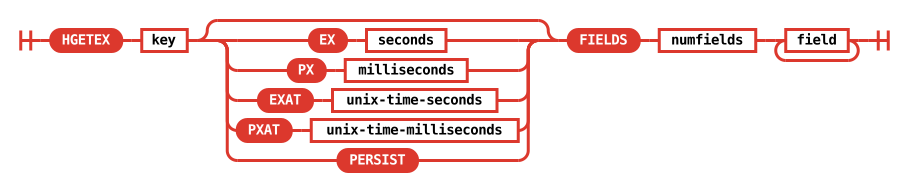
HGETEX key [EX seconds | PX milliseconds | EXAT unix-time-seconds |
  PXAT unix-time-milliseconds | PERSIST] FIELDS numfields field
  [field ...]
- Available since:
- Redis Open Source 8.0.0
- Time complexity:
- O(N) where N is the number of specified fields
- ACL categories:
-
@write,@hash,@fast, - Compatibility:
- Redis Software and Redis Cloud compatibility
Get the value of one or more fields of a given hash key and optionally set their expiration time or time-to-live (TTL).
Required arguments
key
The name of the key that holds the hash.
FIELDS numfields field [field ...]
The hash fields to retrieve. numfields is the number of fields, followed by that many field names.
Optional arguments
The following options modify the command's behavior. They are mutually exclusive.
EX seconds
Set the specified expiration time, in seconds.
PX milliseconds
Set the specified expiration time, in milliseconds.
EXAT unix-time-seconds
Set the specified Unix time at which the fields will expire, in seconds.
PXAT unix-time-milliseconds
Set the specified Unix time at which the fields will expire, in milliseconds.
PERSIST
Remove the TTL associated with the fields.
Examples
redis> HSET mykey field1 "Hello" field2 "World"
(integer) 2
redis> HGETEX mykey EX 120 FIELDS 1 field1
1) "Hello"
redis> HGETEX mykey EX 100 FIELDS 1 field2
1) "World"
redis> HTTL mykey FIELDS 2 field1 field2
1) (integer) 91
2) (integer) 85
redis> HTTL mykey FIELDS 3 field1 field2 field3
1) (integer) 75
2) (integer) 68
3) (integer) -2
...
redis> HTTL mykey FIELDS 3 field1 field2
1) (integer) -2
2) (integer) -2
redis> HGETALL mykey
(empty array)
Redis Software and Redis Cloud compatibility
| Redis Software |
Redis Cloud |
Notes |
|---|---|---|
| ✅ Standard |
✅ Standard |
Return information
- Array reply: a list of values associated with the given fields, in the same order as they are requested.