CLUSTER SETSLOT
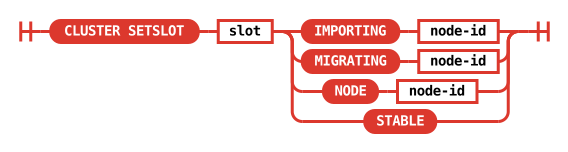
CLUSTER SETSLOT slot <IMPORTING node-id | MIGRATING node-id |
  NODE node-id | STABLE>
- Available since:
- Redis Open Source 3.0.0
- Time complexity:
- O(1)
- ACL categories:
-
@admin,@slow,@dangerous, - Compatibility:
- Redis Software and Redis Cloud compatibility
CLUSTER SETSLOT is responsible for changing the state of a hash slot in the receiving node in different ways. It can, depending on the subcommand used:
MIGRATINGsubcommand: set a hash slot in migrating state.IMPORTINGsubcommand: set a hash slot in importing state.STABLEsubcommand: clear any importing / migrating state from hash slot.NODEsubcommand: bind the hash slot to a different node.
The command with its set of subcommands is useful in order to start and end cluster live resharding operations, which are accomplished by setting a hash slot in migrating state in the source node, and importing state in the destination node.
Each subcommand is documented below. At the end you'll find a description of how live resharding is performed using this command and other related commands.
Required arguments
slot
The hash slot to configure.
IMPORTING node-id | MIGRATING node-id | NODE node-id | STABLE
The slot state to set: IMPORTING to import the slot from the given node, MIGRATING to migrate it to the given node, NODE to assign the slot to the given node, or STABLE to clear any importing or migrating state.
Details
MIGRATING destination-node-id
This subcommand sets a slot to the migrating state. The node that receives the command must own the hash slot; otherwise, Redis returns an error. When a slot is in the migrating state, the node handles commands as follows:
- If the command accesses an existing key, Redis processes the command normally.
- If the command accesses a key that does not exist, Redis returns an ASK redirection to destination node. The client should retry only that command on destination node and should not update its hash slot mapping.
- If the command accesses multiple keys, Redis handles it based on how many of the keys exist:
- If none of the keys exist, Redis returns an ASK redirection.
- If all of the keys exist, Redis processes the command normally.
- If only some of the keys exist, Redis returns a TRYAGAIN error. The client should retry after the relevant keys finish migrating to the target node.
IMPORTING source-node-id
This subcommand is the reverse of MIGRATING. It prepares the destination node to import keys from the specified source node. The command works only if the destination node does not already own the specified hash slot.
When a slot is in the importing state, the node handles commands for that slot as follows:
- If the command is not preceded by
ASKING, Redis rejects the command and returns aMOVEDredirection. - If the command is preceded by
ASKING, Redis executes the command on the importing node.
When a migrating node returns an ASK redirection, the client contacts the target node, sends ASKING, and then sends the redirected command. This lets the target node process commands for keys that do not exist on the source node, as well as keys that have already migrated.
This behavior provides three guarantees:
- Redis creates new keys on the target node, so the migration only needs to move existing keys.
- Redis processes commands for already-migrated keys on the target node, which is becoming the new hash slot owner.
- Without
ASKING, Redis continues to returnMOVEDredirections. This prevents clients with stale or incorrect hash slot mappings from accidentally writing to the target node and creating a second version of a key that has not migrated yet.
STABLE
This subcommand just clears migrating / importing state from the slot. It is
mainly used to fix a cluster stuck in a wrong state by redis-cli --cluster fix.
Normally the two states are cleared automatically at the end of the migration
using the SETSLOT NODE ... subcommand as explained in the next section.
NODE node-id
This subcommand associates a hash slot with the specified node. This subcommand has the most complex behavior because it works only in specific situations and can have different side effects depending on the slot state.
The command has the following preconditions and side effects:
- If the node that receives the command currently owns the hash slot, and the command assigns the slot to a different node, Redis returns an error if the receiving node still contains keys for that slot.
- If the slot is in the
migratingstate, Redis clears that state when it assigns the slot to another node. - If the slot is in the
importingstate on the node that receives the command, and the command assigns the slot to that same node, Redis:- Clears the
importingstate. - Creates a new config epoch and assigns it to the node, unless the node already has the greatest config epoch in the cluster.
- Clears the
The third case occurs on the target node at the end of a hash slot resharding operation. The new config epoch lets the node’s hash slot ownership take precedence over earlier configurations created by failovers or previous slot migrations.
This is the only case where a Redis Cluster node creates a new config epoch without agreement from other nodes. It happens only during manual configuration changes. Redis Cluster still prevents a lasting conflict between nodes with the same config epoch by using its config epoch collision resolution algorithm.
Redis Cluster live resharding explained
The CLUSTER SETSLOT command is an important piece used by Redis Cluster in order to migrate all the keys contained in one hash slot from one node to another. This is how the migration is orchestrated, with the help of other commands as well. We'll call the node that has the current ownership of the hash slot the source node, and the node where we want to migrate the destination node.
- Set the destination node slot to importing state using
CLUSTER SETSLOT <slot> IMPORTING <source-node-id>. - Set the source node slot to migrating state using
CLUSTER SETSLOT <slot> MIGRATING <destination-node-id>. - Get keys from the source node with
CLUSTER GETKEYSINSLOTcommand and move them into the destination node using theMIGRATEcommand. - Send
CLUSTER SETSLOT <slot> NODE <destination-node-id>to the destination node. - Send
CLUSTER SETSLOT <slot> NODE <destination-node-id>to the source node. - Send
CLUSTER SETSLOT <slot> NODE <destination-node-id>to the other master nodes (optional).
Notes:
- The order of step 1 and 2 is important. We want the destination node to be ready to accept
ASKredirections when the source node is configured to redirect. - The order of step 4 and 5 is important. The destination node is responsible for propagating the change to the rest of the cluster. If the source node is informed before the destination node and the destination node crashes before it is set as new slot owner, the slot is left with no owner, even after a successful failover.
- Step 6, sending
SETSLOTto the nodes not involved in the resharding, is not technically necessary since the configuration will eventually propagate itself. However, it is a good idea to do so in order to stop nodes from pointing to the wrong node for the hash slot moved as soon as possible, resulting in less redirections to find the right node.
Redis Software and Redis Cloud compatibility
| Redis Software |
Redis Cloud |
Notes |
|---|---|---|
| ❌ Standard |
❌ Standard |
Return information
OK if the command was successful. Otherwise an error is returned.